
ASD A-SFL-20WH-SC
የASD ደህንነት የጎርፍ ብርሃን ካሜራ ከቤት ውጭ - ስማርት የጎርፍ ብርሃን ካሜራ፣ የሞዴል A-SFL-20WH-SC የተጠቃሚ መመሪያ
ለመጫን፣ ለማስኬድ እና ለጥገና አጠቃላይ መመሪያዎች።
1. መግቢያ
Thank you for choosing the ASD Security Flood Light Camera Outdoor. This smart floodlight camera is designed to provide enhanced security and illumination for your outdoor spaces. Featuring a 180° motion sensor, adjustable light heads, and smart app control, it integrates seamlessly with your smart home ecosystem, including Alexa and Google Assistant. This manual provides essential information for safe installation, operation, and maintenance of your device.
2. ጠቃሚ የደህንነት መረጃ
እባክዎ ከመጫንዎ እና ከመጠቀምዎ በፊት ሁሉንም መመሪያዎች በጥንቃቄ ያንብቡ። ይህንን መመሪያ ለወደፊት ማጣቀሻ ያቆዩት።
- የኤሌክትሪክ ደህንነት; Installation must be performed by a qualified electrician or a person with electrical knowledge. Ensure power is turned off at the circuit breaker before installation or servicing.
- ጥራዝtage: This product is designed to operate on 120V circuits.
- መጫን፡ Mount the fixture securely to a junction box. Ensure the mounting surface can support the weight of the fixture.
- እርጥብ ቦታዎች፡- This product is Wet Locations rated (IP54), suitable for outdoor use. However, avoid submerging the unit in water.
- ሙቀት፡ Do not operate the fixture near flammable materials. Allow the fixture to cool before handling.
- የካሜራ ሌንስ; Avoid touching the camera lens directly to prevent smudges or damage.
3. የጥቅል ይዘቶች
መጫኑን ከመጀመርዎ በፊት ሁሉም አካላት መኖራቸውን ያረጋግጡ-
- ASD Security Flood Light Camera Outdoor (1 unit)
- Mounting Crossbar
- ማፈናጠጥ ብሎኖች
- የሽቦ ፍሬዎች
- ኢቪኤ ፓድ
- የተጠቃሚ መመሪያ (ይህ ሰነድ)
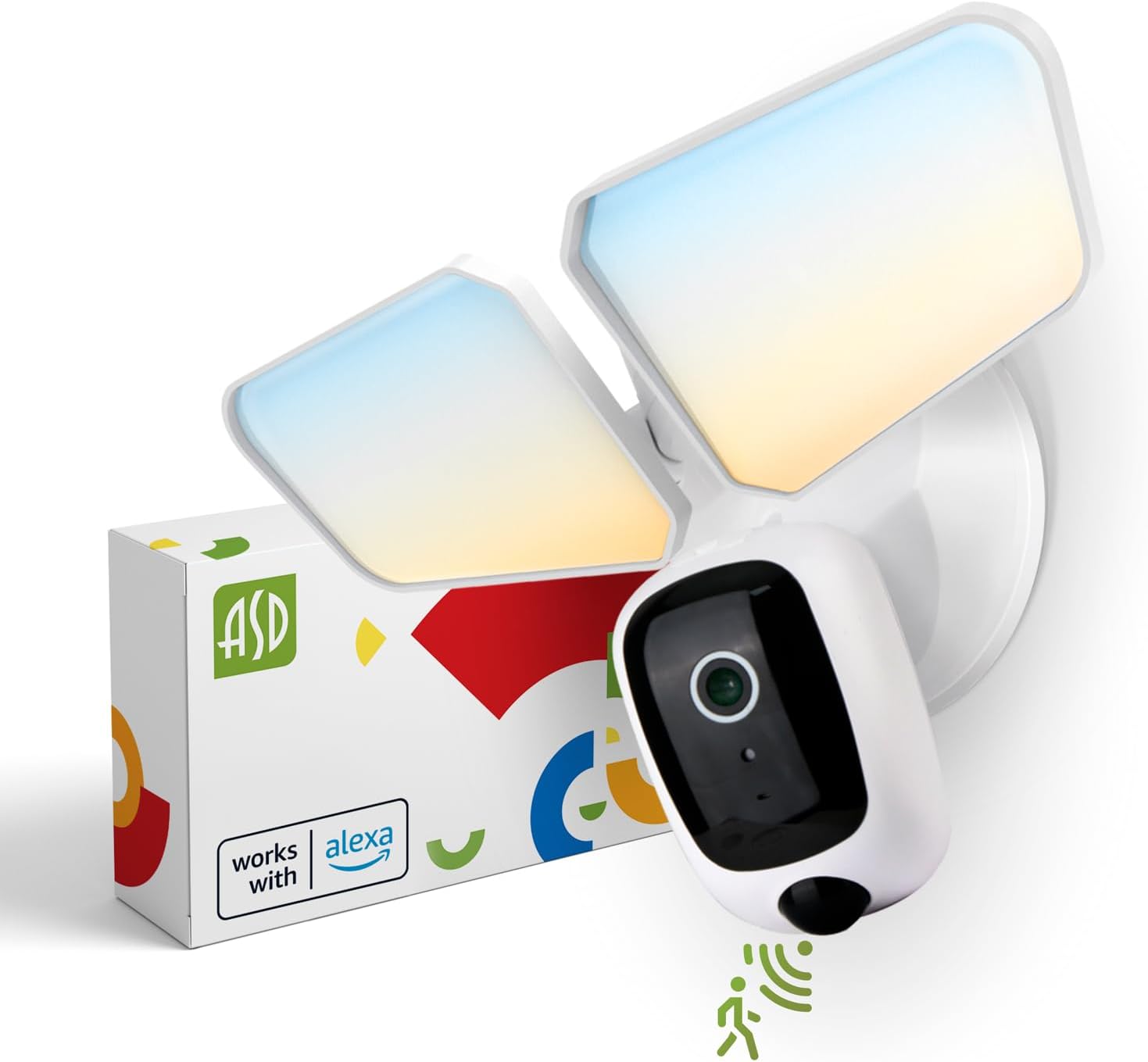
Image 1: ASD Security Flood Light Camera Outdoor and its packaging.
4. የምርት ባህሪዎች
- የሚስተካከሉ የብርሃን ጭንቅላቶች፡ Side-to-side (150°) and up-and-down (180°) rotatable light heads for directional illumination.
- Integrated Smart Camera: Monitor, record, and engage in two-way audio communication.
- 180° Motion Sensor: Automatically activates light and camera recording upon motion detection.
- ከማለዳ እስከ ንጋት የፎቶ ሴል፦ Automatically turns the light on at dusk and off at dawn.
- Color Selectable: Choose from 5 color temperatures: 2700K (Soft White), 3000K (Warm White), 3500K (Neutral White), 4000K (Cool White), or 5000K (Daylight).
- ዘመናዊ ቤት ውህደት፡- Compatible with Amazon Alexa and Google Assistant for voice control.
- የመተግበሪያ ቁጥጥር ቅንብሮችን ያቀናብሩ፣ view live feed, and receive motion-activated push notifications via the dedicated app.
- የማከማቻ አማራጮች፡- Records can be stored on a Micro SD card (not included) or in a Cloud service (subscription may be required).
- ዘላቂ ግንባታ; Made from Aluminum and Polycarbonate.
- ማረጋገጫዎች፡- UL and DLC Premium certified, ensuring quality and safety.

Image 2: Key features of the ASD Security Flood Light Camera.
5. ቴክኒካዊ ዝርዝሮች
| ዝርዝር መግለጫ | ዝርዝር |
|---|---|
| የሞዴል ቁጥር | A-SFL-20WH-SC |
| የኃይል ምንጭ | ሃርድዌር የተሰራ |
| ጥራዝtage | 120 ቮልት |
| ዋትtage | 20 ዋት |
| የብርሃን ምንጭ ዓይነት | LED |
| የቀለም ሙቀት (CCT) | 2700 ኪ፣ 3000 ኪ፣ 3500 ኪ፣ 4000 ኪ፣ 5000 ኪ (ሊመረጥ የሚችል) |
| የእንቅስቃሴ ዳሳሽ ማወቂያ አንግል | 180° |
| የእንቅስቃሴ ዳሳሽ ማወቂያ ርቀት | 16.4-32.9 ጫማ (5-10 ሜትር) |
| የጨረር አንግል | 100° |
| ቁሳቁስ | አሉሚኒየም, ፖሊካርቦኔት |
| የምርት ልኬቶች | 10.24"ኤል x 4.45" ዋ x 7.68" ኤች |
| የእቃው ክብደት | 1.2 ፓውንድ £ |
| የቤት ውስጥ / የውጭ አጠቃቀም | ከቤት ውጭ |
| የአካባቢ ብርሃን ምደባ | IP54 (Wet Locations Rated) |
| የግንኙነት ፕሮቶኮል | ዋይ ፋይ |
| የመቆጣጠሪያ አይነት | Amazon Alexa, Google ረዳት, መተግበሪያ |
| የህይወት ዘመን | 145,000 ሰዓታት |

Image 3: Detailed product specifications and dimensions.
6. የመጫኛ ደረጃዎች
ከመጀመርዎ በፊት፡- Turn off power at the circuit breaker. Ensure you have the necessary tools (screwdriver, wire strippers, etc.).
- ማጠናከሪያውን ያዘጋጁ;
Attach the crossbar to the outlet box using two mounting screws. Remove the cover on the top of the camera. Insert a Micro SD card (sold separately) into the slot until it clicks. Place the cover back on. Change the position of the CCT switch on the housing to the desired color temperature (2700K, 3000K, 3500K, 4000K, or 5000K). - Mount and Wire:
Tear off the EVA pad adhesive and stick it on the rear cover (pay attention to the direction of the gap). Thread the fixture wire through the gasket. Connect the wires: Black to Black, White to White, and Green to Green (ground). Secure the connection with wire nuts. - የመገጣጠሚያውን ደህንነት ይጠብቁ;
Drive the bracket screw through the center hole of the fixture base to the crossbar and secure it by tightening.

ምስል 4፡ የመጫን ሂደቱን የሚያሳይ ምስላዊ መመሪያ።
7. የአሠራር መመሪያዎች
7.1 የእንቅስቃሴ ዳሳሽ ኦፕሬሽን
The built-in 180° motion sensor detects movement within its range (16.4-32.9 ft or 5-10 m). When motion is detected, the floodlight will illuminate, and the camera will begin recording. You can adjust the sensitivity and duration settings via the ASD SMART app.

Image 5: The built-in motion sensor detects movement.
7.2 Dusk-to-Dawn Photocell
The integrated photocell automatically senses ambient light levels. It will turn the floodlight on when it gets dark and turn it off when daylight returns, ensuring efficient operation without manual intervention.

Image 6: Built-in dusk-to-dawn photocell for automatic operation.
7.3 የቀለም ሙቀት ምርጫ (CCT)
Before final installation, you can select your preferred color temperature using the switch located on the fixture's housing. Choose from 2700K (Soft White), 3000K (Warm White), 3500K (Neutral White), 4000K (Cool White), or 5000K (Daylight) to match your aesthetic and lighting needs.

Image 7: Selectable color temperature options.
8. App Control and Smart Integration
8.1 ASD SMART App Setup
To unlock the full potential of your floodlight camera, download and set up the ASD SMART app:
- አውርድ ASD SMART app ከመተግበሪያ መደብር (iOS) ወይም ከGoogle Play መደብር (አንድሮይድ)።
- ወደ መለያዎ ይመዝገቡ ወይም ይግቡ ፡፡
- Select "Add a device" and choose "Camera and lock".
- Follow the on-screen instructions to connect your device to your Wi-Fi network.
- Scan the QR code on your camera when prompted.
For a detailed guide, please refer to the full manual PDF: ASD Security Flood Light Camera Manual PDF
መተግበሪያውን ያውርዱ፡-
- የ iOS መተግበሪያ መደብር ASD SMART on App Store
- አንድሮይድ ጎግል ፕሌይ፡ ASD SMART on Google Play

Image 8: App control interface and smart assistant compatibility.
8.2 Remote Monitoring and Two-Way Audio
Through the ASD SMART app, you can:
- View live video feed from your camera anytime, anywhere.
- Engage in two-way audio communication with visitors or deter intruders.
- Receive instant motion-activated push notifications on your smartphone.
8.3 የቀረጻ ማከማቻ
የቪዲዮ ቀረጻዎች በሁለት መንገዶች ሊቀመጡ ይችላሉ፡
- የማይክሮ ኤስዲ ካርድ ለአካባቢያዊ ማከማቻ በካሜራው ላይ በተጠቀሰው ማስገቢያ ውስጥ የማይክሮ ኤስዲ ካርድ (እስከ 128GB፣ አልተካተተም) ያስገቡ።
- የደመና አገልግሎት Opt for a cloud storage subscription (available through the app) for secure, remote access to your recordings.

Image 9: Remote monitoring and recording storage options.
8.4 ስማርት ረዳት ውህደት
Connect your ASD Security Flood Light Camera to Amazon Alexa or Google Assistant for convenient voice control. Follow the instructions within the ASD SMART app to link your accounts and enable features like turning the light on/off or viewing the camera feed on compatible smart displays.
9. ጥገና
- ማጽዳት፡ ከማጽዳትዎ በፊት ኃይል መጥፋቱን ያረጋግጡ። እቃውን ለስላሳ, መamp ጨርቅ. ገላጭ ማጽጃዎችን ወይም ፈሳሾችን አይጠቀሙ.
- የሌንስ እንክብካቤ; የካሜራ ሌንስን ንፁህ ምስል እንዲኖር በማይክሮፋይበር ጨርቅ በቀስታ ያጽዱት።
- መደበኛ ምርመራዎች; Periodically check for any loose connections or damage to the wiring and housing.
10. መላ መፈለግ
| ችግር | ሊሆን የሚችል ምክንያት | መፍትሄ |
|---|---|---|
| መብራት አይበራም ፡፡ | No power, faulty wiring, photocell issue, CCT switch not set. | Check circuit breaker. Verify wiring connections. Ensure photocell is not obstructed. Confirm CCT switch is set. |
| የእንቅስቃሴ ዳሳሽ አላገኘም። | Incorrect sensitivity settings, obstruction, improper installation height. | Adjust motion sensor sensitivity in the app. Clear any obstructions. Ensure installation height is appropriate (approx. 9.8 ft / 3 m). |
| ካሜራ ከWi-Fi ጋር አልተገናኘም። | የተሳሳተ የWi-Fi ይለፍ ቃል፣ ደካማ ሲግናል፣ ራውተር ጉዳዮች። | Double-check Wi-Fi password. Move router closer or use a Wi-Fi extender. Restart router. Ensure 2.4GHz Wi-Fi network is used. |
| ደካማ የቪዲዮ ጥራት። | Dirty lens, poor Wi-Fi signal, low light conditions. | Clean camera lens. Improve Wi-Fi signal strength. Ensure adequate lighting. |
| ባለሁለት መንገድ ኦዲዮ አይሰራም። | Microphone/speaker issues, app permissions. | Check app permissions for microphone. Ensure volume is up on your device. |
11. የዋስትና መረጃ
ኤኤስዲ ሀ የ 5 ዓመት የተወሰነ ዋስትና for this Security Flood Light Camera. This warranty covers defects in materials and workmanship under normal use. Please retain your proof of purchase for warranty claims. For full warranty terms and conditions, please refer to the official ASD webጣቢያ ወይም የደንበኛ ድጋፍን ያነጋግሩ።
12. የደንበኛ ድጋፍ
For additional assistance, technical support, or warranty inquiries, please visit the ASD Lighting Corporation website or refer to the comprehensive manual available online.
- ASD Lighting Corporation Store: Visit ASD Store on Amazon
- Full Product Manual (PDF): ፒዲኤፍ መመሪያን አውርድ
Ask a question about this manual
Ask about setup, troubleshooting, compatibility, parts, safety, or missing instructions. Manuals+ will review the question and use this page’s manual context to help answer it.