
ፎሜ TP88
Phomemo TP88 Tattoo Transfer Stencil Printer User Manual
ሞዴል፡ TP88
1. ምርት አብቅቷልview
The Phomemo TP88 Tattoo Transfer Stencil Printer is a compact, portable thermal printer designed for tattoo artists and enthusiasts. It utilizes HD thermal technology to produce clear tattoo stencils without the need for ink. The device supports both A4 and US Letter size transfer paper and offers wide compatibility with smartphones (iOS and Android) via Bluetooth and PCs (Windows, Mac OS, Chrome OS, Linux) via USB connection. Its built-in 1200 mAh battery ensures long-lasting operation, capable of printing up to 140 sheets on a full charge.
ቁልፍ ባህሪያት የሚከተሉትን ያካትታሉ:
- ገመድ አልባ ግንኙነት: Bluetooth for smartphones and USB for PCs.
- ቀለም የሌለው የሙቀት ህትመት; High-definition stencils without ink cartridges.
- ተንቀሳቃሽ ንድፍ; ለቀላል መጓጓዣ የታመቀ እና ቀላል ክብደት።
- ሰፊ የወረቀት ተኳሃኝነት፡ Supports A4 and US Letter size tattoo transfer paper.
- የፀረ-ሽክርክሪት ተግባር; Designed to prevent paper rolling during printing.
- Powerful Mobile App: Features image editing, cropping, and tattoo preview ተግባራት.
2. በሳጥኑ ውስጥ ያለው
Upon unboxing your Phomemo TP88 Tattoo Transfer Stencil Printer, you should find the following items:
- 1x Phomemo TP88 Tattoo Transfer Stencil Printer
- 10x Thermal Transfer Paper sheets
- 1 x ዓይነት-C የኃይል መሙያ ገመድ
- 1x Docking Station (USB-A to USB-C adapter)
- 1x Velvet Pouch for carrying
- 1x ፈጣን ጅምር መመሪያ

Image: The Phomemo TP88 printer shown with its accessories, including transfer paper, charging cable, adapter, and velvet pouch.
Video: An unboxing demonstration of the Phomemo TP88 tattoo machine, showcasinግ. ሁሉም የተካተቱ ክፍሎች።
3. Setup and Paper Loading
Follow these steps to prepare your TP88 printer for use:
- አብራ፡ የአታሚውን የኃይል ቁልፍ ተጭነው ይያዙት እና ጠቋሚው መብራት እስኪበራ ድረስ።
- አታሚ ክፈት፦ Press the two side buttons simultaneously to open the printer cover.
- Prepare Transfer Paper:
- Remove the yellow backing paper from the thermal transfer sheet.
- Carefully peel off the transparent protective paper.
- የጭነት ወረቀት Insert the white transfer paper (with the white side facing up) into the printer's paper slot until it is gently gripped by the rollers. Ensure the paper is aligned straight to prevent misprints.

Image: Visual instructions demonstrating how to prepare and load the thermal transfer paper into the TP88 printer.
Video: A demonstration of preparing and loading Phomemo tattoo thermal paper into the printer.
4. የአሠራር መመሪያዎች
4.1. Printing from a Smartphone (Bluetooth)
- መተግበሪያ ያውርዱ Download the "Phomemo" app from the App Store (iOS) or Google Play Store (Android).
- በብሉቱዝ ይገናኙ፡ Open the Phomemo app and enable Bluetooth on your smartphone. ፈልግ and select "TP88" from the list of available devices to connect.
- Select/Edit Design: Within the app, you can choose from massive material templates, upload your own images, or use the free editing tools to adjust, crop, or splice designs. The app also allows you to convert pictures into transfer lines and preview tattoo patterns.
- አትም Adjust print parameters as needed within the app, then initiate printing. The printer will feed the paper and create your stencil.

Image: A smartphone screen showing the Phomemo app interface with options for editing and printing, connected to the TP88 printer.
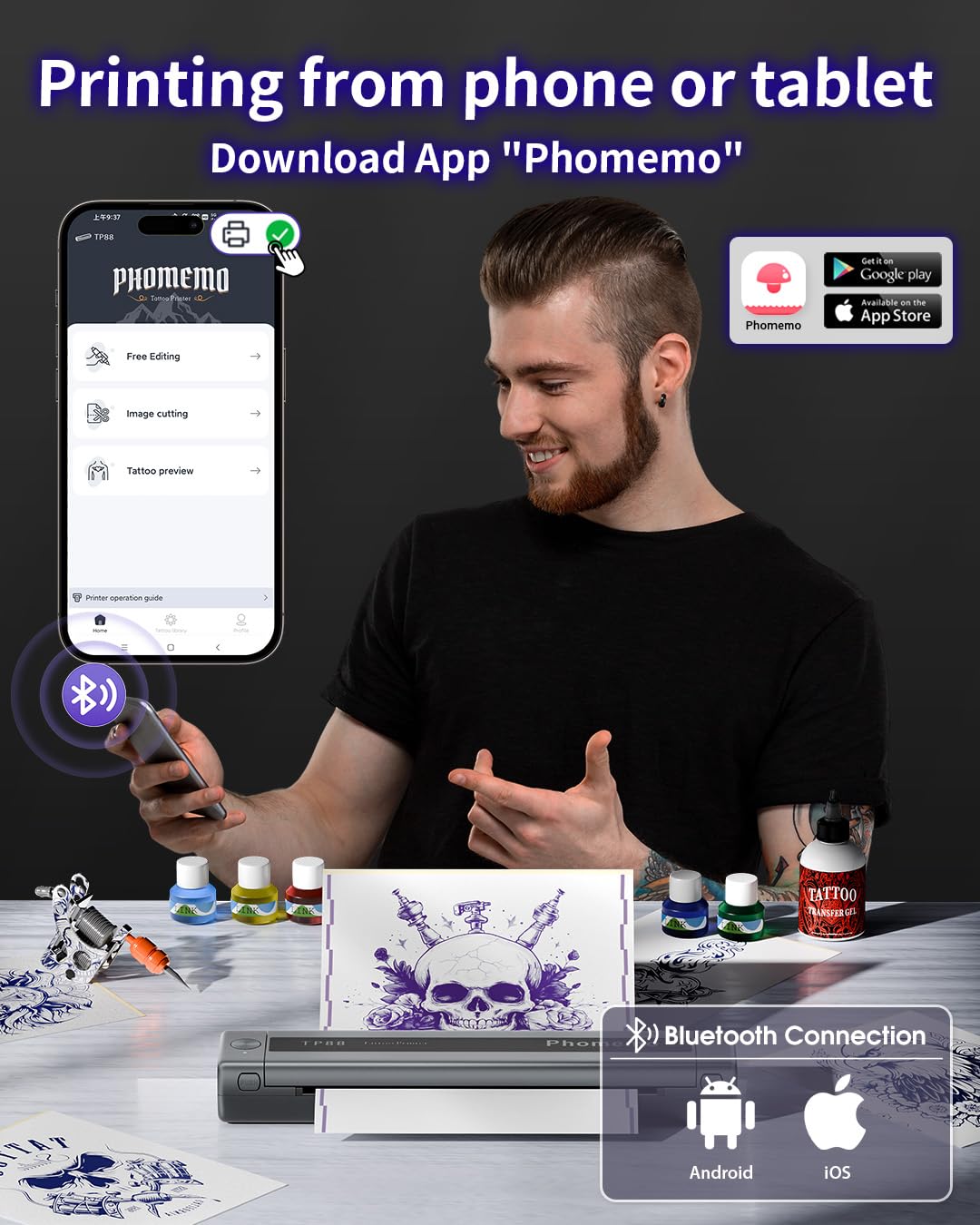
ምስል፡ ዝርዝር view of the Phomemo app's features, including tattoo library, image cutting, and tattoo preview.
4.2. Printing from a Computer (USB)
- አውርድ ነጂ፡ ኦፊሴላዊውን ፌሞ ይጎብኙ website (pages.phomemo.com/#/TP88) to download the appropriate driver for your operating system (Windows, Mac OS, Chrome OS, or Linux).
- ሾፌርን ጫን Follow the on-screen instructions to install the printer driver on your computer.
- ማተሚያ ማገናኘት; Connect the TP88 printer to your computer using the provided Type-C charging cable. If your computer lacks a USB-A port, use the included docking station (USB-A to USB-C adapter).
- አትም Open your desired image or design on your computer, select the TP88 printer from your print options, and initiate printing.

Image: A laptop connected to the Phomemo TP88 printer, demonstrating the process of printing a tattoo stencil from a computer.
Video: A step-by-step guide on how to use the Phomemo TP88 tattoo machine to print stencils via a computer connection.
5. ጥገና
የፎሜሞ TP88 አታሚዎ ረጅም ዕድሜ እና ጥሩ አፈጻጸም እንዲኖረው፣ መደበኛ ጥገና ይመከራል፡
- ማጽዳት፡ Periodically clean the paper path and thermal print head with a soft, lint-free cloth. If necessary, use a small amount of isopropyl alcohol on the cloth for stubborn residue, ensuring the printer is powered off and disconnected from power.
- ማከማቻ፡ ማተሚያውን በቀጥታ ከፀሀይ ብርሀን እና ከከፍተኛ ሙቀት ርቆ በቀዝቃዛና ደረቅ ቦታ ያከማቹ።
- የባትሪ እንክብካቤ For extended storage, ensure the battery is charged to approximately 50-70% to maintain battery health. Avoid fully discharging the battery for long periods.
- የወረቀት አያያዝ; Always use high-quality thermal transfer paper designed for stencil printers. Store paper in its original packaging to protect it from light and moisture.
6. መላ መፈለግ
If you encounter issues with your Phomemo TP88 printer, consider the following common solutions:
- አታሚ እየበራ አይደለም፡- Ensure the printer is fully charged. Connect it to a power source using the provided Type-C cable and a standard 5V/2A (10W) charger.
- ደካማ የህትመት ጥራት፡-
- Check if the thermal transfer paper is loaded correctly (white side up).
- Ensure the paper is not wrinkled or damaged.
- በጥገና ክፍል ውስጥ እንደተገለጸው የሙቀት ማተሚያ ጭንቅላትን ያጽዱ.
- Verify the image resolution and settings in the app or computer driver.
- የግንኙነት ችግሮች (ብሉቱዝ):
- Make sure Bluetooth is enabled on your smartphone and the printer is within range.
- Restart both the printer and your smartphone.
- ሌሎች መሳሪያዎች በብሉቱዝ ግንኙነት ውስጥ ጣልቃ እንደማይገቡ ያረጋግጡ።
- Re-pair the device through the Phomemo app.
- የግንኙነት ጉዳዮች (ዩኤስቢ)፡-
- Verify that the USB cable is securely connected to both the printer and the computer.
- Ensure the correct printer driver is installed and updated for your operating system.
- የተለየ የዩኤስቢ ወደብ ወይም ገመድ ይሞክሩ።
- የወረቀት መቀርቀር: Power off the printer, gently open the cover, and carefully remove any jammed paper. Ensure no small pieces of paper remain inside before closing the cover and powering on.
7. ዝርዝሮች
| ባህሪ | ዝርዝር |
|---|---|
| የሞዴል ቁጥር | TP88 |
| የምርት ልኬቶች | 12.2 x 1.57 x 2.64 ኢንች |
| ክብደት | 2.47 ፓውንድ £ |
| ባትሪ | 1 Lithium Polymer battery (1200 mAh), included |
| የህትመት ቴክኖሎጂ | ሙቀት (ቀለም የሌለው) |
| የወረቀት ተኳኋኝነት | A4, US Letter size thermal transfer paper |
| ግንኙነት | Bluetooth (iOS, Android), USB (Windows, Mac OS, Chrome OS, Linux) |
| የተካተቱ አካላት | TP88 Tattoo Machine, 10x Thermal Transfer Paper, Type-C Charging Cable, Docking Station, Velvet Pouch |
| ቀለም | ጥቁር |
| የውሃ መቋቋም ደረጃ | የውሃ መቋቋም አይደለም |
8. ዋስትና እና ድጋፍ
For any product inquiries, technical support, or warranty claims, please contact Phomemo customer service:
- ኢሜይል፡- bestservice2012@outlook.com
- ስልክ፡- +1 833 879 0321 (ከክፍያ ነፃ)
- WhatsApp: +1 971 476 7804
- የቢሮ ሰዓቶች፡- Monday - Friday, 9 AM - 5 PM (EST)
እባክዎን ለተወሰኑ የዋስትና ዝርዝሮች የግዢ ሰነድዎን ይመልከቱ።
Ask a question about this manual
Ask about setup, troubleshooting, compatibility, parts, safety, or missing instructions. Manuals+ will review the question and use this page’s manual context to help answer it.