
nubia V60 (Model Number: 123439101056)
የ ZTE ኑቢያ V60 ስማርትፎን የተጠቃሚ መመሪያ
Model: V60 (123439101056) | Brand: nubia
1. መግቢያ
Welcome to the user manual for your new ZTE nubia V60 smartphone. This guide provides essential information to help you set up, operate, maintain, and troubleshoot your device. Please read this manual thoroughly to ensure optimal performance and longevity of your smartphone.
The nubia V60 features a 6.72-inch FHD+ display, a powerful 50MP AI rear camera, a 32MP front camera, 8GB RAM (expandable with 12GB Dynamic RAM), 256GB ROM, a 5000mAh battery with 22.5W fast charging, NFC, fingerprint recognition, and DTS sound effects.
2. የመጀመሪያ ደረጃ ማዋቀር
2.1. Unboxing እና ጥቅል ይዘቶች
ከመጀመርዎ በፊት ሁሉም እቃዎች በጥቅሉ ውስጥ መኖራቸውን ያረጋግጡ፡-
- ZTE nubia V60 Smartphone
- የኃይል አስማሚ
- የዩኤስቢ ገመድ
- የሲም ኤጄክተር መሣሪያ (በክልሉ ሊለያይ ይችላል)
- ፈጣን የጅምር መመሪያ (ይህ ሰነድ እንደ አጠቃላይ መመሪያ ሆኖ ያገለግላል)
2.2. ሲም ካርዱን እና ማይክሮ ኤስዲ ካርዱን ማስገባት
- የሲም ካርዱን ትሪ ከመሳሪያዎ ጎን ያግኙት።
- የሲም ማስወጫ መሳሪያውን ከጣፋዩ ቀጥሎ ባለው ትንሽ ቀዳዳ ውስጥ ያስገቡ እና ትሪው ብቅ እስኪል ድረስ በጥብቅ ይጫኑ።
- Place your Nano-SIM card(s) and/or microSD card (if applicable) into the tray with the gold contacts facing down, ensuring they are correctly aligned.
- ወደ ቦታው ጠቅ እስኪያደርግ ድረስ ትሪውን በቀስታ ወደ ማስገቢያው ይግፉት።

ምስል: ጎን view of the nubia V60, illustrating the location of the SIM card tray and physical buttons.
2.3. ባትሪውን በመሙላት ላይ
Before first use, fully charge your device. Connect the USB cable to the power adapter and then to the phone's charging port. Plug the power adapter into a wall outlet. The device supports 22.5W fast charging.
2.4. በማብራት ላይ እና የመጀመሪያ ውቅር
- Press and hold the Power button (located on the right side) until the screen lights up.
- ቋንቋዎን ለመምረጥ፣ ከWi-Fi ጋር ለመገናኘት፣ የGoogle መለያዎን ለማዋቀር እና እንደ የጣት አሻራ ማወቂያ ያሉ የደህንነት ባህሪያትን ለማዋቀር የማያ ገጽ ላይ መመሪያዎችን ይከተሉ።
3. መሳሪያዎን ማስኬድ
3.1. መሰረታዊ ዳሰሳ
The nubia V60 operates on Android 13.0. Use touch gestures such as tap, swipe, pinch-to-zoom, and long-press to navigate the interface. The power button and volume buttons are located on the right side of the device.

ምስል፡ ፊት ለፊት view of the nubia V60, showcasing its 6.72-inch FHD+ display.
3.2. የካሜራ ባህሪያት
Your device is equipped with a 50MP AI Rear Camera and a 32MP Front Camera.
- ካሜራውን ማስጀመር; በመነሻ ስክሪን ወይም በመቆለፊያ ማያዎ ላይ የካሜራ አዶውን ይንኩ።
- ፎቶዎችን/ቪዲዮዎችን ማንሳት፡ Tap the shutter button to capture an image or switch to video mode to record.
- የአይአይ ማሻሻያዎች፡ The AI features automatically optimize settings for various scenes and subjects.
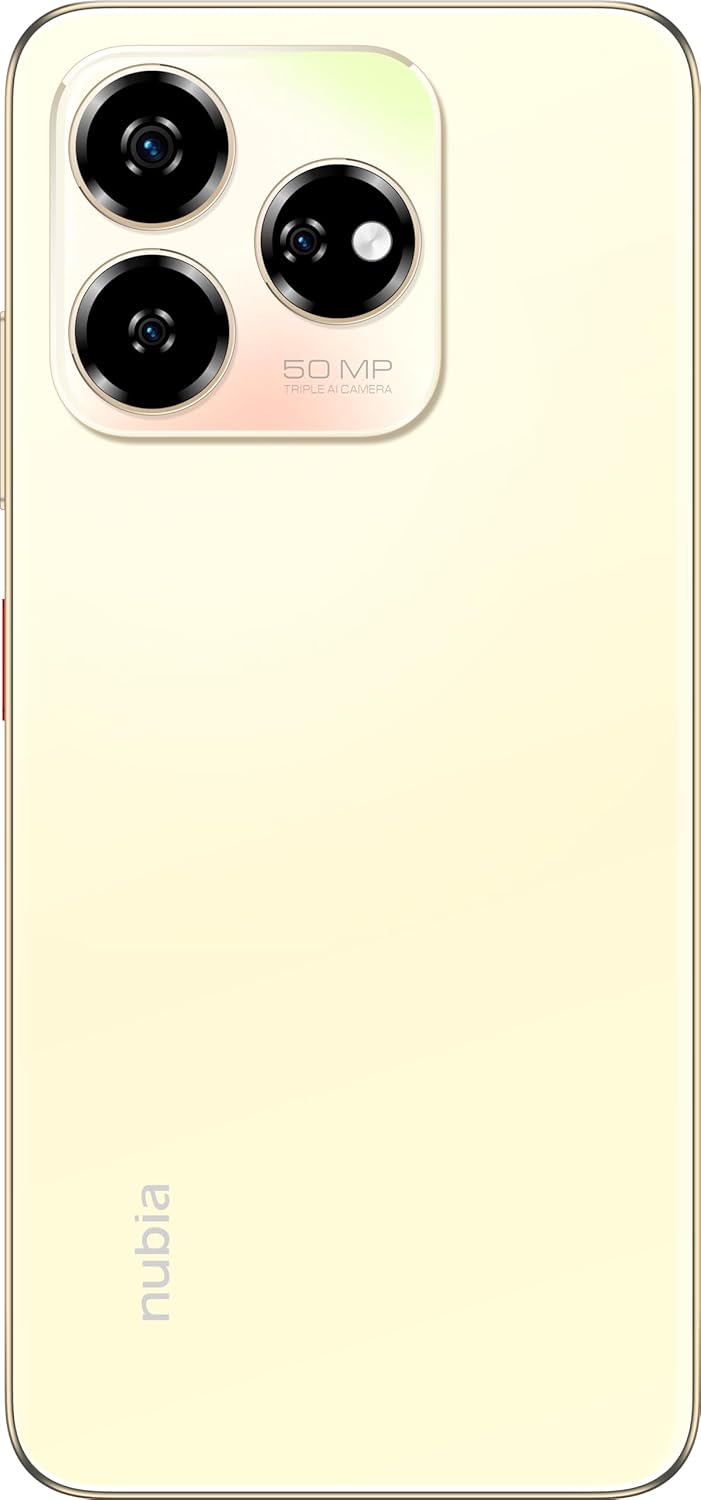
ምስል: የኋላ view of the nubia V60, highlighting the 50MP triple AI camera module.
3.3. የጣት አሻራ እውቅና
The device features a side-mounted fingerprint sensor for secure and quick unlocking. To set up:
- ወደ ሂድ መቼቶች > ደህንነት > የጣት አሻራ.
- የእርስዎን የጣት አሻራ(ዎች) ለመመዝገብ የማያ ገጽ ላይ ጥያቄዎችን ይከተሉ።
3.4. የ NFC ተግባራዊነት
NFC (Near Field Communication) allows for quick data exchange and contactless payments. To use NFC:
- Ensure NFC is enabled in ቅንብሮች > የተገናኙ መሣሪያዎች > የግንኙነት ምርጫዎች > NFC.
- Tap your phone to another NFC-enabled device or payment terminal to initiate a connection or transaction.
3.5. DTS Sound Effect
Experience enhanced audio quality with DTS sound effects. This feature can be configured in your device's sound settings to optimize audio for various media types.
3.6. Live Island
The Live Island feature provides dynamic notifications and quick access to certain functions around the front camera cutout. Explore its functionalities through your device's display settings or by interacting with notifications.
4. ጥገና እና እንክብካቤ
4.1. መሳሪያዎን ማጽዳት
የስልክዎን ስክሪን እና አካል ለማፅዳት ለስላሳ፣ ከጥጥ ነጻ የሆነ ጨርቅ ይጠቀሙ። የማጠናቀቂያውን ወይም የስክሪን ሽፋንን ሊጎዱ የሚችሉ ኃይለኛ ኬሚካሎችን ወይም ገላጭ ቁሳቁሶችን ከመጠቀም ይቆጠቡ።
4.2. የሶፍትዌር ዝመናዎች
መሣሪያዎ የቅርብ ጊዜዎቹ ባህሪያት፣ የደህንነት መጠገኛዎች እና የአፈጻጸም ማሻሻያዎች እንዳሉት ለማረጋገጥ በየጊዜው የሶፍትዌር ማሻሻያዎችን ይፈልጉ እና ይጫኑ። ወደ ሂድ ቅንብሮች > ስርዓት > የስርዓት ማሻሻያ.
4.3. የባትሪ እንክብካቤ
- የባትሪውን ዕድሜ ሊያበላሹ ስለሚችሉ ከፍተኛ ሙቀትን ያስወግዱ።
- ዋናውን ወይም የተመሰከረላቸው የኃይል መሙያ መለዋወጫዎችን ብቻ ይጠቀሙ።
- የባትሪውን ጤና ለማሻሻል ባትሪውን ሙሉ በሙሉ ደጋግሞ ከመሙላት ወይም ለረጅም ጊዜ 100% ባትሪውን ከመሙላት ይቆጠቡ።
4.4. የማከማቻ አስተዳደር
በየጊዜው እንደገናview your device's storage (256GB ROM) and clear unnecessary files, apps, or media to maintain optimal performance. You can check storage usage in ቅንብሮች > ማከማቻ.
5. መላ መፈለግ
This section addresses common issues you might encounter with your nubia V60.
5.1. መሳሪያ አይበራም
- ባትሪው መሙላቱን ያረጋግጡ። ባትሪ መሙያውን ያገናኙ እና ለማብራት ከመሞከርዎ በፊት ጥቂት ደቂቃዎችን ይጠብቁ.
- ዳግም እንዲጀመር ለማስገደድ ቢያንስ ለ10-15 ሰከንድ የኃይል ቁልፉን ተጭነው ይቆዩ።
5.2. የመሙላት ጉዳዮች
- የኃይል መሙያ ገመዱ እና አስማሚው ደህንነቱ በተጠበቀ ሁኔታ የተገናኙ እና ያልተበላሹ መሆናቸውን ያረጋግጡ።
- Try using a different power outlet or charging accessory.
- ማንኛውንም ፍርስራሽ ለማስወገድ የኃይል መሙያውን በር ለስላሳ እና ደረቅ ብሩሽ በቀስታ ያጽዱ።
5.3. የአውታረ መረብ ግንኙነት ችግሮች
- ሲም ካርድዎ በትክክል መግባቱን እና መሥራቱን ያረጋግጡ።
- የአውሮፕላን ሁነታን ያብሩ እና ያጥፉ።
- መሣሪያዎን እንደገና ያስጀምሩ።
- ወደ ሂድ ቅንብሮች > አውታረ መረብ እና በይነመረብ > የሞባይል አውታረ መረብ እና የሚመርጡት የአውታረ መረብ አይነት መመረጡን ያረጋግጡ።
5.4. መተግበሪያዎች እየተበላሹ ወይም እየቀዘቀዙ
- ዝጋ እና መተግበሪያውን እንደገና ይክፈቱ።
- የመተግበሪያውን መሸጎጫ እና ውሂቡን ያጽዱ ቅንብሮች > መተግበሪያዎች > [የመተግበሪያ ስም] > ማከማቻ እና መሸጎጫ.
- መተግበሪያው ወደ የቅርብ ጊዜው ስሪት መዘመኑን ያረጋግጡ።
- መሣሪያዎን እንደገና ያስጀምሩ።
5.5. የፋብሪካ ዳግም ማስጀመር (የመጨረሻው ሪዞርት)
ማስጠንቀቂያ፡ የፋብሪካ ዳግም ማስጀመር በስልክዎ ላይ ያለውን ሁሉንም ውሂብ ይሰርዛል። ከመቀጠልዎ በፊት አስፈላጊ ውሂብ ምትኬ ያስቀምጡ።
የፋብሪካ ዳግም ማስጀመር ለማከናወን ወደ ይሂዱ ቅንብሮች > ስርዓት > አማራጮችን ዳግም አስጀምር > ሁሉንም ውሂብ ደምስስ (የፋብሪካ ዳግም ማስጀመር) እና መመሪያዎቹን ይከተሉ.
6. ቴክኒካዊ ዝርዝሮች
| ባህሪ | ዝርዝር መግለጫ |
|---|---|
| የሞዴል ስም | ቪ60 |
| የንጥል ሞዴል ቁጥር | 123439101056 |
| የምርት ስም | ኑቢያ |
| ስርዓተ ክወና | አንድሮይድ 13.0 |
| የስክሪን መጠን | 6.72 ኢንች |
| የተጫነው RAM ማህደረ ትውስታ መጠን | 8 GB (Additional 12GB Dynamic RAM) |
| የማህደረ ትውስታ ማከማቻ አቅም | 256 ጊባ |
| የሲፒዩ ፍጥነት | 1.8 ጊኸ |
| የኋላ ካሜራ | 50 ሜፒ AI ካሜራ |
| የፊት ካሜራ | 32 ሜፒ |
| የባትሪ ሃይል ደረጃ | 5000 ሚአሰ |
| ፈጣን ባትሪ መሙላት | 22.5 ዋ |
| ገመድ አልባ የመገናኛ ቴክኖሎጂዎች | NFC |
| የግንኙነት ቴክኖሎጂዎች | NFC |
| ሴሉላር ቴክኖሎጂ | 4G |
| ጂፒኤስ | GLONASS |
| ኦዲዮ ጃክ | የጆሮ ማዳመጫ መሰኪያ የለም። |
| የቅጽ ምክንያት | ባር |
| ቀለም | Sunlit Gold |
| የእቃው ክብደት | 510 ግ |
| የጥቅል ልኬቶች | 18 x 8.6 x 5.6 ሴ.ሜ |
| በሳጥኑ ውስጥ ያለው ምንድን ነው | የኃይል አስማሚ፣ የዩኤስቢ ገመድ |
7. የዋስትና መረጃ
Your ZTE nubia V60 smartphone comes with a standard manufacturer's warranty, covering defects in materials and workmanship under normal use. The duration and terms of this warranty may vary by region. Please refer to the warranty card included in your product packaging for specific details.
Additionally, extended warranty and accidental damage protection plans may be available for purchase. For example, options such as a 1-Year Extended Warranty Plan, 2-Years Extended Warranty Plan, and 1-Year Accidental Damage Protection Plan might be offered by authorized retailers.
ለማንኛውም የዋስትና ጥያቄዎች የግዢ ማረጋገጫዎን ያስቀምጡ።
8. የደንበኛ ድጋፍ
For further assistance, technical support, or service inquiries regarding your ZTE nubia V60, please contact nubia customer service through their official webበምርት ሰነድዎ ውስጥ የቀረበው ጣቢያ ወይም የእውቂያ መረጃ።
You can often find FAQs, troubleshooting guides, and software downloads on the official nubia support website. When contacting support, please have your device model number (V60) and item model number (123439101056) ready.
Ask a question about this manual
Ask about setup, troubleshooting, compatibility, parts, safety, or missing instructions. Manuals+ will review the question and use this page’s manual context to help answer it.