
1. መግቢያ
Thank you for choosing the Hama DR2002BT Digital Radio. This device offers a comprehensive audio experience with FM, DAB/DAB+ digital radio reception, and Bluetooth connectivity. Its user-friendly design, featuring large buttons and a clear 4.3-inch TFT color display, makes it suitable for all users. This manual will guide you through the setup, operation, and maintenance of your new digital radio.
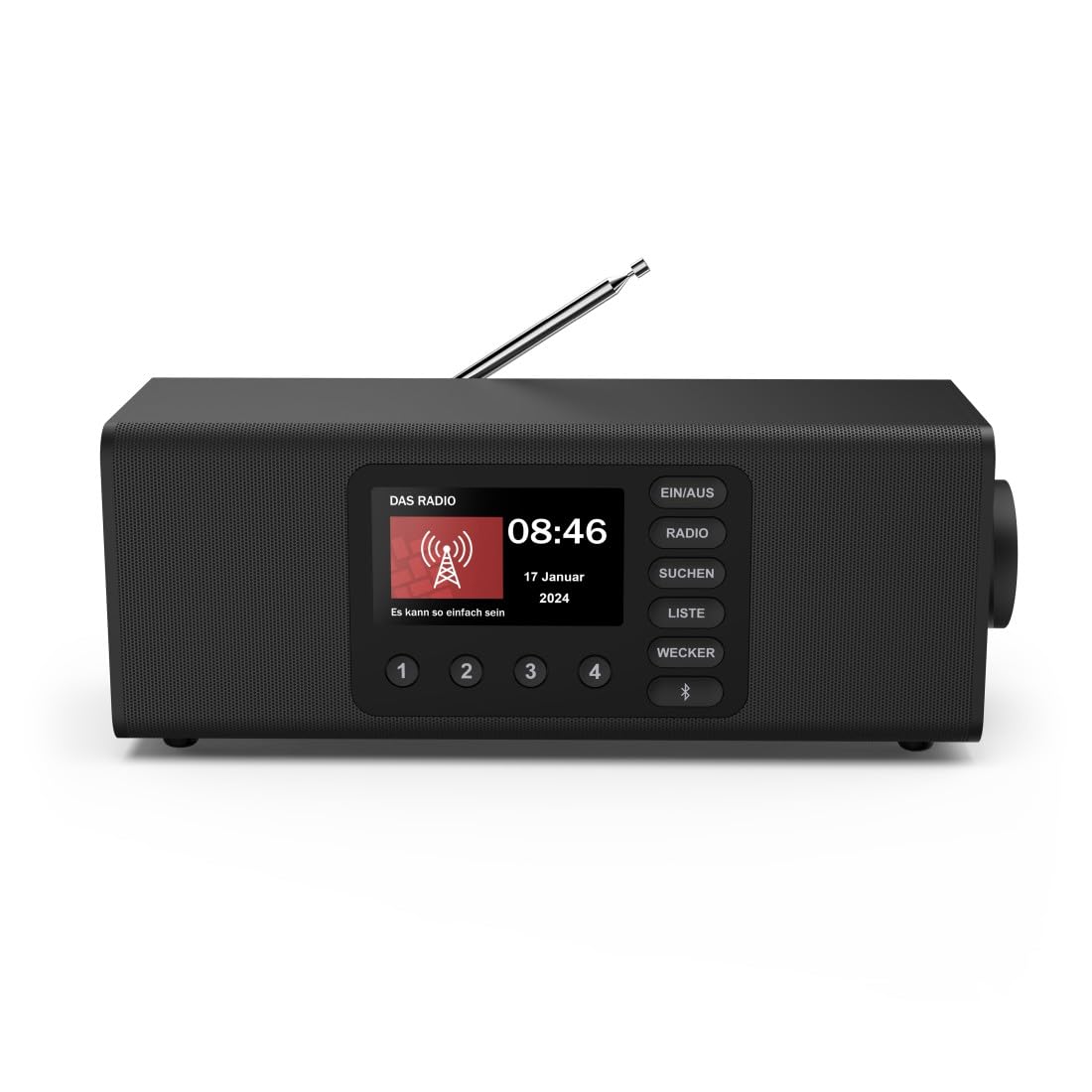
ምስል፡ ፊት ለፊት view of the Hama DR2002BT Digital Radio, showcasing የማሳያ እና የመቆጣጠሪያ አዝራሮች።
2. የደህንነት መረጃ
እባክዎ መሳሪያውን ከመጠቀምዎ በፊት እነዚህን የደህንነት መመሪያዎች በጥንቃቄ ያንብቡ። ይህንን መመሪያ ለወደፊት ማጣቀሻ ያቆዩት።
- መሳሪያውን ለእርጥበት፣ ለዝናብ ወይም ለከፍተኛ ሙቀት አያጋልጡት።
- መሳሪያውን በሙቀት ምንጮች አጠገብ ወይም በቀጥታ የፀሐይ ብርሃን ላይ ከማስቀመጥ ይቆጠቡ.
- መሣሪያውን አይክፈቱ ሐasinሰ. ጥገናው ብቃት ባላቸው ባለሙያዎች ብቻ መከናወን አለበት.
- የቀረበውን የኃይል አስማሚ ብቻ ይጠቀሙ።
- በመሳሪያው ዙሪያ ትክክለኛ የአየር ዝውውርን ያረጋግጡ.
3. የጥቅል ይዘቶች
ሲፈቱ ሁሉም እቃዎች መገኘታቸውን ያረጋግጡ፡-
- Hama DR2002BT Digital Radio
- የኃይል አስማሚ
- የተጠቃሚ መመሪያ
4. ምርት አብቅቷልview
4.1 የፊት ፓነል መቆጣጠሪያዎች እና ማሳያ

Image: Front panel of the radio highlighting the display and control buttons, with icons for Bluetooth, DAB+, and Alarm functions.
The front panel features a 4.3-inch TFT color display, large control buttons, and a rotary knob for easy navigation and selection. Key buttons include:
- EIN/AUS (ON/OFF): መሣሪያውን ያበራል ወይም ያጠፋል።
- ራዲዮ፡ Switches between FM and DAB/DAB+ modes.
- SUCHEN (SEARCH): Initiates station scanning.
- LISTE (LIST): Accesses the list of available stations.
- WECKER (ALARM): የማንቂያ ቅንብሮችን ያዋቅራል።
- የብሉቱዝ አዝራር፡- የብሉቱዝ ማጣመሪያ ሁነታን ያነቃል።
- ቀድሞ የተቀመጡ አዝራሮች (1-4)፦ ወደተከማቹ ተወዳጅ ጣቢያዎች ፈጣን መዳረሻ።
- Rotary Knob (LAUTSTÄRKE/NAVIGIEREN): Controls volume and navigates menus.
4.2 የኋላ ፓነል ግንኙነቶች
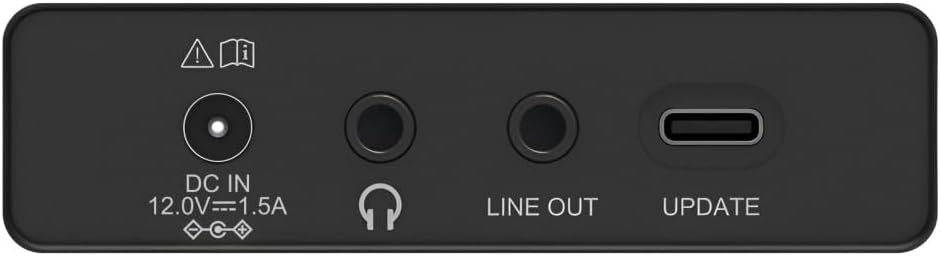
Image: Close-up of the rear panel showing the DC IN, Headphone, Line Out, and UPDATE (USB-C) ports.
የኋላ ፓነል አስፈላጊ የግንኙነት አማራጮችን ይሰጣል-
- DC IN 12.0V --- 1.5A: Power input for the external adapter.
- የጆሮ ማዳመጫ ጃክ (3.5 ሚሜ) ለግል ማዳመጥ።
- ከመስመር ውጭ: ከውጭ ጋር ለመገናኘት የድምጽ ውፅዓት ampአሳሾች ወይም ድምጽ ማጉያዎች.
- UPDATE (USB-C): ለ firmware ዝመናዎች።
- ቴሌስኮፒክ አንቴና፡ For FM and DAB/DAB+ reception.

ምስል: የኋላ view of the Hama DR2002BT Digital Radio with its telescopic antenna extended for optimal signal reception.
5. ማዋቀር
5.1 የኃይል ግንኙነት
- የቀረበውን የኃይል አስማሚን ከ ዲሲ ኢን በሬዲዮው ጀርባ ላይ ወደብ።
- የኃይል አስማሚውን ወደ ተስማሚ የኃይል ምንጭ ይሰኩት.
- ሬዲዮው በራስ-ሰር ይበራል ወይም በመጠባበቂያ ሁነታ ውስጥ ይገባል።
5.2 አንቴና አቀማመጥ
For optimal FM and DAB/DAB+ reception, fully extend the telescopic antenna. Position the radio near a window if reception is poor.
5.3 የመጀመሪያ ማዋቀር (የመጀመሪያ አጠቃቀም)
Upon first power-on, the radio may guide you through an initial setup process, including language selection and an automatic DAB station scan. Follow the on-screen prompts.
6. የአሠራር መመሪያዎች
6.1 ማብራት / ማጥፋት
የሚለውን ይጫኑ EIN/AUS ሬዲዮን ለማብራት ወይም ለማጥፋት አዝራር.
6.2 DAB/DAB+ Radio Mode
- የሚለውን ይጫኑ ራዲዮ የ DAB ሁነታን ለመምረጥ አዝራር።
- If this is the first time in DAB mode or if you want to rescan, press SUCHEN to perform a full scan for available stations.
- Use the rotary knob to navigate through the station list. Press the knob to select a station.
- ለ view the station list, press the ይዘርዝሩ አዝራር።
6.3 ኤፍኤም ሬዲዮ ሁነታ
- የሚለውን ይጫኑ ራዲዮ የኤፍኤም ሁነታን ለመምረጥ አዝራር።
- ተጫን SUCHEN የሚቀጥለውን የኤፍኤም ጣቢያ በራስ-ሰር ለመቃኘት
- Alternatively, use the rotary knob to manually tune to a frequency.
6.4 ቅድመ-ቅምጦችን ማከማቸት እና ማስታወስ
The radio allows you to store up to 4 favorite stations using the dedicated preset buttons (1-4).
- ወደሚፈለገው ጣቢያ (DAB ወይም FM) ያስተካክሉ።
- Press and hold one of the preset buttons (1-4) until the display confirms the station has been saved.
- To recall a preset station, simply press the corresponding preset button (1-4).
6.5 የብሉቱዝ ኦፕሬሽን

ምስል፡ ፊት ለፊት view of the radio with Bluetooth and stereo speaker icons, indicating its wireless audio streaming capability.
The Hama DR2002BT can stream audio from your smartphone, tablet, or laptop via Bluetooth 5.0.
- Press the Bluetooth button on the front panel to enter Bluetooth pairing mode. The display will show a pairing indicator.
- On your external device (smartphone, tablet), enable Bluetooth and search for available devices.
- Select "Hama DR2002BT" from the list of devices to pair.
- Once paired, you can play audio from your device, and it will be output through the radio's speakers.
6.6 የማንቂያ ሰዓት ተግባር

Image: A person waking up with the Hama DR2002BT Digital Radio placed on a bedside table, illustrating its alarm clock functionality.
The radio features two independent alarm settings.
- የሚለውን ይጫኑ ዌክከር button to access alarm settings.
- Use the rotary knob to select Alarm 1 or Alarm 2.
- Configure the alarm time, source (buzzer or radio station), and repetition (once, daily, weekdays, weekends, or specific days).
- Press the rotary knob to confirm each setting.
- To quickly activate/deactivate an alarm, press the ዌክከር button and use the rotary knob to toggle the alarm status.

Image: A person interacting with the Hama DR2002BT Digital Radio, demonstrating its ease of use for setting functions like alarms or tuning stations.
7. ጥገና
To ensure the longevity and optimal performance of your Hama DR2002BT Digital Radio, follow these maintenance guidelines:
- ማጽዳት፡ የራዲዮውን ውጫዊ ክፍል ለማጽዳት ለስላሳ፣ ደረቅ፣ ከላጣ ነፃ የሆነ ጨርቅ ይጠቀሙ። ሻካራ ማጽጃዎችን፣ ሰሞችን ወይም ሟሟቶችን አይጠቀሙ።
- አቧራ፡ Regularly dust the device to prevent accumulation in vents and ports.
- ማከማቻ፡ ሬዲዮን ለረጅም ጊዜ ካስቀመጠ ከኃይል አቅርቦቱ ያላቅቁት እና በቀዝቃዛና ደረቅ ቦታ ያስቀምጡት.
- አንቴና፡ ቴሌስኮፒክ አንቴናውን በጥንቃቄ ይያዙት፤ ይህም እንዳይታጠፍ ወይም እንዳይሰበር ይከላከላል።
8. መላ መፈለግ
በራዲዮዎ ላይ ችግሮች ካጋጠሙዎት የሚከተሉትን የተለመዱ ችግሮች እና መፍትሄዎች ይመልከቱ፡
| ችግር | ሊሆን የሚችል ምክንያት | መፍትሄ |
|---|---|---|
| ኃይል የለም | የኃይል አስማሚ አልተገናኘም፤ የኃይል መውጫው ችግር አለበት | የኃይል አስማሚውን ግንኙነት ይፈትሹ፤ የተለየ የኃይል መውጫ ይሞክሩ። |
| ደካማ የሬዲዮ አቀባበል (DAB/FM) | አንቴና አልተዘረጋም፤ ደካማ የሲግናል አካባቢ፤ ጣልቃ ገብነት | Fully extend the telescopic antenna; Reposition the radio (e.g., near a window); Perform a new station scan. |
| የብሉቱዝ ማጣመር አልተሳካም። | Bluetooth not enabled on external device; Radio not in pairing mode; Device too far | Ensure Bluetooth is on and visible on your device; Press the Bluetooth button on the radio; Move devices closer (within 10m). |
| ድምጽ የለም። | ድምጽ በጣም ዝቅተኛ ነው፤ ድምጸ-ከል ነቅቷል፤ የተሳሳተ ምንጭ ተመርጧል | Increase volume using the rotary knob; Check if mute is active; Ensure the correct mode (DAB, FM, Bluetooth) is selected. |
| ማንቂያ አይሰማም። | Alarm not activated; Incorrect alarm time/day set | Verify alarm is enabled in settings; Check alarm time and repetition settings. |
9. ዝርዝሮች

Image: Diagram showing the dimensions of the Hama DR2002BT Digital Radio: 35 cm (width), 12.5 cm (depth), and 13 cm (height).
| ባህሪ | ዝርዝር |
|---|---|
| የሞዴል ቁጥር | DR2002BT (00054298) |
| መቀበያ | DAB፣ DAB+፣ FM |
| የብሉቱዝ ስሪት | 5.0 |
| የውጤት ኃይል (RMS) | 10 W (Stereo) |
| ማሳያ | 4.3 ኢንች TFT ቀለም ማሳያ |
| ግንኙነቶች | 3.5mm Jack (Headphone), USB-C (Update), Line Out, DC IN |
| የኃይል አቅርቦት | ውጫዊ የኃይል አስማሚ |
| መጠኖች (ወ x D x H) | 35 x 12.5 x 13 ሴ.ሜ |
| ክብደት | 1788 ግራም |
| ቁሳቁስ | ፕላስቲክ |
| ቀለም | ጥቁር |
| ተጨማሪ ባህሪያት | Alarm Function (2 alarms), Direct Selection Keys |
10. ዋስትና እና ድጋፍ
Hama GmbH & Co KG provides a warranty for this product. Please refer to the warranty card included in your package or visit the official Hama webለዝርዝር የዋስትና ውሎች እና ሁኔታዎች ጣቢያ።
For technical support, troubleshooting assistance, or spare parts, please contact Hama customer service or visit their website. The availability of spare parts in the EU is guaranteed for 7 years.
- አምራች፡ Hama GmbH & Co KG
- የትውልድ ሀገር፡- ጀርመን
- የአውሮፓ ህብረት የመለዋወጫ ዕቃዎች አቅርቦት፡ 7 ዓመታት