
Vrabocry sp548e
Vrabocry SP548E SPI RGB LED Controller User Manual
Comprehensive instructions for setup, operation, and maintenance of your SP548E LED controller.
1. መግቢያ
The Vrabocry SP548E is an advanced SPI RGB LED controller designed for digital addressable LED strip lights. It offers versatile control options including WiFi, Bluetooth, 2.4G RF remote, and onboard buttons. This controller supports a wide range of LED ICs such as WS2811, WS2812B, WS2815, and SK series, operating on DC 5-24V. It enables users to manage up to 1200 controllable pixels, providing dynamic lighting effects, music synchronization, and smart home integration via Alexa.
2. የጥቅል ይዘቶች
እባክህ ከዚህ በታች የተዘረዘሩት ሁሉም እቃዎች በጥቅልህ ውስጥ መካተታቸውን አረጋግጥ፡
- 1x Vrabocry SP548E WiFi BT Pixel LED Controller
- 1x 2.4G RF Remote Control (Battery not included)
- 1 x የተጠቃሚ መመሪያ (ይህ ሰነድ)
- 1x Mounting Clip (may vary by package)
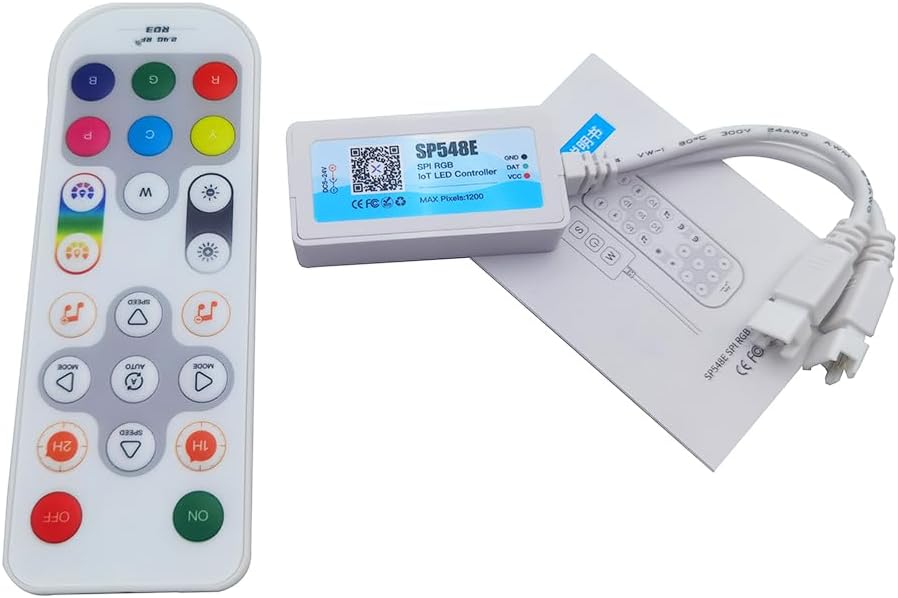
Image: The SP548E controller, its 2.4G RF remote, and the included instruction manual, laid out on a white surface.
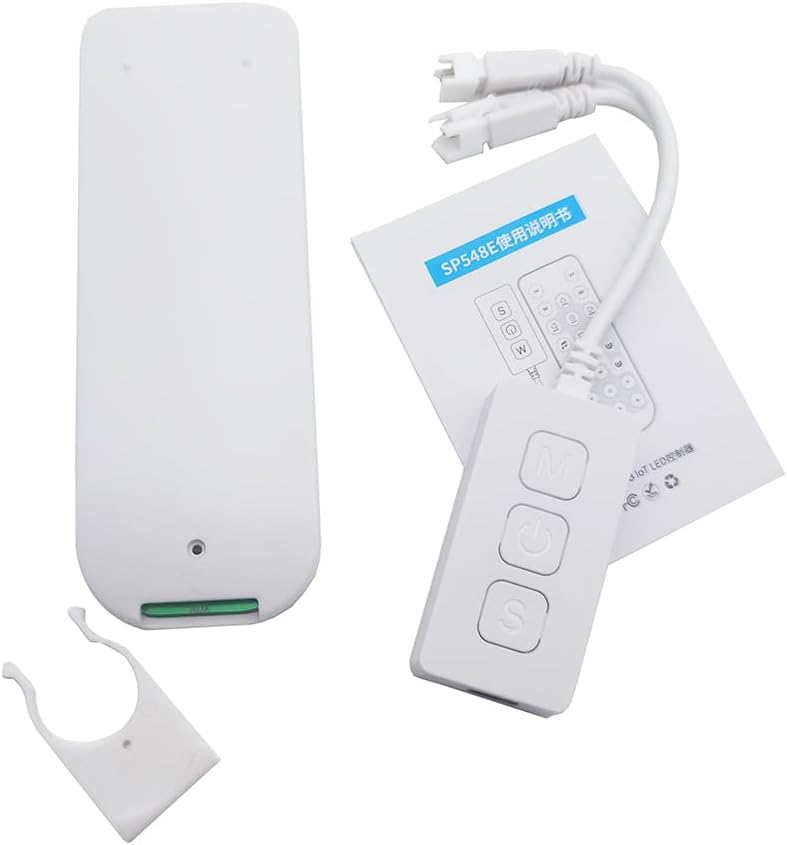
ምስል: የተሟላ view of the package contents, including the SP548E controller, the remote, the manual, and a white mounting clip.
3. ዝርዝሮች
| ግብዓት Voltage | ዲሲ 5-24V |
| የግንኙነት አይነት | ዋይፋይ፣ ብሉቱዝ |
| Controllable Pixels | Up to 1200 ICs |
| መተግበሪያ | Digital Addressable LED Light Strips |
| የውጤት ምልክት | SPI (TTL) Digital Signal |
| ተኳሃኝ የኤልኢዲ ስትሪፕስ | WS2811, WS2812, WS2815, SK series IC SPI RGB LED strips |
| የመተግበሪያ ስም | Banlanx |
| የሥራ ሙቀት | -20 ℃ እስከ 60 ℃ |
| ከፍተኛው የአሁኑ | 6A |
| የመቆጣጠሪያ ዘዴዎች | APP, IR Remote, Buttons, Alexa Voice Control |
4. የማዋቀር መመሪያዎች
4.1 ተቆጣጣሪ በላይview
Familiarize yourself with the controller's ports and buttons before proceeding with installation.

Image: The SP548E controller showing its 5.5x2.5mm DC input, 3-pin output for LED strips, and onboard buttons labeled for Music mode, ON/OFF, and Speed adjustment.
4.2 የሽቦ ዲያግራም
Follow the diagram below to correctly connect the LED controller to your power supply and LED strip.

Image: A simplified wiring diagram illustrating the connection. The DC 5-24V power input connects to the controller, and the controller's 3-pin output connects to a compatible LED strip (e.g., Cob Strip).
- Ensure all power is disconnected before making any connections.
- Connect a DC 5-24V power supply to the controller's DC input port.
- Connect your compatible digital addressable LED strip (e.g., WS2811, WS2812B) to the controller's 3-pin output connector. Ensure correct polarity (Data, Ground, VCC).
- Once all connections are secure, connect the power supply to an electrical outlet.
4.3 App Installation (Banlanx)
To utilize the full features of your controller, download the "Banlanx" app from your device's app store (available for iOS and Android). Follow the in-app instructions to pair your controller via WiFi or Bluetooth.
5. የአሠራር መመሪያዎች
5.1 የርቀት መቆጣጠሪያ ተግባራት
The included 2.4G RF remote control provides convenient access to various lighting modes and settings. Ensure the remote has batteries installed (not included).
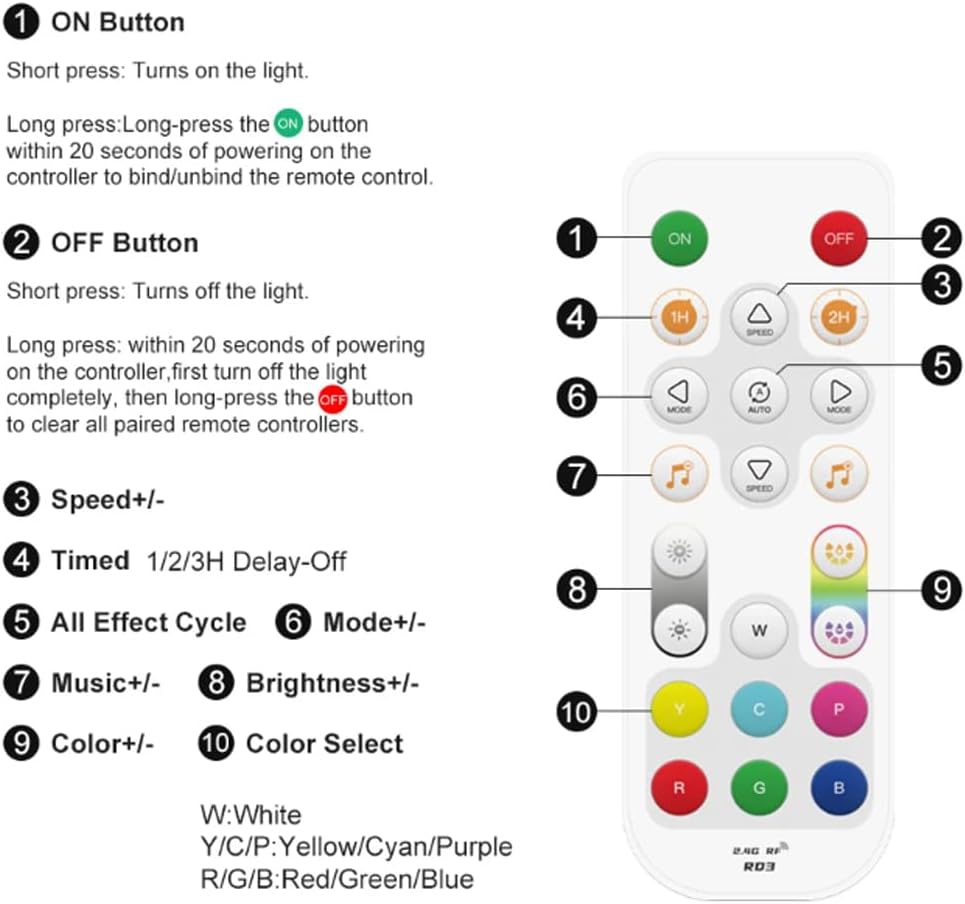
Image: A detailed layout of the 2.4G RF remote control, indicating the function of each button. Key functions include ON/OFF, Speed adjustment, Timed Delay-Off, Effect Cycle, Mode selection, Music effects, Brightness control, and Color selection.
- በርቷል አዝራር፡- መብራቱን ለማብራት አጭር ተጫን። የርቀት መቆጣጠሪያውን ለማሰር/ለመንቀል ተቆጣጣሪውን በ20 ሰከንድ ውስጥ በረጅሙ ይጫኑ።
- ጠፍቷል አዝራር፡- Short press to turn off the light. Long press within 20 seconds of powering on the controller (after turning off the light completely) to clear all paired remote controllers.
- ፍጥነት +/-: ተለዋዋጭ ተፅእኖዎችን ፍጥነት ያስተካክላል.
- Timed 1H/2H Delay-Off: Sets a timer for the lights to turn off after 1 or 2 hours.
- All Effect Cycle (AUTO): Cycles through all available dynamic effects.
- ሁነታ +/-: Selects different dynamic lighting modes.
- Music +/-: Selects different music synchronization effects.
- ብሩህነት +/-: የብርሃን ብሩህነት ደረጃን ያስተካክላል.
- Color +/-: Fine-tunes color selection within certain modes.
- Color Select Buttons (W, Y, C, P, R, G, B): Directly selects White, Yellow, Cyan, Purple, Red, Green, or Blue colors.
The 2.4G RF remote offers a long control distance and stable signal transmission.

Image: The 2.4G RF remote control overlaid on an image of a room illuminated by colorful LED strip lights, demonstrating its wireless control capability.
5.2 የቦርድ ቁልፍ መቆጣጠሪያ
The controller itself features three buttons for basic control:

Image: The SP548E controller with its three buttons labeled: 'M' for Mode adjust, power symbol for ON/OFF, and 'S' for Speed adjust. The controller is shown in a room with LED strip lighting.
- የኃይል አዝራር (መሃል)፦ Turns the LED lights ON or OFF.
- 'M' Button (Top): Adjusts the lighting mode.
- 'S' Button (Bottom): ተለዋዋጭ የብርሃን ተፅእኖዎችን ፍጥነት ያስተካክላል.
5.3 Smart APP Control (Banlanx)
The "Banlanx" app provides comprehensive control over your LED lights. After pairing your controller via WiFi or Bluetooth, you can:
- Select from 180 non-music dynamic effects with adjustable brightness and speed.
- Choose from 8 built-in music effects for synchronization with audio.
- Access 8 dynamic LED effects and 8 solid color scenes.
- ቀለሞችን ያብጁ እና ለግል የተበጁ የብርሃን ትዕይንቶችን ይፍጠሩ።
- ለራስ-ሰር አሠራር የሰዓት ቆጣሪዎችን እና የጊዜ ሰሌዳዎችን ያዘጋጁ።
5.4 Alexa Smart Voice Control
The SP548E controller supports integration with Alexa for voice commands. Once configured through the Banlanx app and linked to your Alexa account, you can use voice commands to:
- Turn lights ON/OFF.
- Change colors.
- ብሩህነትን ያስተካክሉ።
- Activate specific dynamic LED effects, solid color scenes, or music effects.
Refer to the Banlanx app's help section for detailed instructions on Alexa integration.
6. ጥገና
- Keep the controller in a dry environment, away from moisture and extreme temperatures.
- Clean the controller's exterior with a soft, dry cloth. Do not use liquid cleaners or solvents.
- ከመጠን በላይ ሙቀትን ለመከላከል በመቆጣጠሪያው ዙሪያ ትክክለኛውን የአየር ዝውውርን ያረጋግጡ.
- If the remote control is unresponsive, check and replace its batteries.
7. መላ መፈለግ
| ችግር | ሊሆን የሚችል ምክንያት | መፍትሄ |
|---|---|---|
| የ LED ስትሪፕ አይበራም. |
|
|
| የርቀት መቆጣጠሪያ ምላሽ አይሰጥም። |
|
|
| App cannot connect to the controller. |
|
|
| መብራቶች ይብረከረካሉ ወይም የተሳሳቱ ቀለሞችን ያሳያሉ። |
|
|
8. ዋስትና እና ድጋፍ
Specific warranty information for the Vrabocry SP548E SPI RGB LED Controller is not provided in this manual. For warranty details, technical support, or further assistance, please contact your retailer or the manufacturer directly. Please retain your proof of purchase for any warranty claims.
Ask a question about this manual
Ask about setup, troubleshooting, compatibility, parts, safety, or missing instructions. Manuals+ will review the question and use this page’s manual context to help answer it.