
መግቢያ
This manual provides instructions for the safe and efficient use of your Freaks and Geeks External Battery for PS5 Controller. Please read this manual thoroughly before use and retain it for future reference.
The Freaks and Geeks External Battery is designed to extend the playtime of your PlayStation 5 DualSense controller, offering an additional 2500mAh capacity. It features a Type-C connection for seamless integration.
የደህንነት መረጃ
- ባትሪውን ለከፍተኛ ሙቀት፣ ቀጥተኛ የፀሐይ ብርሃን ወይም እሳት አያጋልጡት።
- አትሰብስቡ፣ አይቀይሩ ወይም ባትሪውን ለመጠገን አይሞክሩ።
- ልጆች በማይደርሱበት ቦታ ያስቀምጡ.
- ባትሪውን ለጠንካራ ተጽእኖዎች ከመጣል ወይም ከመጣል ይቆጠቡ።
- Use only the provided or certified Type-C cables for charging.
- ባትሪው የጉዳት፣ የማበጥ ወይም የመፍሰስ ምልክቶች ካሳየ ወዲያውኑ መጠቀም ያቁሙ።
የጥቅል ይዘቶች
- 1 x Freaks and Geeks External Battery for PS5 Controller (Model: 150072)
- 1 x Type-C Charging Cable (Note: PS5 controller not included)
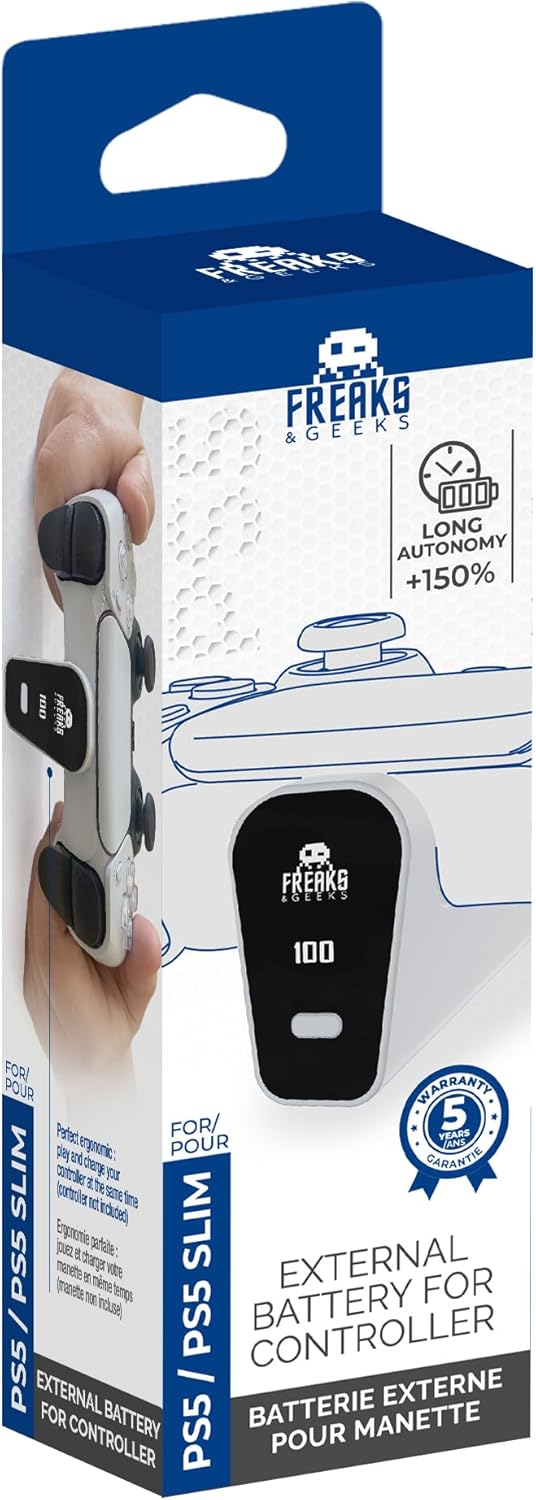
Image: Freaks and Geeks External Battery for PS5 Controller in its retail packaging, showing the product and brand.
ማዋቀር
Attaching the External Battery to your PS5 Controller
- Ensure your PS5 DualSense controller is clean and free of debris around the Type-C port.
- Align the Type-C connector of the external battery with the Type-C port on your PS5 controller.
- Gently push the external battery onto the controller until it is securely seated. The battery should click into place or feel firmly attached. Do not force it.

Image: Diagram illustrating the correct method to attach the external battery to the PS5 controller's USB-C port.

ምስል፡ ፊት ለፊት view of the Freaks and Geeks external battery securely attached to a PS5 DualSense controller.
የአሠራር መመሪያዎች
Charging the External Battery and Controller
The external battery charges simultaneously with the PS5 controller when connected to a power source via the Type-C cable. The battery features an LED indicator to show its charge status.
- Connect the provided Type-C charging cable to the external battery's charging port.
- Connect the other end of the Type-C cable to a compatible USB power adapter (not included) or a PS5 console USB port.
- The LED indicator on the external battery will illuminate to show charging status.
- Once fully charged, the LED indicator will change or turn off (refer to specific LED behavior below).
የ LED አመልካች ሁኔታ
- ድፍን ቀይ፡ ባትሪ እየሞላ ነው።
- ጠንካራ አረንጓዴ; ባትሪው ሙሉ በሙሉ ተሞልቷል።
- የሚያብረቀርቅ ቀይ፡ ዝቅተኛ የባትሪ ማስጠንቀቂያ.
- ብርሃን የለም፡ Battery is off or fully discharged.

ምስል: ጎን view of the external battery attached to a PS5 controller, highlighting the battery's display and charging port.
ጥገና
- Clean the external battery with a soft, dry cloth. Do not use liquid cleaners or solvents.
- Store the battery in a cool, dry place away from direct sunlight when not in use.
- If storing for an extended period, charge the battery to approximately 50% capacity to prolong its lifespan.
- Avoid exposing the Type-C connector to dust or moisture.
መላ መፈለግ
| ችግር | ሊሆን የሚችል ምክንያት | መፍትሄ |
|---|---|---|
| ባትሪ እየሞላ አይደለም። | Loose cable connection, faulty cable, or power source issue. | Ensure Type-C cable is securely connected. Try a different Type-C cable or power source. |
| Battery not powering controller. | Battery not securely attached, battery discharged. | Re-attach the external battery firmly to the controller. Charge the external battery. |
| Battery gets hot during use/charging. | Normal operation (slight warmth), or potential malfunction. | Slight warmth is normal. If it becomes excessively hot, disconnect immediately and discontinue use. Contact manufacturer support if concern persists. |
ዝርዝሮች
| የሞዴል ቁጥር፡- | 150072 |
| የባትሪ አቅም፡- | 2500 ሚአሰ |
| የባትሪ ሕዋስ ዓይነት | ሊቲየም ፖሊመር |
| ጥራዝtage: | 3.7 ቮልት |
| ግቤት/ውፅዓት፡- | የዩኤስቢ ዓይነት-ሲ |
| ልኬቶች (L x W x H)፦ | 5.91 x 1.57 x 1.97 ኢንች (በግምት) |
| ተኳኋኝነት | PlayStation 5 DualSense መቆጣጠሪያ |
የዋስትና መረጃ
Specific warranty details for this product are not provided within this manual. Please refer to the manufacturer's official webለአጠቃላይ የዋስትና ውሎች እና ሁኔታዎች ጣቢያ ወይም የግዢ ሰነድዎ።
ድጋፍ
For technical support, troubleshooting assistance beyond this manual, or inquiries regarding your Freaks and Geeks External Battery, please visit the official Freaks and Geeks webየደንበኛ አገልግሎት ክፍላቸውን ይጎብኙ ወይም ያነጋግሩ። የእውቂያ መረጃ በተለምዶ በምርት ማሸጊያው ወይም በአምራቹ ላይ ይገኛል። webጣቢያ.