
1. መግቢያ
This manual provides instructions for the installation, operation, maintenance, and troubleshooting of your NETGEAR XS516TM 18-Port 10G/Multi-Gigabit Ethernet Smart Switch. This device is designed to provide high-speed network connectivity with advanced management features for business environments.
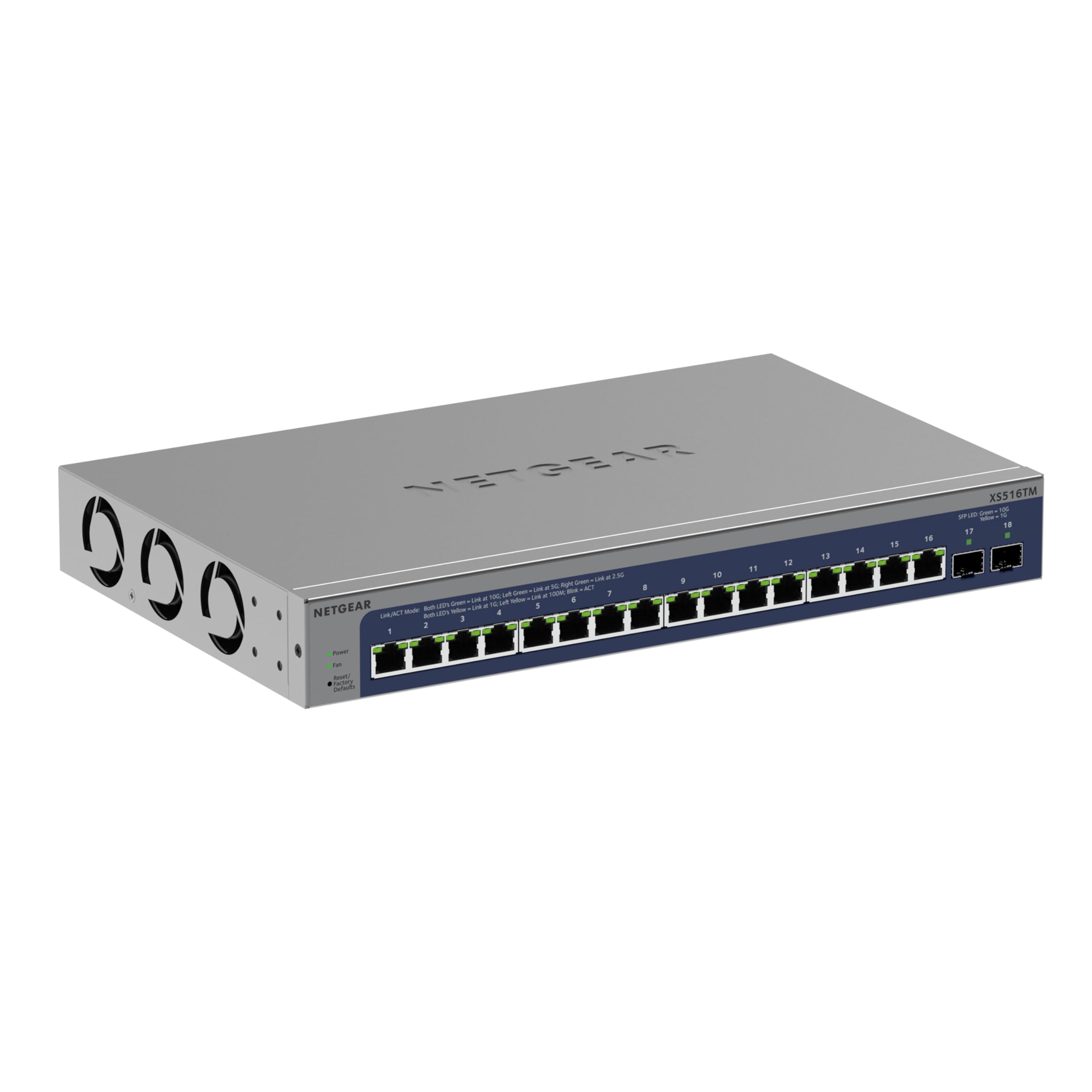
ምስል 1: የፊት view of the NETGEAR XS516TM Smart Switch.
2. የጥቅል ይዘቶች
Verify the contents of your package. If any items are missing or damaged, contact your NETGEAR reseller.
- NETGEAR XS516TM Smart Switch
- የኃይል ገመድ
- Mounting kit (for wall or rack mount)
- የጠረጴዛ ሰሌዳ ለመጫን የጎማ ሰሌዳዎች
- የመጫኛ መመሪያ
3. አካላዊ ከመጠን በላይview
The NETGEAR XS516TM switch features 16 multi-gigabit Ethernet ports and 2 SFP+ ports for high-speed connectivity.

Figure 2: Front and rear panel of the XS516TM switch, highlighting the 16 Ethernet ports, 2 SFP+ ports, power input, and status indicators.
የፊት ፓነል ባህሪዎች
- 16 x 1G/2.5G/5G/10G Ethernet Ports: These ports support various speeds for flexible network connections.
- 2 x 10ጂ SFP+ ወደቦች፡ For high-speed fiber optic connections or direct attach copper cables.
- የ LED አመልካቾች Provide status information for power, link/activity, and speed for each port.
- ዳግም አስጀምር አዝራር፡- የፋብሪካ ነባሪ ቅንብሮችን ወደነበረበት ለመመለስ ጥቅም ላይ ይውላል።
የኋላ ፓነል ባህሪዎች
- የኃይል ግቤት፡ ከተካተተው የኃይል ገመድ ጋር ይገናኛል።
- የምድር መጥረጊያ; For optional grounding.
4. ማዋቀር እና መጫን
4.1. የመጫኛ አማራጮች
The XS516TM switch can be installed on a desktop, wall-mounted, or rack-mounted.
- የዴስክቶፕ ጭነት; Attach the included rubber footpads to the bottom of the switch.
- የግድግዳ ተራራ Use the provided mounting kit to secure the switch to a wall. Ensure the wall can support the weight of the switch and connected cables.
- የመደርደሪያ ተራራ; Use the provided rack-mount brackets to install the switch in a standard 19-inch equipment rack.
4.2. መቀየሪያውን በማገናኘት ላይ
- Connect your network devices (servers, workstations, access points, etc.) to the 1G/2.5G/5G/10G Ethernet ports using appropriate Ethernet cables.
- For high-speed uplinks or connections to other network devices, use the 10G SFP+ ports with compatible SFP+ transceivers or DAC cables.
- Connect the power cord to the switch's power input and then to an AC power outlet.
- Verify the Power LED illuminates, indicating the switch is receiving power.
5. ማብሪያ / ማጥፊያውን በመሥራት ላይ
The XS516TM is a Smart Switch, offering advanced management capabilities through its web-based interface and optional NETGEAR Insight cloud management.
5.1. Local Configuration and Control
ወደ ማብሪያ / ማጥፊያው ይድረሱ web-based management interface from a connected computer to configure settings such as VLANs, QoS, IGMP, security features, and more. Refer to the detailed software manual for comprehensive configuration instructions.

ምስል 3: ዘፀample of the Smart Switch software interface for local configuration.
5.2. NETGEAR Insight Remote Management
The switch includes a 1-year subscription to NETGEAR Insight, allowing remote management of your network from anywhere. This feature provides centralized control and monitoring through a cloud-based platform without requiring additional hardware.

Figure 4: NETGEAR Insight interface for remote management on various devices.
Key features of NETGEAR Insight include:
- Multi-Location Support
- Network Scan Device Discovery
- Configuration Copy & Cloning
- Advanced PoE Configuration (if applicable to model)
- Firmware Scheduler
- SNMP Device Status
- የውሂብ ታሪክ
- ነጠላ መግቢያ
- ባለ ሁለት ደረጃ ማረጋገጫ
- Email Alerts/Push Notifications
6. ጥገና
To ensure optimal performance and longevity of your NETGEAR XS516TM switch, follow these maintenance guidelines:
- ማጽዳት፡ ማብሪያና ማጥፊያውን ንፁህና ከአቧራ የጸዳ ያድርጉት። ለማጽዳት ለስላሳና ደረቅ ጨርቅ ይጠቀሙ። ፈሳሽ ወይም ኤሮሶል ማጽጃዎችን አይጠቀሙ።
- የአየር ማናፈሻ; Ensure proper airflow around the switch. Do not block ventilation openings.
- የጽኑዌር ዝማኔዎች ፦ የNETGEAR ድጋፍን በመደበኛነት ያረጋግጡ website for the latest firmware updates. Applying updates can improve performance, add new features, and enhance security.
- የአካባቢ ሁኔታዎች; ጉዳት እንዳይደርስ ለመከላከል መቀየሪያውን በተጠቀሰው የሙቀት መጠን እና እርጥበት ክልል ውስጥ ያንቀሳቅሱት።
7. መላ መፈለግ
If you encounter issues with your NETGEAR XS516TM switch, refer to the following common troubleshooting steps:
- ኃይል የለም፡
- የኤሌትሪክ ገመዱ ከመቀየሪያው እና ከሚሰራው ኤሌክትሪክ መሰኪያ ጋር ደህንነቱ በተጠበቀ ሁኔታ መገናኘቱን ያረጋግጡ።
- ሌላ መሳሪያ በመጫን የኃይል ማከፋፈያው የሚሰራ መሆኑን ያረጋግጡ።
- የአገናኝ መብራት የለም፡
- Verify that the Ethernet cable is properly connected to both the switch port and the connected device.
- የተለየ የኤተርኔት ገመድ ይሞክሩ።
- የተገናኘው መሣሪያ መብራቱን እና በትክክል መስራቱን ያረጋግጡ።
- የአውታረ መረብ ግንኙነት ጉዳዮች፡-
- Check the IP configuration of your devices.
- Log into the switch's management interface to check port status, VLAN settings, and other configurations.
- If using NETGEAR Insight, check the device status and logs remotely.
- Perform a factory reset if all other troubleshooting fails (refer to the "Reset Button" in Section 3).
- ቀርፋፋ አፈጻጸም፡
- Ensure all connected devices are operating at their optimal speeds.
- የኔትወርክ መጨናነቅ ወይም ከመጠን በላይ የስርጭት ትራፊክ መኖሩን ያረጋግጡ።
- Verify cable quality and length meet specifications for 10G/Multi-Gigabit speeds.
For more detailed troubleshooting, consult the full user manual available on the NETGEAR support website or contact NETGEAR technical support.
8. ዝርዝሮች
| ባህሪ | ዝርዝር መግለጫ |
|---|---|
| የምርት ስም | NETGEAR |
| የሞዴል ቁጥር | XS516TM-100NAS |
| የወደብ ብዛት | 18 (16 x 1G/2.5G/5G/10G Ethernet, 2 x 10G SFP+) |
| የውሂብ ማስተላለፍ ፍጥነት | 10 Gigabits Per Second (max) |
| የመቀየሪያ አይነት | Managed (Smart Switch) |
| በይነገጽ | Ethernet, SFP+ |
| የእቃው ክብደት | 3.49 ኪ |
| ልኬቶች (H x W x D) | 1.7 x 13.0 x 8.1 ኢንች |
| የላይኛው የሙቀት ደረጃ | 50 ዲግሪዎች ሴልሲየስ |
| ዩፒሲ | 606449165456 |
9. ዋስትና እና ድጋፍ
NETGEAR provides comprehensive support and warranty for the XS516TM Smart Switch:
- የተወሰነ የዕድሜ ልክ የሃርድዌር ዋስትና፡ Your product is covered by a limited lifetime hardware warranty.
- የሚቀጥለው የስራ ቀን ምትክ፡ In case of hardware failure, a replacement unit can be dispatched on the next business day.
- 24/7 የውይይት ድጋፍ፦ የቴክኒክ ድጋፍ ለማግኘት ከNETGEAR ባለሙያ ጋር የ24/7 የውይይት ድጋፍ ማግኘት።
For warranty details, product registration, and technical support, please visit the official NETGEAR support webጣቢያ፡ www.netgear.com/support