
1. ምርት አብቅቷልview
The boogostore PS-160 is a high-capacity 50000mAh portable power bank designed for versatile charging on the go. It features multiple charging methods including a built-in AC wall plug, USB cable input, and an auxiliary solar panel. With 5 output ports, including 3 built-in cables (Micro-USB, Type-C, Lightning) and dedicated USB-A and Type-C ports, it supports fast charging for a wide range of devices. Additional functionalities include dual LED flashlights and an integrated pull-out phone holder, making it an ideal companion for travel and outdoor activities.
2. የጥቅል ይዘቶች
- 1x boogostore PS-160 Portable Solar Power Bank
- 1x USB-A to Micro-USB Charging Cable (for power bank)
- 1x ካራቢነር
- 1 x Lanyard
- 1 x የተጠቃሚ መመሪያ
3. የምርት ባህሪዎች

An annotated image highlighting the power bank's various components including built-in cables (Micro, Type-C, Lightning), USB output, Type-C input/output, AC plug, solar panel, mobile phone holder, flashlight, and power button.
- አብሮገነብ ኬብሎች; Equipped with Micro-USB, Type-C, and Lightning output cables for direct charging of most mobile devices without needing extra cables.
- አብሮ የተሰራ የኤሲ ግድግዳ መሰኪያ፡- A foldable AC plug allows for convenient direct wall charging of the power bank itself.
- የፀሐይ ፓነል; An auxiliary solar panel provides emergency charging or helps maintain the power bank's charge when outdoors.
- በርካታ የውጤት ወደቦች፡ In addition to the built-in cables, the power bank includes a dedicated USB-A output port and a Type-C output/input port, allowing up to five devices to be charged simultaneously.
- በርካታ የግቤት ወደቦች፡- The power bank can be recharged via its built-in AC wall plug, a built-in USB-A cable, the Type-C port, or the solar panel.
- Dual LED Flashlights: Two bright LED lights provide illumination for emergencies or low-light conditions.
- Pull-out Phone Holder: An integrated bracket allows you to prop up your smartphone for hands-free viewing
- የ LED አመልካቾች Four LED lights indicate the remaining battery capacity of the power bank.
4. የኃይል ባንክ ሂሳብ በመሙላት ላይ

An illustration demonstrating how to charge the power bank using a USB cable, directly plugging into a wall outlet, and via its solar panel.
- AC Wall Plug Charging: Extend the built-in AC wall plug and insert it directly into a standard wall outlet. The power bank will be fully charged in approximately 6 hours.
- USB Cable Charging: Connect the provided USB-A to Micro-USB cable (or a Type-C cable) to the corresponding input port on the power bank and to a USB power adapter. The power bank can be fully charged in approximately 5 hours using a 5V/2.6A adapter.
- የፀሐይ ኃይል መሙላት; Place the power bank with its solar panel facing direct sunlight. The LED indicator will flash to show that solar charging is active. Note that solar charging is an auxiliary function and is significantly slower than wall or USB charging. It is best used for emergencies or to maintain charge levels when other power sources are unavailable.
For the first use, it is recommended to fully charge the power bank via the AC wall plug or USB cable to ensure optimal performance.
5. Using the Power Bank to Charge Devices
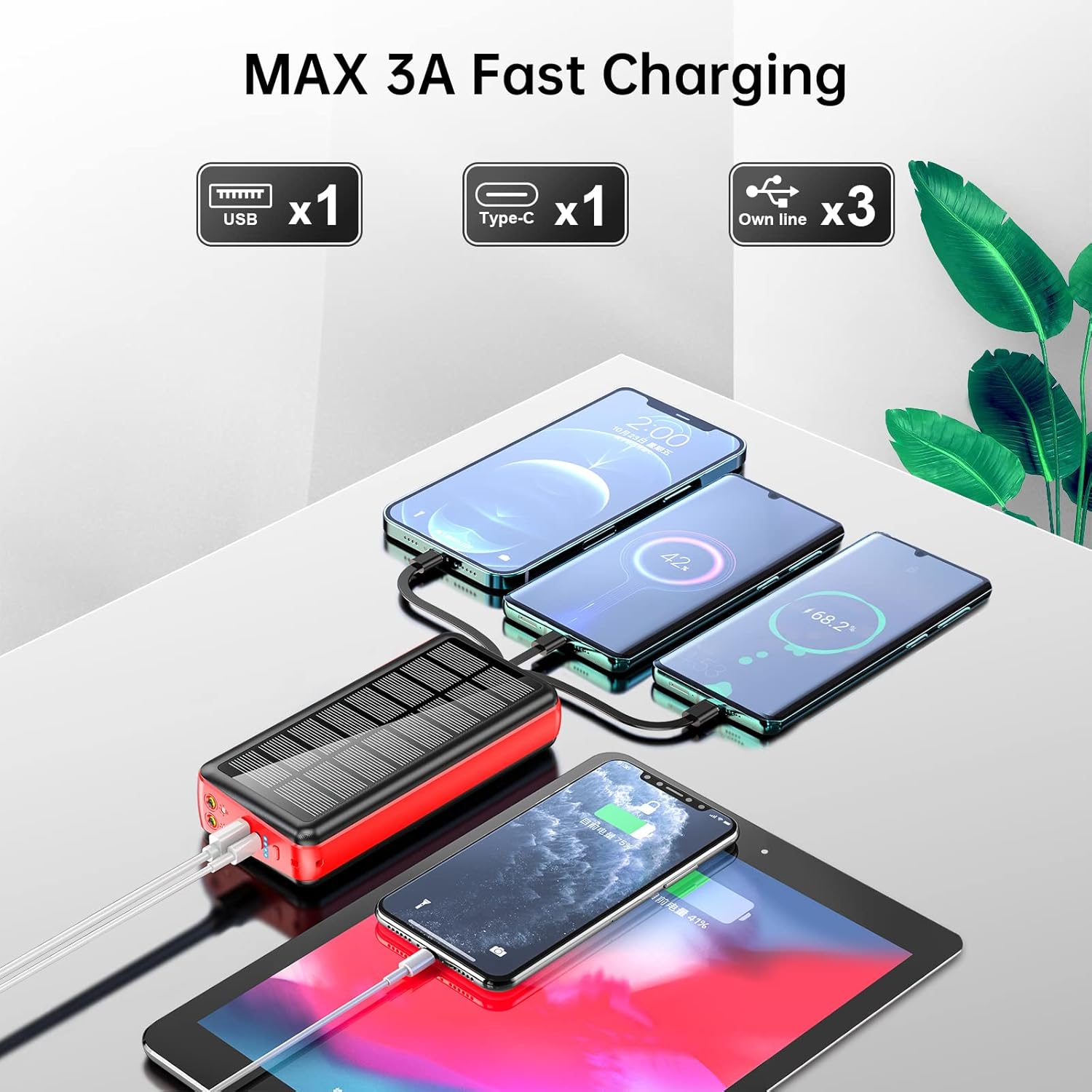
The power bank is shown charging three smartphones and a tablet using its various output options, demonstrating its multi-device charging capability.
- አብሮ የተሰሩ ኬብሎችን መጠቀም፡- Select the appropriate built-in cable (Micro-USB, Type-C, or Lightning) and connect it directly to your device.
- Using USB-A or Type-C Ports: Connect your device's charging cable to the USB-A output port or the Type-C output/input port on the power bank.
The power bank will automatically detect your device and begin charging. Disconnect your device once charging is complete or when you wish to stop.
6. Using the LED Flashlights

The power bank's dual LED flashlights are shown in use, providing illumination in a dark outdoor setting next to a campድንኳን.
To activate the dual LED flashlights, long press the power button for more than 3 seconds. To turn them off, long press the power button again for more than 3 seconds.
7. የስልክ መያዣውን መጠቀም

A smartphone is shown resting in the pull-out phone holder of the power bank, illustrating its hands-free viewing ተግባር.
Locate the pull-out bracket on the side of the power bank. Gently pull it outwards to deploy the phone holder. Place your smartphone into the holder for hands-free viewing
8. ዝርዝሮች
| ባህሪ | ዝርዝር |
|---|---|
| ሞዴል | PS-160 |
| የባትሪ አቅም | 50000mAh / 185Wh |
| Built-in Line Output | 5V/2A |
| የዩኤስቢ ውፅዓት | 4.5V/5A፣ 5V/4.5A፣ 9V/2A፣ 12V/1.5A (ከፍተኛ 30 ዋ) |
| ዓይነት-C ውፅዓት/ግቤት | 5V/3A፣ 9V/2A፣ 12V/1.5A (PD 18W) |
| Built-in Line Input | 5V/2A |
| የAC Plug Input | 5V/2A |
| መጠኖች | 6.42 x 2.91 x 1.18 ኢንች (163 x 74 x 30 ሚሜ) |
| የእቃው ክብደት | 1.17 ፓውንድ |
| ባትሪዎች | 2 ሊቲየም ፖሊመር ባትሪዎች (ተጨምሯል) |
| ልዩ ባህሪያት | Built-in Cable, Built-in Wall Plug, Fast Charging, Flashlight, Phone Holder, Solar Charging |
9. የደህንነት መረጃ

A graphic illustrating the multiple safety protections integrated into the power bank, including overcurrent, short-circuit, over-discharge, and temperature protection.
- Do not place the product in fire or expose it to temperatures exceeding 50°C (122°F).
- Avoid dropping the power bank or subjecting it to strong impacts.
- Do not attempt to disassemble, modify, or repair the unit yourself.
- Keep the power bank away from corrosive and flammable liquids.
- Do not leave the power bank in a completely enclosed car under direct sunlight for extended periods.
- Optimal operating temperature is 10-35°C (50-95°F). Avoid using outside this range.
- Dispose of waste electronic products responsibly and in accordance with local regulations.
- The power bank includes built-in safety features such as OverCurrent Protection, Short-Circuit Protection, Over Voltage Protection, and Over Heat Protection to ensure safe charging.
10. መላ መፈለግ
- መሣሪያ እየሞላ አይደለም፡-
- Ensure the power bank has sufficient charge. Check the LED indicators.
- የኃይል መሙያ ገመዱ ከኃይል ባንኩ እና ከመሳሪያዎ ጋር ደህንነቱ በተጠበቀ ሁኔታ መገናኘቱን ያረጋግጡ።
- Try using a different built-in cable or output port on the power bank.
- መሳሪያዎ ከኃይል ባንክ የውጤት ዝርዝር መግለጫዎች ጋር ተኳሃኝ መሆኑን ያረጋግጡ።
- የኃይል ባንክ እየሞላ አይደለም፡-
- Ensure the AC wall plug or USB charging cable is securely connected to a working power source.
- Try a different wall outlet or USB power adapter.
- For solar charging, ensure the solar panel is exposed to direct sunlight and not obstructed. Remember solar charging is slower and primarily for auxiliary use.
- የእጅ ባትሪ እየሰራ አይደለም፡
- የኃይል ባንኩ መብራቱን ያረጋግጡ።
- Long press the power button for more than 3 seconds to activate or deactivate the flashlight.
11. ዋስትና እና ድጋፍ
The product comes with a free return policy within 3 months of purchase. If you encounter any problems or have questions regarding your boogostore PS-160 Portable Solar Power Bank, please contact our customer service. We are committed to resolving any issues within 12 hours.
12. የምርት ማሳያ ቪዲዮ
This video provides a visual guide to the boogostore PS-160 Portable Solar Power Bank, showcasing its built-in cables, wall plug, solar panel, flashlight, and phone holder, along with how to charge devices and recharge the power bank.