
1. መግቢያ
Welcome to the WONNIE DC105P Digital Camera user manual. This guide provides essential information for setting up, operating, and maintaining your new camera. Designed for ease of use, this camera captures vivid 56MP photos and Full HD 1080P videos, making it perfect for young photographers to explore their creativity.
2. የደህንነት መረጃ
- ካሜራውን ለውሃ ወይም ለከፍተኛ ሙቀት አያጋልጡት።
- ካሜራውን ከጠንካራ መግነጢሳዊ መስኮች ያርቁ።
- Use only the specified batteries and charging cable.
- ካሜራውን ከመጣል ወይም ለጠንካራ ተጽእኖ ከመጋለጥ ይቆጠቡ።
- ሌንሱን ለስላሳ እና ደረቅ ጨርቅ ያጽዱ.
3. በሳጥኑ ውስጥ ያለው
Upon unboxing your WONNIE DC105P Digital Camera, please ensure all the following items are present:
- WONNIE DC105P Digital Camera
- 32 ጊባ TF ካርድ
- ዳግም ሊሞሉ የሚችሉ ባትሪዎች (x2)
- ዓይነት-ሲ ዩኤስቢ ገመድ
- ላንያርድ
- የማጠራቀሚያ ቦርሳ
- የተጠቃሚ መመሪያ (ይህ ሰነድ)
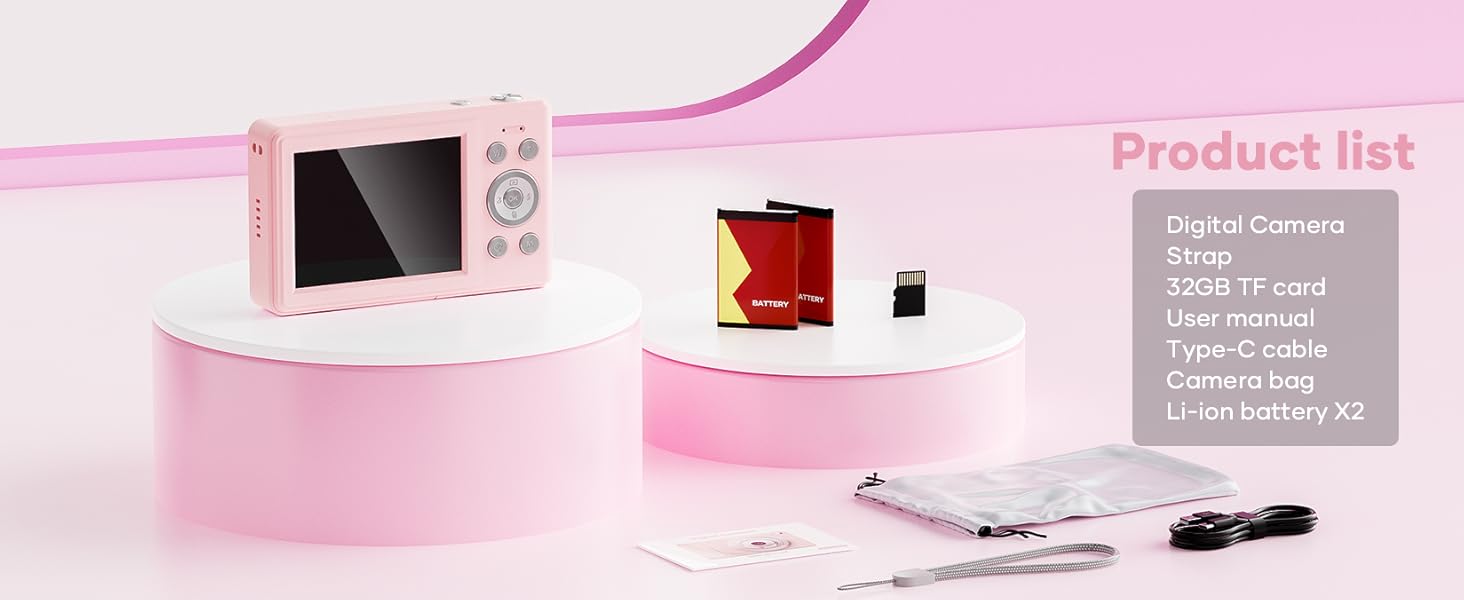
This image displays the WONNIE DC105P Digital Camera alongside its accessories: two rechargeable batteries, a 32GB TF card, a Type-C USB cable, a lanyard, and a soft storage bag, all neatly arranged.
4. ምርት አብቅቷልview
ከካሜራው ክፍሎች እና መቆጣጠሪያዎች ጋር እራስዎን ይወቁ።
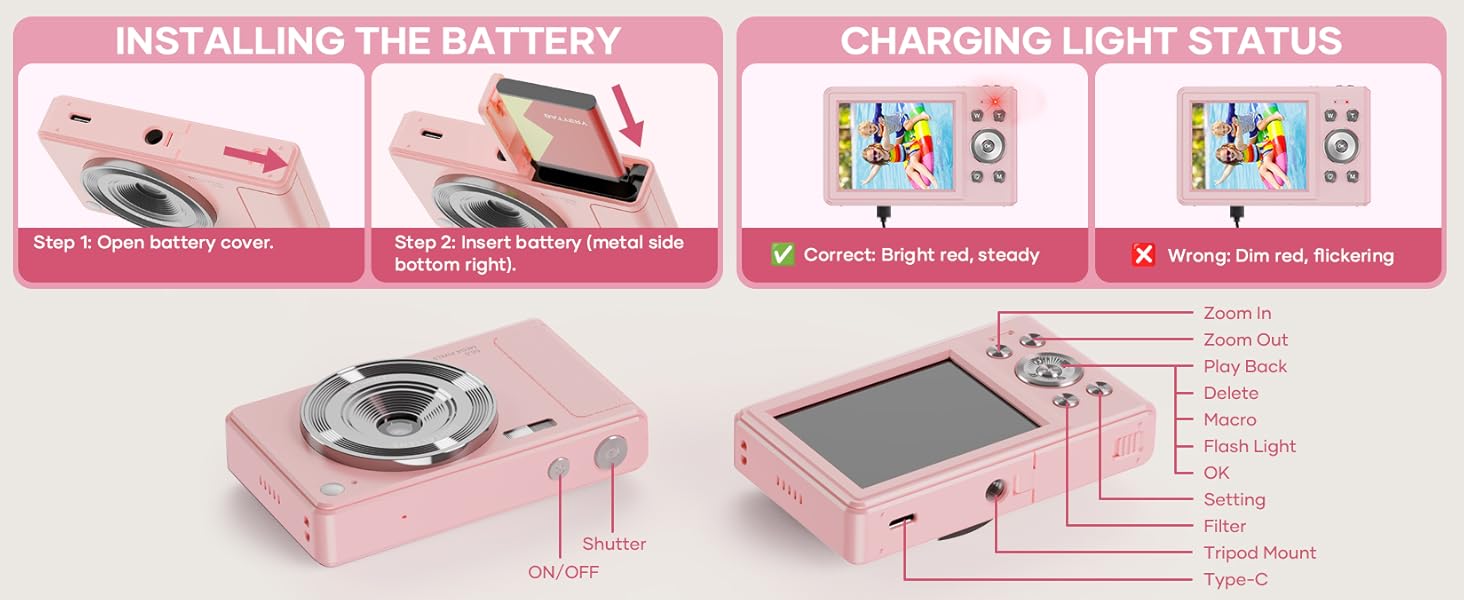
This diagram highlights the various buttons and ports on the WONNIE DC105P Digital Camera, including the power button, shutter button, zoom controls, playback button, menu button, OK button, flash light, tripod mount, and Type-C port.
ቁልፍ አካላት፡-
- መነፅር ምስሎችን እና ቪዲዮዎችን ይይዛል።
- ብልጭታ፡- በዝቅተኛ ብርሃን ሁኔታዎች ውስጥ ብርሃን ይሰጣል.
- የመዝጊያ ቁልፍ፡- ፎቶ ለማንሳት ወይም የቪዲዮ ቀረጻ ለመጀመር/ለማቆም ይጫኑ።
- የኃይል ቁልፍ፡- ካሜራውን ያበራል ወይም ያጠፋል።
- LCD ስክሪን፡ በቀጥታ ያሳያል view፣ ምናሌዎች እና መልሶ ማጫወት።
- የማውጫ ቁልፎች (ላይ/ታች/ግራ/ቀኝ/እሺ)፡ ለምናሌ አሰሳ እና አማራጮችን ለመምረጥ ጥቅም ላይ ይውላል።
- የማጉላት አዝራሮች (W/T): ዲጂታል ማጉላትን ያስተካክላል።
- የመልሶ ማጫወት አዝራር፡- ወደ መልሶ ማጫወት ሁነታ ይገባል view ሚዲያዎችን ተይዟል።
- የምናሌ አዝራር፡- የካሜራ ቅንብሮችን ይደርሳል።
- ዓይነት-ሲ ወደብ: ለክፍያ እና የውሂብ ማስተላለፍ.
- Tripod Mount: For attaching the camera to a tripod.
5. ማዋቀር
5.1 የባትሪ ጭነት
- በካሜራው ጎን ላይ የሚገኘውን የባትሪ ክፍል ክዳን ይክፈቱ።
- Insert the rechargeable battery with the metal contacts facing down and to the right, ensuring it clicks into place.
- የባትሪውን ክፍል ደህንነቱ በተጠበቀ ሁኔታ ይዝጉ።
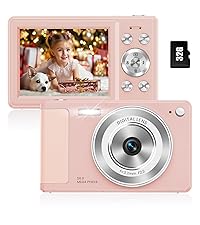
This image illustrates the two steps for battery installation: first, opening the battery cover, and second, inserting the battery with the metal side facing down and to the right.
5.2 ኤስዲ ካርድ መጫን
The camera supports a 32GB TF (Micro SD) card. Insert the TF card into the designated slot in the battery compartment until it clicks.
5.3 ባትሪውን መሙላት
- Connect the camera to a power source using the provided Type-C USB cable.
- The charging indicator light will show the charging status. A bright red, steady light indicates correct charging. A dim, flickering light indicates an issue.
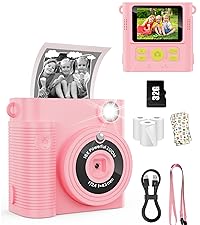
This image displays the camera's charging light status: a bright red, steady light for correct charging, and a dim, flickering light indicating an incorrect status.
5.4 ላንያርድን በማያያዝ
Thread the lanyard through the designated loop on the camera body to prevent accidental drops.
6. ካሜራውን መስራት
6.1 ማብራት / ማጥፋት
Press and hold the Power button (labeled ON/OFF) on the top of the camera to turn it on or off.
6.2 ፎቶዎችን ማንሳት
In photo mode, frame your shot using the LCD screen and press the Shutter button to capture an image. The camera features 56MP resolution for clear photos.

This image shows a child holding the pink WONNIE DC105P Digital Camera, with the screen displaying a photo of children. Other children are in the foreground, emphasizing the camera's ease of use for capturing vibrant 56MP photos and smooth FHD 1080P videos.
Special Photo Features:
- 16 x ዲጂታል ማጉላት፡ Use the 'W' and 'T' buttons to zoom in or out.
- 20 Fun Filters: Apply various creative filters to your photos via the menu.
- ራስ-ጊዜ ቆጣሪ; Set a delay (2s, 5s, 10s) before taking a photo, ideal for group shots.
- Continuous Shooting (Burst Mode): Capture a rapid sequence of 3 photos.
- ፀረ-መንቀጥቀጥ፡ Digital image stabilization helps reduce blur from camera movement.
- ብርሃን ይሙሉ; Activate the built-in fill light for brighter photos in dim environments. (Note: Fill light won't activate in macro mode or when battery is too low.)
- Smile Recognition: ፈገግታ ሲገኝ ፎቶ በራስ-ሰር ይቀርጻል።

This image showcases three key features: Self Timer for perfect selfies, Continuous Shooting to capture every moment, and Anti Shake for steady shots.

This image illustrates the camera's 16x digital zoom capability with examples at 4x, 8x, and 16x, alongside a selection of 20 fun filters like Normal, Cold Filter, Warm Filter, and more, for endless creativity.
6.3 ቪዲዮዎችን መቅዳት
Switch to video mode (usually indicated by a camcorder icon in the menu) and press the Shutter button to start recording. Press again to stop. Videos are recorded in FHD 1080P with a built-in microphone.
6.4 Playback/Viewሚዲያ
Press the Playback button to enter playback mode. Use the navigation buttons to scroll through your photos and videos. Press the OK button to play videos.
6.5 በማስተላለፍ ላይ Files
You have several options to transfer your media:
- USB to PC: Connect the camera to your computer using the Type-C cable. The camera will appear as a removable disk.
- OTG to Phone: Use a compatible OTG cable adapter (sold separately) to connect the camera to your smartphone (e.g., iPhone 15, Samsung).
- ካርድ አንባቢ: Remove the TF card and insert it into a card reader to transfer files to a computer or phone.

This image illustrates three convenient ways to view and transfer media: directly connecting the camera via USB to a PC, using an OTG adapter to connect to a smartphone, or using a card reader with a smartphone.
6.6 Webcam ተግባራዊነት
Connect the camera to a computer via the Type-C USB cable. Select 'Webcam' mode on the camera (if prompted) to use it for video calls or live streaming.

This image demonstrates the WONNIE DC105P Digital Camera's capability to function as a webcam, showing it mounted on a laptop for a video call and for live streaming.
7. የቪዲዮ ማሳያ
ይህ ቪዲዮ አጠቃላይ መግለጫ ይሰጣልview of the WONNIE Digital Camera, highlighting its features and suitability for kids and teens.
This video offers an introduction to the digital camera, demonstrating its basic functions and design.
8. ጥገና
- ማጽዳት፡ የካሜራውን አካልና ስክሪን ለማጽዳት ለስላሳና ከሊንት-ነጻ ጨርቅ ይጠቀሙ። ሌንሱን ለማፅዳት ልዩ የሌንስ ማጽጃ ጨርቅና መፍትሄ ይጠቀሙ።
- ማከማቻ፡ Store the camera in its provided storage bag in a cool, dry place away from direct sunlight and humidity. Remove the battery if the camera will not be used for an extended period.
- የባትሪ እንክብካቤ Fully charge batteries before first use. Avoid completely draining the battery frequently to prolong its lifespan.
9. መላ መፈለግ
| ችግር | ሊሆን የሚችል መፍትሄ |
|---|---|
| ካሜራ አይበራም። | ባትሪው በትክክል መግባቱን እና ሙሉ በሙሉ መሙላቱን ያረጋግጡ። |
| ፎቶዎችን ማንሳት/ቪዲዮዎችን መቅዳት አይቻልም። | Check if the SD card is inserted correctly and has sufficient free space. Ensure the battery is not critically low. |
| ምስሎች ደብዛዛ ናቸው። | Ensure the lens is clean. Use the anti-shake feature. Hold the camera steady while shooting. |
| ማስተላለፍ አይቻልም files to computer/phone. | Verify the USB cable connection. Ensure the camera is in the correct mode for data transfer (if prompted). Try a different USB port or cable. For phones, ensure OTG compatibility and adapter. |
| Charging indicator is flickering. | Refer to Figure 5.2 for correct charging status. Re-insert the cable or try a different power source. |
10. ዝርዝሮች
| ባህሪ | ዝርዝር |
|---|---|
| የፎቶ ዳሳሽ ጥራት | 56 ሜፒ |
| የቪዲዮ ጥራት | 1080p FHD |
| የጨረር ማጉላት | 16 x ዲጂታል ማጉላት |
| የስክሪን መጠን | 2.8 ኢንች LCD |
| ምስል ማረጋጊያ | ዲጂታል |
| የማከማቻ ሚዲያ | 32GB TF Card (included), Max 32GB supported |
| ግንኙነት | OTG, USB Type-C |
| ልዩ ባህሪያት | ጊዜ ሴንትamp, Anti-shake, Time-lapse, Continuous Shoot, Face Detection, Self-timer, Webcam, Filter Effect, Fill light, Selfie mirror, Auto Shut-off, Built-in Microphone |
| የእቃው ክብደት | 0.22 ኪሎግራም (በግምት 0.48 ፓውንድ) |
| መጠኖች | Approx. 3.8 x 0.78 x 2.4 inches (based on image) |
| የባትሪ ዓይነት | Lithium Ion (1000mAh, 3.8V) |
11. ዋስትና እና ድጋፍ
Your WONNIE DC105P Digital Camera comes with a የ 1 ዓመት ዋስትና. We are committed to providing excellent customer service and offer a hassle-free replacement policy. For any inquiries, missing accessories, or support needs, please contact our customer service team. We aim to respond within 24 hours.
For further assistance, please visit the official WONNIE Store on Amazon: WONNIE Store