
COOLGEEK CS-01
COOLGEEK Record Player Model CS-01 User Manual
Original Vinyl Turntable with Bluetooth 5.0 and AT-3600L Stylus
1. መግቢያ
Thank you for choosing the COOLGEEK Record Player Model CS-01. This manual provides essential information for the safe and optimal use of your new record player. Please read it thoroughly before operation and retain it for future reference.
The COOLGEEK CS-01 combines classic vinyl playback with modern Bluetooth connectivity, offering a rich audio experience through its integrated 4-speaker system and advanced suspension technology.
2. በሳጥኑ ውስጥ ያለው
- ቪንtagኢ ቪኒል ሪከርድ ማጫወቻ
- መመሪያ መመሪያ
- የኃይል አስማሚ
3. ምርት አብቅቷልview
The COOLGEEK CS-01 is designed for both aesthetic appeal and superior sound performance. Key features include:
- ልዩ ንድፍ፡ Metal frame and one-piece body construction with anti-vibration silicone base.
- ሙያዊ-ደረጃ ድምፅ፡ Equipped with 4 high-quality speakers (2x 15W track-shape speakers for bass, 2x 10W treble units) and circular inverted tubes for enhanced low-frequency volume.
- Cushioning Shock Absorption System: Features a unique 4-spring suspension cushion system and core disk rotating shaft to minimize resonance and optimize shock resistance.
- Dual Rotation Speed: Supports 33 1/3 and 45 RPM vinyl records.
- AT-3600L Stylus Head: Comes with a high-quality Audio-Technica AT-3600L cartridge for accurate tracking and sound reproduction.
- የብሉቱዝ 5.0 ግንኙነት፡- Seamlessly connect your PC, tablet, or smartphone for wireless audio streaming.
- Adjustable Counterweight & Anti-Skate Control: For precise tonearm balance and optimal tracking.
- Phono-Line Output: ከውጫዊ የስቴሪዮ ስርዓቶች ጋር ግንኙነት ይፈቅዳል።

Figure 1: COOLGEEK Record Player Model CS-01

ምስል 2 - ተጠናቀቀview of key features including Bluetooth 5.0, Vinyl Mode, Line Out, Audio-Technica Cartridge, Carbon Fiber Tonearm, Spring Suspension, High Fidelity, Dual Speed, and Shock-Absorbing Foot Pad.

ምስል 3: ዝርዝር view of the internal speaker configuration, showing 2x 15W track-shape speakers, 2x 10W treble units, and circular inverted tubes for enhanced bass.
4. የማዋቀር መመሪያዎች
Follow these steps to set up your COOLGEEK Record Player:
- ማሸግ፡ ሁሉንም ክፍሎች ከማሸጊያው በጥንቃቄ ያስወግዱ። ማሸጊያውን ለወደፊት ለማጓጓዝ ወይም ለማከማቸት ያስቀምጡት።
- አቀማመጥ፡- Place the record player on a stable, level surface away from direct sunlight, heat sources, and excessive vibration.
- የኃይል ግንኙነት; Connect the power adapter to the DC 24V/2A port on the back of the record player and then plug it into a wall outlet.
- የፕላስተር እና ቀበቶ መትከል፡
- ሳህኑን በሾልደር ላይ ያስቀምጡት።
- Locate the drive belt (usually pre-installed or found in packaging). Carefully stretch the belt around the motor pulley and the inner rim of the platter.
- የአቧራ ሽፋን መጫኛ; Attach the dust cover hinges to the designated slots on the back of the record player.
- Cartridge and Stylus: The AT-3600L cartridge and stylus are typically pre-installed. Ensure the stylus protector is removed before playing a record.
- Tonearm Balance and Tracking Force:
- Unlock the tonearm.
- Slide the counterweight onto the rear of the tonearm. Adjust it until the tonearm floats horizontally and is balanced.
- Once balanced, turn the numbered ring on the counterweight to set the tracking force. Refer to the cartridge specifications (AT-3600L typically requires 3.5g).
- Adjust the anti-skating dial to match the tracking force setting.
Video 1: Official setup and overview of the COOLGEEK Record Player. This video demonstrates the product's features and basic operation.

Figure 4: Illustration of the 4-spring suspension cushion system and anti-vibration silicone base, designed to reduce resonance and optimize shock resistance.

ምስል 5: መቀራረብ view of the Audio-Technica AT-3600L stylus head, highlighting its precision for optimal sound quality.
5. የአሠራር መመሪያዎች
5.1 የቪኒል ሪከርዶችን ማጫወት
- አብራ፡ Turn the power knob to the 'LP' (Album Mode) position.
- ፍጥነት ይምረጡ፡ Choose the appropriate speed (33 1/3 or 45 RPM) using the speed selector switch.
- የቦታ መዝገብ፡- በጥንቃቄ የቪኒል ሪከርድ በሳህኑ ላይ ያስቀምጡ።
- የአቀማመጥ ቶንአርም፦ Unlock the tonearm. Gently lift the tonearm using the cueing lever and position it over the desired track on the record.
- የታችኛው ቶን አርም፦ Slowly lower the cueing lever to allow the stylus to gently descend onto the record. The platter will automatically start rotating.
- የድምጽ መጠን አስተካክል; Use the anodized alloy metal knob to adjust the volume to your preference.
- መልሶ ማጫወትን ጨርስ፡ At the end of the record, the tonearm will automatically lift and return to its rest position. Alternatively, manually lift the tonearm using the cueing lever and return it to the rest.

Figure 6: Demonstrates how to unlock the tonearm and place it on the record's outermost segment. The disk automatically starts rotating, and the machine lowers the arm for playback.

Figure 7: Close-up of the 33/45 dual rotation speed selector, allowing compatibility with various vinyl record types.
5.2 የብሉቱዝ ሁነታ
- ብሉቱዝን ያንቁ፡ Turn the power knob to the 'BT' (Bluetooth Mode) position. The Bluetooth indicator light will begin to flash, indicating it's in pairing mode.
- መሣሪያ አጣምር፡ On your smartphone, tablet, or PC, enable Bluetooth and search for 'COOLGEEK CS-01' (or similar name). Select it to pair.
- ማረጋገጫ፡- በተሳካ ሁኔታ ከተጣመረ በኋላ የብሉቱዝ አመልካች መብራቱ ብልጭ ድርግም ብሎ ይቆያል እና ጠንካራ ሆኖ ይቆያል።
- ኦዲዮን አጫውት፡ Start playing audio from your paired device. The sound will be output through the record player's speakers.
- የድምጽ መጠን አስተካክል; Control the volume using the record player's volume knob and/or your paired device's volume controls.

Figure 8: Visual comparison of the record player in vinyl playback mode and Bluetooth streaming mode, illustrating its dual functionality.
5.3 Connecting to External Speakers (Line Out)
For enhanced sound, you can connect your COOLGEEK CS-01 to an external stereo system or powered speakers using the Line Out ports.
- Locate Ports: Identify the 'LINE OUT L' and 'LINE OUT R' RCA ports on the back of the record player.
- ገመዶችን ማገናኘት; Connect RCA cables (not included) from these ports to the corresponding audio input ports on your external ampማንሻ ወይም የተጎላበተው ድምጽ ማጉያዎች.
- ግቤትን ይምረጡ፡- On your external audio system, select the input source corresponding to where you connected the record player.
- የድምጽ መጠን አስተካክል; Control the volume primarily through your external audio system.
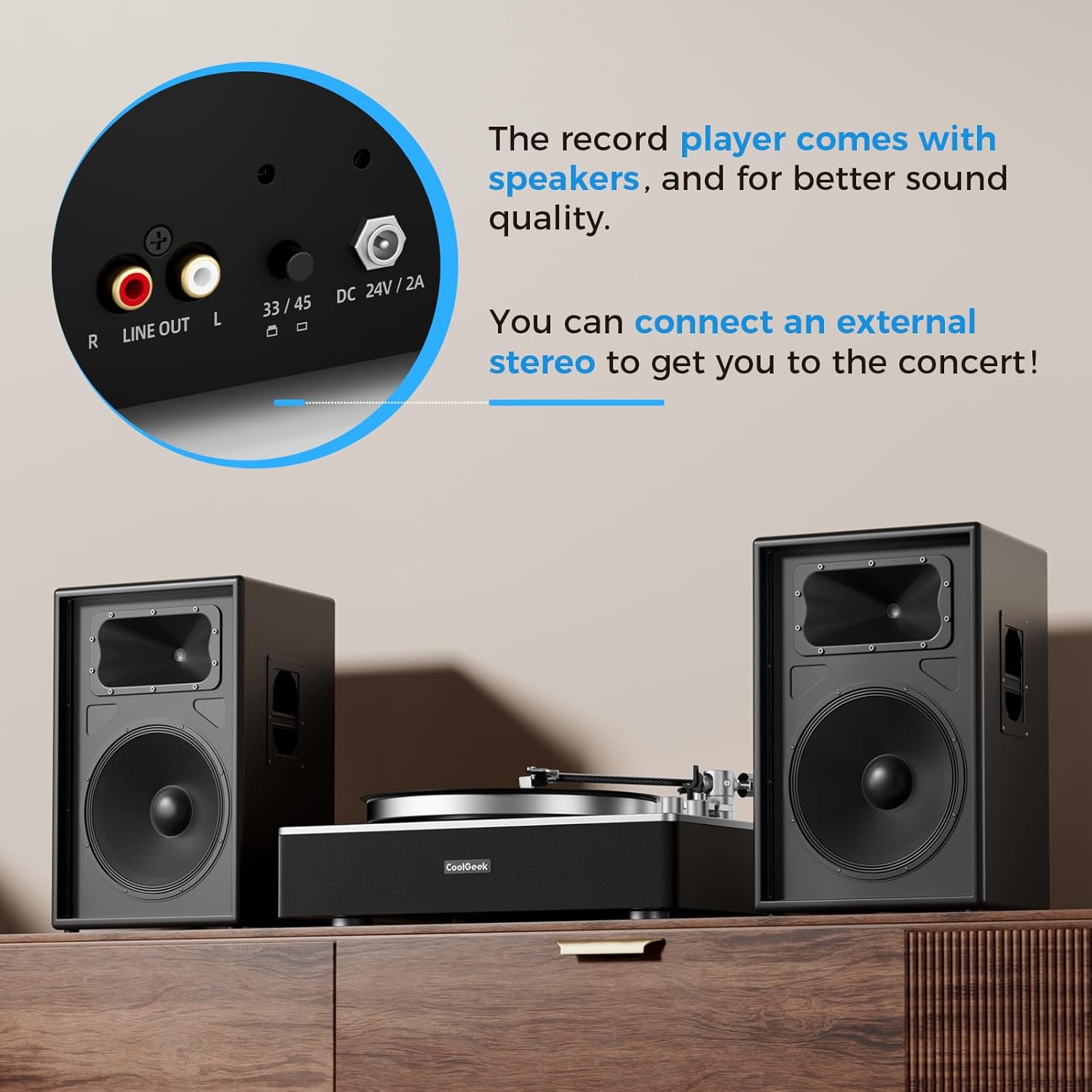
ምስል 9: መቀራረብ view of the rear panel, showing the Line Out (RCA) ports and the 33/45 speed selector, allowing connection to external audio systems.
6. ጥገና
- ማጽዳት፡ Use a soft, dry cloth to clean the record player's surface. For the stylus, use a soft brush designed for stylus cleaning, brushing gently from back to front.
- የአቧራ ሽፋን; Keep the dust cover closed when not in use to protect the platter and tonearm from dust and debris.
- የስታይለስ ምትክ፦ The stylus has a limited lifespan. Replace it when you notice a degradation in sound quality or visible wear. Refer to the manufacturer's guidelines for compatible replacement styli (e.g., Audio-Technica AT-3600L replacement stylus).
- የቀበቶ ጥገና፡ Periodically check the drive belt for wear or stretching. Replace if necessary to maintain consistent platter speed.
7. መላ መፈለግ
| ችግር | ሊሆን የሚችል ምክንያት | መፍትሄ |
|---|---|---|
| ኃይል የለም | የኃይል አስማሚ አልተገናኘም፤ የኃይል መውጫው ችግር አለበት | Ensure adapter is securely connected; Try a different outlet |
| ከድምጽ ማጉያዎች ድምፅ የለም | ድምጽ በጣም ዝቅተኛ፤ የተሳሳተ ሁነታ ተመርጧል፤ ውጫዊ ድምጽ ማጉያዎች አልተገናኙም/አይሰሩም | Increase volume; Ensure correct mode (LP/BT); Check external speaker connections and power |
| መዝለል ወይም የተዛባ ድምጽ | Dust/debris on record/stylus; Incorrect tracking force/anti-skate; Record player not level; Damaged stylus | Clean record/stylus; Re-balance tonearm and adjust tracking force/anti-skate; Ensure player is on a level surface; Replace stylus if damaged |
| ብሉቱዝ አይጣመርም። | Player not in BT mode; Device too far; Interference | Ensure player is in BT mode; Move device closer; Restart player and device |
| የተሳሳተ የመልሶ ማጫወት ፍጥነት | Wrong speed selected; Drive belt issue | Select correct speed (33/45 RPM); Check drive belt for proper placement or wear |
8. ዝርዝሮች
| ባህሪ | ዝርዝር |
|---|---|
| የምርት ስም | COOLGEEK |
| የሞዴል ቁጥር | CS-01 |
| ቀለም | ጥቁር |
| ቁሳቁስ | Acrylic, Ceramic, Metal |
| የእቃው ክብደት | 21 ፓውንድ £ |
| የጥቅል ልኬቶች | 21 x 16 x 9.35 ኢንች |
| ከፍተኛው የማዞሪያ ፍጥነት | 45 ራፒኤም |
| የተካተቱ አካላት | Instruction Manual, Power Adapter, Vintagኢ ቪኒል ሪከርድ ማጫወቻ |
| ልዩ ባህሪያት | Adjustable Anti Skate Control, Shock-Resistant Silicone, 4-Spring Suspension Cushion System, Stereo Speakers, Bluetooth Input, Cartridge AT-3600L Stylus Head, Adjustable Counterweight, Phono-Line Output, Built-in Preamp, Arm auto pause |
| ተስማሚ መሣሪያዎች | ተናጋሪ |
9. ዋስትና እና ድጋፍ
For warranty information and customer support, please refer to the documentation included with your product or visit the official COOLGEEK webጣቢያ. ለማንኛውም የዋስትና የይገባኛል ጥያቄዎች የግዢ ደረሰኝዎን እንደ ግዢ ማረጋገጫ ያቆዩት።
Ask a question about this manual
Ask about setup, troubleshooting, compatibility, parts, safety, or missing instructions. Manuals+ will review the question and use this page’s manual context to help answer it.