
1. መግቢያ
This manual provides detailed instructions for the safe and effective use of your Telbum DJ Lights with Stand RGBW LED Derby Par Light Set. Please read this manual thoroughly before operating the device and retain it for future reference.
The Telbum DJ Light Set combines 2 RGB Derby lights, 6 RGBW Par lights, and 21 white LED strobe lights to create dynamic lighting effects. It features automated and sound-activated programs and includes a portable tripod stand for versatile placement.
2. የደህንነት መረጃ
ደህንነቱ የተጠበቀ አሰራርን ለማረጋገጥ እና ጉዳት እንዳይደርስ ለመከላከል የሚከተሉትን ቅድመ ጥንቃቄዎች ይከተሉ።
- የኃይል አቅርቦት; የተገለጸውን የኃይል አስማሚ ብቻ ይጠቀሙ። ጥራዝ ያረጋግጡtagሠ ከመሳሪያው መስፈርቶች ጋር ይዛመዳል.
- የአየር ማናፈሻ; የአየር ማናፈሻ ክፍተቶችን አያግዱ. ከመጠን በላይ ሙቀትን ለመከላከል በክፍሉ ዙሪያ በቂ የአየር ዝውውርን ያረጋግጡ.
- እርጥበት፡- Keep the device away from water, high humidity, and liquids. Do not operate in rain or damp አከባቢዎች.
- የሙቀት መጠን፡ መሳሪያውን ለከፍተኛ ሙቀት ወይም ለቀጥታ የፀሐይ ብርሃን ከማጋለጥ ይቆጠቡ።
- አያያዝ፡ ክፍሉን በጥንቃቄ ይያዙት. ለጠንካራ ተጽእኖዎች ከመጣል ወይም ከመጣል ተቆጠብ።
- ማጽዳት፡ Disconnect power before cleaning. Use a soft, dry cloth. Do not use harsh chemicals or abrasive cleaners.
- አገልግሎት መስጠት፡ ክፍሉን እራስዎ ለመጠገን ወይም ለመለወጥ አይሞክሩ. ሁሉንም አገልግሎቶች ብቁ ለሆኑ ባለሙያዎች ያመልክቱ።
- የአይን ደህንነት; ለብርሃን ምንጭ በቀጥታ አይን ከመጋለጥ ይቆጠቡ፤ ምክንያቱም ኃይለኛ ሊሆን ይችላል።
- መረጋጋት; Ensure the tripod stand is fully extended and stable on a flat surface before mounting the light bar. Do not use in windy conditions outdoors.
3. በሳጥኑ ውስጥ ያለው
ሲፈቱ ሁሉም ክፍሎች መገኘታቸውን ያረጋግጡ፡-
- 1 x LED PartyBAR (Light Set)
- 1 x Tripod Lighting Stand
- 1 x የርቀት መቆጣጠሪያ
- 1 x የተጠቃሚ መመሪያ

This image displays the LED PartyBAR, tripod stand, remote control, and user manual, which are included in the product package.
4. የማዋቀር መመሪያዎች
Follow these steps to assemble and set up your Telbum DJ Light Set:
- የትሪፖድ ማቆሚያውን ያሰባስቡ፡-
- ሙሉ በሙሉ ተዘርግተው እስኪረጋጉ ድረስ የሦስትዮሽ መቆሚያውን እግሮች ይክፈቱ.
- Adjust the height of the stand using the locking mechanisms on the central pole. Ensure all locks are securely tightened.
- የብርሃን አሞሌውን ያያይዙ፡
- Carefully place the Telbum LED PartyBAR onto the top mounting bracket of the tripod stand.
- Secure the light bar to the stand using the provided screws or locking pins, ensuring it is firmly attached and cannot wobble.
- የግንኙነት ኃይል;
- Plug the power cable into the power input port on the back of the LED PartyBAR.
- Connect the other end of the power cable to a suitable electrical outlet.
- አቀማመጥ፡
- Place the assembled light set on a flat, stable surface.
- Ensure there is sufficient space around the unit for proper ventilation and light projection.

This image shows the Telbum DJ light bar securely mounted on its tripod stand, ready for operation. A remote control is also visible, along with examples of the light's color output.

This diagram provides the physical dimensions of the light bar and illustrates the adjustable height and foldable nature of the tripod stand for easy setup and transport.
5. የአሠራር መመሪያዎች
The Telbum DJ Light Set can be controlled using the included IR remote control. Ensure the remote is aimed at the signal receiver on the light bar for proper function.
5.1 የርቀት መቆጣጠሪያ ተግባራት
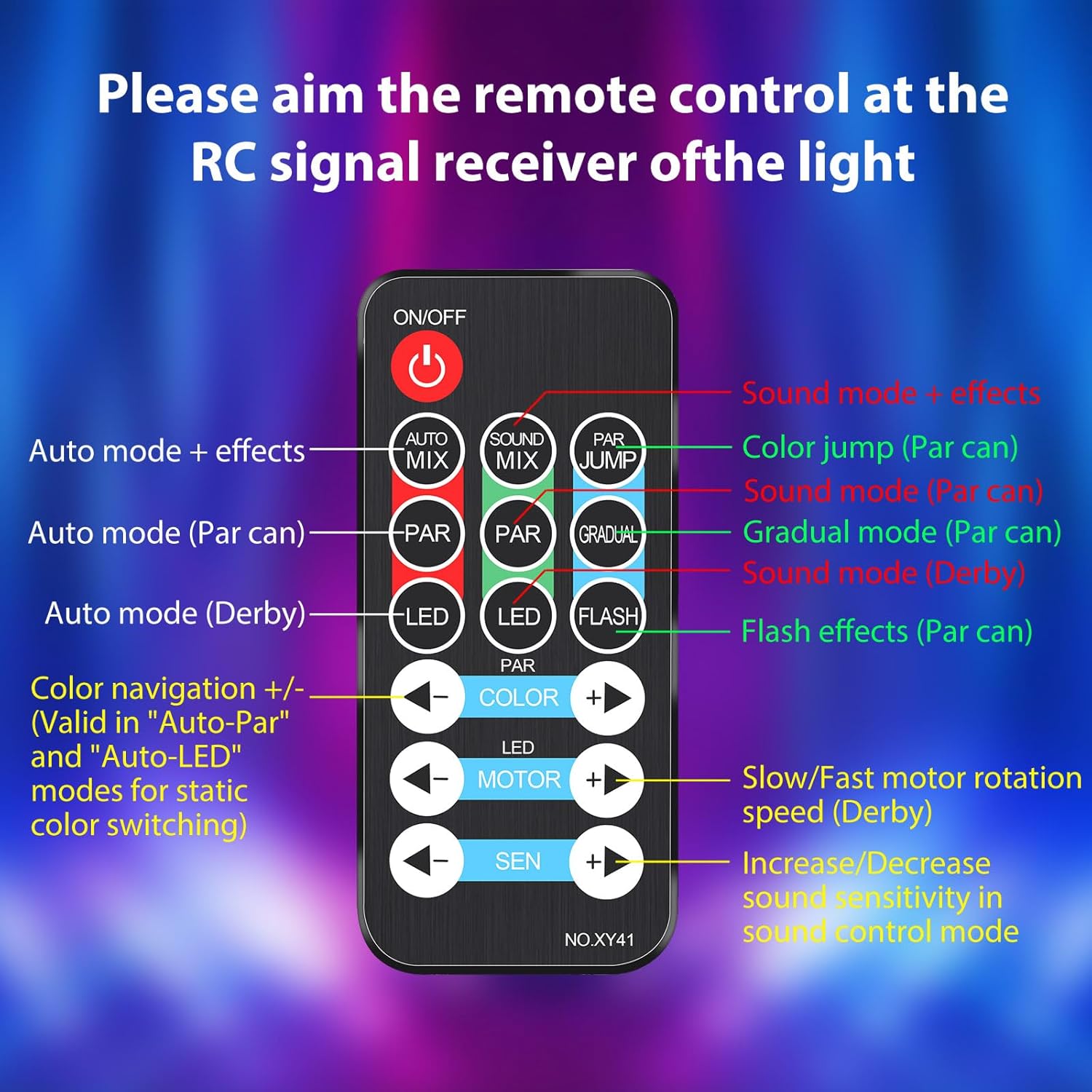
ይህ ምስል በዝርዝር ያቀርባል view of the remote control, indicating the function of each button for easy operation.
- አብራ/አጥፋ፡ ክፍሉን ያበራል ወይም ያጠፋል።
- AUTO MIX: Activates Auto-Play mode with mixed effects.
- SOUND MIX: Activates Sound-Activated mode with mixed effects.
- PAR JUMP: Initiates a color jump effect for the Par lights.
- PAR፡ Cycles through Auto mode for Par lights.
- SOUND (PAR): Activates Sound mode for Par lights.
- GRADUAL (PAR): Activates Gradual mode for Par lights.
- LED: Cycles through Auto mode for Derby lights.
- SOUND (DERBY): Activates Sound mode for Derby lights.
- ብልጭታ: Activates flash effects for Par lights (strobe).
- ቀለም +/-: Navigates through colors in Auto-Par and Auto-LED modes for static color switching.
- MOTOR +/-: Adjusts the rotation speed of the Derby light motor (slow/fast).
- SEN +/-: Increases or decreases sound sensitivity in sound control mode.
5.2 የአሠራር ሁነታዎች
The light set offers various modes to suit different event needs:
- Auto-Play Mode: The lights cycle through pre-programmed patterns and color changes automatically.
- በድምፅ የነቃ ሁነታ፡- The lights react to music and sounds, changing patterns and colors in sync with the rhythm. The built-in microphone detects audio.
- Derby Light Effects: Projects criss-cross multi-color beams.
- Par Light Effects: Creates exciting color washes.
- Strobe Light Effects: The 21 white LEDs provide a super bright strobe effect. Note: The strobe effect in the built-in automated programs cannot be turned off independently.

This image illustrates various colorful light patterns created by the Telbum DJ lights, showcasing the dynamic visual effects possible. Optimal effects are achieved in a smoke environment.

This image demonstrates the integrated automated and sound-activated programs, showing a red light effect, a white light effect, and a multi-color effect. It also notes that the strobe effect is integrated into these programs.
6. ጥገና
Proper maintenance ensures the longevity and optimal performance of your Telbum DJ Light Set.
6.1 ጽዳት
- ከማጽዳትዎ በፊት ሁልጊዜ የኃይል አቅርቦቱን ያላቅቁ.
- Use a soft, lint-free cloth to wipe the exterior of the light bar and stand.
- ለግትር ቆሻሻ፣ በትንሹ መampen the cloth with water. Avoid using abrasive cleaners, solvents, or harsh chemicals, as these can damage the finish.
- Gently clean the light lenses to ensure clear light projection.
6.2 ማከማቻ
- When not in use, store the light set in a cool, dry place, away from direct sunlight and extreme temperatures.
- ከተቻለ የአቧራ ክምችት እና አካላዊ ጉዳትን ለመከላከል የመጀመሪያውን ማሸጊያ ወይም የመከላከያ መያዣ ይጠቀሙ።
- Ensure the tripod stand is folded and secured to prevent accidental unfolding or damage.
7. መላ መፈለግ
If you encounter issues with your Telbum DJ Light Set, refer to the following common problems and solutions:
| ችግር | ሊሆን የሚችል ምክንያት | መፍትሄ |
|---|---|---|
| መብራት አይበራም ፡፡ | የኃይል አቅርቦት የለም። Faulty power cable/outlet. | Ensure the power cable is securely plugged into both the light bar and a working electrical outlet. Test the outlet with another device. |
| የርቀት መቆጣጠሪያ ምላሽ አይሰጥም። | የርቀት ባትሪ ተሟጧል። በርቀት እና በብርሃን መካከል ያለው እገዳ. Remote not aimed correctly. | Replace the remote control battery. Ensure there are no obstructions. Aim the remote directly at the IR receiver on the light bar. |
| የድምፅ ማግበር ሁነታ አይሰራም። | Microphone blocked. Sound level too low. Sensitivity setting too low. | Ensure the microphone on the light bar is not covered. Increase the volume of the music. Adjust the 'SEN +' button on the remote to increase sensitivity. |
| Light effects are dim or unclear. | የቆሸሹ ሌንሶች። የድባብ ብርሃን በጣም ብሩህ። | Clean the light lenses as described in the Maintenance section. Operate the lights in a darker environment for best results. |
| Tripod stand is unstable. | Legs not fully extended/locked. ያልተስተካከለ ወለል። | Ensure all tripod legs are fully extended and the locking mechanisms are tightened. Place the stand on a flat, level surface. |
እነዚህን መፍትሄዎች ከሞከሩ በኋላ ችግሩ ከቀጠለ፣ እባክዎ የደንበኛ ድጋፍን ያግኙ።
8. ዝርዝሮች
| ባህሪ | ዝርዝር |
|---|---|
| የሞዴል ቁጥር | PL-29Z |
| የምርት ስም | ቴልቡም |
| ቀለም | RGBW |
| ቁሳቁስ | ፕላስቲክ |
| የማጠናቀቂያ ዓይነት | ቀለም የተቀባ |
| የብርሃን ምንጭ ዓይነት | ብርሃን አመንጪ ዳዮድ (LED) |
| የኃይል ምንጭ | ባለገመድ ኤሌክትሪክ |
| ዋትtage | 50 ዋት |
| የብርሃን ምንጮች ብዛት | 29 (2 Derby, 6 Par, 21 Strobe) |
| Product Dimensions (Light Bar) | 21"ኤል x 10" ዋ x 4.7" ኤች |
| የእቃው ክብደት | 5.34 ፓውንድ |
| የመጫኛ አይነት | Floor Mount (with tripod) |
| አምፖል ባህሪዎች | Sound Activated, Automated Lighting Effects, Color Changing |
| የተካተቱ አካላት | 1*Derby Par Light Set, 1*Remote Control, 1*Tripod Lighting Stand, 1*User Manual |
9. ዋስትና እና ድጋፍ
Telbum products are manufactured to high-quality standards. For information regarding warranty coverage, please refer to the warranty card included with your purchase or visit the official Telbum brand store.
For technical support, troubleshooting assistance beyond this manual, or inquiries about replacement parts, please contact Telbum customer service through their official channels. You can find more information and contact options on the Telbum Brand Store on Amazon.