
1. መግቢያ
This manual provides essential information for the proper use and maintenance of your EBTOOLS 8-Inch 2-in-1 Pocket PC Computer. Please read this guide thoroughly before operating the device to ensure optimal performance and longevity. This compact and versatile device features an 8-inch touchscreen, a 360-degree rotating design, and runs on Windows 11 Pro.

Image: The EBTOOLS 8-Inch 2-in-1 Pocket PC shown in its tablet configuration, with a scenic road displayed on the screen.
2. የጥቅል ይዘቶች
ከዚህ በታች የተዘረዘሩት ሁሉም እቃዎች በምርት ጥቅልዎ ውስጥ መካተታቸውን ያረጋግጡ፡-
- 1 x EBTOOLS 8-Inch 2-in-1 Laptop
- 1 x የኃይል አቅርቦት ገመድ
- 1 x የኃይል አስማሚ (US Plug)
- 2 x User Manuals (this document is one of them)

Image: The EBTOOLS 8-Inch 2-in-1 Pocket PC, its power supply cord, and the US plug adapter, laid out as they would appear in the package.
3. ምርት አብቅቷልview
The EBTOOLS 8-Inch 2-in-1 Pocket PC is designed for portability and versatility. It features a compact form factor and a 360-degree rotating display, allowing it to function as both a laptop and a tablet.
ቁልፍ ባህሪዎች
- ፕሮሰሰር፡ N100 CPU, capable of up to 3.4GHz frequency.
- ማህደረ ትውስታ፡ 12GB LPDDR5 ራም.
- ማከማቻ፡ 512GB M.2 SSD, expandable up to 2TB.
- ማሳያ፡- 8-inch touchscreen with 360-degree rotation.
- ግንኙነት፡ WiFi6 (2.4G/5G band) and Bluetooth 5.2.
- ካሜራ፡ 2MP 30 Frame HD built-in front camera for video calls.
- የቁልፍ ሰሌዳ፡ Edge-less full-size QWERTY keyboard with integrated touchpad.
- ባትሪ፡ Built-in 5000mAh polymer lithium battery, providing 4-6 hours of use.
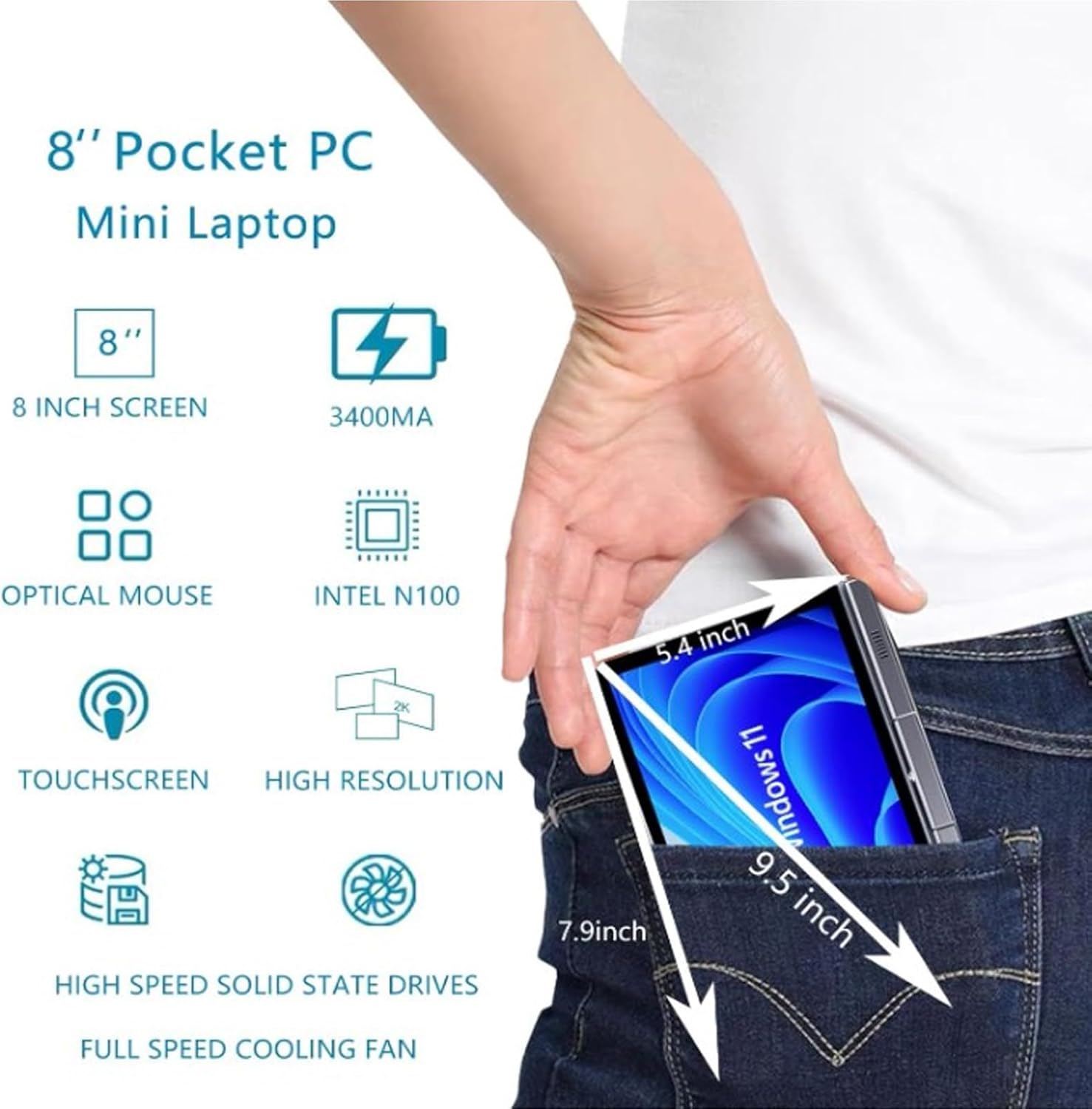
Image: A visual representation of the 8-inch Pocket PC's compact dimensions, demonstrating its portability by showing it fitting into a standard pocket.

Image: A labeled diagram highlighting the various ports (USB 3.0, Type-C, Audio, RJ45) and keyboard components (Front Camera, Speaker, Power Light, Power Button, Left/Right/Middle Mouse Buttons) of the EBTOOLS 8-Inch 2-in-1 Pocket PC.
4. ማዋቀር
4.1 የመነሻ ኃይል በማብራት እና በመሙላት ላይ
- መሣሪያውን መሙላት; Before first use, connect the power adapter to the Type-C port on the device and plug it into a power outlet. Allow the device to charge fully. The power light indicator will show charging status.
- አብራ፡ Press and hold the Power Button located on the keyboard deck until the screen illuminates.
- የመጀመሪያ ማዋቀር፡- Follow the on-screen instructions to complete the Windows 11 Pro setup process, including language selection, network connection, and user account creation.
The device is designed for immediate use upon completion of the initial Windows setup.
5. የአሠራር መመሪያዎች
5.1 የቁልፍ ሰሌዳ እና የመዳሰሻ ሰሌዳ
- The device features an edge-less full-size QWERTY keyboard for typing.
- The integrated touchpad supports standard mouse functions, including moving the pointer, scrolling, and left/right clicks. The left, right, and middle mouse buttons are clearly indicated on the diagram.
5.2 የንክኪ ማያ ገጽ አሠራር
- The 8-inch display is a multi-touch screen. Use gestures such as tap, swipe, pinch-to-zoom, and rotate for navigation and interaction with applications.
5.3 360-ዲግሪ ሽክርክሪት
- The display can be rotated 360 degrees to switch between laptop mode (traditional clamshell) and tablet mode (screen folded back against the base).
- When in tablet mode, the keyboard is automatically disabled to prevent accidental input.
5.4 ማገናኛ ፔሪፈራል
- ዩኤስቢ 3.0: Connect external devices such as USB drives, mice, or keyboards to the USB 3.0 port.
- ዓይነት-ሲ ለኃይል መሙላት እና የውሂብ ማስተላለፍ ጥቅም ላይ ይውላል.
- High Definition Multimedia Interface (HDMI): Connect an external monitor or projector using an HDMI cable for extended display.
- 3.5mm Standard Headphone Jack: የጆሮ ማዳመጫዎችን ወይም የውጭ ድምጽ ማጉያዎችን ያገናኙ ፡፡
- RJ45 የአውታረ መረብ ወደብ፡ ለገመድ የበይነመረብ ግንኙነት የኤተርኔት ገመድ ያገናኙ።
5.5 የገመድ አልባ ግንኙነት
- ዋይፋይ6፡ Access wireless networks (2.4G and 5G bands) for internet connectivity. Enable Wi-Fi through Windows settings.
- ብሉቱዝ 5.2: Pair with Bluetooth-enabled devices such as headphones, speakers, or other peripherals. Enable Bluetooth through Windows settings.
6. ጥገና
6.1 ጽዳት
- ስክሪኑን እና የውጪውን ገጽ ለማጽዳት ለስላሳ፣ ከላጣ ነፃ የሆነ ጨርቅ ይጠቀሙ። ለጠንካራ ምልክቶች፣ ትንሽampጨርቁን በውሃ ወይም በስክሪን ማጽጃ መፍትሄ.
- ጠጣር ኬሚካሎችን፣ ሻካራ ማጽጃዎችን ወይም ኤሮሶል የሚረጩ ነገሮችን በቀጥታ በመሳሪያው ላይ ከመጠቀም ይቆጠቡ።
- ከማጽዳትዎ በፊት መሳሪያው መጥፋቱን እና መሰካቱን ያረጋግጡ።
6.2 ማከማቻ
- መሳሪያውን በቀጥታ ከፀሀይ ብርሀን እና ከከፍተኛ ሙቀት ርቆ በቀዝቃዛና ደረቅ ቦታ ያከማቹ።
- If storing for an extended period, ensure the battery is charged to approximately 50% to preserve battery health.
7. መላ መፈለግ
This section addresses common issues you might encounter with your EBTOOLS 8-Inch 2-in-1 Pocket PC.
7.1 መሳሪያ አይበራም።
- መሳሪያው ሙሉ በሙሉ መሙላቱን ያረጋግጡ። የኃይል አስማሚውን ያገናኙና እንደገና ለማብራት ከመሞከርዎ በፊት ጥቂት ደቂቃዎችን ይጠብቁ።
- Verify the power adapter and cable are securely connected and the power outlet is functional.
- ከባድ ዳግም ለማስጀመር ለ10-15 ሰከንድ ያህል የኃይል ቁልፉን በመያዝ ይሞክሩ።
7.2 የ Wi-Fi ወይም የብሉቱዝ ግንኙነት ጉዳዮች
- Check if Wi-Fi or Bluetooth is enabled in Windows settings.
- Restart the device and your wireless router/Bluetooth device.
- በWi-Fi አውታረ መረብ ወይም በብሉቱዝ መሳሪያ ክልል ውስጥ መሆንዎን ያረጋግጡ።
- Update wireless drivers if available.
7.3 የንክኪ ማያ ገጽ ምላሽ አይሰጥም
- መሣሪያውን እንደገና ያስጀምሩ.
- ማያ ገጹ ንጹህ እና ከቆሻሻ የጸዳ መሆኑን ያረጋግጡ።
- Check for any system updates that might include touchscreen driver fixes.
7.4 አጭር የባትሪ ህይወት
- የባትሪ አጠቃቀምን ለማሻሻል በዊንዶውስ ውስጥ የኃይል ቅንብሮችን ያስተካክሉ።
- ከበስተጀርባ የሚሰሩ አላስፈላጊ መተግበሪያዎችን ዝጋ።
- የስክሪን ብሩህነት ቀንስ።
- Ensure the device is not running resource-intensive tasks continuously.
8. ዝርዝሮች
| ባህሪ | ዝርዝር መግለጫ |
|---|---|
| ስርዓተ ክወና | ዊንዶውስ 11 ፕሮ |
| የማሳያ መጠን | 8 ኢንች |
| ፕሮሰሰር | N100 CPU (up to 3.4GHz) |
| ራም | 12GB LPDDR5 |
| ማከማቻ | 512GB M.2 SSD (supports up to 2TB) |
| የፊት ካሜራ | 2MP 30 Frame HD Built-In Camera |
| ብሉቱዝ | BT 5.2 |
| Wireless Fidelity Type | 2.4G / 5G Band (WiFi6) |
| በይነገጾች | 1 x USB3.0, 1 x 3.5mm Standard Headphone Jack, 1 x High Definition Multimedia Interface Port, 1 x Type-C, 1 x RJ45 Network Port |
| የባትሪ ዓይነት | አብሮ የተሰራ 5000mAh ፖሊመር ሊቲየም ባትሪ |
| የባትሪ ህይወት | 4-6 hours (typical use) |
| የእቃው ክብደት | 2.68 ፓውንድ (በግምት 1.22 ኪግ) |
| የጥቅል ልኬቶች | 9.45 x 7.09 x 2.36 ኢንች |
9. ዋስትና እና ድጋፍ
9.1 የምርት ዋስትና
Specific warranty details for your EBTOOLS 8-Inch 2-in-1 Pocket PC are typically provided with your purchase documentation or on the manufacturer's official webድህረ ገጽ። ስለ ዋስትና ሽፋን፣ የቆይታ ጊዜ እና ውሎች መረጃ ለማግኘት እባክዎ እነዚህን ሀብቶች ይመልከቱ።
9.2 የደንበኛ ድጋፍ
For technical assistance, troubleshooting beyond this manual, or warranty claims, please contact EBTOOLS customer support. Contact information can usually be found on the product packaging, the manufacturer's webጣቢያ፣ ወይም በእርስዎ ቸርቻሪ በኩል።
When contacting support, please have your product model number (EBTOOLS9pxf4058ch-12) and purchase information readily available.