
1. መግቢያ
This manual provides essential information for the safe and efficient operation of your TOPBULL 40A MPPT Solar Charge Controller. This device is designed to optimize power harvesting from your solar panels and efficiently charge various battery types in 12V or 24V systems. It features advanced Maximum Power Point Tracking (MPPT) technology, comprehensive protection functions, and a user-friendly LCD interface.

ምስል 1፡ ፊት view of the TOPBULL 40A MPPT Solar Charge Controller, showing the LCD display and control buttons.
2. የደህንነት መመሪያዎች
Please read all safety instructions carefully before installation and operation. Failure to follow these instructions may result in personal injury or damage to the controller or other components.
- ኃይል ከመጠቀምዎ በፊት ሁሉም ግንኙነቶች ትክክለኛ እና ደህንነታቸው የተጠበቀ መሆናቸውን ያረጋግጡ።
- መቆጣጠሪያውን አይበታተኑ ወይም ለመጠገን አይሞክሩ። ለአገልግሎት ብቁ የሆኑ ባለሙያዎችን ይመልከቱ።
- መቆጣጠሪያውን በደንብ አየር በሚተነፍስበት ቦታ ላይ ይጫኑት፣ ከሚቀጣጠሉ ቁሳቁሶች እና እርጥበት ርቆ።
- ባትሪውን ሁልጊዜ መጀመሪያ ከመቆጣጠሪያው ጋር ያገናኙ፣ ከዚያም ከፀሐይ ፓነል እና በመጨረሻም ከጭነቱ ጋር ያገናኙ። በተገላቢጦሽ ቅደም ተከተል ግንኙነቱን ያቋርጡ።
- Wear appropriate personal protective equipment, including eye protection, when working with batteries and electrical systems.
- The controller includes multiple electronic protections such as reverse polarity, overcharge, over-discharge, overload, short-circuiting, TVS lightning, overpower, reverse current, and overtemperature protection. However, proper installation is crucial for optimal safety.
3. የጥቅል ይዘቶች
ሁሉም እቃዎች በጥቅሉ ውስጥ መኖራቸውን ያረጋግጡ፡-
- TOPBULL 40A MPPT Solar Charge Controller
- ማፈናጠጥ ብሎኖች
- የተጠቃሚ መመሪያ (ይህ ሰነድ)

Image 2: Contents of the product package, showing the controller, user manual, and mounting hardware.
4. ምርት አብቅቷልview
The TOPBULL 40A MPPT Solar Charge Controller features a clear LCD display and intuitive buttons for monitoring and configuration. It is equipped with terminals for solar panel input, battery connection, DC load output, and dual USB ports.
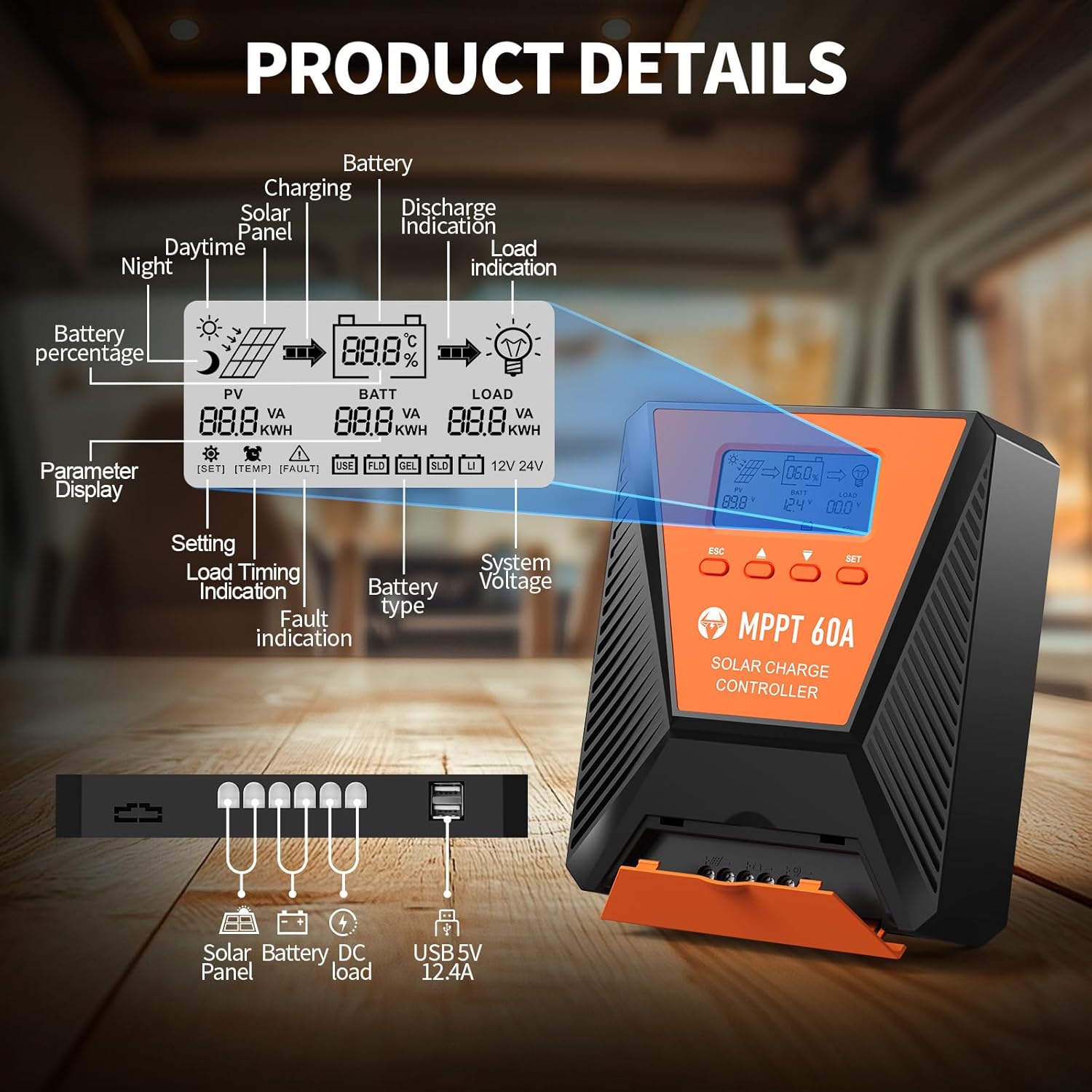
ምስል 3፡ ዝርዝር view of the controller's LCD display, showing various indicators and parameters, along with the connection ports at the bottom.
የኤልሲዲ ማሳያ አመልካቾች፡
- ፒቪ: የፀሐይ ፓነል ጥራዝtagሠ እና ኃይል.
- ባት: የባትሪ ጥራዝtage, charge status, and type.
- ጭነት: Load status and power.
- ባትሪ Percentage: Current battery charge level.
- Charging/Discharge Indication: Arrows indicating power flow.
- የስህተት ምልክት Error codes displayed if issues occur.
- ስርዓት ጥራዝtage: Automatically detected 12V or 24V.
የመቆጣጠሪያ አዝራሮች;
- ESC፡ Exit menu or cancel setting.
- ወደላይ/ታች ቀስቶች፡ Navigate menus or adjust values.
- SET: Enter menu or confirm setting.
5. ማዋቀር እና መጫን
የፀሐይ ኃይል መሙያ መቆጣጠሪያዎን በትክክል ለመጫን የሚከተሉትን ደረጃዎች ይከተሉ
- መጫን፡ Choose a suitable location for the controller, ensuring adequate ventilation and protection from direct sunlight, high temperatures, and moisture. Use the provided mounting screws to secure the controller.
- የባትሪ ግንኙነት፡- Connect the battery to the controller's battery terminals first. Ensure correct polarity (positive to positive, negative to negative). The controller will automatically detect the 12V or 24V system voltage.
- የፀሐይ ፓነል ግንኙነት; Connect the solar panel to the controller's solar input terminals. Ensure correct polarity. The controller will begin charging the battery.
- DC Load Connection (Optional): Connect your DC loads to the load terminals. Ensure correct polarity.

Image 4: Connection diagram illustrating how to connect the solar panel, battery bank, inverter (for AC load), and DC load to the MPPT controller.
The controller supports various deep cycle battery types, including FLD, LiFePO4, SLD, GEL, and AGM. It also supports 0V lithium battery charging (lithium battery activation function).

Image 5: The controller is compatible with various 12V/24V battery types, automatically identifying voltage and supporting custom parameters and 0V lithium battery charging.
6. የአሠራር መመሪያዎች
LCD Display and Parameter Settings:
The LCD display provides real-time information about your solar charging system. Use the four buttons (ESC, UP, DOWN, SET) to navigate menus and adjust parameters.
- ተጫን አዘጋጅ ወደ ዋናው ምናሌ ለመግባት.
- ተጠቀም ወደላይ/ወደታች to scroll through options such as battery type, load timer settings, and other customizable parameters.
- ተጫን አዘጋጅ again to select an option and then use ወደላይ/ወደታች እሴቶችን ለመለወጥ.
- ተጫን አዘጋጅ to confirm changes, or ESC ሳያስቀምጡ ለመውጣት.
የመሙላት ሂደት፡-
The controller utilizes a smart 4-stage charging process to optimize battery health and longevity:
- የጅምላ ክፍያ Rapid charging to bring the battery to approximately 80% capacity.
- የመምጠጥ ክፍያ; በቋሚ ቮልት መሙላትtage to bring the battery to 100% capacity.
- ተንሳፋፊ ክፍያ Maintaining the battery at full charge with a lower voltage.
- Equalization Charge (for specific battery types): Periodically overcharging to balance cell voltagኢ.
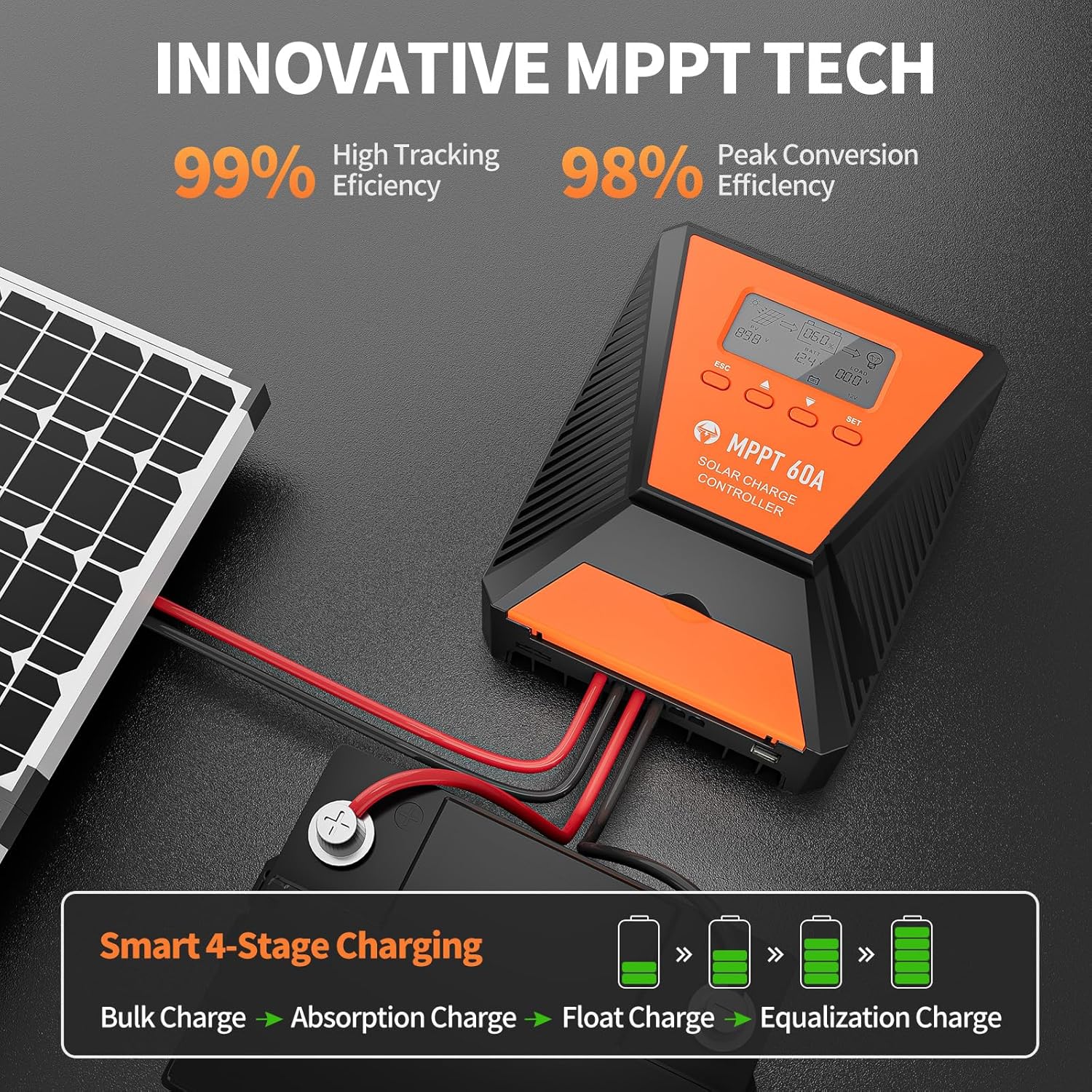
Image 6: The controller features 99% high tracking efficiency and 98% peak conversion efficiency, along with a smart 4-stagሠ መሙላት ሂደት.
የዩኤስቢ ባትሪ መሙላት፡
The controller includes dual USB ports for charging electronic devices. These ports provide 5V DC output.
7. ጥገና
Regular maintenance ensures optimal performance and extends the lifespan of your solar charge controller and battery system.
- ግንኙነቶችን ይፈትሹ፡ ሁሉንም የሽቦ ግንኙነቶች ለጠጣርነት እና ለዝገት በየጊዜው ይፈትሹ።
- ንፁህ መቆጣጠሪያ; መቆጣጠሪያውን ንፁህ እና ከአቧራ እና ፍርስራሾች ነፃ ያድርጉት። ለማጽዳት ደረቅ ጨርቅ ይጠቀሙ.
- የአየር ማናፈሻ; Ensure the installation area remains well-ventilated to prevent overheating. The controller is designed with a metal case and dual high-speed intelligent fans for enhanced heat dissipation.
- የባትሪ ፍተሻ፡- Follow the manufacturer's maintenance guidelines for your specific battery type.
- የሙቀት ማካካሻ; The controller features a temperature compensation function that automatically adjusts charging and discharging parameters to prolong battery life.
8. መላ መፈለግ
If you encounter issues with your controller, refer to the LCD display for error codes and consult the following common troubleshooting steps:
- ማሳያ የለም፡ የባትሪውን ግንኙነት ይፈትሹ እና ባትሪው በቂ voltage እንዳለው ያረጋግጡtage.
- መሙላት የለም፡ Verify solar panel connections and ensure adequate sunlight. Check for any fault indications on the LCD.
- ጭነት እየሰራ አይደለም፦ Check load connections and ensure the load is within the controller's rated capacity. Verify load timer settings.
- የስህተት ኮዶች The LCD display will show specific error codes for various issues (e.g., overvoltagሠ, undervoltage, overtemperature, short circuit). Refer to the controller's internal error code list (if provided in a separate document) for detailed explanations and solutions.
The controller incorporates 9 intelligent protection features to safeguard your system:
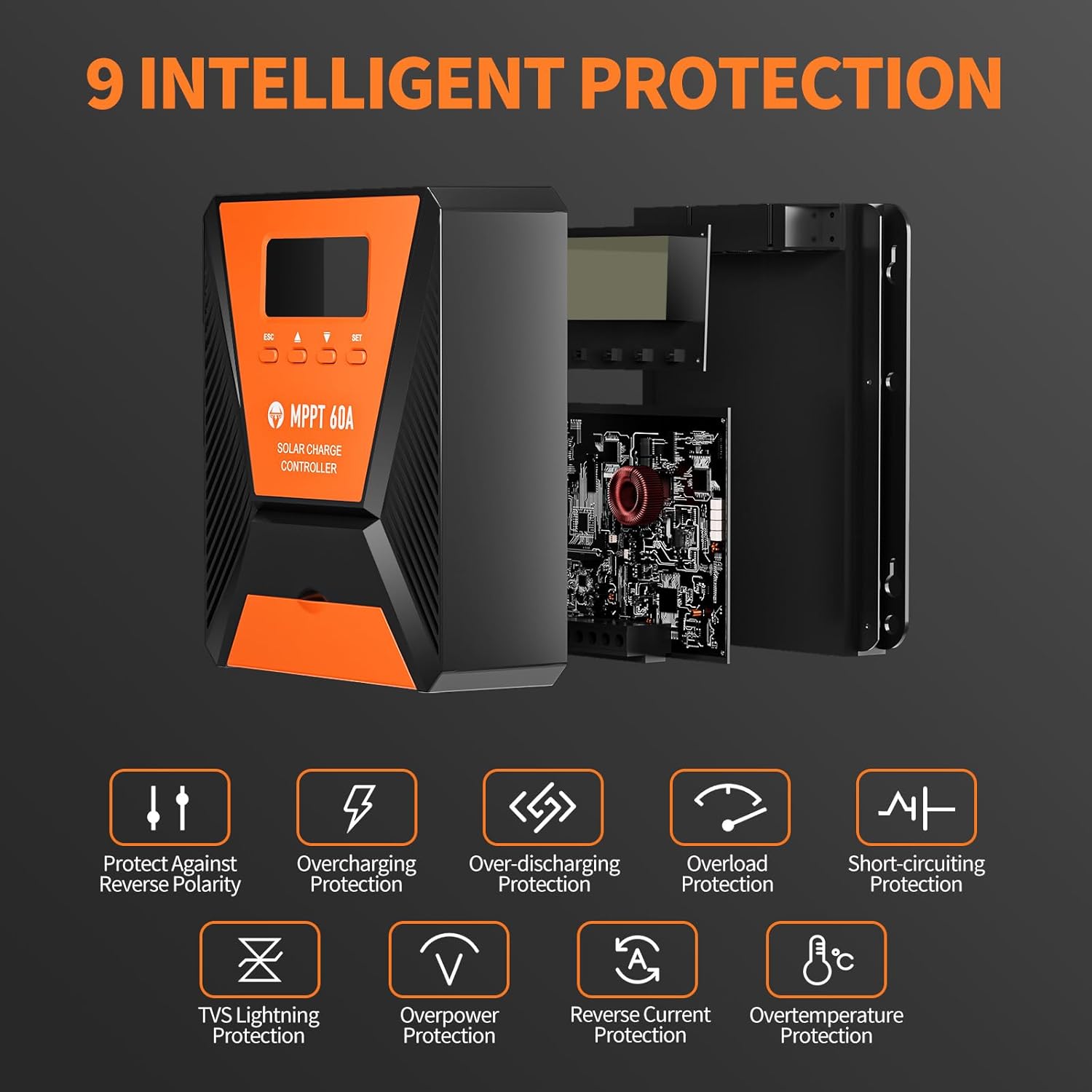
Image 7: The controller provides 9 intelligent protection features, including protection against reverse polarity, overcharging, over-discharging, overload, short-circuiting, TVS lightning, overpower, reverse current, and overtemperature.
9. ዝርዝሮች
| ባህሪ | ዝርዝር መግለጫ |
|---|---|
| ሞዴል | 40 ኤ |
| የምርት ስም | ቶፕቡል |
| ስርዓት ጥራዝtage | 12V/24V Automatic Recognition |
| የመከታተያ ውጤታማነት | > 99% |
| ከፍተኛ የልወጣ ቅልጥፍና | ከፍተኛው 98% |
| ተስማሚ የባትሪ ዓይነቶች | FLD, LiFePO4, SLD, GEL, AGM |
| ከፍተኛው የ PV ግቤት ጥራዝtage | 100 ቪ ዲ.ሲ |
| Max Solar Input Power (12V System) | 720 ዋ |
| Max Solar Input Power (24V System) | 1440 ዋ |
| የዩኤስቢ ውፅዓት | Dual USB Ports, 5V DC |
| የማሳያ ዓይነት | LCD |
| መጠኖች (ጥቅል) | 23.6 x 22.1 x 10.59 ሴ.ሜ |
| ክብደት (ጥቅል) | 1.25 ኪ.ግ |
| የተካተቱ መለዋወጫዎች | ማፈናጠጥ ብሎኖች |
10. ዋስትና እና ድጋፍ
TOPBULL is committed to providing professional technical support. If you have any questions or require assistance with your MPPT solar charge controller, please contact our customer service. We strive to meet your needs and provide the best possible support.