
1. መግቢያ
Thank you for choosing the XHDATA D109WB and D220 Portable Radios. This manual provides detailed instructions for the setup, operation, and maintenance of your new radios. Please read this manual thoroughly before use to ensure optimal performance and longevity of your devices.

Image 1: The XHDATA D109WB (black) and D220 (orange) portable radios.
2. ምርት አብቅቷልview
The XHDATA D109WB and D220 are versatile portable radios designed for excellent reception and ease of use. The D109WB offers a wide range of bands including FM, AM, Shortwave (SW), Longwave (LW), and NOAA Weather Band (WB), along with advanced features like Bluetooth, TF card playback, and an alarm clock. The D220 is a compact and lightweight FM/AM/SW radio, ideal for portability and simple operation.
2.1 XHDATA D109WB Key Features
- የድግግሞሽ ማሰሪያዎች- FM (64-108MHz), AM (520-1710KHz), LW (153-513KHz), SW (1711-29999KHz), NOAA Weather Band (162.40-162.55MHz).
- DSP ቺፕ፡ Enhances reception sensitivity.
- የድምጽ ውፅዓት፡- 40mm speaker for clear sound, 3.5mm stereo headphone jack.
- መልቲሚዲያ፡ MP3 music mode, Bluetooth 5.0 connectivity, TF card support.
- የአደጋ ጊዜ ባህሪያት: NOAA Weather Band for alerts, SOS Distress Alarm.
- ምቾት፡ Alarm clock, 500 memory stations, Auto Frequency Search (ATS).

Image 2: The XHDATA D109WB radio highlighting its various features including FM/AM/SW/WB, NOAA Scan Alert, Bluetooth, TF card, Alarm Clock, 5W Speaker, SOS Alarm, 500 Memory Stations, Earphone Jack, and Auto Frequency Search.
2.2 XHDATA D220 Key Features
- የድግግሞሽ ማሰሪያዎች- FM, AM, Shortwave (SW).
- የታመቀ ንድፍ Small size (125x74x30mm) and lightweight (125g without batteries) for easy portability.
- ቀላል መቆጣጠሪያዎች; Tuning knob, band switch, volume/power switch button for straightforward operation.
- አቀባበል፡ Excellent signal reception with a long antenna.

Image 3: The XHDATA D220 radio demonstrating its compact size and ease of carrying, with dimensions of 125mm (4.9 inches) in height, 72mm (2.8 inches) in width, and 28mm (1.1 inches) in depth.
3. የጥቅል ይዘቶች
እባክዎን ጥቅሉን ለሚከተሉት ነገሮች ያረጋግጡ፡
- XHDATA D109WB Radio (if purchased as a set)
- XHDATA D220 Radio (if purchased as a set)
- የጆሮ ማዳመጫ ጃክ
- Power Adapter (for D109WB, if included)
- የተጠቃሚ መመሪያ (ይህ ሰነድ)
ማሳሰቢያ፡ ባትሪዎች በተለምዶ አይካተቱም እና ለብቻው መግዛት አለባቸው።
4. መቆጣጠሪያዎች እና ባህሪያት
4.1 XHDATA D109WB Controls
The D109WB features a comprehensive control panel and display. Refer to the image below for a visual guide to its main components.

Image 4: The XHDATA D109WB radio displaying its frequency ranges for WB (162.40-162.55MHz), LW (153-513KHz), SW (1711-29999KHz), MW (520-1710KHz), and FM (64-108MHz).
- የኃይል ቁልፍ፡- ሬዲዮን ያበራል/ያጠፋል።
- የመደወያ/አዝራሮች ማስተካከያ፡ For manual station selection.
- የባንድ መቀየሪያ፦ Selects between FM, AM, SW, LW, WB.
- የድምጽ መቆጣጠሪያ፡- የድምጽ ውፅዓት ደረጃን ያስተካክላል።
- ማሳያ ማያ: ድግግሞሽን፣ ጊዜን፣ የባትሪ ሁኔታን እና ሌሎች መረጃዎችን ያሳያል።
- የቁጥር ቁልፍ ሰሌዳ፡ For direct frequency input or memory recall.
- Memory Buttons: Save and recall favorite stations.
- Bluetooth/MP3/TF Card Controls: Play, pause, skip tracks, mode selection.
- Alarm A/B Buttons: ማንቂያዎችን ያዘጋጁ እና ያግብሩ።
- የኤስኦኤስ ቁልፍ፡- Activates distress alarm.
- የጆሮ ማዳመጫ ጃክ ለግል ማዳመጥ።
- DC-IN ወደብ፡- For external power adapter.
- አንቴና፡ Extendable telescopic antenna for improved reception.
4.2 XHDATA D220 Controls
The D220 is designed for simplicity. Its main controls are located on the side and front panels.

Image 5: The XHDATA D220 radio with its key components labeled, including the long antenna, tuning dial, volume/power switch, FM/AM/SW switch, bracket, 2xAA battery compartment, and 3.5mm earphone jack.
- Long Antenna: Extendable for enhanced signal reception.
- መደወልን ይደውሉ For manual station selection.
- Volume/Power Switch: የድምጽ መጠንን ለማስተካከል ይሽከረከራል እና ለማብራት/ለማጥፋት ይገፋል።
- የኤፍኤም/ኤኤም/ኤስደብሊው ቀይር፡ Slides to select the desired frequency band.
- ቅንፍ፡ Integrated stand for upright positioning.
- የባትሪ ክፍል፡ Holds 2xAA batteries.
- 3.5 ሚሜ የጆሮ ማዳመጫ ጃክ; ለግል ማዳመጥ።
5. ማዋቀር
5.1 የባትሪ ጭነት
Both radios require batteries for portable operation.
- XHDATA D109WB: Typically uses a rechargeable lithium battery. Open the battery compartment cover, insert the battery according to the polarity markings, and close the cover. Ensure the battery is fully charged before first use using the provided power adapter.
- XHDATA D220: Requires 2xAA batteries. Open the battery compartment cover on the back of the radio. Insert the batteries, matching the positive (+) and negative (-) terminals as indicated inside the compartment. Close the cover securely.
5.2 የመነሻ ኃይል በርቷል
- XHDATA D109WB: Press and hold the Power button until the display illuminates.
- XHDATA D220: Rotate the Volume/Power switch clockwise until you hear a click and the radio turns on.
6. የአሠራር መመሪያዎች
6.1 ማብራት / ማጥፋት እና የድምጽ መቆጣጠሪያ
- ማብራት/ማጥፋት፡
- D109WB: Press and hold the Power button.
- D220: Rotate the Volume/Power switch.
- የድምጽ ማስተካከያ;
- D109WB: Use the dedicated volume buttons or knob (if present).
- D220: Rotate the Volume/Power switch.
6.2 Band Selection and Tuning
በተለይም ለኤፍኤም እና ለኤስደብሊው ባንዶች ተስማሚ አቀባበል እንዲኖር ቴሌስኮፒክ አንቴናውን ሙሉ በሙሉ ያራዝሙ።
- XHDATA D109WB:
- የባንዱ ምርጫ Press the "BAND" button or use the dedicated band switch to cycle through FM, AM, SW, LW, WB.
- በእጅ ማስተካከል Use the tuning knob or up/down arrow buttons to fine-tune to a specific frequency.
- አውቶማቲክ ማስተካከያ (ATS): Press the "ATS" button (if available) to automatically scan and save strong stations.
- ቀጥተኛ ድግግሞሽ ግቤት፡ Use the numeric keypad to enter a frequency directly.
- XHDATA D220:
- የባንዱ ምርጫ Use the FM/AM/SW slide switch on the side of the radio.
- በእጅ ማስተካከል Rotate the Tuning Dial on the side to find desired stations.
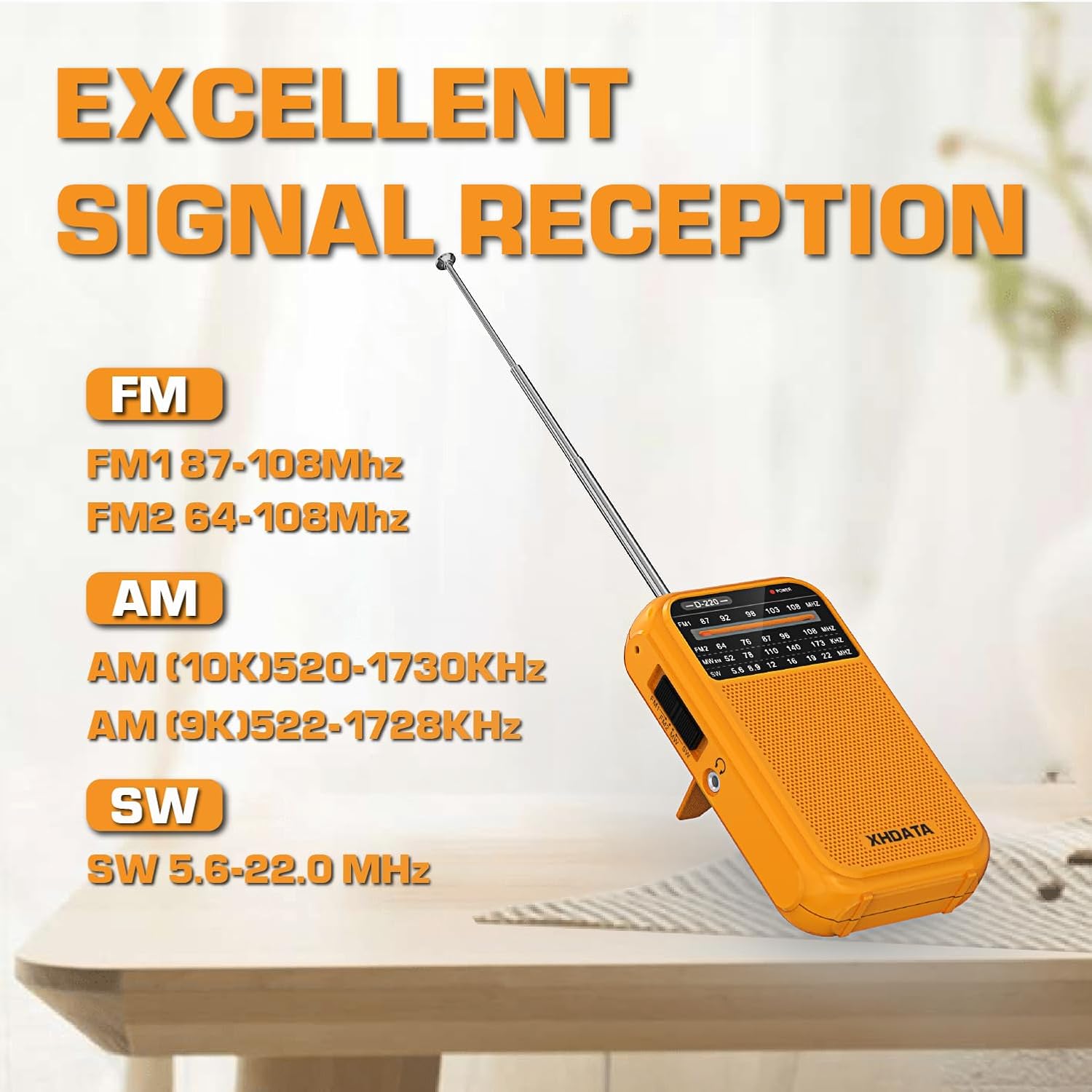
Image 6: The XHDATA D220 radio demonstrating its excellent signal reception capabilities across FM (FM1 87-108MHz, FM2 64-108MHz), AM (AM 10K 520-1730KHz, AM 9K 522-1728KHz), and SW (5.6-22.0 MHz) bands.
6.3 NOAA Weather Band (D109WB Only)
The D109WB can receive 7 NOAA Weather Bands to provide real-time weather alerts.
- Accessing WB: Switch the band to "WB". The radio will automatically scan for NOAA weather channels.
- የአየር ሁኔታ ማንቂያዎች The radio is designed to alert you to severe weather conditions when in WB mode.

Image 7: The XHDATA D109WB radio featuring 7 NOAA Weather Bands and an SOS Distress Alarm function, indicated by a red glowing circle around the SOS button.
6.4 Multimedia Playback (D109WB Only)
- የብሉቱዝ ግንኙነት
- Switch the D109WB to Bluetooth mode.
- Enable Bluetooth on your mobile device and search for "XHDATA D109WB" (or similar).
- Pair the devices. Once connected, you can play audio from your device through the radio.
- TF ካርድ መልሶ ማጫወት፡
- የ TF (ማይክሮ ኤስዲ) ካርድ ከMP3 ኦዲዮ ጋር ያስገቡ fileወደ የተሰየመ ማስገቢያ s.
- Switch the radio to MP3/TF card mode.
- Use the playback controls (play/pause, next/previous track) to manage your music.

Image 8: The XHDATA D109WB radio showcasing its wireless Bluetooth connectivity and support for TF cards, allowing for music playback from external devices or memory cards.
6.5 Alarm Clock and SOS Alarm (D109WB Only)
- ማንቂያ በማዘጋጀት ላይ፡ Refer to the D109WB's specific instructions for setting Alarm A and Alarm B, usually involving pressing and holding the alarm button, then using tuning buttons to set time.
- SOS ማንቂያ፡- Press the "SOS" button to activate a loud distress alarm. Press it again to deactivate.
6.6 የጆሮ ማዳመጫ አጠቃቀም
Both radios are equipped with a 3.5mm headphone jack for private listening. Insert standard 3.5mm headphones into the jack. The internal speaker will typically mute automatically.
7. ጥገና
- ማጽዳት፡ ሬዲዮውን ለስላሳ እና ደረቅ ጨርቅ ይጥረጉ. ገላጭ ማጽጃዎችን ወይም ፈሳሾችን አይጠቀሙ.
- የባትሪ እንክብካቤ
- Remove batteries from the D220 if the radio will not be used for an extended period to prevent leakage.
- For the D109WB, ensure the rechargeable battery is charged regularly to maintain its lifespan. Avoid fully discharging the battery frequently.
- ማከማቻ፡ ራዲዮውን በቀጥታ ከፀሀይ ብርሀን እና ከከፍተኛ ሙቀት ርቆ በቀዝቃዛና ደረቅ ቦታ ያከማቹ።
- አንቴና፡ Handle the telescopic antenna carefully to avoid bending or breaking. Retract it when not in use.
8. መላ መፈለግ
| ችግር | ሊሆን የሚችል ምክንያት | መፍትሄ |
|---|---|---|
| ሬዲዮ አይበራም። | የሞቱ ወይም በስህተት የተጫኑ ባትሪዎች። | Check battery polarity. Replace batteries (D220) or charge battery (D109WB). |
| Poor reception/static. | አንቴናው አልተዘረጋም፣ ደካማ ምልክት፣ ጣልቃ ገብነት። | Extend antenna fully. Reposition the radio. Try tuning to a different frequency. Move away from electronic devices. |
| ከተናጋሪው ምንም ድምፅ የለም። | Volume too low, headphones connected, mute activated. | Increase volume. Disconnect headphones. Check for mute function (D109WB). |
| D109WB Bluetooth not connecting. | Radio not in Bluetooth mode, device not discoverable, too far. | Ensure D109WB is in Bluetooth mode. Make sure your device's Bluetooth is on and discoverable. Move devices closer. |
9. ዝርዝሮች
9.1 XHDATA D109WB Specifications
- የድግግሞሽ ክልል፡
- ኤፍኤም፡ 64-108ሜኸ
- ጥዋት: 520-1710 ኪኸ
- LW: 153-513KHz (9K)
- SW: 1711-29999 ኪኸ
- NOAA WB: 162.40-162.55MHz
- ተናጋሪ፡- 40 ሚሜ
- ግንኙነት፡ Bluetooth 5.0, TF Card, 3.5mm Headphone Jack
- ልዩ ባህሪያት፡ DSP Chip, NOAA Weather Band, SOS Alarm, Alarm Clock, MP3 Playback, 500 Memory Stations, ATS.
- የኃይል ምንጭ፡- Battery Powered (Rechargeable Lithium, typically)
- የተካተቱ አካላት፡- Headphone Jack, Power Adapter, User Manual
9.2 XHDATA D220 Specifications
- የድግግሞሽ ክልል፡
- FM: 64-108MHz (FM1 87-108MHz, FM2 64-108MHz)
- AM: 520-1730KHz (10K), 522-1728KHz (9K)
- SW: 5.6-22.0 ሜኸ
- መጠኖች፡- 125 ሚሜ x 74 ሚሜ x 30 ሚሜ (ግምት 4.9 x 2.9 x 1.2 ኢንች)
- ክብደት፡ 125ጊ (ያለ ባትሪ)
- ግንኙነት፡ 3.5 ሚሜ የጆሮ ማዳመጫ ጃክ
- የኃይል ምንጭ፡- 2xAA ባትሪዎች
- የተካተቱ አካላት፡- የተጠቃሚ መመሪያ
10. የደህንነት መረጃ
- ሬዲዮውን ለውሃ ወይም ከመጠን በላይ እርጥበት አያጋልጡት።
- ከፍተኛ ሙቀት፣ ቀጥተኛ የፀሐይ ብርሃን እና አቧራማ አካባቢዎችን ያስወግዱ።
- ሬዲዮውን ለመበተን ወይም ለማሻሻል አይሞክሩ። ይህ ዋስትናውን ውድቅ ያደርገዋል እና ጉዳት ሊያስከትል ይችላል።
- ልጆች በማይደርሱበት ቦታ ያስቀምጡ.
- በአካባቢያዊ ደንቦች መሰረት ባትሪዎችን በትክክል ያስወግዱ.
- በከፍተኛ የድምፅ መጠን ለረጅም ጊዜ ማዳመጥ የመስማት ችሎታን ሊጎዳ ይችላል።
11. ዋስትና እና ድጋፍ
XHDATA products are designed for reliability and performance. For specific warranty details, please refer to the warranty card included with your purchase or contact XHDATA customer support directly. For technical assistance or further inquiries, please visit the official XHDATA webጣቢያ ወይም የደንበኞች አገልግሎት ክፍልን ያነጋግሩ።