
ኢጂአይኤስ K22
EIGIIS K22 Smartwatch User Manual
ሞዴል፡ K22
1. መግቢያ
Welcome to the EIGIIS K22 Smartwatch user manual. This guide provides essential information for setting up, operating, and maintaining your new smartwatch. The EIGIIS K22 is a robust military-grade smartwatch designed for active lifestyles, featuring an AMOLED HD Always On Display, Bluetooth calling, comprehensive health monitoring, and over 100 sports modes.

Image: EIGIIS K22 Smartwatch, showcasinጠንካራ ዲዛይኑ እና ደማቅ ማሳያው ነው።
2. በሳጥኑ ውስጥ ያለው
እባክዎ ቦክስ ሲወጡ የጥቅል ይዘቱን ያረጋግጡ፡-
- EIGIIS K22 Smartwatch (with 1 Watch Band)
- የኃይል መሙያ ገመድ
- የተጠቃሚ መመሪያ (ይህ ሰነድ)
3. የመጀመሪያ ደረጃ ማዋቀር
3.1 Smartwatchን በመሙላት ላይ
Before first use, fully charge your EIGIIS K22 Smartwatch. The device features a 400mAh battery that typically charges in approximately 2 hours.
- የማግኔቲክ ኃይል መሙያ ገመዱን ከስማርት ሰዓቱ ጀርባ ላይ ካሉት የኃይል መሙያ እውቂያዎች ጋር ያገናኙ።
- የኬብሉን የዩኤስቢ ጫፍ ወደ መደበኛ የዩኤስቢ ሃይል አስማሚ (5V/1A የሚመከር) ወይም የኮምፒውተር ዩኤስቢ ወደብ ይሰኩት።
- የሰዓት ማሳያው የኃይል መሙያ ሁኔታን ያሳያል።

Image: The smartwatch displaying its charging status, indicating a 400mAh battery capacity and charging time.
3.2 የመተግበሪያ ጭነት
የስማርት ሰዓትዎን ሙሉ ተግባር ለመክፈት፣ ያውርዱ እና ይጫኑት FitCloudPro በእርስዎ ዘመናዊ ስልክ ላይ መተግበሪያ.
- በፈጣን ጅምር መመሪያው ውስጥ የተሰጠውን የQR ኮድ ይቃኙ ወይም በስማርትፎንዎ የመተግበሪያ መደብር (Google Play Store for Android፣ Apple App Store for iOS) ውስጥ "FitCloudPro" የሚለውን ይፈልጉ።
- Install the app and grant necessary permissions for optimal performance.
3.3 ከስማርትፎንዎ ጋር ማጣመር
After installing the app, pair your smartwatch with your phone via Bluetooth.
- በእርስዎ ዘመናዊ ስልክ ላይ ብሉቱዝ መንቃቱን ያረጋግጡ።
- አዲስ መሣሪያ ለማከል የFitCloudPro መተግበሪያን ይክፈቱ እና በማያ ገጹ ላይ ያሉትን መመሪያዎች ይከተሉ።
- Select the EIGIIS K22 from the list of available devices.
- በሁለቱም በስልክዎ እና በስማርት ሰዓቱ ላይ የማጣመሪያ ጥያቄውን ያረጋግጡ።
4. Smartwatchን መስራት
4.1 ማሳያ እና አሰሳ
The EIGIIS K22 features a 1.43-inch AMOLED HD Always On Display. You can navigate the watch interface using touch gestures and the physical buttons.
- ወደ ላይ/ወደታች ያንሸራትቱ፦ ፈጣን ቅንብሮችን ወይም ማሳወቂያዎችን ይድረሱ።
- ወደ ግራ/ቀኝ ያንሸራትቱ፦ Cycle through widgets like activity data, heart rate, weather, etc.
- የጎን ቁልፍን ይጫኑ፡- ወደ መነሻ ማያ ገጽ ይመለሱ ወይም የመተግበሪያውን ምናሌ ይድረሱ።

Image: Close-up of the 1.43-inch AMOLED display, showing a detailed watch face with time and activity data.
4.2 የብሉቱዝ ጥሪ እና ስማርት ማሳወቂያዎች
The smartwatch allows you to make and receive calls directly from your wrist and receive notifications from your paired smartphone.
- ጥሪዎችን ማድረግ; Use the built-in dialer or access your contacts through the watch interface.
- ጥሪዎችን መቀበል፡- በቀጥታ በሰዓትዎ ላይ ገቢ ጥሪዎችን ይመልሱ ወይም ውድቅ ያድርጉ።
- ማሳወቂያዎች፡- Receive alerts for messages, social media, and other app notifications. Ensure notification permissions are enabled in the FitCloudPro app.

Image: The smartwatch displaying an incoming call and various app notification icons, illustrating its Bluetooth call and smart notification capabilities.
4.3 የስፖርት ሁነታዎች
The EIGIIS K22 supports over 100 sports modes to track your physical activities. Data such as calories burned, steps taken, and distance covered are recorded and synced to the FitCloudPro app.
- Access the Sports menu on your watch.
- Select your desired activity (e.g., Running, Cycling, Basketball).
- The watch will begin tracking your workout data.

Image: A user hiking while the smartwatch displays workout metrics like calories, distance, and steps, alongside icons for various sports modes.
4.4 የጤና ክትትል
The smartwatch continuously monitors key health metrics.
- የልብ ምት: የልብ ምት በእውነተኛ ጊዜ መከታተል።
- የደም ግፊት; የደም ግፊት ደረጃዎችን ይገምታል።
- የደም ኦክስጅን (ስፒኦ2)፡- የደም ኦክሲጅን ሙሌትን ይለካል.
- የእንቅልፍ ክትትል; Analyzes sleep patterns (Awake, Light Sleep, Deep Sleep) to provide insights into sleep quality.
All health data is synced to the FitCloudPro app for detailed analysis and historical trends.
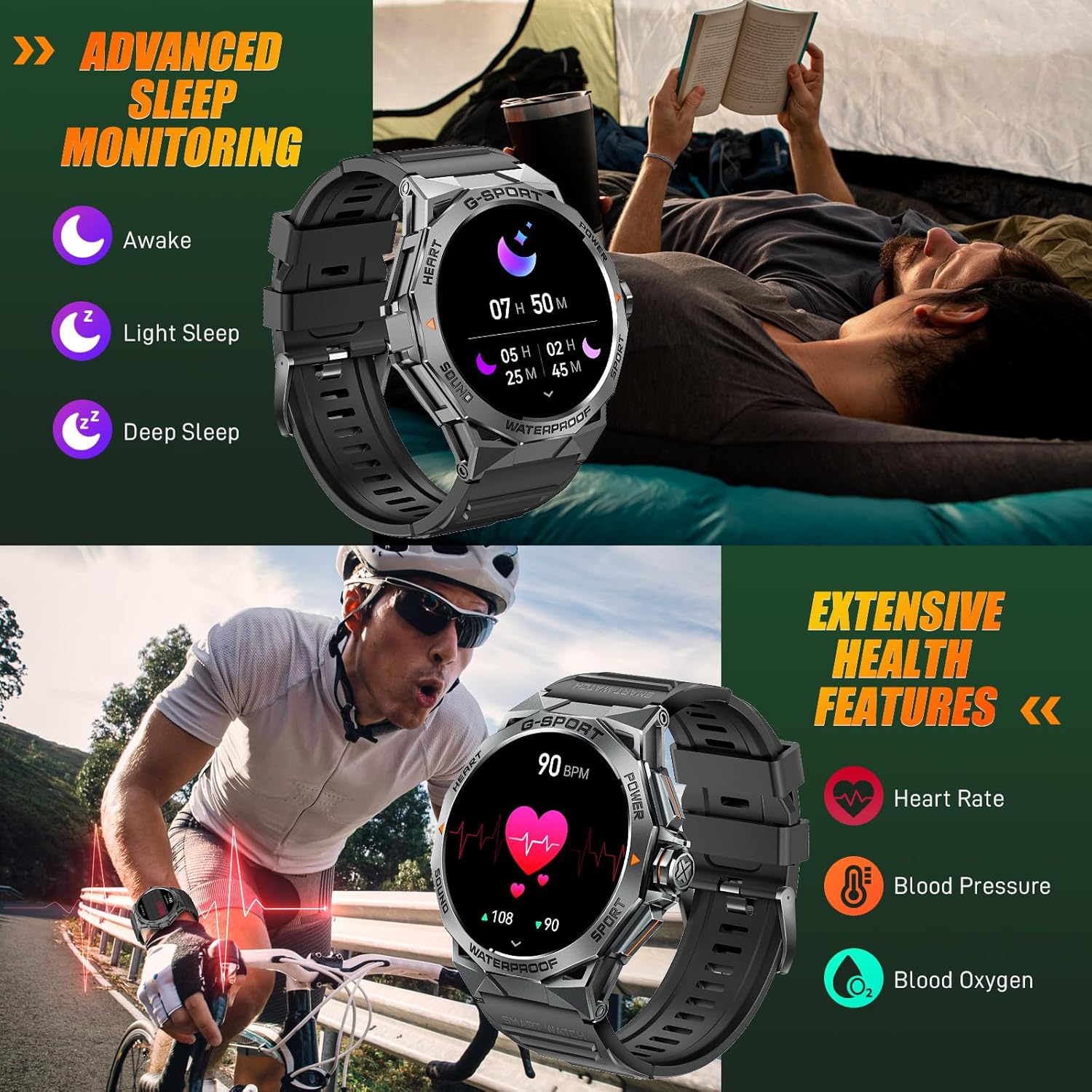
Image: The smartwatch displaying sleep data and heart rate monitoring, with icons for heart rate, blood pressure, and blood oxygen.
4.5 ሌሎች ስማርት ባህሪያት
The EIGIIS K22 offers several additional features to enhance daily convenience:
- የሙዚቃ ቁጥጥር፡- በስማርትፎንዎ ላይ የሙዚቃ መልሶ ማጫወትን ይቆጣጠሩ።
- የርቀት ካሜራ ቁጥጥር; የእጅ ሰዓትዎን ለስልክዎ ካሜራ እንደ የርቀት መዝጊያ ይጠቀሙ።
- የአየር ሁኔታ ዝመናዎች በእውነተኛ ጊዜ የአየር ሁኔታ ትንበያዎችን ያግኙ።
- ማንቂያ ደውል: ማንቂያዎችን በቀጥታ ከእጅ አንጓ ያዘጋጁ።
- ስልክ አግኝ፡ በስህተት የተቀመጠ ስማርትፎንዎን ያግኙ።
- የማይንቀሳቀስ አስታዋሾች፡- እንቅስቃሴ-አልባ ጊዜያት ካለፉ በኋላ ለማንቀሳቀስ ማንቂያዎችን ይቀበሉ።
- የድምፅ ረዳት የስልክዎን የድምጽ ረዳት ይድረሱበት።

Image: A collage showing the smartwatch controlling music, acting as a camera remote, displaying weather, and featuring stopwatch, alarm, and 'find phone' functions.
5. ጥገና እና እንክብካቤ
5.1 የውሃ መቋቋም (IP68)
The EIGIIS K22 Smartwatch is IP68 waterproof, meaning it is resistant to dust and can withstand immersion in water up to 1.5 meters for 30 minutes. It is suitable for daily use, including washing hands and swimming.
- Avoid prolonged exposure to hot water, steam, or high-pressure water jets.
- የውሃ ውስጥ ቁልፎችን አይጠቀሙ.
- ሰዓቱን ከውሃ ጋር ከተጋለጡ በኋላ በደንብ ያድርቁት።

Image: A person swimming while wearing the EIGIIS K22 Smartwatch, highlighting its IP68 waterproof rating.
5.2 የባትሪ ህይወት ማመቻቸት
The 400mAh battery provides 4-7 days of typical usage and up to 25 days on standby. To maximize battery life:
- የማያ ገጽ ብሩህነት ወደ ዝቅተኛ ቅንብር ያስተካክሉ።
- Limit the use of the Always On Display feature if extended battery life is critical.
- አላስፈላጊ ማሳወቂያዎችን ያሰናክሉ።
- Close background apps on the watch when not in use.
5.3 ጽዳት
Regularly clean your smartwatch and watch band to prevent skin irritation and maintain performance.
- ሰዓቱን እና ማሰሪያውን በለስላሳ፣ ዲ ይጥረጉamp ጨርቅ.
- ኃይለኛ ኬሚካሎችን ወይም ሻካራ ቁሳቁሶችን ከመጠቀም ይቆጠቡ.
6. መላ መፈለግ
If you encounter issues with your EIGIIS K22 Smartwatch, refer to the following common solutions:
| ችግር | ሊሆን የሚችል መፍትሄ |
|---|---|
| ሳይበራ ይመልከቱ | ሰዓቱ ሙሉ በሙሉ መሙላቱን ያረጋግጡ። ቢያንስ ለ 30 ደቂቃዎች ከኃይል መሙያው ጋር ያገናኙት. |
| ከስማርትፎን ጋር ማጣመር አይቻልም | Ensure Bluetooth is enabled on your phone. Restart both the watch and phone. Make sure the FitCloudPro app has Bluetooth permissions. |
| ማሳወቂያዎች አልተቀበሉም። | Check notification settings in the FitCloudPro app and your phone's system settings. Ensure the app is running in the background. |
| አጭር የባትሪ ህይወት | Disable the Always On Display feature. Reduce screen brightness. Limit frequent heart rate monitoring. See Section 5.2 for more tips. |
| Bluetooth audio defaults to watch speaker | This is a common behavior for smartwatches with built-in speakers. In your phone's Bluetooth settings, you may be able to disconnect the watch's audio profile while keeping the data connection. Alternatively, some apps allow you to select the audio output device. |
| ትክክለኛ ያልሆነ የጤና መረጃ | Ensure the watch is worn snugly on your wrist, about one finger's width above the wrist bone. Avoid excessive movement during measurements. Note that smartwatches are not medical devices and readings are for reference only. |
7. ዝርዝሮች
| ባህሪ | ዝርዝር |
|---|---|
| የሞዴል ቁጥር | K22 |
| ማሳያ | 1.43 Inches AMOLED HD Always On Display |
| የባትሪ አቅም | 400 ሚአሰ |
| የባትሪ ህይወት | ከ4-7 ቀናት (መደበኛ አጠቃቀም)፣ እስከ 25 ቀናት (በመጠባበቂያ ጊዜ) |
| የኃይል መሙያ ጊዜ | በግምት 2 ሰዓታት |
| የውሃ መቋቋም | IP68 |
| ግንኙነት | ብሉቱዝ |
| ስርዓተ ክወና | Wear OS |
| ተኳኋኝነት | አንድሮይድ 4.4 እና ከዚያ በላይ፣ iOS 8.0 እና ከዚያ በላይ |
| የእቃው ክብደት | 50 ግራም (1.76 አውንስ) |
| የምርት ልኬቶች | 6.69 x 4.33 x 1.18 ኢንች |
8. ዋስትና እና ድጋፍ
8.1 የምርት ዋስትና
The EIGIIS K22 Smartwatch comes with a የ 12 ወር ጥራት ዋስትና from the date of purchase. This warranty covers manufacturing defects and issues arising from normal use. It does not cover damage caused by misuse, accidents, unauthorized modifications, or failure to follow instructions.
8.2 የደንበኛ ድጋፍ
For any questions, technical assistance, or warranty claims, please contact EIGIIS customer support through the following channels:
- ከምርት ማሸጊያዎ ጋር የቀረበውን የእውቂያ መረጃ ይመልከቱ።
- Visit the official EIGIIS webለድጋፍ ሀብቶች ጣቢያ.
- Contact the seller directly through the platform where you purchased the product.
Please have your purchase receipt and product model number (K22) ready when contacting support.
ተዛማጅ ሰነዶችK22


Ask a question about this manual
Ask about setup, troubleshooting, compatibility, parts, safety, or missing instructions. Manuals+ will review the question and use this page’s manual context to help answer it.