
መግቢያ
This manual provides detailed instructions for the installation, operation, and maintenance of your Carro Smart Ceiling Fan. The Tilbury 52-inch smart ceiling fan is designed to provide efficient cooling and lighting for large indoor and outdoor living spaces. It features a modern design with a white finish, elegant plywood blades, and an integrated 4000K LED cool light. This fan incorporates remote control, Wi-Fi app control, Siri Shortcut, and voice control technology, compatible with Amazon Alexa and Google Home Assistant, to customize your fan preferences.
የደህንነት መረጃ
ከመጫንና ከመጠቀምዎ በፊት ሁሉንም የደህንነት መመሪያዎች በጥንቃቄ ያንብቡ። እነዚህን መመሪያዎች አለመከተል የኤሌክትሪክ ንዝረት፣ እሳት ወይም የግል ጉዳት ሊያስከትል ይችላል።
- ከመጫንዎ ወይም ከማገልገልዎ በፊት በሲውትሪክ ብሬክተር ላይ ያለው ኃይል መጥፋቱን ያረጋግጡ።
- ሁሉም ገመዶች በብሔራዊ እና በአካባቢው የኤሌክትሪክ ኮዶች መሰረት መሆን አለባቸው.
- ስለ ሽቦ አሠራሮች እርግጠኛ ካልሆኑ ብቃት ያለው ኤሌትሪክ ያማክሩ።
- Mount the fan to a structurally sound ceiling capable of supporting the fan's weight.
- Keep hands, hair, and clothing clear of the fan blades during operation.
- Do not attempt to repair or modify the fan yourself. Contact customer support for assistance.
ማዋቀር እና መጫን
The Carro Smart Ceiling Fan is designed for straightforward installation. The process typically takes about 20 minutes to replace your current ceiling fan.
- ክፍሎቹን ያራግፉ፡ ሁሉንም ክፍሎች ከማሸጊያው በጥንቃቄ ያስወግዱ። ሁሉም ክፍሎች በማሸጊያው ዝርዝር መሠረት መኖራቸውን ያረጋግጡ።
- የኃይል ግንኙነት መቋረጥ; Before beginning installation, ensure the power supply to the fan location is turned off at the main circuit breaker.
- የመገጣጠሚያ ቅንፍ መጫኛ የመትከያውን ቅንፍ ከጣሪያው መጋጠሚያ ሳጥን ጋር በጥንቃቄ ያያይዙት. የማገናኛ ሳጥኑ ለጣሪያ አድናቂ ድጋፍ ደረጃ መሰጠቱን ያረጋግጡ።
- የገመድ ግንኙነቶች; Connect the fan's electrical wires to the household wiring according to the provided wiring diagram. Ensure all connections are secure and properly insulated.
- የደጋፊዎች ስብስብ Attach the fan motor assembly to the mounting bracket. Install the fan blades and light kit as per the instructions.
- የኃይል መልሶ ማቋቋም; Once installation is complete, restore power at the circuit breaker and test the fan's operation.

ምስል፡ አልቋልview of Carro Smart Ceiling Fan components and general installation steps.
የአሠራር መመሪያዎች
Your Carro Smart Ceiling Fan offers multiple control methods for convenience and customization.
1. የመቆጣጠሪያ ዘዴዎች
The fan can be controlled via the included remote, a mobile app, or voice commands through smart home assistants.
- የርቀት መቆጣጠሪያ፡- Use the dedicated remote to adjust fan speed, light settings, and turn the fan on/off. This ensures control even without a Wi-Fi connection.
- የሞባይል መተግበሪያ Download the Carro Home app to customize settings remotely. The app allows for advanced control and scheduling.
- የድምጽ ቁጥጥር፡- The fan is compatible with Amazon Alexa, Siri, and Google Assistant. Use voice commands such as "Alexa, set the white ceiling fan in the bedroom to speed 8, turn the yellow light to 75%, and adjust the white light to 36%."

Image: Remote control and mobile phone app interface for fan operation.

Image: Demonstrates voice control functionality with Amazon Alexa, Google Assistant, and Siri Shortcuts.
2. Fan Operation (DC Motor)
The fan is equipped with an efficient DC motor, offering quiet operation and energy savings.
- የፍጥነት ቅንብሮች፡- Choose from 10 adjustable wind speeds, ranging from a maximum airflow of 4500 CFM to a minimum of 980 CFM.
- ተለዋዋጭ የአየር ፍሰት; The reversible function allows you to change the direction of airflow. Use the downward airflow for cooling in summer and upward airflow to circulate warm air in winter.
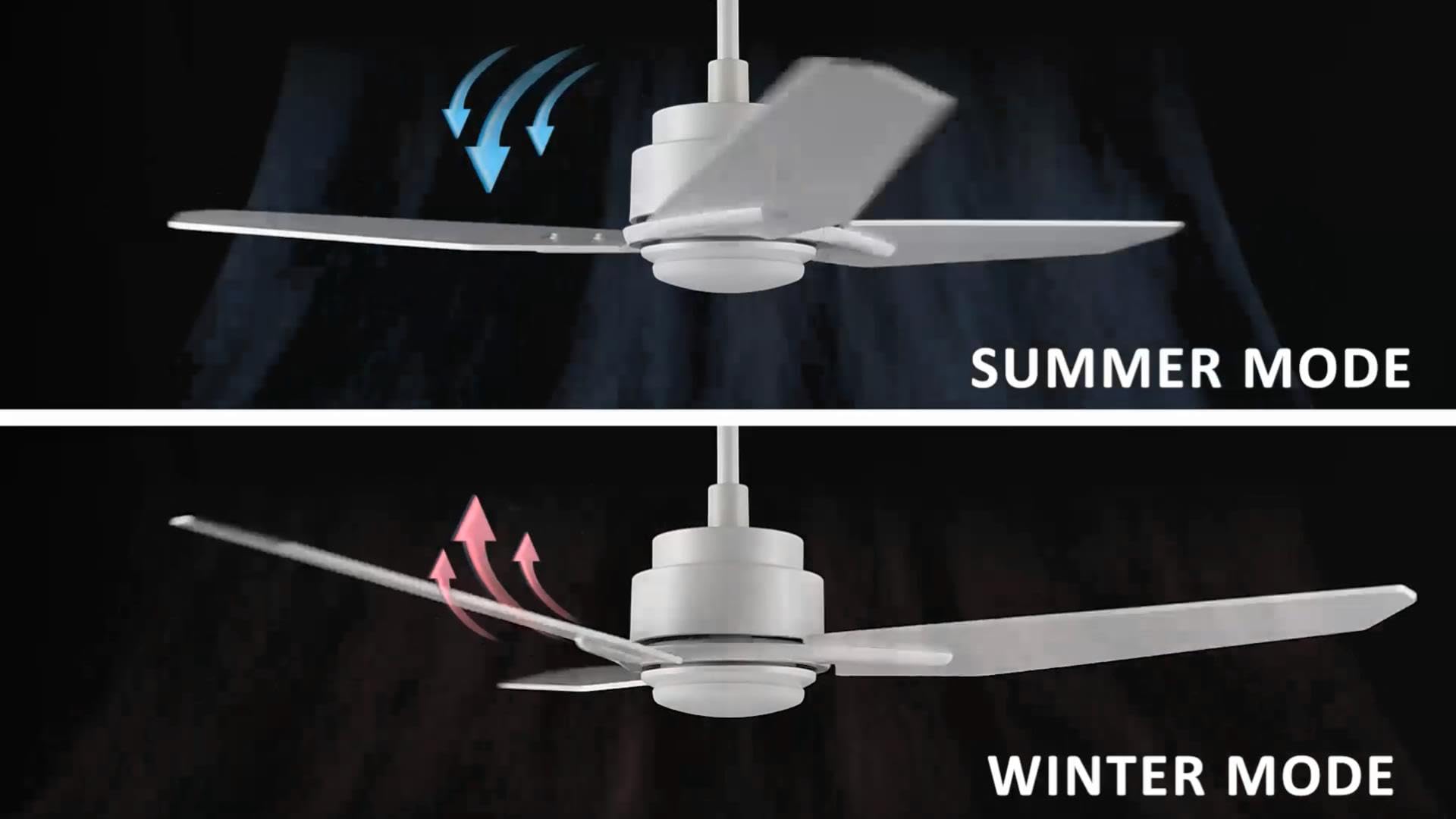
Image: Illustration of summer mode (downward airflow) and winter mode (upward airflow) for optimal air circulation.
3. Adjustable Dimmable LED Lights
Control the fan's lighting independently with ease.
- የቀለም ሙቀት አማራጮች: Select from three light colors: 4000K (cool light), 3000K (bright light), and 2700K (warm light).
- ተለዋዋጭ ተግባር The LED lights are dimmable from 1% to 100%, allowing you to adjust brightness for any situation.
- Smart Grouping: Group the LED lights with the fan or other smart devices for unified control via the app or voice commands.

Image: Visual representation of the three dimmable light color options: Cool Light (4000K), Natural Light (3000K), and Warm Light (2700K).
4. Timer and Scheduling Options
Utilize the scheduling feature through the mobile app to automate fan and light operations.
- የዕለት ተዕለት ተግባራትን ያቀናብሩ፦ Program the fan to activate at specific times, with desired light and fan settings, for different areas of your home.
- Exampላይ: Program the living room fan to turn on daily at 18:00 with both yellow and white lights. Set the study fan to turn on at 21:00 from Monday to Friday, illuminating only the yellow light.
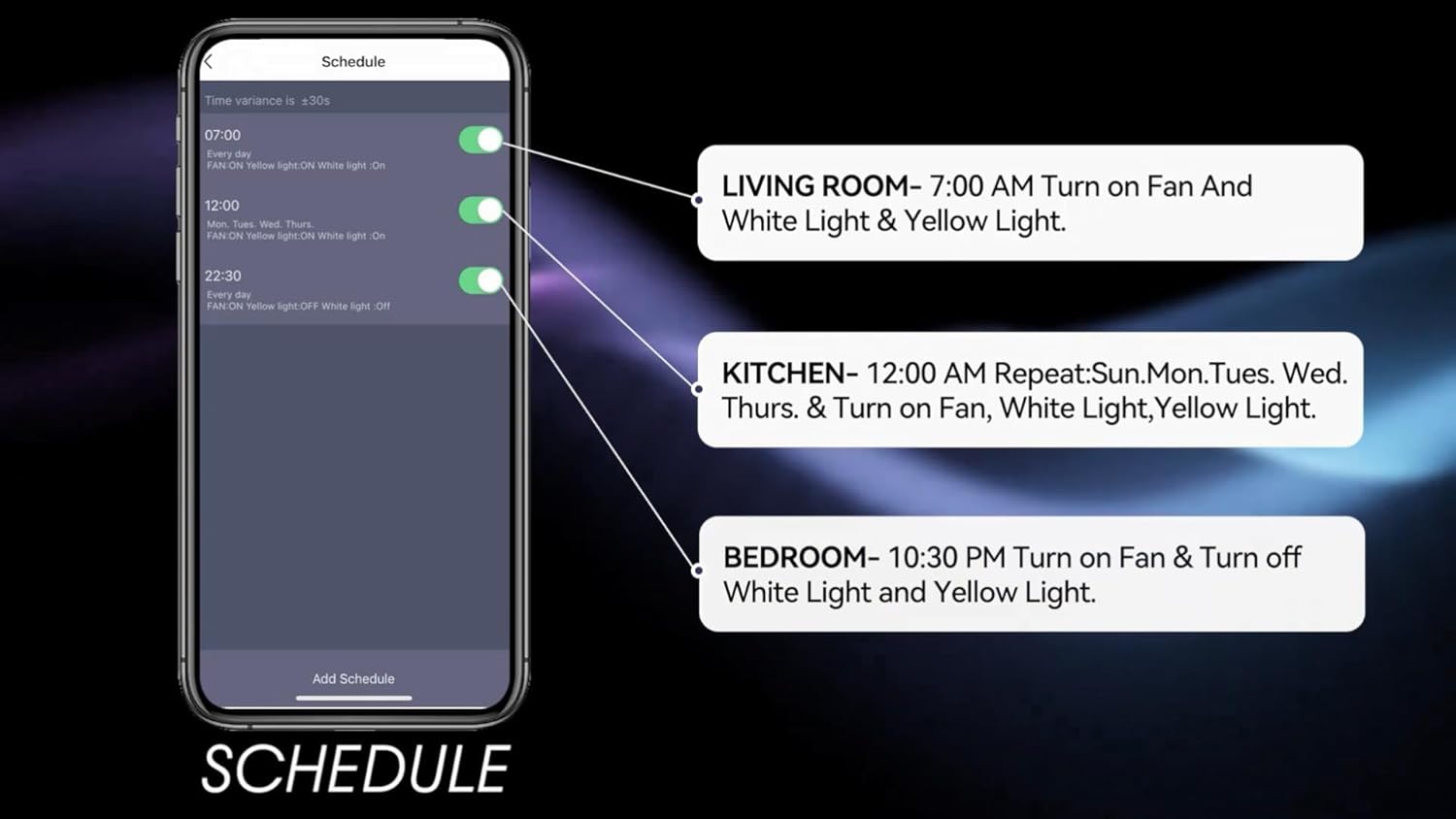
Image: Screenshot of the mobile app's scheduling interface, demonstrating how to set routines for different rooms.
ጥገና
መደበኛ ጥገና የጣራውን ማራገቢያ ጥሩ አፈፃፀም እና ረጅም ዕድሜን ያረጋግጣል።
- ማጽዳት፡ የአየር ማራገቢያውን ቢላዋ እና የሞተር ቤትን በየጊዜው ለስላሳ፣ መamp ጨርቅ. ገላጭ ማጽጃዎችን ወይም ፈሳሾችን አይጠቀሙ.
- የቢላ ጥብቅነት; Check blade screws annually to ensure they are secure. Loose blades can cause wobbling and noise.
- የብርሃን ስብስብ; የተቀናጀው የኤልኢዲ መብራት ምንጭ ለረጅም ጊዜ አገልግሎት የተዘጋጀ ሲሆን በአብዛኛው ምትክ አያስፈልገውም። ችግሮች ከተከሰቱ የደንበኞች ድጋፍን ያነጋግሩ።
- ኃይል ዝጋ: Always turn off the power at the circuit breaker before performing any cleaning or maintenance.
መላ መፈለግ
If you encounter issues with your Carro Smart Ceiling Fan, refer to the following common problems and solutions:
| ችግር | ሊሆን የሚችል ምክንያት | መፍትሄ |
|---|---|---|
| ደጋፊ አይጀምርም። | ለደጋፊው ምንም ኃይል የለም; የላላ ሽቦ ግንኙነቶች; የርቀት መቆጣጠሪያ ባትሪ ዝቅተኛ ነው። | የወረዳ የሚላተም ያረጋግጡ; ሁሉም የሽቦ ግንኙነቶች አስተማማኝ መሆናቸውን ያረጋግጡ; የርቀት መቆጣጠሪያ ባትሪ ይተኩ. |
| ደጋፊ ይንቀጠቀጣል። | ልቅ የሆኑ የቢላ ዊንጮች፤ ተገቢ ያልሆነ ሚዛናዊ ቢላዎች፤ ልቅ የሆኑ የመጫኛ ቅንፍ። | ሁሉንም የቢላ ዊንጮችን ያጥብቁ፤ ቢላዎችን ለማመጣጠን የማመጣጠኛ ኪት (ያልተካተተ) ይጠቀሙ፤ የመጫኛ ቅንፍ ደህንነቱ በተጠበቀ ሁኔታ መያዙን ያረጋግጡ። |
| ብርሃን አይሰራም | No power to the light kit; Loose wire connections; Light setting off. | Check power supply; Verify light kit wiring; Ensure light is turned on via remote, app, or voice control. |
| የርቀት መቆጣጠሪያ አይሰራም | ዝቅተኛ ባትሪ; የርቀት መቆጣጠሪያ አልተጣመረም። | Replace remote battery; Refer to pairing instructions in the full manual (if applicable). |
| ከWi-Fi/መተግበሪያ ጋር መገናኘት አልተቻለም | የተሳሳተ የ Wi-Fi ይለፍ ቃል; ራውተር በጣም ሩቅ; መተግበሪያ አልዘመነም። | Verify Wi-Fi password; Move router closer or use a Wi-Fi extender; Update the Carro Home app to the latest version. |
የምርት ዝርዝሮች
| ባህሪ | ዝርዝር መግለጫ |
|---|---|
| የምርት ስም | ካሮ |
| ሞዴል | 52" White |
| ቀለም | ነጭ |
| የኤሌክትሪክ ማራገቢያ ንድፍ | የጣሪያ አድናቂ። |
| የኃይል ምንጭ | AC/DC |
| ቅጥ | ዘመናዊ |
| የምርት ልኬቶች | 52" ዲ x 52" ዋ x 13.4" ኤች |
| የክፍል አይነት | Bedroom, Dining Room, Home Office, Living Rooms, Study Room |
| ልዩ ባህሪ | ፕሮግራም ሊደረግ የሚችል |
| የሚመከር አጠቃቀሞች | የአየር ዝውውር |
| የቢላዎች ብዛት | 3 |
| የአየር ፍሰት አቅም | 4500 ኪዩቢክ ጫማ በደቂቃ |
| የቢላ ርዝመት | 22.7 ኢንች |
| ጥራዝtage | 120 ቮልት |
| የተካተቱ አካላት | Ceiling fan X1 |
| ዝርዝር ሜታል | ኢ.ቲ.ኤል |
| የመቆጣጠሪያ ዘዴ | Voice, Remote, App |
| የእቃው ክብደት | 15.7 ፓውንድ |
| የመጫኛ አይነት | Downrod ተራራ |
የዋስትና መረጃ
Carro products are manufactured to the highest quality standards. This product comes with a limited warranty against defects in materials and workmanship. Please refer to the warranty card included in your product packaging or visit the official Carro webለዝርዝር የዋስትና ውሎች እና ሁኔታዎች ጣቢያ።
የደንበኛ ድጋፍ
For technical assistance, troubleshooting, or warranty claims, please contact Carro customer support:
- Webጣቢያ፡ Visit the official Carro webለተደጋጋሚ ጥያቄዎች እና የድጋፍ መርጃዎች ጣቢያ።
- ኢሜይል፡- Refer to your product packaging for customer service email.
- ስልክ፡ የደንበኞች አገልግሎት ስልክ ቁጥር ለማግኘት የምርት ማሸጊያዎን ይመልከቱ።
Please have your model number (52" White) and purchase date ready when contacting support.