
1. መግቢያ
The MECCANIXITY MPPT Solar Charge Controller is designed to optimize the energy utilization efficiency of photovoltaic systems. It features a built-in maximum power tracking program to ensure your solar panels operate at their peak output point. This intelligent regulator is suitable for 12V/24V auto-adaptive systems and includes an LCD display for monitoring and configuration, along with dual USB ports for convenience.
2. የደህንነት መረጃ
- ባትሪው በቂ መጠን እንዳለው ያረጋግጡtage for the controller to recognize the correct battery type during first use.
- Only use photovoltaic panels as a charging source. Do not connect DC or other power sources.
- Always connect the battery to the charge controller first, then connect the solar panel. When disconnecting, disconnect the solar panel first, then the battery.
- Ensure all wiring connections are secure and properly insulated to prevent short circuits or damage to equipment.
- Avoid touching bare wires. If necessary, use electrical tape to cover exposed wire ends.
3. ምርት አብቅቷልview

ምስል 3.1: የፊት view of the MECCANIXITY MPPT Solar Charge Controller 100A, showing the LCD display, control buttons, and dual USB ports.

ምስል 3.2: ዝርዝር view of the controller's features, including the LCD display, Menu, Page Up, Page Down/Manual buttons, and 2 USB ports.
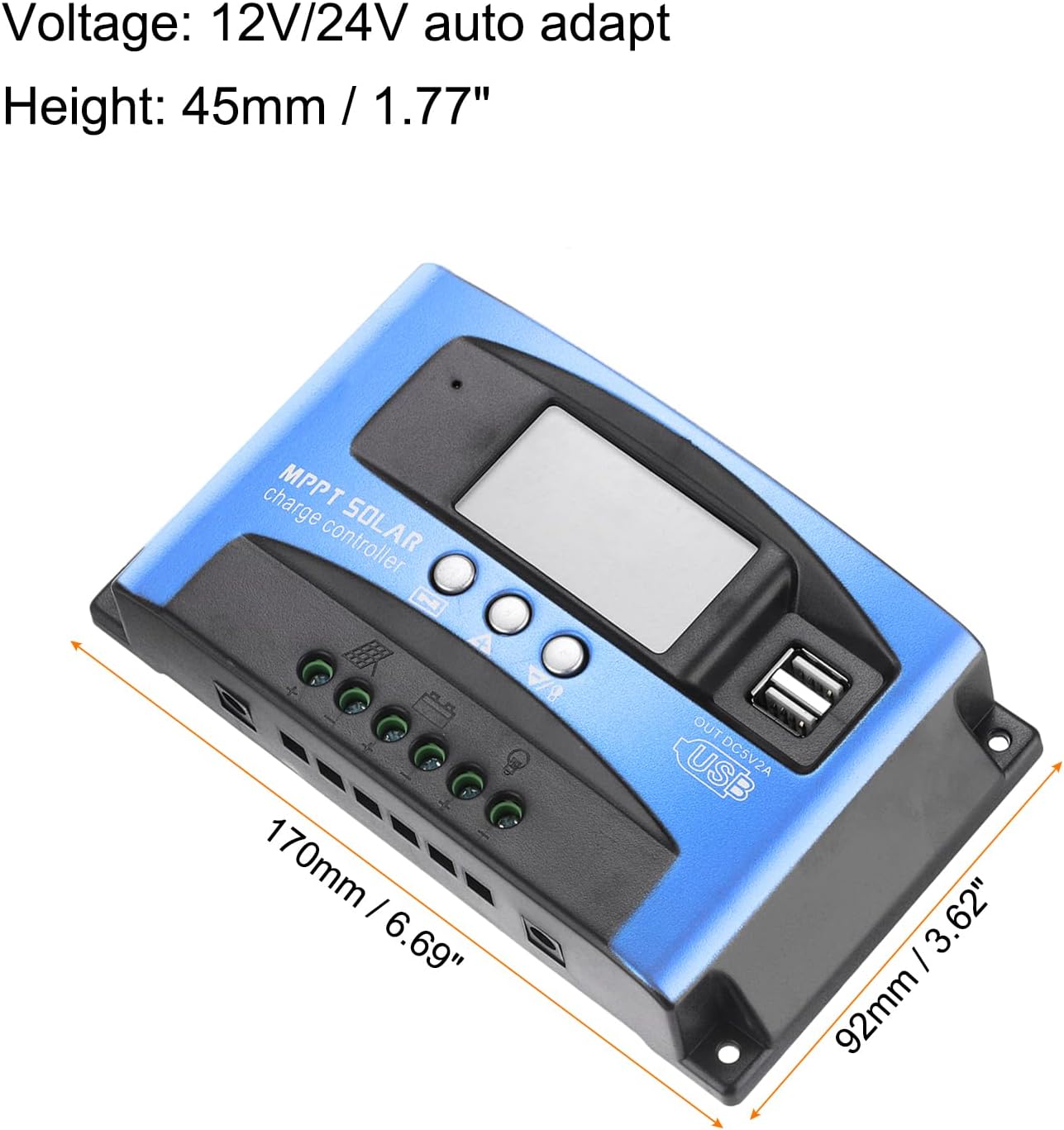
Figure 3.3: Dimensions of the MECCANIXITY MPPT Solar Charge Controller 100A, measuring 170mm (6.69") in length, 92mm (3.62") in width, and 45mm (1.77") in height.
ቁልፍ ባህሪዎች
- MPPT ቴክኖሎጂ፡- Maximizes energy harvest from solar panels.
- LCD ማሳያ፡- Provides real-time status and data, allowing for easy mode switching and parameter configuration.
- ሁለት የዩኤስቢ ወደቦች: 5V/2A Max output for charging external devices.
- ራስ -ሰር ጥራዝtage Adaptation: Supports 12V/24V systems.
- አጠቃላይ ጥበቃ; ከመጠን በላይ ጥራዝ ያካትታልtage, short circuit, overload, over-charge, and over-discharge protection.
4. ማዋቀር እና መጫን
የገመድ ሥዕል

Figure 4.1: Wiring diagram illustrating connections for solar panel, battery, load, and inverter.
የመጫኛ ደረጃዎች
- ባትሪውን ያገናኙ; Connect the battery to the charge regulator's positive and negative terminals first. Ensure correct polarity.
- የፀሐይ ፓነልን ያገናኙ; Connect the photovoltaic module (solar panel) to the charge regulator's positive and negative terminals.
- ጭነቱን ያገናኙ፦ Connect the consumer (load) to the charge regulator's positive and negative terminals.
Important: Always connect the battery first and disconnect the solar panel first to prevent damage to the controller.
የመጫኛ ቪዲዮ
Video 4.1: This video demonstrates the proper installation sequence for the solar charge controller, emphasizing the importance of connecting the battery before the solar panel and disconnecting the solar panel first. It shows how to secure wiring and check connections.
5. የአሠራር መመሪያዎች
የኤልሲዲ ማሳያ እና የአዝራር ተግባራት፡
The LCD display provides real-time information about your solar system. The control buttons (Menu, Page Up, Page Down/Manual) allow you to navigate through different screens and adjust parameters.
- ዋና ማሳያ፡- የአሁኑን የባትሪ መጠን ያሳያልtagሠ እና የመሙላት ሁኔታ.
- ተንሳፋፊ ጥራዝtage: ጥራዝ ያሳያልtage at which the battery is maintained after full charge (e.g., 13.7V for 12V systems).
- የመልቀቂያ ግንኙነትን ያገናኙ ጥራዝtage at which the load will be reconnected after being disconnected due to low battery (e.g., 12.6V for 12V systems).
- የመልቀቂያ ማቆሚያ ጥራዝtage at which the load will be disconnected to protect the battery from over-discharge (e.g., 10.7V for 12V systems).
- የባትሪ ዓይነት፡ Allows selection of battery type (e.g., Sealed, Gel, Flooded).
- የስራ ሁኔታ፡ Configures load output modes (e.g., 24-hour output, dusk-to-dawn, timed output).
Press the 'Menu' button to cycle through different display interfaces. Use the 'Page Up' and 'Page Down/Manual' buttons to adjust settings when in configuration mode (typically by long-pressing the 'Menu' button to enter setting mode).
6. ጥገና
- ሁሉንም የሽቦ ግንኙነቶች ጥብቅነት እና ዝገት ለማረጋገጥ በየጊዜው ያረጋግጡ።
- Keep the controller clean and free from dust and debris to ensure proper heat dissipation.
- በመቆጣጠሪያው ዙሪያ በቂ የአየር ዝውውርን ያረጋግጡ።
- የኤል ሲ ዲ ማሳያውን ለማንኛውም የስህተት ኮዶች ወይም ያልተለመዱ ንባቦች ይከታተሉ።
7. መላ መፈለግ
የተለመዱ ጉዳዮች እና መፍትሄዎች:
- ምንም ማሳያ/ኃይል የለም፡ የባትሪ ግንኙነቶችን እና ጥራዝ ይፈትሹtage. Ensure the battery has sufficient charge.
- ባትሪ እየሞላ አይደለም፡- Verify solar panel connections and ensure adequate sunlight. Check for shading on solar panels. Confirm correct battery type setting.
- ጭነት እየሰራ አይደለም፦ Check load connections. Ensure the battery voltage is above the discharge reconnect voltage. Verify load work mode settings.
- ከመጠን በላይtage/Over-current Protection: The controller will automatically disconnect to protect the system. Identify the cause (e.g., too many solar panels, incorrect battery voltage) and rectify it before restarting.

Figure 7.1: The controller features a 7-point security protection system, including short circuit, open circuit, over current, over charge, over voltage, over load, and over discharge protection.
8. ዝርዝሮች
| መለኪያ | ዋጋ |
|---|---|
| ጥራዝtage | 12V/24V Auto Adapt |
| ወቅታዊ ክፍያ መሙላት | 100 ኤ |
| የአሁን መፍሰስ | 30 ኤ |
| መጠን | 170*92*45 ሚሜ (6.69 x 3.62 x 1.77 ኢንች) |
| የአሠራር ሙቀት | -35-80℃ / -31°F-176°F |
| ተንሳፋፊ ክፍያ Voltagሠ (12V/24V) | 13.8V / 27.6V |
| የዩኤስቢ ውፅዓት | 5 ቪ / 2 ኤክስ ማክስ |
| የእቃው ክብደት | 10.1 አውንስ |
9. ዋስትና እና ድጋፍ
For warranty information and technical support, please refer to the product packaging or contact MECCANIXITY customer service directly. Keep your purchase receipt for warranty claims.