
1. ምርት አብቅቷልview
The MiBOXER Y3 RGB+CCT Vertical Remote provides comprehensive control over compatible RGB+CCT LED lighting systems. This remote allows for precise adjustments of RGB colors, color temperature (CCT), and brightness. Utilizing 2.4GHz wireless technology, it ensures reliable communication with your lighting devices. Its ergonomic vertical design and intuitive interface are designed for ease of use, enabling users to effortlessly customize lighting for various environments.
ቁልፍ ባህሪዎች
- RGB, CCT, and Brightness Control: Adjust colors, color temperature, and brightness with ease.
- 2.4GHz ገመድ አልባ ቴክኖሎጂ፡ Ensures reliable, long-range connectivity.
- አቀባዊ ዲዛይን፡ Ergonomic and easy-to-use layout for quick adjustments.
- Multi-Color and Dimmable: Create customized lighting scenes with vibrant colors and dimming options.
- ሁለገብ ተኳኋኝነት Works with MiBOXER RGB+CCT lighting products.
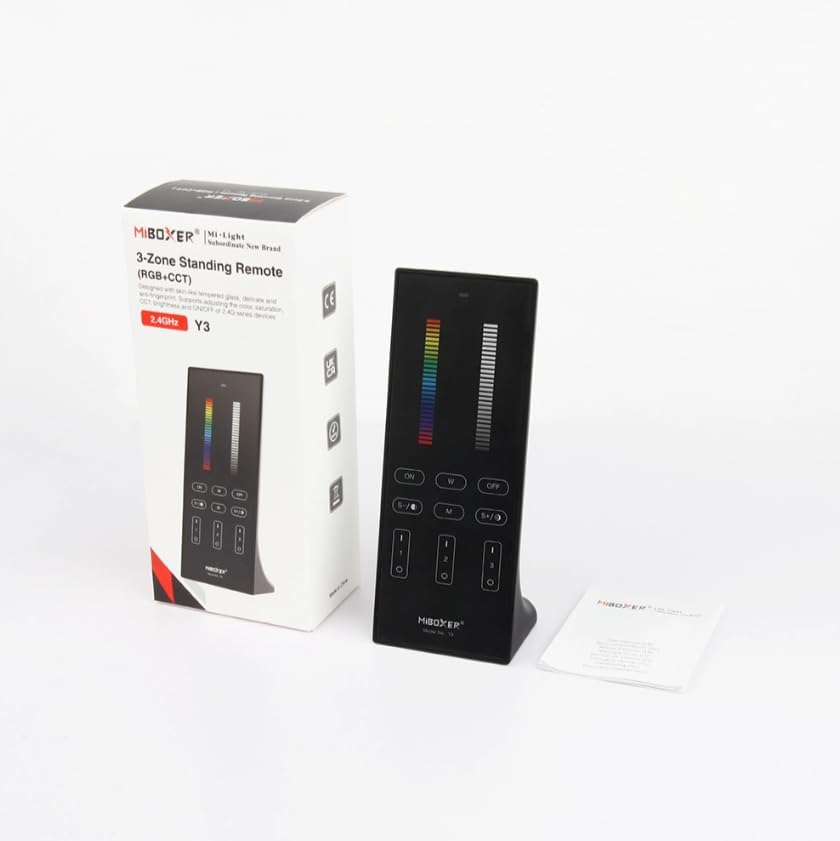
Figure 1: MiBOXER Y3 RGB+CCT Vertical Remote with its retail packaging.
2. የማዋቀር መመሪያዎች
2.1 የባትሪ ጭነት
The MiBOXER Y3 remote requires two AAA batteries (not included). To install:
- የባትሪውን ክፍል ከርቀት መቆጣጠሪያው ጀርባ ያግኙት።
- ለመክፈት ሽፋኑን ወደታች ያንሸራትቱ።
- ሁለት የ AAA ባትሪዎችን ያስገቡ፣ ትክክለኛውን የፖላራይቲ (+ እና -) ያረጋግጡ።
- ደህንነቱ በተጠበቀ ሁኔታ ጠቅ እስኪያደርግ ድረስ ሽፋኑን ወደ ቦታው ያንሸራትቱት።
2.2 Linking the Remote to Lighting Devices
To control your MiBOXER RGB+CCT lighting devices, the remote must be linked to them. This process typically involves a specific sequence of actions on both the remote and the lighting device. Refer to your specific MiBOXER lighting product's manual for detailed linking instructions, as the procedure may vary slightly between different light models. A common linking procedure is as follows:
- Ensure the lighting device is powered off.
- Power on the lighting device.
- Within 3 seconds of powering on the light, press the "Zone ON" button (labeled "I" or "1") on the remote for the desired zone.
- The light should flash several times, indicating successful linking.
- If linking fails, repeat the process.
To unlink a device from a zone, power on the light and within 3 seconds, press the "Zone ON" button (labeled "I" or "1") five times rapidly for the corresponding zone. The light should flash multiple times to confirm unlinking.
3. የአሠራር መመሪያዎች
The MiBOXER Y3 remote features an intuitive layout for controlling various lighting parameters. Familiarize yourself with the buttons and sliders as shown in Figure 2.

Figure 2: MiBOXER Y3 Remote Control button layout and functions.
3.1 የአዝራር ተግባራት፡-
| አዝራር / መቆጣጠሪያ | ተግባር |
|---|---|
| አመልካች ብርሃን | Flashes to confirm button presses. |
| RGB ተንሸራታች | Slide to select desired RGB color. |
| ብሩህነት ተንሸራታች | Slide to adjust light brightness (0-100%). |
| Master ON (I/ON) | Turns all linked lights ON. |
| Master OFF (O/OFF) | Turns all linked lights OFF. |
| White Light (W) | Activates pure white light mode. |
| Speed-/CCT-/Saturation- | Decreases speed in dynamic mode, decreases color temperature (warmer white), or decreases color saturation. |
| Speed+/CCT+/Saturation+ | Increases speed in dynamic mode, increases color temperature (cooler white), or increases color saturation. |
| Dynamic Mode (M) | Cycles through various dynamic lighting effects. Press repeatedly to change effects. |
| Zone ON (1, 2, 3 - "I") | Turns ON lights linked to the specific zone. Used for linking/unlinking. |
| Zone OFF (1, 2, 3 - "O") | Turns OFF lights linked to the specific zone. |
3.2 አጠቃላይ ሥራ;
- Turning Lights On/Off: Use the "Master ON" or "Master OFF" buttons for all lights, or "Zone ON" / "Zone OFF" for specific zones.
- የቀለም ማስተካከያ; Slide your finger along the "RGB Slider" to select your desired color.
- ብሩህነትን ማስተካከል; Slide your finger along the "Brightness Slider" to increase or decrease the light intensity.
- የቀለም ሙቀት ማስተካከያ (CCT)፡ In white light mode, use the "CCT-" and "CCT+" buttons to make the white light warmer or cooler.
- ተለዋዋጭ ሁነታዎች Press the "M" button to activate dynamic lighting modes. Use "Speed-" and "Speed+" to adjust the speed of the current dynamic effect.
- Saturation Adjustment: In RGB mode, use "Saturation-" and "Saturation+" to adjust the intensity of the color.
4. ጥገና
Proper maintenance ensures the longevity and optimal performance of your MiBOXER Y3 remote.
- ማጽዳት፡ Wipe the remote with a soft, dry cloth. Do not use abrasive cleaners, solvents, or wet cloths, as these can damage the surface or internal components.
- የባትሪ መተካት፡ Replace batteries when the indicator light becomes dim or the remote's response becomes inconsistent. Always use new AAA batteries and dispose of old batteries responsibly.
- ማከማቻ፡ የርቀት መቆጣጠሪያውን ከፀሐይ ብርሃን እና ከፍተኛ የሙቀት መጠን ራቅ ባለ ቀዝቃዛና ደረቅ ቦታ ያስቀምጡ። ለረጅም ጊዜ ከተከማቹ፣ እንዳይፈስ ለመከላከል ባትሪዎቹን ያስወግዱ።
- እርጥበትን ያስወግዱ; This remote is not waterproof. Keep it away from water and high humidity environments.
5. መላ መፈለግ
If you encounter issues with your MiBOXER Y3 remote, refer to the following troubleshooting steps:
| ችግር | ሊሆን የሚችል ምክንያት | መፍትሄ |
|---|---|---|
| Remote not responding to button presses. | የሞቱ ወይም ዝቅተኛ ባትሪዎች. Remote not linked to lights. ከክልል ውጭ | ባትሪዎችን ይተኩ. Re-link the remote to the lighting devices (refer to Section 2.2). Move closer to the lighting devices. |
| Lights not changing color/brightness. | ትክክል ያልሆነ ሁነታ ተመርጧል። Remote not linked to the specific zone. | Ensure you are in the correct mode (e.g., RGB for color, CCT for white temperature). Verify the remote is linked to the correct zone. |
| Indicator light not flashing. | የሞቱ ባትሪዎች. ውስጣዊ ስህተት. | ባትሪዎችን ይተኩ. ባትሪ ከተተካ በኋላ ችግሩ ከቀጠለ የደንበኛ ድጋፍን ያነጋግሩ። |
| Interference with other 2.4GHz devices. | ከሌሎች ገመድ አልባ መሳሪያዎች ጋር ቅርበት። | Move the remote or other 2.4GHz devices further apart. |
6. ዝርዝሮች
Technical specifications for the MiBOXER Y3 RGB+CCT Vertical Remote.
| ባህሪ | ዝርዝር |
|---|---|
| የሞዴል ቁጥር | Y3 |
| የምርት ስም | MiBOXER |
| የመቆጣጠሪያ ዓይነት | RGB+CCT Vertical Remote |
| ገመድ አልባ ቴክኖሎጂ | 2.4GHz |
| የኃይል አቅርቦት | 2 x AAA ባትሪዎች (አልተካተተም) |
| ልዩ ባህሪ | RGB/CCT/brightness dimmable |
| የእቃው ክብደት | 4.8 አውንስ (136 ግራም ገደማ) |
| የጥቅል ልኬቶች | 6.5 x 3 x 2 ኢንች (በግምት. 16.5 x 7.6 x 5.1 ሴሜ) |


Figure 3: Dimensions of the MiBOXER Y3 Remote Control and its packaging.
7. ዋስትና እና ድጋፍ
For warranty information, please refer to the documentation provided with your specific MiBOXER lighting product or contact the retailer where the product was purchased. MiBOXER products typically come with a manufacturer's warranty covering defects in materials and workmanship.
ለቴክኒክ ድጋፍ ወይም ለተጨማሪ እርዳታ፣ እባክዎን ኦፊሴላዊውን MiBOXER ይጎብኙ website or contact their customer service department. Contact details are usually available on the product packaging or the brand's official online presence.