
መግቢያ
Thank you for choosing the SWOFY D26 MP3 Player. This device combines a high-capacity music player with the versatility of an Android 13.0 system, featuring Bluetooth and Wi-Fi connectivity, a 4.7-inch HD touchscreen, and support for various streaming applications. This manual will guide you through the setup, operation, maintenance, and troubleshooting of your new device to ensure an optimal user experience.
በሣጥኑ ውስጥ ያለው
እባክዎ የጥቅል ይዘቱን በጥንቃቄ ያረጋግጡ። ማንኛቸውም ነገሮች ከጠፉ ወይም ከተበላሹ የደንበኛ ድጋፍን ያነጋግሩ።
- SWOFY D26 MP3 Player (x1)
- የዩኤስቢ-ሲ ኃይል መሙያ ገመድ (x1)
- 64GB SD Card (x1)
- Wired Headphones (x1)
- መከላከያ መያዣ (x1)
- የተጠቃሚ መመሪያ (x1)

Image: All components included in the SWOFY D26 MP3 Player package.
መሣሪያ አብቅቷልview
The SWOFY D26 features a sleek design with a responsive touchscreen and essential physical controls.

ምስል፡ ፊት ለፊት view of the SWOFY D26 MP3 Player.
ቁልፍ ባህሪዎች
- ባለ 4.7 ኢንች ኤችዲ ንክኪ ስክሪን፡ ለቀላል አሰሳ እና ሚዲያ viewing
- የኃይል ቁልፍ፡- Located on the side for turning the device on/off and screen lock.
- የድምጽ አዝራሮች፡- የድምጽ ውፅዓት አስተካክል።
- ዩኤስቢ-ሲ ወደብ ለክፍያ እና የውሂብ ማስተላለፍ.
- 3.5 ሚሜ የጆሮ ማዳመጫ ጃክ; ለገመድ የድምጽ ውፅዓት።
- የማይክሮ ኤስዲ ካርድ ማስገቢያ; የማስታወስ ችሎታን ለማስፋት።
- የተዋሃደ ድምጽ ማጉያ፡ የጆሮ ማዳመጫ ሳይኖር ለድምጽ መልሶ ማጫወት።
ማዋቀር
1. መሣሪያውን በመሙላት ላይ
Before first use, fully charge the MP3 player. Connect the provided USB-C cable to the device's USB-C port and the other end to a compatible USB power adapter (not included) or a computer's USB port. The charging indicator will show the charging status.
2. ማብራት / ማጥፋት
- ለማብራት፡- ማያ ገጹ እስኪበራ ድረስ የኃይል አዝራሩን ተጭነው ይያዙ ፡፡
- ለማጥፋት፡- የኃይል አዝራሩን ተጭነው ይያዙት፣ ከዚያም በማያ ገጹ ላይ ካሉት አማራጮች ውስጥ "ፓወር አጥፋ" የሚለውን ይምረጡ።
- ማያ ገጹን ለመቆለፍ/ለመክፈት፦ የኃይል ቁልፉን በአጭሩ ይጫኑ።
3. የመጀመሪያ ደረጃ ማዋቀር
በመጀመሪያ ሲበራ፣ የማያ ገጽ ላይ ጥያቄዎችን ይከተሉ፡-
- የሚመርጡትን ቋንቋ ይምረጡ።
- Connect to a Wi-Fi network for internet access and app downloads.
- ቀን እና ሰዓት ያዘጋጁ።
4. ኤስዲ ካርዱን በማስገባት ላይ
The device comes with 32GB of internal ROM and includes a 64GB SD card, providing a total of 96GB storage. It supports expansion up to 1TB via a microSD card.
- Locate the microSD card slot on the side of the device.
- Gently insert the microSD card into the slot with the gold contacts facing down until it clicks into place.
- ለማስወገድ ካርዱን እስኪወጣ ድረስ በትንሹ ይግፉት።
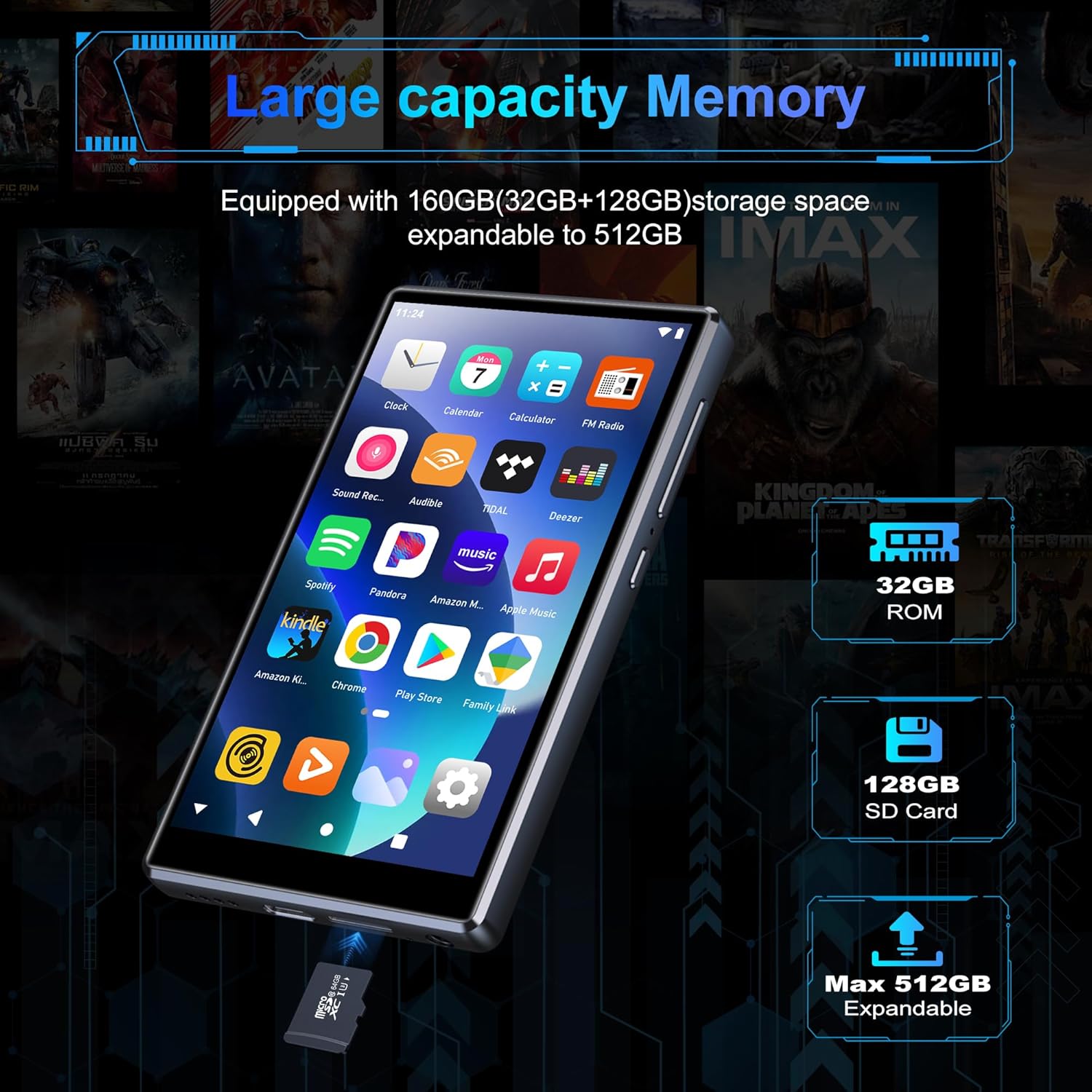
Image: Inserting an SD card for memory expansion.
የአሠራር መመሪያዎች
1. መሰረታዊ ዳሰሳ
The SWOFY D26 operates like a standard Android device. Use touch gestures (tap, swipe, pinch) to navigate menus, open apps, and control media playback.
2. ከ Wi-Fi ጋር በመገናኘት ላይ
- ወደ ሂድ ቅንብሮች > አውታረ መረብ እና በይነመረብ > ዋይ ፋይ.
- Wi-Fi ቀይር On.
- ከዝርዝሩ ውስጥ የሚፈልጉትን አውታረ መረብ ይምረጡ እና ከተጠየቁ የይለፍ ቃሉን ያስገቡ።
- The device supports dual-band Wi-Fi (2.4GHz and 5GHz) for stable connections.
3. የብሉቱዝ ማጣመር
Connect your SWOFY D26 to Bluetooth headphones, speakers, or car stereo systems.
- ወደ ሂድ ቅንብሮች > የተገናኙ መሣሪያዎች > ብሉቱዝ.
- ብሉቱዝን ቀያይር On.
- የብሉቱዝ መለዋወጫዎ በማጣመር ሁነታ ላይ መሆኑን ያረጋግጡ።
- ለማጣመር ከሚገኙት መሳሪያዎች ዝርዝር ውስጥ መለዋወጫውን ይምረጡ።

Image: Bluetooth connectivity for audio playback.
4. የሙዚቃ መልሶ ማጫወት
The device supports various audio formats including MP3, OGG, FLAC, AAC, WAV, WMA, and APE. You can play music stored locally or stream from pre-installed apps.
- አካባቢያዊ Files: Use the pre-installed music player app to browse and play audio files stored on the device or SD card.
- የዥረት መተግበሪያዎች፡- Access Spotify, Amazon Music, Deezer, Pandora, HIBY, and other streaming services via their respective apps.

Image: Enjoying music with the SWOFY D26 MP3 Player.
5. የቪዲዮ መልሶ ማጫወት
The 4.7-inch HD screen supports 720p and 1280p video playback. Supported formats include AVI, MKV, RMVB, MP4, MPG, MOV, DAT, and TS.
- Use the pre-installed video player app to watch videos stored on the device or SD card.
- Download video streaming apps from the Play Store for online content.
6. የመተግበሪያ አስተዳደር
The device comes with several popular apps pre-installed. You can download more apps via Wi-Fi from the Google Play Store or uninstall unnecessary ones.

Image: Pre-installed applications on the SWOFY D26.
- መተግበሪያዎችን ጫን Open the Google Play Store app, search for your desired app, and tap "Install."
- መተግበሪያዎችን አራግፍ፡ ወደ ሂድ ቅንብሮች > መተግበሪያዎች, select the app, and tap "Uninstall."
7. የወላጅ ቁጥጥሮች
Utilize the parental control features to manage app access and screen time for children.
- Access parental control settings through the device's ቅንብሮች ምናሌ.
- You can restrict app installations, remove pre-installed apps, set a reset lock, and control internet and music player usage duration.
8. ኤፍኤም ሬዲዮ
The device includes a built-in FM radio. Connect wired headphones (acting as an antenna) to use this feature.
- ባለገመድ የጆሮ ማዳመጫዎችን ይሰኩ።
- Open the FM Radio app.
- Scan for available stations.
ጥገና
1. ማጽዳት
To clean the device, use a soft, dry, lint-free cloth. Avoid using harsh chemicals, cleaning solvents, or abrasive materials, as these can damage the screen or finish.
2. የባትሪ እንክብካቤ
The SWOFY D26 is equipped with a 2500mAh lithium battery. To maximize battery life:
- በተደጋጋሚ ባትሪውን ሙሉ በሙሉ ከመሙላት ይቆጠቡ።
- መሳሪያውን ለከፍተኛ ሙቀት (ሙቅ ወይም ቀዝቃዛ) አያጋልጡት.
- መሳሪያው ሙሉ በሙሉ ቻርጅ ከተደረገ በኋላ ቻርጀሩን ይንቀሉት።
- Expected battery life: Up to 60 hours music playback, 10 hours video playback, 240 hours standby.

Image: Battery capacity and estimated usage times.
3. የሶፍትዌር ዝመናዎች
Periodically check for software updates to ensure optimal performance and access to new features. Connect to Wi-Fi and go to ቅንብሮች > ስርዓት > የስርዓት ዝመና.
መላ መፈለግ
If you encounter issues with your SWOFY D26 MP3 Player, refer to the following common solutions:
| ችግር | መፍትሄ |
|---|---|
| መሣሪያው አይበራም። | Ensure the device is charged. Connect to a charger for at least 30 minutes. If unresponsive, perform a hard reset by holding the power button for 10-15 seconds. |
| የWi-Fi ግንኙነት ችግሮች። | Check if Wi-Fi is enabled in settings. Ensure the password is correct. Restart the device and your Wi-Fi router. Try connecting to a different Wi-Fi network. |
| የብሉቱዝ ማጣመር አለመሳካት። | Ensure Bluetooth is enabled on both devices and the accessory is in pairing mode. Move devices closer. Restart both devices. |
| መተግበሪያዎች እየተበላሹ ወይም እየቀዘቀዙ። | የመተግበሪያውን መሸጎጫ እና ውሂቡን ያጽዱ ቅንብሮች > መተግበሪያዎች. Uninstall and reinstall the app. Ensure sufficient storage space is available. |
| ደካማ የድምጽ ጥራት። | Check headphone connection or Bluetooth connection. Test with different headphones or speakers. Ensure audio files are not corrupted. Adjust equalizer settings if available. |
ዝርዝሮች
| ባህሪ | ዝርዝር |
|---|---|
| የሞዴል ስም | ዲ26 |
| ስርዓተ ክወና | አንድሮይድ 13.0 |
| ፕሮሰሰር | 8-ኮር ፕሮሰሰር |
| ራም | 4 ጊባ |
| የውስጥ ማከማቻ (ሮም) | 32 ጊባ |
| የተካተተ የኤስዲ ካርድ | 64 ጊባ |
| ከፍተኛ ሊሰፋ የሚችል ማከማቻ | Up to 1 TB (via microSD card) |
| የስክሪን መጠን | 4.7 ኢንች |
| የማያ ጥራት | 720 * 1280 (HD Touchscreen) |
| ግንኙነት | Dual-band Wi-Fi (2.4GHz & 5GHz), Bluetooth |
| የባትሪ አቅም | 2500 ሚአሰ |
| የባትሪ ህይወት (ሙዚቃ) | እስከ 60 ሰዓታት ድረስ |
| የባትሪ ህይወት (ቪዲዮ) | እስከ 10 ሰዓታት ድረስ |
| የሚደገፉ የድምጽ ቅርጸቶች | MP3፣ OGG፣ FLAC፣ AAC፣ WAV፣ WMA፣ APE |
| የሚደገፉ የቪዲዮ ቅርጸቶች | AVI, MKV, RMVB, MP4, MPG, MOV, DAT, TS |
| ልዩ ባህሪያት | Built-in Speaker, FM Radio, Parental Controls |
| ቀለም | ጥቁር |
| ልኬቶች (L x W x H) | 11.9 x 6.7 x 1 ሴ.ሜ |
| ክብደት | 150 ግራም |

Image: Internal processor and RAM details.
ዋስትና እና ድጋፍ
The SWOFY D26 MP3 Player comes with a standard manufacturer's warranty. For specific warranty terms and conditions, please refer to the warranty card included in your package or contact SWOFY customer support.
For technical support, troubleshooting assistance, or any product-related inquiries, please visit the official SWOFY website or contact their customer service department. Contact information can typically be found on the product packaging or the SWOFY brand store page.
SWOFY Brand Store: Visit SWOFY Store on Amazon