
መግቢያ
This manual provides essential information for the safe and efficient operation of your SCULPFUN S9 PRO 10W Laser Engraver. The S9 PRO features 10W laser beam shaping technology, offering a 0.06mm ultra-fine laser focus for strong cutting penetration and precision. It is capable of cutting materials such as 15mm thick wood and 10mm acrylic, and engraving ceramics and stainless steel. Please read this manual thoroughly before use to ensure proper setup, operation, and maintenance.

የደህንነት መረጃ
Operating a laser engraver involves potential hazards. Adhere to all safety guidelines to prevent injury or damage.
- የዓይን መከላከያ; Always wear appropriate laser safety glasses when operating the machine. The integrated laser filter on the S9 PRO blocks 98% of ultraviolet light, allowing observation without additional safety glasses for bystanders, but direct laser exposure should always be avoided.
- የኃይል መቀየሪያ The machine is equipped with a secure power switch. Always turn off the machine when not in use or during maintenance.
- ደህንነቱ የተጠበቀ አቀማመጥ፡ Utilize the fastening holes on the four feet and frame structure to secure the machine and data cables, preventing accidental movement.
- የገጽታ ጥበቃ፡ Use the provided A4-sized steel pad to protect your work surface from laser damage.
- የአየር ማናፈሻ; Ensure adequate ventilation in your workspace to dissipate fumes produced during engraving and cutting.
- ተቀጣጣይ ቁሶች; Do not engrave or cut highly flammable materials without proper precautions.
- ልጆች እና የቤት እንስሳት; Keep children and pets away from the operating area. The laser point can attract attention, but direct exposure is dangerous.

የጥቅል ይዘቶች
ሲፈቱ ሁሉም ክፍሎች መገኘታቸውን ያረጋግጡ፡-
- 1 x SCULPFUN S9 Pro 10 W Laser Engraver
- A4-sized steel pad
- የኃይል አስማሚ
- የዩኤስቢ ገመድ
- የመሰብሰቢያ መሳሪያዎች
- የተጠቃሚ መመሪያ (ይህ ሰነድ)
የማዋቀር መመሪያ
1. ስብሰባ
The SCULPFUN S9 PRO features a fast assembly design, allowing for installation typically within 10 to 20 minutes. Follow the steps below:
- ደረጃ 1፡ Assemble the main frame components.
- ደረጃ 2፡ Attach the X-axis and laser module to the frame.
- ደረጃ 3፡ ሁሉንም አስፈላጊ ገመዶች ያገናኙ.
- ጨርስ፡ Ensure all connections are secure and the frame is stable.
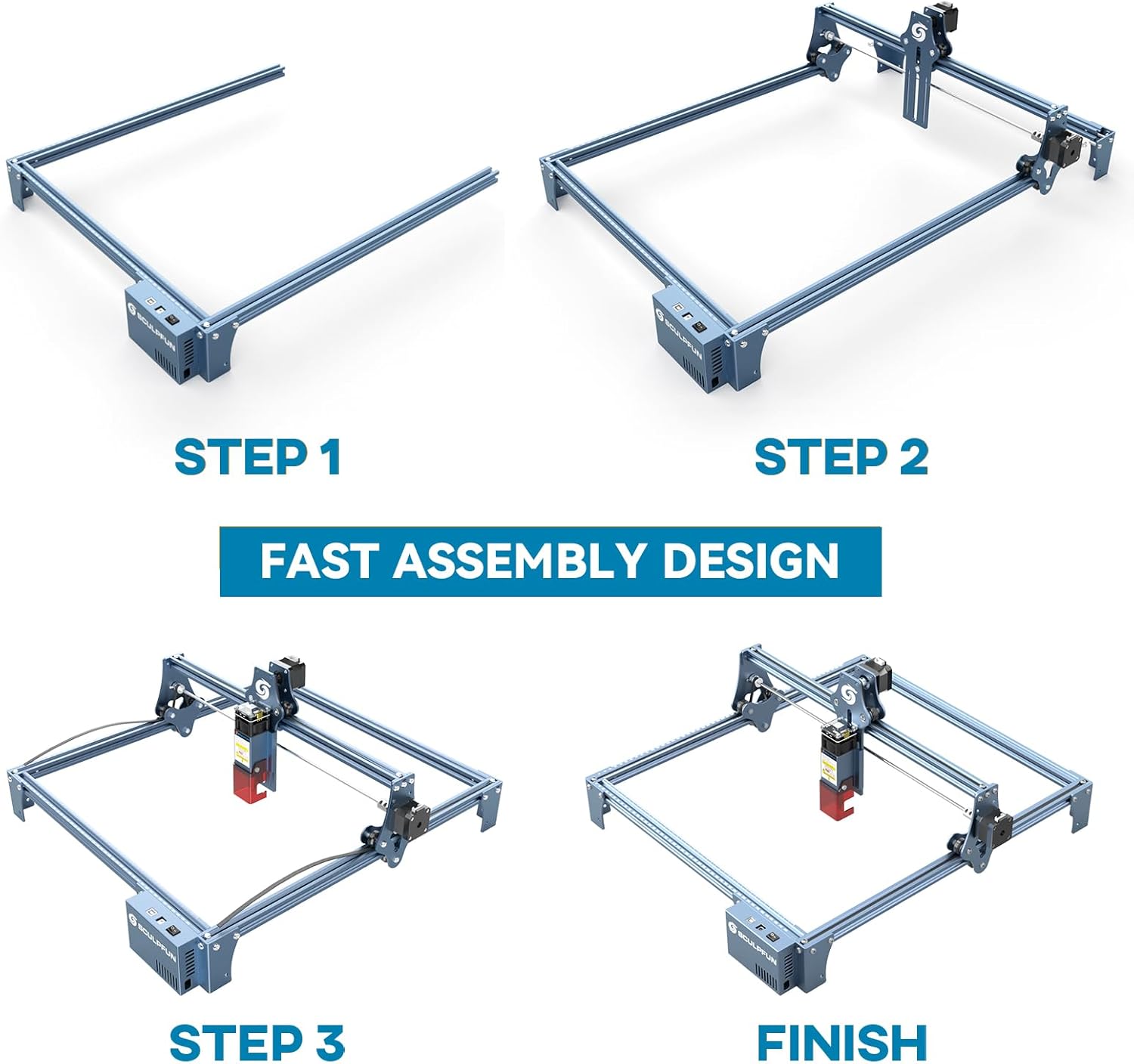
The full-metal structure enhances robustness and engraving accuracy. The X and Y axes include precise scale lines, forming a rectangular measuring ruler for quick object sizing.


2. የትኩረት ማስተካከያ
The S9 PRO features a quick fixed-focus design. The laser combines a fixed-focus lens with a sliding design for easy adjustment.
- Place the laser module over your material.
- Move the laser module up or down until the focus is achieved.
- Tighten the screws to secure the laser module in place.

የአሠራር መመሪያዎች
1. የሶፍትዌር ተኳሃኝነት
The SCULPFUN S9 PRO is compatible with various advanced engraving software:
- LaserGRBL (Windows)
- LightBurn (Windows, macOS, Linux)
- Benbox
- GrblController
- LiteFire
It supports engraving in PWM mode and various file formats including JPG, PNG, DXF, SVG, AI, G-code, NC, and BMP.

2. Material Capabilities
The 10W laser module provides strong cutting and engraving capabilities across a wide range of materials:
- መቁረጥ፡ Up to 15mm thick wood, 10mm black acrylic.
- መቅረጽ፡ Wood, leather, ceramics, stainless steel, aluminum oxide, PCB board, paper, cardboard, dark stone, and more.


3. General Operation Workflow
- ንድፍ፡ Create or import your design using compatible software (e.g., LightBurn, LaserGRBL).
- የቁሳቁስ አቀማመጥ፡- Place your material on the work surface, ensuring it is flat and secure. Use the integrated rulers for precise positioning.
- የትኩረት ማስተካከያ፡- Adjust the laser focus as described in the Setup section.
- የሶፍትዌር ቅንጅቶች Configure laser power, speed, and passes in your chosen software according to the material and desired effect. Refer to software documentation for detailed settings.
- ተግባርን ጀምር፡ Initiate the engraving or cutting process from the software. Monitor the machine during operation.
- ማጠናቀቅ፡ Once the process is complete, turn off the machine and carefully remove your finished piece.
ጥገና
Regular maintenance ensures optimal performance and extends the lifespan of your SCULPFUN S9 PRO.
- የሌዘር ሌንስን ያፅዱ፤ የሌዘር ትክክለኛነትን ለመጠበቅ የሌዘር ሌንሱን ለስላሳ፣ ከላስቲክ ነፃ በሆነ ጨርቅ እና የሌንስ ማጽጃ መፍትሄ በየጊዜው ያጽዱ።
- የሥራ ቦታውን ማጽዳት; Remove debris and dust from the engraving area after each use to prevent interference with machine movement.
- ቀበቶዎችን እና ትራሶችን ይመርምሩ; Check the drive belts for tension and wear. Keep the guide rails clean and lubricated if necessary to ensure smooth movement of the laser module.
- የጽኑዌር ዝማኔዎች ፦ Check the official SCULPFUN website for any available firmware updates to ensure your machine has the latest features and improvements.
መላ መፈለግ
ይህ ክፍል ሊያጋጥሙዎት የሚችሉ የተለመዱ ጉዳዮችን ይመለከታል።
- ሌዘር የማይተኮስ;
- Check if the power cable is securely connected and the power switch is on.
- Verify that the USB cable is connected to your computer and the machine.
- Ensure the software is correctly configured and sending commands.
- Check the laser module connection.
- ደካማ የተቀረጸ/የመቁረጥ ጥራት፡-
- Re-check the laser focus. An incorrect focus is a common cause of poor quality.
- Adjust laser power and speed settings in your software. Different materials require different settings.
- Ensure the material is flat and securely placed.
- የሌዘር ሌንስ ቆሻሻ መስሎ ከታየ ያጽዱ።
- Machine Not Moving Correctly:
- Check for any obstructions on the rails or belts.
- Ensure belts are properly tensioned and not slipping.
- Verify that all cables are securely connected.
- Restart the software and the machine.
- የሶፍትዌር ግንኙነት ችግሮች፡
- በሶፍትዌሩ ውስጥ ትክክለኛው የCOM ወደብ መመረጡን ያረጋግጡ።
- Try restarting your computer and the engraver.
- Reinstall the software or drivers if necessary.
For persistent issues, refer to the SCULPFUN support webጣቢያ ወይም የደንበኛ አገልግሎትን ያነጋግሩ።
ዝርዝሮች
| የምርት ስም | SCULPFUN |
| የሞዴል ቁጥር | S9PRO10W-ELE |
| ሌዘር ኃይል | 10W (Diode Laser) |
| ሌዘር ትኩረት | 0.06mm (Ultrafine) |
| የተቀረጸ ትክክለኛነት | 0.01 ሚሜ |
| የተቀረጸ አካባቢ | 400 x 410 ሚ.ሜ |
| የኃይል ምንጭ | AC |
| የጥቅል ልኬቶች | 61.79 x 38.4 x 13.4 ሴ.ሜ |
| የጥቅል ክብደት | 4.95 ኪ.ግ |
| የተካተቱ አካላት | 1 x SCULPFUN S9 Pro 10 W laser engraver |
| የሶፍትዌር ተኳሃኝነት | LaserGRBL, LightBurn, Benbox, GrblController, LiteFire |
| የሚደገፍ ስርዓተ ክወና | ዊንዶውስ ፣ ማክሮስ ፣ ሊኑክስ |
| የሚደገፍ File ቅርጸቶች | JPG, PNG, DXF, SVG, AI, G-code, NC, BMP |
ዋስትና እና ድጋፍ
For warranty information, technical support, or service inquiries, please contact SCULPFUN customer support through their official webምርቱ የተገዛበት ጣቢያ ወይም ቸርቻሪ። የግዢ ደረሰኝዎን እንደ ግዢ ማረጋገጫ ያስቀምጡ።
አምራች፡ SCULPFUN
መጀመሪያ የሚገኝ ቀን፡- ህዳር 29፣ 2024