
1. መግቢያ
This manual provides essential information for the safe and effective operation of your MATRIX APS-4000B Programmable Bench AC Power Supply. The APS-4000B is a single-phase SPWM variable frequency AC power source designed for precise control of AC voltage, current, and frequency. It features a 700VA capacity, with output ranges of 0-150V/0-6A or 0-300V/0-3A, and a frequency range of 45-250Hz. Please read this manual thoroughly before use and retain it for future reference.
2. የደህንነት መረጃ
በመሳሪያው ላይ ጉዳት እና ጉዳት እንዳይደርስ ለመከላከል የሚከተሉትን የደህንነት ጥንቃቄዎች ሁልጊዜ ይከተሉ፡
- መሬት ላይ የኤሌክትሪክ ንዝረትን ለመከላከል የኃይል አቅርቦቱ በትክክል መቆሙን ያረጋግጡ።
- የኃይል ምንጭ፡- Connect the unit to an AC power source within the specified voltage and frequency range (99-121 Vac, 47-63Hz).
- የአየር ማናፈሻ; Do not block the ventilation openings. Ensure adequate airflow around the unit to prevent overheating.
- አካባቢ፡ Operate the power supply in a dry environment, away from moisture, dust, and corrosive gases.
- አገልግሎት መስጠት፡ ሁሉንም የአገልግሎት ዓይነቶች ብቁ ለሆኑ ባለሙያዎች ይላኩ። ክፍሉን እራስዎ ለመክፈት ወይም ለመጠገን አይሞክሩ።
- የውጤት ግንኙነት፡- Ensure all output connections are secure before applying power.
3. የምርት ባህሪዎች
- የውጤት መግለጫዎች፡- Low range 0-150V/0-6A/0-700VA, High range: 0-300V/0-3A/0-700VA.
- ግቤት፡ Single phase 99-121 Vac, 47-63Hz.
- ጥራት፡ 0.1V/10mA
- ድግግሞሽ፡ 45-250Hz, step 0.1Hz.
- በይነገጽ፡ RS232C for remote control.
- ፒሲ ሶፍትዌር Free APS-4000 Series PC software provided for remote control via RS-232C.
- ከፍተኛ አስተማማኝነት; Utilizes advanced Direct Digital Frequency Synthesizer (DDS) waveform for high frequency stability and accurate measurements.
- Intelligent Analyzing Function: Automatically identifies failure causes and displays error codes.
- ለስላሳ ጅምር ተግባር፡ Prevents damage from instantaneous impulse current during power-on.
- የቁልፍ ሰሌዳ አቋራጮች Customizable shortcuts for 110V, 220V, 50Hz, 60Hz.
- Measuring Function: ማሳያዎች ጥራዝtage, current, frequency, power, and power factor.
- የማህደረ ትውስታ ተግባር Five sets of memory (M1-M5) to store commonly used voltage and frequency settings for quick recall.
- የቁልፍ መቆለፊያ ተግባር Prevents inadvertent changes to settings.
- የተጠቃሚ በይነገጽ፡ Push-down infinite coding knob switch for adjustments, 4-window 5-digit display.
- ነጠላ፥ Input and output are isolated for safety.
4. የጥቅል ይዘቶች
The package for the MATRIX APS-4000B Programmable AC Power Supply includes:
- 1 x MATRIX APS-4000B Programmable AC Power Supply
- 1 x RS-232C Cable
- 1 x የኃይል ገመድ
- 1 x የተጠቃሚ መመሪያ (ይህ ሰነድ)
5. ማዋቀር
Follow these steps to set up your power supply:
- ማሸግ፡ የኃይል አቅርቦቱን እና ሁሉንም መለዋወጫዎች ከማሸጊያው በጥንቃቄ ያስወግዱ። የጉዳት ምልክቶችን ይፈትሹ።
- አቀማመጥ፡- Place the unit on a stable, level surface with adequate ventilation space around it. Ensure the heat dissipation holes are not obstructed.
- መሬት ላይ Connect the ground terminal on the rear panel to a reliable earth ground using an appropriate wire.
- የኤሲ ግቤት ግንኙነት፡- Connect the provided power cord to the AC Input outlet on the rear panel and then to a suitable grounded AC power source.
- የግንኙነት ጭነት Connect your load to the Output jack on the rear panel. Ensure connections are secure and correct polarity is observed if applicable.
- RS-232C Connection (Optional): If using PC control, connect the RS-232C cable from the power supply's RS-232 port to your computer. Install the provided PC software.

ምስል 5.1: የኋላ ፓነል ግንኙነቶች
This image displays the rear panel connections of the power supply. Key components include the RS-232 serial port for PC communication, a heat dissipation fan, the main AC output jack, a fuse protection cover, a ground terminal for safety, and the AC input power outlet.
6. የአሠራር መመሪያዎች
This section details the basic operation of the MATRIX APS-4000B.

ምስል 6.1፡ የፊት ፓነል ላይview
The front panel features a multi-window digital display for voltage, current, power, and frequency. It includes control knobs for adjustment, various function buttons for settings and shortcuts, and the main power switch.
- ማብራት/ማጥፋት፡ Press the main POWER switch on the front panel to turn the unit on or off.
- Setting Output Parameters:
- Use the push-down infinite coding knob switch to navigate through the display parameters (Voltage, Current, Frequency).
- Press the knob to select a parameter, then rotate it to adjust the value. Press again to confirm or move to the next digit.
- The 4-window 5-digit display shows the set and measured values.
- የቁልፍ ሰሌዳ አቋራጮች Utilize the dedicated shortcut buttons for quick setting of common voltages (110V, 220V) and frequencies (50Hz, 60Hz). These can be self-assembled/configured.
- Memory Functions (M1-M5): The unit allows storing up to five sets of frequently used voltage (V) and frequency (F) settings. Refer to the detailed programming manual for saving and recalling these settings with a single key.
- የቁልፍ መቆለፊያ ተግባር To prevent accidental changes to settings, activate the Key LOCK function. This will disable the front panel controls. Refer to the display for 'LocH' status.
- ለስላሳ ጅምር ተግባር፡ The power supply incorporates a soft start function to protect both the unit and the load from sudden current surges upon activation.
- Measuring Function: The display provides real-time measurements of voltage (Vrms), current (Arms), frequency (Fre), power (Wattage), and power factor (PF).
- PC Software Control: For advanced control and automation, use the provided PC software. Connect via the RS-232C interface. The software supports commands in ASCII and HEX codes.
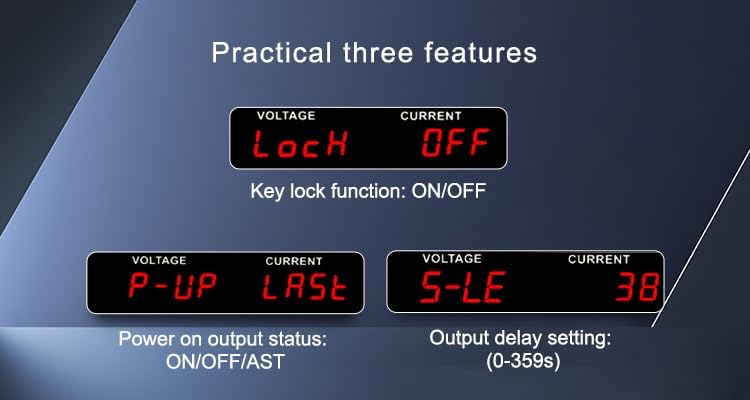
Figure 6.2: Practical Features Display
This image shows three practical features on the display: 'LocH' for Key Lock function (ON/OFF), 'P-UP' for Power On Output Status (ON/OFF/AST), and 'S-LE' for Output Delay Setting (0-359 seconds).
Video 6.3: APS-4000 Series Programmable AC Power Supplies Demonstration
This video provides a visual demonstration of the MATRIX APS-4000 Series Programmable AC Power Supplies, showcasing its features and operational aspects.
7. ጥገና
Proper maintenance ensures the longevity and reliable operation of your power supply:
- ማጽዳት፡ የቤቱን ውጫዊ ክፍል ለስላሳና ደረቅ ጨርቅ አዘውትረው ያጽዱ። የማጽጃ ማጽጃዎችን ወይም ሟሟቶችን አይጠቀሙ።
- የአየር ማናፈሻ; Keep the heat dissipation holes clear of dust and debris. Use compressed air to gently clean the fan area if necessary.
- ማከማቻ፡ When not in use for extended periods, store the power supply in a cool, dry place, protected from extreme temperatures and humidity.
- ፊውዝ መተካት፡ If the fuse blows, replace it only with a fuse of the same type and rating as specified in the specifications. Ensure the unit is disconnected from the main power before replacing the fuse.
8. መላ መፈለግ
ይህ ክፍል ለተለመዱ ጉዳዮች መመሪያ ይሰጣል። ውስብስብ ለሆኑ ችግሮች የቴክኒክ ድጋፍን ያነጋግሩ።
- ኃይል የለም፡ Check the power cord connection, the main power switch, and the fuse on the rear panel. Ensure the AC input voltage በተጠቀሰው ክልል ውስጥ ነው.
- ምንም ውጤት የለም፡ Verify that the output is enabled. Check for any active protection mechanisms (e.g., overcurrent, overload).
- ወቅታዊ ጥበቃ፡- If the load current exceeds the set limit, the output will be turned off, and an audible/visual alarm will activate. Reduce the load or increase the current limit if appropriate.

Figure 8.1: Overcurrent Protection Display
This image illustrates the power supply's display indicating an 'Overcurrent protection' status. When the load current exceeds the set limit, the output is automatically turned off, and an audible and visual alarm is activated.
- Intelligent Analyzing Function: The unit can automatically diagnose certain failures and display corresponding error codes. Consult the detailed programming manual for a list of error codes and their meanings.
- ትክክል ያልሆኑ ንባቦች; Ensure proper connections and calibration. If issues persist, contact support.
9. ዝርዝሮች
Detailed technical specifications for the MATRIX APS-4000B (700VA) model:

Figure 9.1: APS-4000 Series Specifications Overview
This table provides detailed technical specifications for the APS-4000 series, comparing models A, B, and C. It covers parameters such as capacity (VA), working mode, input and output voltage/current ranges, frequency, resolution, communication interface, protection features, and physical dimensions. Refer to the 'APS4000B' column for this specific model.
| መለኪያ | Value (APS-4000B) |
|---|---|
| የሞዴል ስም | APS-4000B |
| የምርት ስም | ማትሪክስ |
| የውጤት ዋትtage | 700 ዋት |
| የማቀዝቀዣ ዘዴ | አየር |
| የንጥል መጠኖች (L x W x H) | 14.6 x 17 x 6 ኢንች |
| የእቃው ክብደት | 41 ፓውንድ £ |
| አምራች | ማትሪክስ ቴክኖሎጂ Inc. |
| Mfr ክፍል ቁጥር | APS-4000B-110VIN |
| አብሮ የተሰራ ሚዲያ | Programmable AC Power Supply, RS-232 cable |
| የግቤት ደረጃ | Single Phase (1∅2W) |
| ግብዓት Voltage | 99-121 ቪ |
| የግቤት ድግግሞሽ | 47-63Hz |
| የውጤት ቁtagሠ ክልል | 0-150VAC / 0-300VAC (Auto) |
| Output Current (L=120V) | 6A |
| Output Current (H=240V) | 3A |
| የውጤት ድግግሞሽ ክልል | 45-250Hz (0.1 Step) |
| ጥራዝtagሠ ጥራት | 0.1 ቪ |
| የአሁኑ ጥራት | 10mA |
| የድግግሞሽ ጥራት | 0.1Hz |
| የግንኙነት በይነገጽ | RS-232C |
| የክወና አካባቢ | 0-40℃, 20-80% RH |
10. ዋስትና እና ድጋፍ
ዋስትና፡- The MATRIX APS-4000B Programmable Bench AC Power Supply comes with a 3-year warranty from the date of purchase. This warranty covers defects in materials and workmanship under normal use.
ድጋፍ፡ For technical assistance, troubleshooting, or warranty claims, please contact MATRIX TECHNOLOGY INC. OFFICIAL STORE. Our dedicated support team is available to provide assistance and ensure your satisfaction with MATRIX products.