
1. መግቢያ
This manual provides essential information for the safe and efficient operation, installation, and maintenance of your Durastar DRTHC122XNA1 Through-the-Wall Air Conditioner. Please read these instructions thoroughly before installation and use, and retain them for future reference.
2. የደህንነት መረጃ
ጠቃሚ የደህንነት መመሪያዎች፡-
- Always connect the unit to a properly grounded electrical outlet with the correct voltagሠ (208V/230V)።
- Do not operate the unit with a damaged power cord or plug. If the cord is damaged, it must be replaced by qualified service personnel.
- Ensure the unit is installed securely in a wall opening according to local electrical and building codes.
- Do not block air intake or exhaust vents. Maintain clear space around the unit for proper airflow.
- Turn off and unplug the unit before performing any maintenance or cleaning.
- በሚሠራበት ጊዜ ልጆችን እና የቤት እንስሳትን ከክፍሉ ያርቁ።
- ክፍሉን እራስዎ ለመጠገን ወይም ለመለወጥ አይሞክሩ. ሁሉንም አገልግሎቶች ብቁ ለሆኑ ባለሙያዎች ያመልክቱ።
3. ምርት አብቅቷልview
The Durastar DRTHC122XNA1 is a 12,000 BTU through-the-wall air conditioner designed for cooling and supplemental heating. It features a remote control for convenient operation.
ቁልፍ አካላት፡-
- የአየር ማቀዝቀዣ ክፍል
- የርቀት መቆጣጠሪያ
- Air Filter (internal)
ባህሪያት፡
- 12,000 BTU የማቀዝቀዣ አቅም
- 10,600 BTU Supplemental Heating Capacity
- Covers areas of approximately 450-550 sq. ft.
- Multiple operating modes: Cool, Heat, Fan, Dry, Auto
- የሚስተካከሉ የአየር ማራገቢያ ፍጥነቶች
- ፕሮግራም የሚሠራ ሰዓት ቆጣሪ
- የእንቅልፍ ሁነታ
- የርቀት መቆጣጠሪያ ተግባር
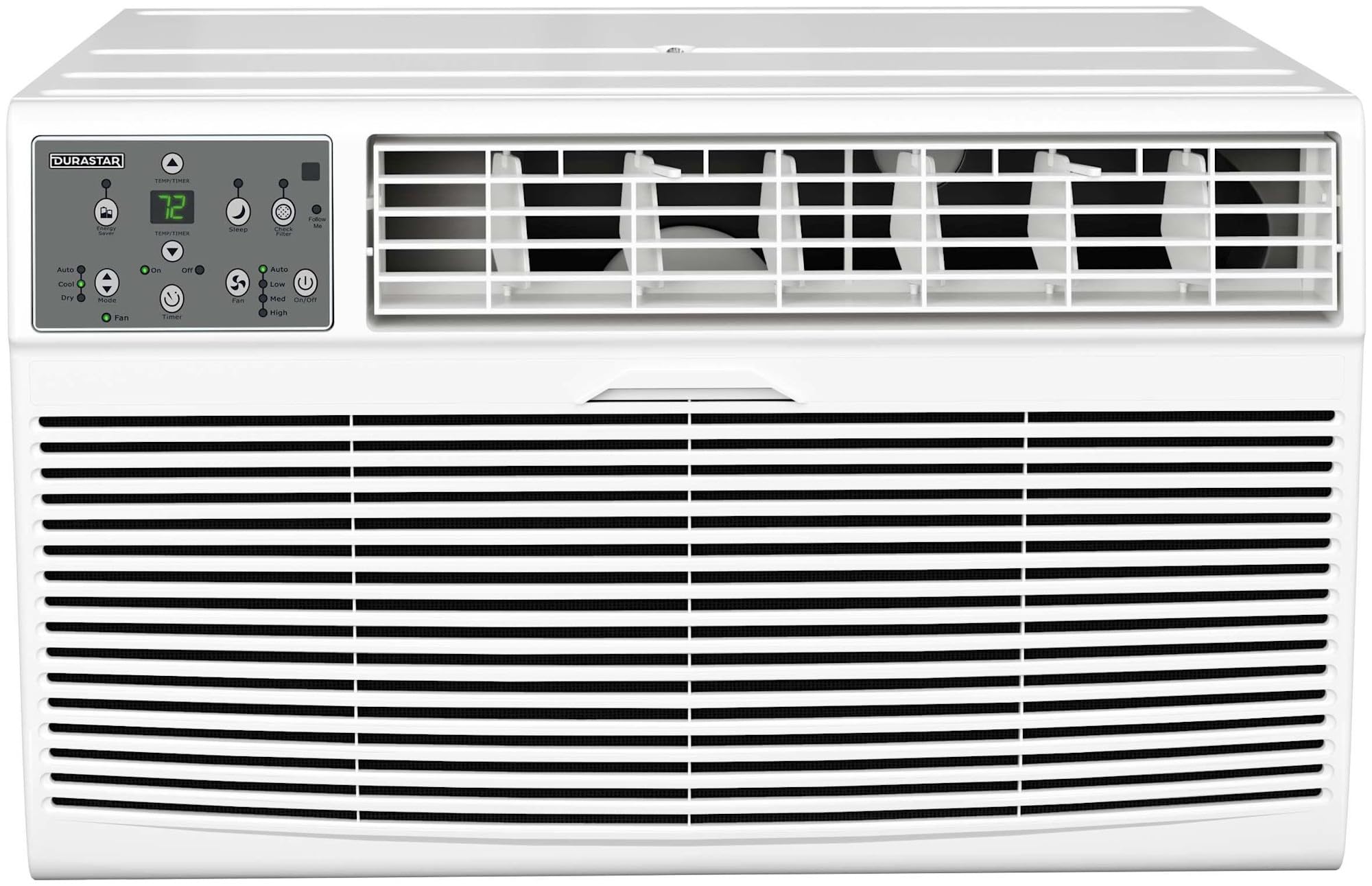
ምስል 3.1፡ ፊት view of the Durastar DRTHC122XNA1 Through-the-Wall Air Conditioner unit.

Image 3.2: The remote control for the Durastar DRTHC122XNA1 Air Conditioner, showing various function buttons and the display.
4. ማዋቀር እና መጫን
The DRTHC122XNA1 is designed for through-the-wall installation. A wall sleeve (Durastar DRWTCSLV) is required and sold separately for proper installation. Professional installation is recommended.
4.1 የጣቢያ ምርጫ
- Choose a wall location that can support the unit's weight (approximately 75 lbs).
- Ensure there are no obstructions to airflow both inside and outside the room.
- The unit requires a dedicated 208V / 230V electrical outlet with a NEMA 6-20P plug type. Ensure the outlet is within reach of the power cord.

Image 4.1: The air conditioner installed in a wall, showing the required NEMA 6-20P electrical plug type and unit dimensions.
4.2 Wall Opening Dimensions
The unit dimensions are approximately 20.25 inches (Depth) x 24.25 inches (Width) x 14.5 inches (Height). The wall opening should accommodate these dimensions, along with the wall sleeve if used, ensuring a snug fit and proper sealing to prevent air leakage.

ምስል 4.2፡ ውጫዊ view of the air conditioner installed through a wall, demonstrating proper outdoor clearance.
4.3 የኤሌክትሪክ ግንኙነት
This unit operates on 208V / 230V AC power. It comes with a NEMA 6-20P plug. Ensure your electrical circuit and outlet are compatible and properly grounded. Do not use extension cords or adapter plugs.
5. የአሠራር መመሪያዎች
The unit can be operated using the control panel on the unit or the included remote control.
5.1 የርቀት መቆጣጠሪያ ተግባራት
- አብራ/አጥፋ፡ ክፍሉን ያበራል ወይም ያጠፋል።
- አቅጣጫዎች: ዑደቶች በክወና ሁነታዎች፡- ራስ-ሰር፣ አሪፍ፣ ደረቅ፣ ሙቀት፣ ደጋፊ።
- የሙቀት መጠን ▲/▼፡ የሚፈለገውን የሙቀት መጠን ያስተካክላል.
- የደጋፊዎች ፍጥነት: Selects fan speed: High, Medium, Low, Auto.
- ሰዓት ቆጣሪ በርቷል/ ጠፍቷል፡ Sets the unit to turn on or off automatically after a set period.
- እንቅልፍ፡ ለፀጥታ አሠራር እና በእንቅልፍ ጊዜ ኃይል ለመቆጠብ የእንቅልፍ ሁነታን ያነቃቃል።
- ተከተሉኝ፡ Allows the remote control to act as a thermostat, sensing the temperature at its location.
- ℃/℉ በሴልሺየስ እና ፋራናይት መካከል የሙቀት ማሳያን ይቀያይራል።
- የ LED ማሳያ የዩኒቱን የ LED ማሳያ ያበራል ወይም ያጠፋል።
- ኢነርጂ ቆጣቢ፡- Activates energy-saving features.
5.2 የአሠራር ሁነታዎች
- አሪፍ ሁነታ፡ ማቀዝቀዣን ይሰጣል። የሚፈለገውን የሙቀት መጠን እና የማራገቢያ ፍጥነት ያዘጋጁ።
- ሙቀት ሁነታ: Provides supplemental heating. Set desired temperature and fan speed.
- የደጋፊ ሁነታ፡ አየርን ሳይቀዘቅዝ ወይም ሳይሞቅ ያሰራጫል። የሚፈለገውን የማራገቢያ ፍጥነት ይምረጡ።
- ደረቅ ሁኔታ በክፍሉ ውስጥ ያለውን እርጥበት ይቀንሳል. የአየር ማራገቢያ ፍጥነት በራስ-ሰር ቁጥጥር ይደረግበታል።
- AUTO ሁነታ፡ The unit automatically selects cooling, heating, or fan-only operation based on the room temperature and your set temperature.
6. ጥገና
Regular maintenance ensures optimal performance and extends the lifespan of your air conditioner. Always unplug the unit before cleaning or servicing.
6.1 የአየር ማጣሪያ ማጽዳት
የአየር ማጣሪያው እንደ አጠቃቀሙ እና የአየር ጥራት በየሁለት ሳምንቱ ወይም ከዚያ በላይ በተደጋጋሚ ማጽዳት አለበት.
- የመሳሪያውን የፊት ፓነል ይክፈቱ።
- የአየር ማጣሪያውን በጥንቃቄ ያስወግዱ.
- ማጣሪያውን በሞቀ, በሳሙና ውሃ ያጠቡ. በደንብ ያጠቡ.
- Allow the filter to air dry completely before reinstalling. Do not expose to direct sunlight or heat.
- ደረቅ ማጣሪያውን እንደገና ያስገቡ እና የፊት ፓነልን ይዝጉ።
6.2 የውጭ ጽዳት
የክፍሉን ውጫዊ ገጽታ ለስላሳ, መamp cloth. Do not use harsh cleaners, waxes, or polishes that could damage the finish or internal components.
6.3 ወቅታዊ ማከማቻ
If the unit will not be used for an extended period, clean the air filter and ensure the unit is dry. Store the unit in a dry, protected area.
7. መላ መፈለግ
የደንበኛ ድጋፍን ከማነጋገርዎ በፊት, እንደገናview የሚከተሉት የተለመዱ ጉዳዮች እና መፍትሄዎች.
| ችግር | ሊሆን የሚችል ምክንያት | መፍትሄ |
|---|---|---|
| ክፍል አይበራም። | ኃይል የለም፤ የኃይል ገመድ ተነቅሏል፤ የወረዳ መቆራረጫ ተሰናክሏል | Check power connection; Ensure plug is fully inserted; Reset circuit breaker |
| በቂ ያልሆነ ማቀዝቀዣ / ማሞቂያ | Dirty air filter; Temperature setting too high/low; Blocked air vents; Room size exceeds capacity | Clean air filter; Adjust temperature setting; Clear obstructions; Ensure unit matches room size |
| ያልተለመደ ጫጫታ | ልቅ ክፍሎች፤ ክፍሉ ደረጃ የለውም፤ በማራገቢያ ውስጥ ያሉ ፍርስራሾች | Check for loose components; Ensure unit is level; Inspect for debris (unplug first) |
| የርቀት መቆጣጠሪያ አይሰራም | የሞቱ ባትሪዎች፤ በርቀት መቆጣጠሪያ እና በመሳሪያ መካከል እንቅፋት | Replace batteries; Remove obstructions; Ensure remote is pointed at the unit |
8. ዝርዝሮች
| ዝርዝር መግለጫ | ዝርዝር |
|---|---|
| የሞዴል ቁጥር | DRTHC122XNA1 |
| የማቀዝቀዝ አቅም | 12,000 BTU |
| የማሞቂያ አቅም | 10,600 BTU (ተጨማሪ) |
| ሽፋን አካባቢ | 450-550 ካሬ. Ft. |
| ጥራዝtage | 208V / 230V |
| ዋትtage | 1495 ዋት |
| የእቃው ክብደት | 75 ፓውንድ |
| የምርት ልኬቶች (D x W x H) | 20.25 x 24.25 x 14.5 ኢንች |
| የድምፅ ደረጃ | 65.4 ዲሴብል |
| የመጫኛ ዘዴ | ግድግዳው በኩል |
| ልዩ ባህሪያት | የርቀት ቁጥጥር |
| ቀለም | ነጭ |
9. የዋስትና መረጃ
This Durastar DRTHC122XNA1 Air Conditioner comes with a የ 2 ዓመት የአምራች ዋስትና. Please refer to the warranty documentation included with your product for specific terms, conditions, and registration details. Keep your proof of purchase for warranty claims.
10. የደንበኛ ድጋፍ
For technical assistance, troubleshooting beyond this manual, or warranty inquiries, please contact Durastar customer support. Visit the official Durastar webበጣም ወቅታዊ የእውቂያ መረጃ እና የድጋፍ ምንጮች ለማግኘት ጣቢያ.
Durastar Official Webጣቢያ፡ Visit the Durastar Store on Amazon


