
1. የደህንነት መረጃ
Please read and understand all safety information before operating this multimeter. Failure to follow these instructions may result in electric shock, fire, or damage to the meter or the equipment under test.
- የሙከራ ሊዶቹ በጥሩ ሁኔታ ላይ መሆናቸውን እና በአግባቡ መገናኘታቸውን ሁልጊዜ ያረጋግጡ።
- ጥራዝ አይጠቀሙtagለቆጣሪው ከፍተኛ ደረጃ የተሰጣቸውን እሴቶች የሚበልጥ ኢ ወይም ጅረት።
- ከቮል ጋር ሲሰሩ ጥንቃቄ ያድርጉtagከ30V AC RMS በላይ፣ 42V ጫፍ፣ ወይም 60V ዲሲ። እነዚህ ጥራዝtagአስደንጋጭ አደጋ ይፈጥራል።
- Before measuring current, ensure the circuit is de-energized and the meter is connected in series.
- ተግባራትን ከመቀየርዎ በፊት, በፈተና ውስጥ ካለው ወረዳ ውስጥ የሙከራ መሪዎችን ያላቅቁ.
- ቆጣሪው ተጎድቶ ከታየ ወይም የባትሪው ሽፋን በትክክል ካልተዘጋ አያንቀሳቅሱ።
- የባትሪው ዝቅተኛ አመልካች ሲታይ ባትሪውን ወዲያውኑ ይተኩ።
- የአካባቢ እና የሀገር ደህንነት ኮዶችን ያክብሩ።
2. ምርት አብቅቷልview
The UOFKIPBA DT-118 is a compact, auto-ranging digital multimeter designed for high-precision measurements in industrial, automotive, and household applications. It features an automatic digital display and a durable design.
2.1 ክፍሎች
Familiarize yourself with the main components of your DT-118 multimeter:
- LCD ማሳያ፡- የመለኪያ ንባቦችን፣ አሃዶችን እና የተግባር አመልካቾችን ያሳያል።
- የሮታሪ ማብሪያ/ማጥፊያ ተግባር፡ የሚፈለገውን የመለኪያ ተግባር (ጥራዝ) ለመምረጥ ጥቅም ላይ ይውላልtage, Current, Resistance, etc.) and to turn the meter OFF.
- የግቤት ጃክሶች፡- የሙከራ መስመሮችን ለማገናኘት ተርሚናሎች።
- MODE አዝራር፡- በአንድ ተግባር ውስጥ ባሉ የተለያዩ የመለኪያ ሁነታዎች መካከል ይቀያይራል (ለምሳሌ፣ AC/DC vol)tagሠ) ፡፡
- ያዝ ቁልፍ፡ የአሁኑን የማሳያ ንባብ ያቀዘቅዛል።
- Backlight Button (Light Bulb Icon): የማሳያውን የኋላ መብራት ያነቃቃል ወይም ያቦዝናል።

ምስል 2.1: የፊት view of the UOFKIPBA DT-118 Digital Multimeter, showing the display, rotary switch, and function buttons.

Figure 2.2: The DT-118 multimeter displaying "0.00 mA", highlighting its automatic digital display capability for household use.
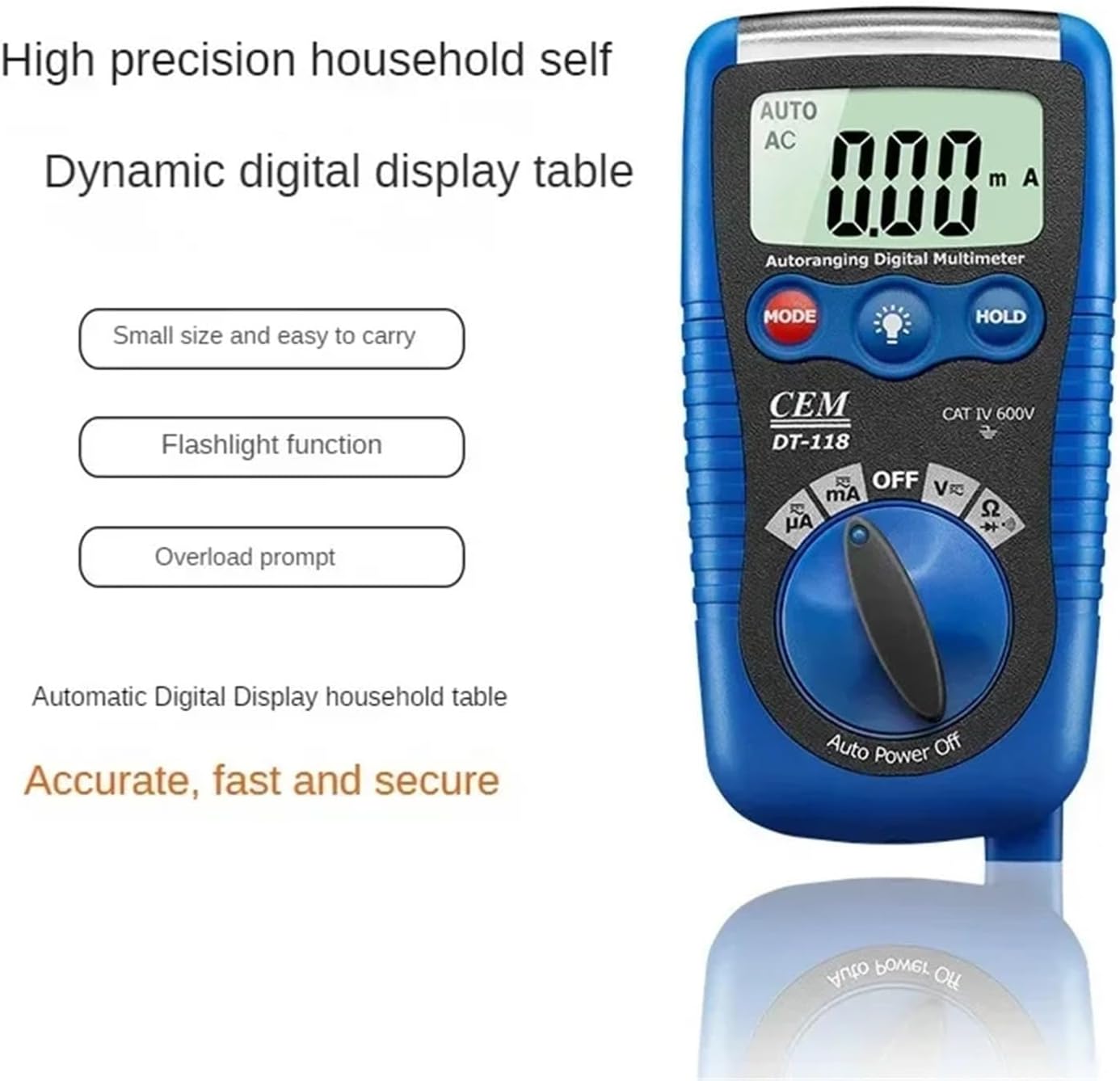
Figure 2.3: The DT-118 multimeter emphasizing its features: small size, easy to carry, flashlight function, and overload prompt for accurate, fast, and secure measurements.
3. ማዋቀር
3.1 የባትሪ ጭነት
The DT-118 multimeter requires batteries for operation. Follow these steps to install or replace the batteries:
- መልቲሜትሩ መጥፋቱን ያረጋግጡ እና ሁሉንም የሙከራ መሪዎችን ያላቅቁ።
- የባትሪውን ክፍል ሽፋን በሜትር መለኪያው ጀርባ ላይ ያግኙት።
- ሽፋኑን የሚሸፍኑትን ዊንጮች (ዊንች) ለማላላት ዊንች ይጠቀሙበት።
- Remove the cover and insert new batteries, observing the correct polarity (+ and -).
- የባትሪውን ክፍል ክዳን ይተኩ እና ዊንጮቹን(ዎችን) ያጥብቁ።
3.2 የማገናኘት የሙከራ እርሳሶች
ለትክክለኛ እና ደህንነቱ የተጠበቀ መለኪያዎች የፈተና ሊዶች ትክክለኛ ትስስር ወሳኝ ነው።
- ጥቁር የሙከራ ሊዱን ወደ "COM" (Common) የግቤት መሰኪያ ውስጥ ያስገቡ።
- ለአብዛኛዎቹ መለኪያዎች (ጥራዝtage, Resistance, Diode, Continuity, small Current), insert the red test lead into the "VΩmA" input jack.
- For high current measurements (if applicable and supported by the model), refer to the specific input jack labeled for higher current (e.g., "10A" or "20A"). The DT-118 typically uses a single mA input for current.

Figure 3.1: The DT-118 multimeter with its red and black test leads properly connected to the input jacks, ready for use.
4. ኦፕሬሽን
This section describes how to use the DT-118 multimeter for various measurements.
4.1 መለካት DC Voltagኢ (ቪ=)
- Turn the rotary switch to the "V" position. The meter will automatically select DC voltage. If it defaults to AC, press the MODE button to switch to DC.
- የቀይ ሙከራ መሪውን ከወረዳው አወንታዊ (+) ጎን እና ጥቁር ፈተናውን ወደ አሉታዊ (-) ጎን ያገናኙ።
- ጥራዝ ያንብቡtagበኤልሲዲ ማሳያ ላይ ኢ እሴት።
4.2 AC ቮልtagሠ (V~)
- Turn the rotary switch to the "V" position. The meter will automatically select AC voltage. If it defaults to DC, press the MODE button to switch to AC.
- የሚለኩትን ወረዳ ወይም ክፍል ላይ የሙከራ ሽቦዎችን ያገናኙ።
- ጥራዝ ያንብቡtagበኤልሲዲ ማሳያ ላይ ኢ እሴት።
4.3 መቋቋምን መለካት (Ω)
- የመቋቋም አቅምን ከመለካትዎ በፊት ወረዳው ኃይል መሟጠጡን ያረጋግጡ።
- Turn the rotary switch to the "Ω" position.
- የሙከራ ገመዶቹን የመቋቋም አቅማቸውን መለካት በሚፈልጉት አካል ላይ ያገናኙ።
- በ LCD ማሳያ ላይ ያለውን የመቋቋም ዋጋ ያንብቡ.
4.4 Measuring Current (mA)
ጥንቃቄ፡- መልቲሜትርን ከቮል ጋር በትይዩ በጭራሽ አያገናኙtagየኤሌክትሪክ ጅረትን በሚለኩበት ጊዜ ምንጭ፣ ምክንያቱም ይህ ቆጣሪውን እና ወረዳውን ሊጎዳ ይችላል።
- ወረዳው ከኃይል መሟጠጡን ያረጋግጡ።
- Turn the rotary switch to the "mA" position. Press MODE to select AC or DC current if necessary.
- Break the circuit and connect the multimeter in series with the load. The current must flow through the meter.
- Re-energize the circuit and read the current value on the LCD display.
4.5 የዳይኦድ ሙከራ (→|) and Continuity Test (🔊)
- ወረዳው ከኃይል መሟጠጡን ያረጋግጡ።
- Turn the rotary switch to the "Ω" position. Press the MODE button until the diode symbol (→|) or continuity symbol (🔊) በማሳያው ላይ ይታያል።
- የዲዲዮ ሙከራ: የቀይውን እርሳስ ወደ አኖድ እና ጥቁር መሪውን ከዲዲዮው ካቶድ ጋር ያገናኙ. ወደፊት ጥራዝtage drop will be displayed. Reverse the leads; an "OL" (Open Loop) or very high reading indicates a good diode.
- ቀጣይነት ያለው ፈተና፡- Connect the test leads across the component or wire. If there is continuity (low resistance), the meter will emit an audible beep.
5. ጥገና
Proper maintenance ensures the longevity and accuracy of your DT-118 multimeter.
5.1 ጽዳት
- Disconnect the meter from all circuits and turn it OFF.
- መያዣውን በማስታወቂያ ይጥረጉamp ጨርቅ እና መለስተኛ ሳሙና። ማጽጃዎችን ወይም ማሟሟቶችን አይጠቀሙ።
- ከመጠቀምዎ በፊት ቆጣሪው ሙሉ በሙሉ ደረቅ መሆኑን ያረጋግጡ።
5.2 የባትሪ መተካት
When the low battery indicator appears on the display, replace the batteries as described in Section 3.1. Always use the specified battery type.
5.3 ፊውዝ መተካት
If the current measurement function stops working, the fuse may need replacement. Refer to the specifications for the correct fuse type and rating. Fuse replacement typically involves opening the back case of the meter (similar to battery replacement) and carefully replacing the blown fuse with a new one of the exact same rating.
ማስጠንቀቂያ፡- Always replace fuses with those of the specified type and rating to prevent damage to the meter or personal injury.
6. መላ መፈለግ
This section addresses common issues you might encounter with your DT-118 multimeter.
| ችግር | ሊሆን የሚችል ምክንያት | መፍትሄ |
|---|---|---|
| ሜትር አይበራም። | የሞቱ ወይም በስህተት የተጫኑ ባትሪዎች። | የባትሪውን ዋልታ ያረጋግጡ; ባትሪዎችን ይተኩ. |
| "OL" (ከመጠን በላይ ጭነት) ይታያል። | Measurement exceeds meter's range; open circuit. | Select a higher range (if not auto-ranging); check for open circuit in resistance/continuity. |
| Incorrect readings. | Wrong function selected; poor test lead connection; low battery. | Verify function selection; ensure leads are firmly connected; replace batteries. |
| የአሁኑ መለኪያ አይሰራም. | Blown fuse; incorrect connection (not in series). | Check and replace fuse (Section 5.3); ensure meter is connected in series with the load. |
7. ዝርዝሮች
The following are the general specifications for the UOFKIPBA DT-118 Digital Multimeter. Specific ranges and accuracies may vary slightly.
- ሞዴል፡ DT-118
- ማሳያ፡- Automatic Digital Display
- የደህንነት ደረጃ ድመት IV 600V
- ዲሲ ጥራዝtage: Range typically up to 600V
- ኤሲ ጥራዝtage: Range typically up to 600V
- የዲሲ ወቅታዊ፡ Range typically up to 200mA
- AC የአሁን፡ Range typically up to 200mA
- መቋቋም፡ Range typically up to 20MΩ
- የዲዲዮ ሙከራ: አዎ
- ቀጣይነት ያለው ፈተና፡- አዎ (ከማጉላት ጋር)
- ኃይል፡- Battery operated (specific type not provided, assume common multimeter batteries like AAA or 9V)
- መጠኖች፡- Approximately 1.18 x 0.79 x 0.39 inches (Package Dimensions, actual product might be slightly different but gives an idea of compact size)
- ክብደት፡ በግምት 1.76 አውንስ (50 ግራም)
- ባህሪያት፡ Auto-ranging, Data Hold, Backlight, Auto Power Off, Overload Prompt, Flashlight Function.
8. ዋስትና እና ድጋፍ
For warranty information or technical support regarding your UOFKIPBA DT-118 Digital Multimeter, please contact the retailer or manufacturer directly. Keep your purchase receipt as proof of purchase.
Manufacturer: UOFKIPBA