
1. መግቢያ
This manual provides instructions for the safe and efficient use of your boogostore PS-618 Solar Charger Power Bank. This device is designed to provide portable power for various electronic devices, featuring multiple charging methods including solar, hand-crank, and traditional wall charging, along with an integrated LED flashlight for outdoor and emergency situations.
2. የምርት ባህሪዎች
- ከፍተኛ አቅም፡ 63200mAh Li-polymer battery for extended power supply.
- Multiple Charging Inputs: Dual input ports (Type-C and Micro USB) for fast charging the power bank.
- Emergency Charging Options: Integrated solar panel and hand-crank for emergency power generation.
- ባለብዙ መሣሪያ መሙላት፡ Dual USB outputs and built-in cables (Lightning, Micro USB, USB-C) for charging various devices simultaneously.
- የተዋሃደ የ LED ፍላሽ መብራት፡ 4 LED flashlights with 3 modes (lighting, flashing, SOS) for illumination and signaling.
- ዘላቂ ንድፍ; Constructed from professional ABS material, offering waterproof (IPX66), dropproof, and dustproof capabilities.
- የደህንነት ጥበቃ Automatic output adjustment to prevent overcharging, over-current, over-voltage, እና አጭር ወረዳዎች.
- ረጅም ዕድሜ; Designed for over 1600 charge life cycles.
3. የጥቅል ይዘቶች
ሁሉም እቃዎች በጥቅልዎ ውስጥ መኖራቸውን ያረጋግጡ፡-
- 1x boogostore PS-618 Solar Charger Power Bank
- 1 x የዩኤስቢ ዓይነት-ሲ ኃይል መሙያ ገመድ
- 1 x Lanyard
- 1 x የተጠቃሚ መመሪያ (ይህ ሰነድ)

Image: Contents of the product package, including the power bank, Type-C cable, lanyard, and user manual.
4. ምርት አብቅቷልview
ከኃይል ባንክዎ ክፍሎች ጋር እራስዎን ይወቁ:
- የፀሐይ ፓነል; Located on the front surface for passive solar charging.
- የ LED የእጅ ባትሪዎች; Four bright LEDs on one end for illumination.
- የኃይል ቁልፍ፡- Controls power and flashlight modes.
- የእጅ ክራንች; በእጅ ኃይል ለማመንጨት በጎን በኩል የሚታጠፍ ክራንክ።
- Charging Ports (under protective cover):
- 2x USB Type-A Output ports
- 1x USB Type-C Input/Output port
- 1x Micro USB Input port
- አብሮገነብ የኃይል መሙያ ኬብሎች፡ Integrated cables for Lightning, Micro USB, and USB-C devices.
- የባትሪ አመልካች መብራቶች፡- LEDs indicating remaining battery capacity.

ምስል፡ አልቋልview of the power bank's multiple charging methods: USB, solar, and hand crank.

ምስል፡ ዝርዝር view of the Micro USB and Type-C input ports, solar panel, and hand-crank mechanism.
5. የኃይል ባንክን የመጀመሪያ ማዋቀር እና መሙላት
It is highly recommended to fully charge the power bank via a wall charger before its first use to ensure optimal battery performance.
5.1. Wall Charging (Recommended)
- Open the protective cover on the side of the power bank to reveal the charging ports.
- Connect the provided USB Type-C cable to the Type-C input port on the power bank. Alternatively, use a Micro USB cable with the Micro USB input port.
- Connect the other end of the USB cable to a compatible USB wall adapter (not included) and plug it into a power outlet.
- The battery indicator lights will illuminate to show the charging progress. All lights will be solid when fully charged.
- Charging time via wall adapter is approximately 9-12 hours.
5.2. Solar Charging (Emergency Use Only)
The solar panel is designed for emergency charging and maintaining battery levels, not as a primary charging source. Direct sunlight is required for effective solar charging.
- የኃይል ባንኩን የፀሐይ ፓነል በቀጥታ የፀሐይ ብርሃን ፊት ለፊት ያድርጉት።
- The solar charging indicator light will illuminate when charging via solar power.
- For best results, ensure no obstructions block the solar panel from sunlight.
5.3. Hand-Crank Charging (Emergency Use Only)
The hand-crank feature provides an alternative emergency charging method when no other power sources are available.
- Locate the foldable hand crank on the side of the power bank.
- Unfold the crank handle.
- Rotate the crank clockwise at a steady pace to generate power. The battery indicator lights will show charging activity.
- Continuous cranking is required to provide a meaningful charge.

Image: Demonstrates hand-crank charging, useful in emergencies without electricity or sunlight.
6. ውጫዊ መሳሪያዎችን መሙላት
The power bank can charge multiple devices simultaneously using its various output options.
6.1. Using Built-in Cables
- Pull out the desired built-in charging cable (Lightning, Micro USB, or USB-C) from its storage slot on the back of the power bank.
- Connect the cable to your electronic device.
- የኃይል ባንኩ መሳሪያዎን በራስ-ሰር መሙላት ይጀምራል። ካልሆነ፣ የኃይል መሙያውን ለማግበር የኃይል አዝራሩን አንድ ጊዜ ይጫኑ።
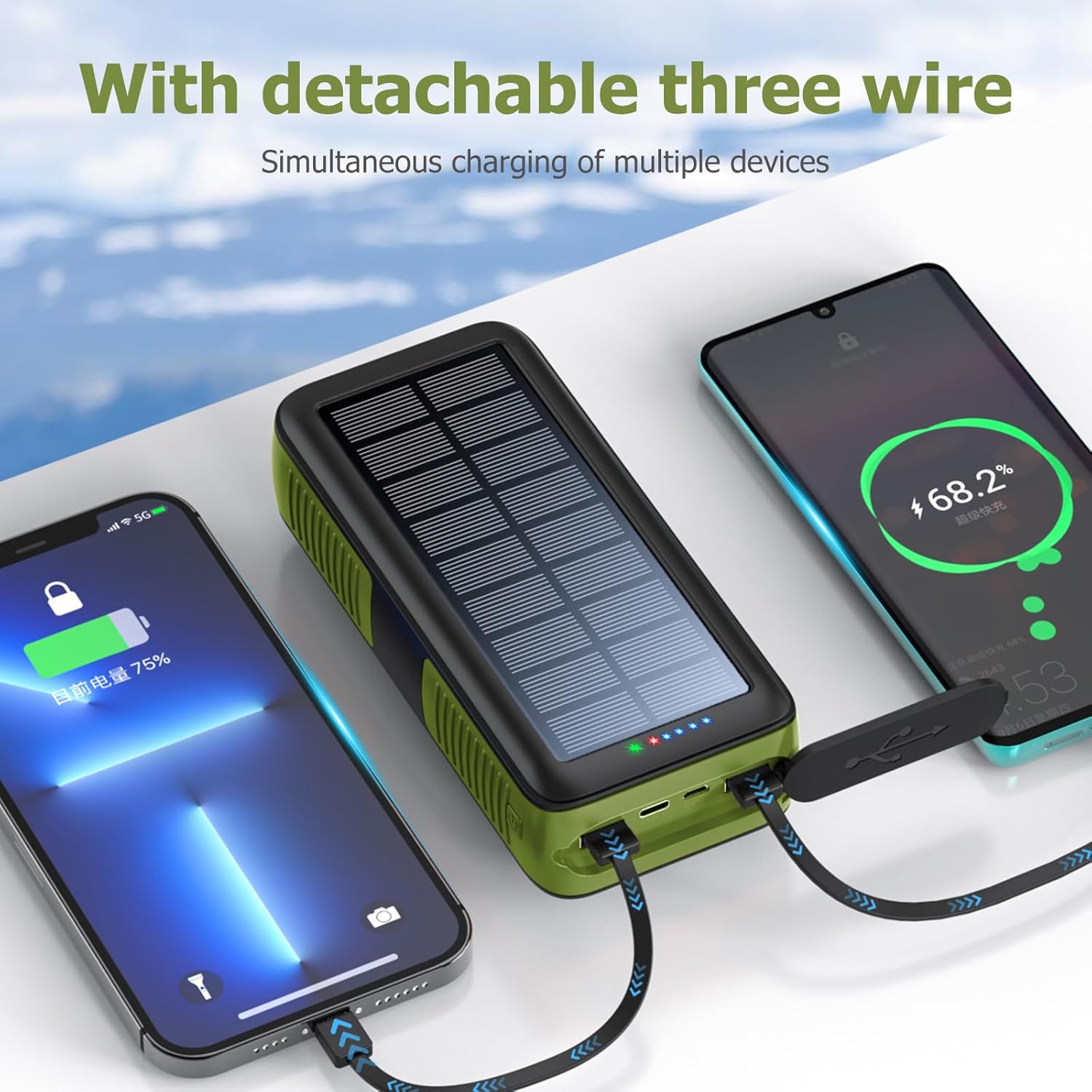
Image: The power bank's built-in cables charging multiple devices simultaneously.
6.2. Using USB Output Ports
- Open the protective cover on the side of the power bank.
- Connect your device's charging cable to one of the USB Type-A output ports or the USB Type-C output port.
- Connect the other end of your cable to your electronic device.
- የኃይል ባንኩ መሳሪያዎን በራስ-ሰር መሙላት ይጀምራል። ካልሆነ፣ የኃይል መሙያውን ለማግበር የኃይል አዝራሩን አንድ ጊዜ ይጫኑ።

Image: The power bank's built-in cables charging multiple devices simultaneously.
7. የኤልኢዲ ፍላሽ መብራት አሠራር
The integrated LED flashlight offers multiple lighting modes for different situations.
- አብራ/አጥፋ፡ Double-press the power button on the side of the power bank to turn the flashlight on or off.
- የዑደት ሁነታዎች፡- While the flashlight is on, single-press the power button to cycle through the modes:
- ብሩህ ብርሃን
- ደብዛዛ ብርሃን
- SOS Mode (flashing)
- Warning Light (rapid flashing)

Image: The power bank's LED flashlight demonstrating its various modes for different uses.
8. ዝርዝሮች
| ባህሪ | ዝርዝር |
|---|---|
| የሞዴል ቁጥር | PS-618 |
| የባትሪ አቅም | 63200 ሚሊamp Hours (Li-polymer) |
| የምርት ልኬቶች | 6.7 x 3 x 2 ኢንች |
| የእቃው ክብደት | 1.74 ፓውንድ |
| የግቤት ወደቦች | Micro USB, USB Type-C, Solar Panel, Hand Crank |
| የውጤት ወደቦች | 2x USB Type-A, 1x USB Type-C, Built-in Cables (Lightning, Micro USB, USB-C) |
| ልዩ ባህሪያት | Built-in Cables, Flashlight, Solar Charging, Hand Crank, Waterproof (IPX66), Dropproof, Dustproof |
| አምራች | Shenzhen Ente Intelligent Co., Ltd |
9. ጥገና
- የኃይል ባንኩን ከከፍተኛ ሙቀት፣ ከቀጥታ ሙቀት እና ከተከፈተ እሳት ያርቁ።
- Avoid dropping or subjecting the device to severe impacts, despite its durable design.
- ውጫዊውን ለስላሳ እና ደረቅ ጨርቅ ያጽዱ. ኃይለኛ ኬሚካሎችን ወይም ሻካራ ማጽጃዎችን አይጠቀሙ.
- Ensure protective covers for ports are securely closed when not in use to maintain water and dust resistance.
- ለረጅም ጊዜ አገልግሎት በማይሰጥበት ጊዜ የኃይል ባንኩን በቀዝቃዛና ደረቅ ቦታ ያከማቹ።
10. መላ መፈለግ
- የኃይል ባንክ እየሞላ አይደለም፡-
- የኃይል መሙያ ገመዱ ከኃይል ባንኩ የግቤት ወደብ እና ከኃይል ምንጭ ጋር ደህንነቱ በተጠበቀ ሁኔታ መገናኘቱን ያረጋግጡ።
- Verify the wall adapter and power outlet are functional.
- For solar charging, ensure the panel is in direct, strong sunlight. Remember solar charging is slow and for emergencies.
- For hand-crank charging, ensure continuous and steady rotation.
- መሳሪያ ከኃይል ባንክ እየሞላ አይደለም፡-
- Press the power button once to activate the power bank's output.
- Ensure your device's charging cable is properly connected to an output port or using one of the built-in cables.
- Check if the power bank has sufficient battery charge.
- የተለየ የውጤት ወደብ ወይም ገመድ ይሞክሩ።
- የእጅ ባትሪ አይሰራም;
- Double-press the power button to turn the flashlight on.
- Ensure the power bank has sufficient battery charge.
11. የደህንነት መረጃ
- መሳሪያውን እራስዎ አይሰብስቡ፣ አይቀይሩት ወይም አይጠግኑት።
- Do not expose the power bank to water or moisture for prolonged periods, or immerse it in water, despite its water-resistant rating.
- Avoid extreme temperatures (above 60°C/140°F or below -10°C/14°F).
- ልጆች በማይደርሱበት ቦታ ያስቀምጡ.
- የኤሌክትሪክ ባንኩን በኤሌክትሮኒክስ ቆሻሻ ላይ በአካባቢው ደንብ መሠረት ያስወግዱ።
12. ዋስትና እና ድጋፍ
Your boogostore PS-618 Solar Charger Power Bank comes with a user manual and lifetime friendly customer service. If you have any questions or encounter issues after purchasing our products, please feel free to contact us. We are committed to providing you with the most satisfactory solution.
For support, please refer to the contact information provided with your purchase or visit the official boogostore webጣቢያ.