
1. መግቢያ
This manual provides detailed instructions for the installation, operation, and maintenance of your AlienRider M2PRO-201 Motorcycle Smart System. This system integrates advanced features such as wireless CarPlay/Android Auto, a 1080P HD dashcam, rear-view streaming, and comprehensive blind spot detection to enhance your riding experience and safety. Please read this manual thoroughly before using the product to ensure proper function and to prevent damage.
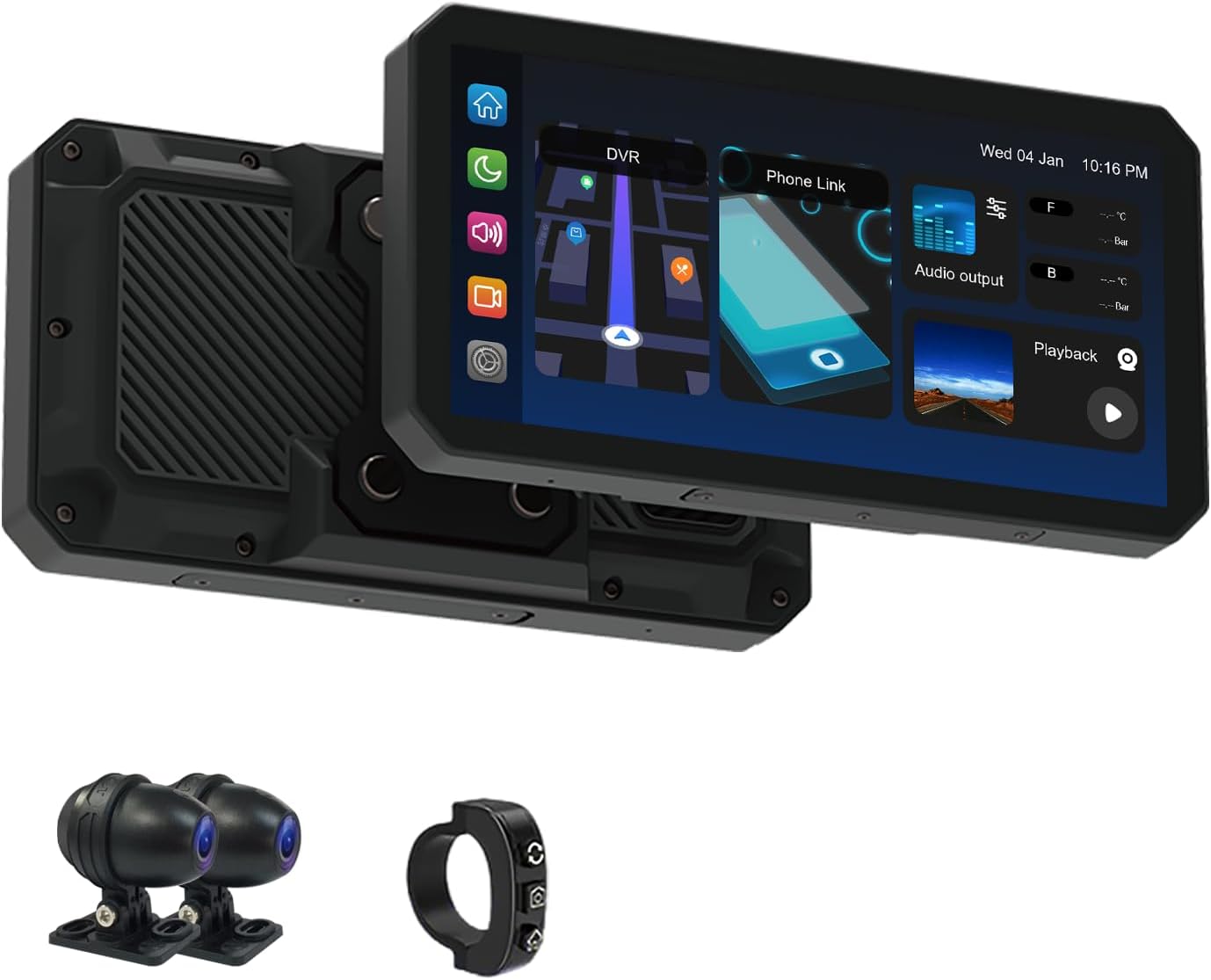
ምስል 1.1፡ AlienRider M2PRO-201 Main Unit, Cameras, and Wired Controller. This image displays the primary components of the AlienRider M2PRO-201 system, including the central display unit, two external cameras, and a compact wired controller.
2. የደህንነት መረጃ
Always prioritize safety when installing and operating electronic devices on your motorcycle. Improper installation or use can lead to accidents or damage to the device and motorcycle.
- መሣሪያው ደህንነቱ በተጠበቀ ሁኔታ መጫኑን እና እርስዎን እንደማይከለክል ያረጋግጡ view or interfere with motorcycle controls.
- All wiring should be properly routed and secured to prevent entanglement, chafing, or interference with moving parts.
- Avoid operating the device or making significant setting changes while riding. Perform adjustments only when the motorcycle is safely stopped.
- The system is IP68 waterproof; however, avoid submerging it or exposing it to high-pressure water jets.
- Consult a professional motorcycle technician if you are unsure about any installation steps.
3. የጥቅል ይዘቶች
ከዚህ በታች የተዘረዘሩት ሁሉም እቃዎች በጥቅልዎ ውስጥ መኖራቸውን ያረጋግጡ። ማንኛውም እቃ ከጎደለ ወይም ከተበላሸ፣ እባክዎን የደንበኞች ድጋፍን ያነጋግሩ።
- AlienRider M2PRO-201 Host Unit (Display)
- Front Camera (1080P HD)
- Rear Camera (1080P HD)
- ባለገመድ ተቆጣጣሪ
- የኃይል ገመድ
- Camera Extension Cables
- የማጣበቂያ ቅንፎች እና ሃርድዌር
- የተጠቃሚ መመሪያ
Note: Optional accessories such as TPMS sensors or radar units may be included depending on your specific package.
4. ምርት አብቅቷልview
The AlienRider M2PRO-201 is a comprehensive smart system designed for motorcycles, integrating navigation, recording, and safety features into a single unit.
4.1 ቁልፍ ባህሪያት
- High-Brightness IPS Touchscreen: A 1200-nit, 1440x720 resolution display ensures clear visibility even in direct sunlight.
- ገመድ አልባ CarPlay እና አንድሮይድ አውቶ ከስማርትፎንዎ ጋር ለአሰሳ፣ ሙዚቃ እና ግንኙነት እንከን የለሽ ውህደት።
- 1080P HD Dual Dashcam: Front and rear cameras record high-definition video with starlight-level night vision, loop recording, and G-sensor incident detection.
- የዓይነ ስውር ቦታ መለየት (BSD): Utilizes 77G mmWave radar to monitor blind spots and provide warnings for approaching vehicles.
- Lane Change Assist (LCA): Alerts you to vehicles in adjacent lanes during lane changes.
- የኋላ ግጭት ማስጠንቀቂያ (RCW): Provides warnings for rapidly approaching vehicles from the rear.
- IP68 የውሃ መከላከያ ንድፍ; በተለያዩ የአየር ሁኔታ ሁኔታዎች ውስጥ ዘላቂነት እና አፈፃፀምን ያረጋግጣል።
- Real-Time TPMS (Optional): Monitors tire pressure and temperature with alerts for abnormalities.

ምስል 4.1፡ AlienRider M2PRO-201 System Settings Interface. This image shows the main screen of the device with various icons representing different settings and functions, such as record resolution, date and time, screen saver, language, and connection options.
5. ማዋቀር እና መጫን
Proper installation is crucial for the performance and safety of the M2PRO-201 system. Follow these steps carefully.
5.1 የአስተናጋጅ ክፍሉን መትከል
- Choose a suitable location on your motorcycle's handlebars or dashboard that provides a clear view of the screen without obstructing your riding view ወይም መቆጣጠሪያዎች.
- Attach the mounting bracket to the host unit.
- Securely fasten the bracket to your chosen location using the provided hardware. Ensure it is stable and does not vibrate excessively.
5.2 ካሜራዎችን መጫን
- የፊት ካሜራ፡ Mount the front camera in a position that provides an unobstructed view of the road ahead, typically near the headlight or front fender.
- የኋላ ካሜራ; Mount the rear camera to capture a clear view of the road behind, usually near the license plate or rear fender.
- Ensure both cameras are securely fastened and their lenses are clean and free from obstructions.
5.3 Connecting the Wired Controller
The wired controller allows for easy access to key functions while riding.
- Mount the wired controller on your handlebars within easy reach.
- Connect the controller cable to the designated port on the host unit.
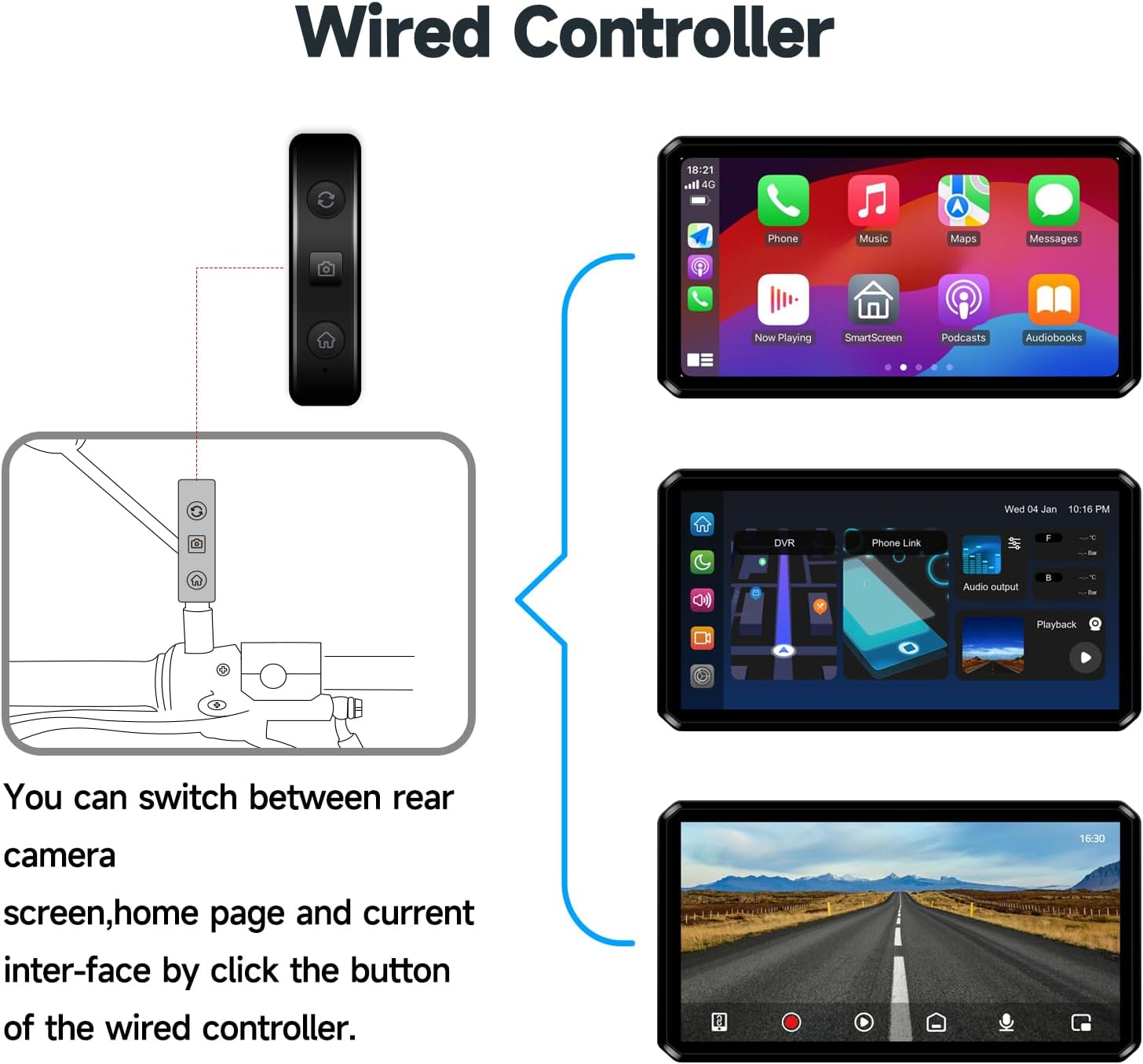
ምስል 5.1፡ Wired Controller Functions. This diagram illustrates how the wired controller connects to the main unit and allows switching between the rear camera view, home page, and current interface with a single button click.
5.4 የሽቦ ዲያግራም
Follow the wiring diagram carefully to connect the power, cameras, and other components to the host unit. Ensure all connections are secure and waterproof.
- ያገናኙት። ኤሲሲ (ቀይ) wire to a switched 12V power source on your motorcycle.
- ያገናኙት። Power Positive Pole (Yellow) wire to a constant 12V power source.
- ያገናኙት። Negative Pole of Power Supply (Black) wire to the motorcycle's ground.
- Connect the Front Camera to the Front camera interface (4Pin).
- Connect the Rear Camera to the Rear camera interface (4Pin).
- Connect the Wired Controller to the Button interface (4Pin).
- If applicable, connect the Radar unit to its designated port.

ምስል 5.2፡ Installation and Wiring Diagram. This detailed diagram illustrates the placement of the host unit, front and rear cameras, radar (if included), and wired controller on a motorcycle, along with the necessary electrical connections for each component.
6. የአሠራር መመሪያዎች
6.1 ማብራት / ማጥፋት
- The system will automatically power on when the motorcycle ignition is turned on (ACC power).
- To power off, turn off the motorcycle ignition. The system will save recordings and shut down automatically.
6.2 በይነገጹን ማሰስ
The M2PRO-201 features a touch-sensitive IPS display. Swipe and tap to navigate through menus and select functions. The main screen typically displays navigation, dashcam view, and connectivity options.
6.3 ገመድ አልባ CarPlay / Android Auto
- በእርስዎ ዘመናዊ ስልክ ላይ ብሉቱዝ እና ዋይ ፋይ መንቃታቸውን ያረጋግጡ።
- On the M2PRO-201, select the CarPlay or Android Auto icon.
- ስልክዎን በብሉቱዝ በኩል ለማጣመር የማያ ገጽ ላይ መመሪያዎችን ይከተሉ።
- Once paired, the system will automatically establish a Wi-Fi connection for CarPlay or Android Auto functionality.
6.4 Dashcam Operation
- አውቶማቲክ ቀረጻ፡ The dashcam automatically begins recording when the system powers on.
- ሉፕ ቀረጻ፡ አሮጌ ፉtage is overwritten by new recordings when the storage card is full. Important videos can be locked to prevent overwriting.
- ጂ-ዳሳሽ፡- In the event of a sudden impact or collision, the G-sensor automatically locks the current video segment to prevent it from being overwritten.
- መልሶ ማጫወት፡ Access recorded videos through the 'Playback' or 'DVR' option on the main interface.
6.5 Blind Spot Detection (BSD) System
The 77G mmWave radar continuously monitors your blind spots and provides visual and audible warnings.
- BSD (Blind Spot Detection): ዓይነ ስውር ቦታዎችዎ ውስጥ ያሉ ተሽከርካሪዎችን ያስጠነቅቃል።
- LCA (Lane Change Assist): Provides an alert if a vehicle is detected in your blind spot when you signal a lane change.
- RCW (Rear Collision Warning): Alerts you to vehicles approaching rapidly from the rear.
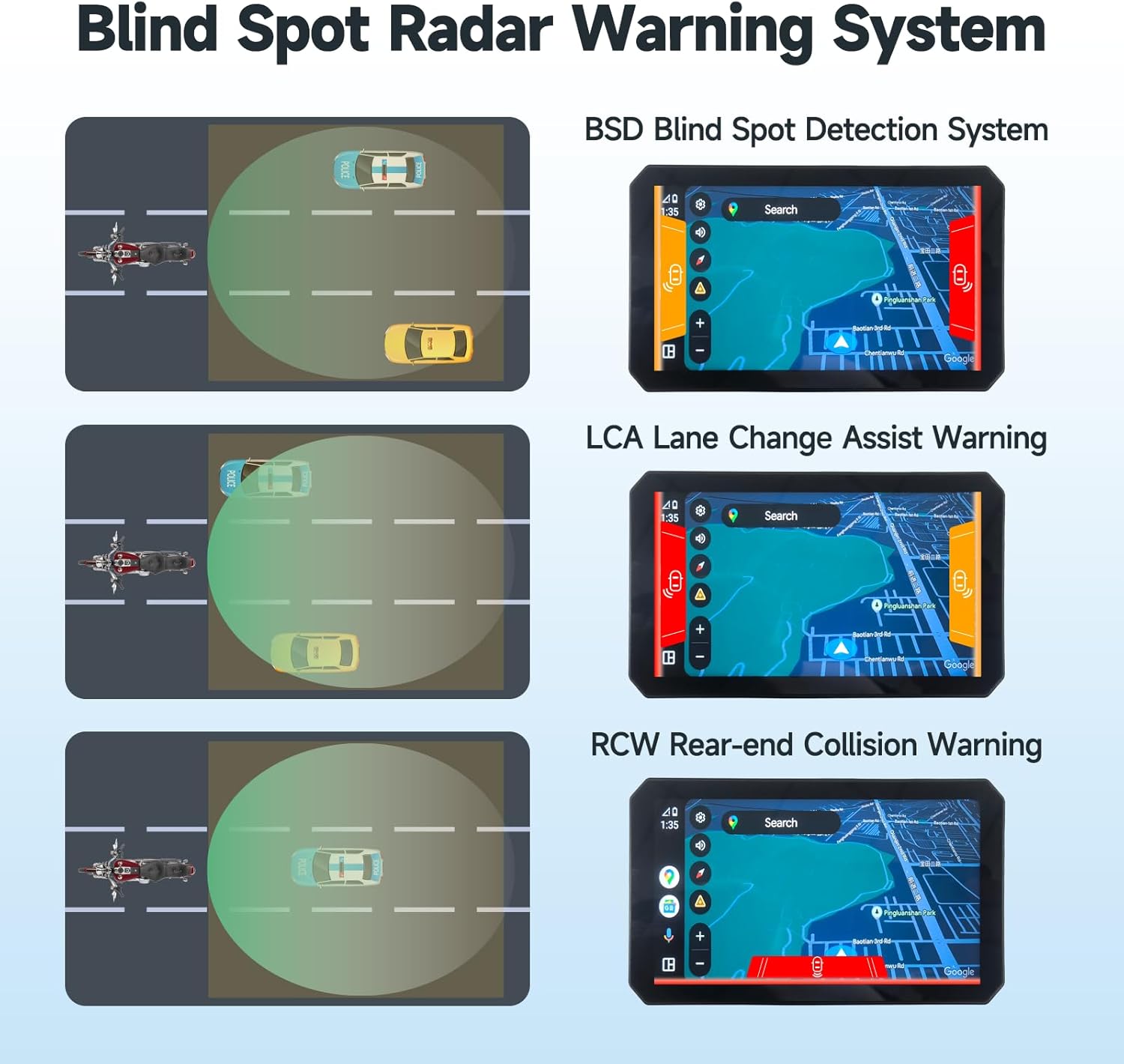
ምስል 6.1፡ Blind Spot Radar Warning System Visuals. This image displays three scenarios: BSD (Blind Spot Detection), LCA (Lane Change Assist), and RCW (Rear-end Collision Warning), showing how the system visually alerts the rider to potential hazards on the screen.
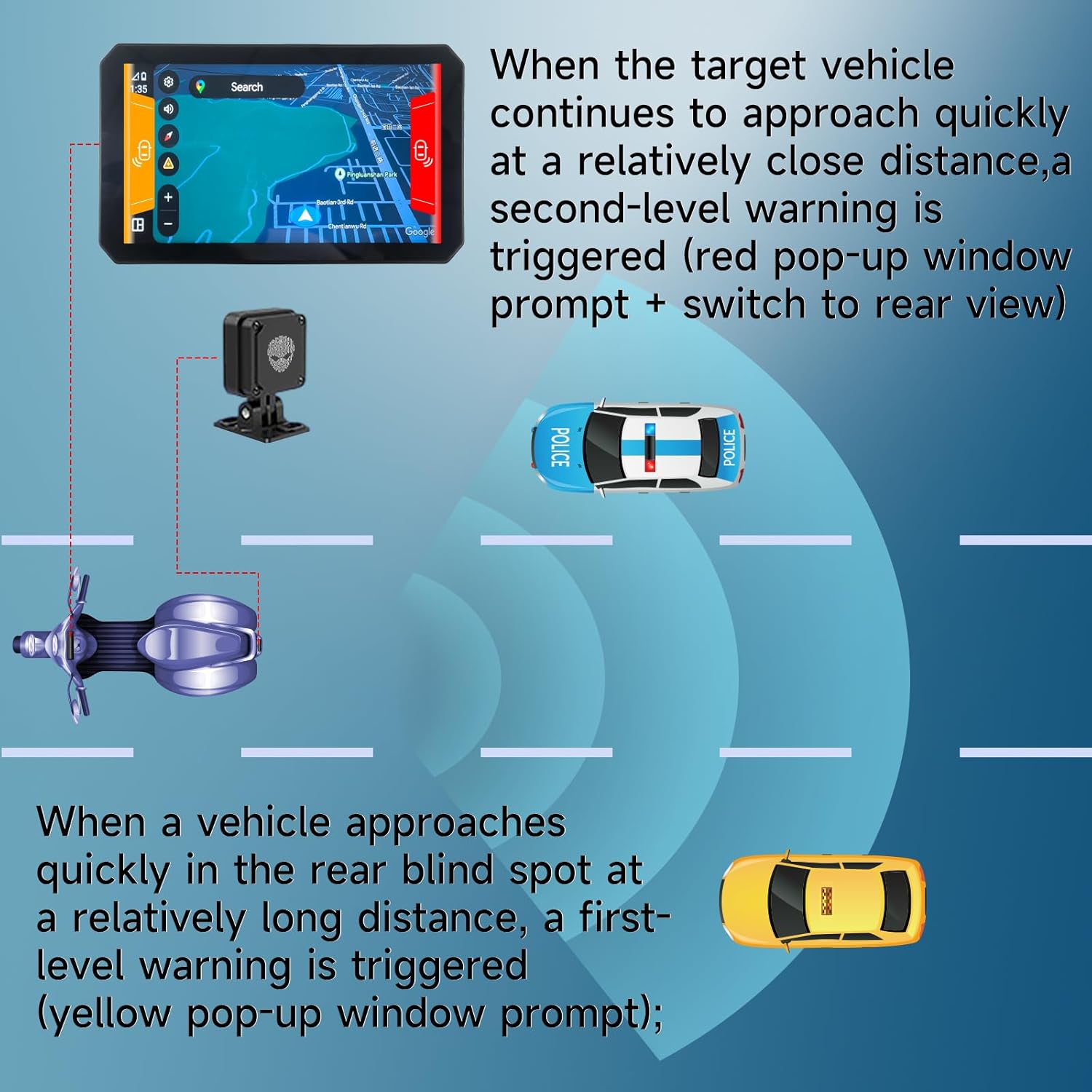
ምስል 6.2፡ Blind Spot Warning Levels. This diagram illustrates the two levels of warnings: a first-level (yellow pop-up) for a vehicle approaching at a long distance in the rear blind spot, and a second-level (red pop-up with rear view switch) for a target vehicle approaching quickly at a close distance.
6.6 TPMS (Tire Pressure Monitoring System) - Optional
If your package includes TPMS sensors, the system will display real-time tire pressure and temperature. Alerts will be triggered if values fall outside preset safe ranges.
- Install the TPMS sensors according to their separate instructions.
- On the M2PRO-201, navigate to the TPMS section.
- Pair the sensors with the system as prompted.
- Monitor tire data and respond to any alerts promptly.
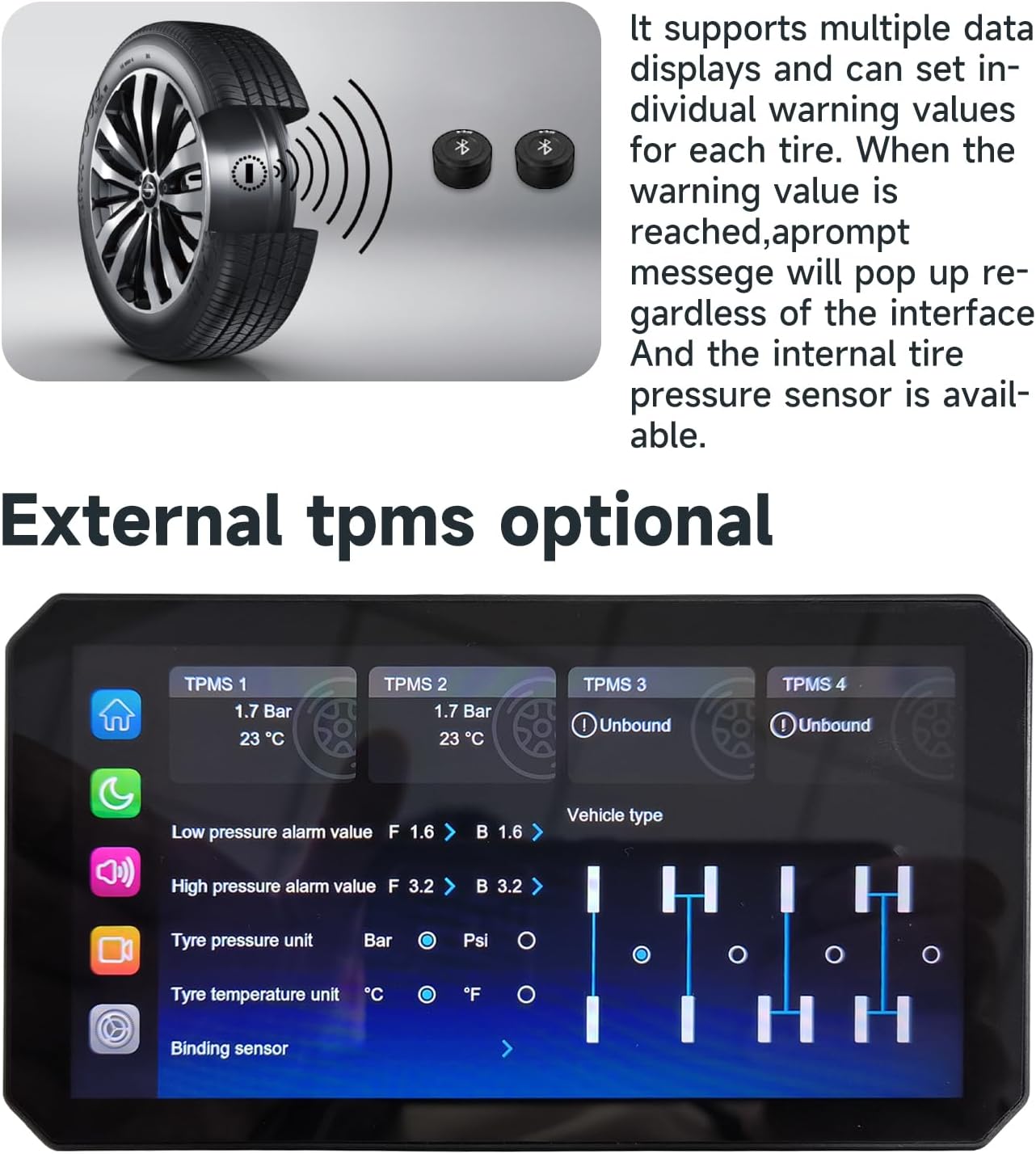
ምስል 6.3፡ TPMS Display Interface. This image shows the system's screen displaying real-time data for up to four tires, including pressure and temperature, along with settings for alarm values and tire pressure units.
7. ጥገና
- ማጽዳት፡ ለስላሳ ይጠቀሙ, መamp cloth to clean the display and camera lenses. Avoid abrasive cleaners or solvents.
- የጽኑዌር ዝማኔዎች ፦ በየጊዜው የአምራቹን ያረጋግጡ webምርጥ አፈጻጸምን እና የአዳዲስ ባህሪያትን ተደራሽነት ለማረጋገጥ የጽኑ ትዕዛዝ ማሻሻያ ጣቢያ።
- የማከማቻ ካርድ፡ Format the storage card regularly (e.g., monthly) to maintain optimal recording performance. Back up important videos before formatting.
8. መላ መፈለግ
| ችግር | ሊሆን የሚችል ምክንያት | መፍትሄ |
|---|---|---|
| ስርዓቱ አይበራም። | Incorrect power connection; Blown fuse. | Check power wiring (ACC, positive, negative). Verify motorcycle fuse. |
| No camera display. | Camera cable loose or damaged; Camera faulty. | Ensure camera cables are securely connected. Test with another camera if available. |
| CarPlay/Android Auto አይገናኝም። | Bluetooth/Wi-Fi off on phone; Pairing issue. | Ensure phone's Bluetooth/Wi-Fi is on. Forget device and re-pair. Restart phone and system. |
| ደካማ የቪዲዮ ጥራት። | Dirty camera lens; Incorrect resolution setting; Faulty SD card. | Clean camera lenses. Check video resolution settings. Format or replace SD card. |
| Blind Spot Detection not working. | Radar unit obstructed or disconnected; System setting disabled. | Check radar unit for obstructions and secure connection. Verify BSD settings in the menu. |
9. ዝርዝሮች
| ባህሪ | ዝርዝር መግለጫ |
|---|---|
| የሞዴል ስም | M2PRO-201 (M2PRO-Series) |
| ማሳያ | 6.1 Inches IPS Touchscreen, 1200-nit brightness |
| የቪዲዮ ቀረጻ ጥራት | 1080p (ፊትና ጀርባ) |
| የግንኙነት ቴክኖሎጂ | ብሉቱዝ፣ ዋይፋይ (ለCarPlay/አንድሮይድ አውቶ) |
| ልዩ ባህሪ | IP68 Waterproof, G-Sensor, Loop Recording, Starlight Night Vision |
| የዓይነ ስውራን ማወቂያ | 77G mmWave Radar (BSD, LCA, RCW) |
| የመጫኛ አይነት | Dashboard Mount / Handlebar Mount |
| የእቃው ክብደት | 4.05 pounds (approximate, for Host+Cameras package) |
| አምራች | AlienRider |
10. ዋስትና እና ድጋፍ
The AlienRider M2PRO-201 Motorcycle Smart System comes with a standard manufacturer's warranty. Please refer to the warranty card included in your package or visit the official AlienRider webለዝርዝር የዋስትና ውሎች እና ሁኔታዎች ጣቢያ።
For technical support, troubleshooting assistance, or warranty claims, please contact AlienRider customer service through their official webጣቢያ ወይም ከግዢዎ ጋር የቀረበው የእውቂያ መረጃ።
እባክዎ ለዋስትና ዓላማዎች የግዢ ማረጋገጫዎን ያቆዩ።