
1. መግቢያ
This manual provides detailed instructions for the installation, operation, and maintenance of your KERUI 2.4GHz WiFi Water Leak Detector. Please read this manual thoroughly before using the device to ensure proper function and safety. This device is designed to detect water leaks and water levels, providing real-time alerts to help protect your home from water damage.
2. ምርት አብቅቷልview

ምስል 2.1፡ The KERUI Water Leak Detector main unit.
2.1 ቁልፍ ባህሪያት
- 3-in-1 Advanced Functionality: Equipped with a top sensor, two bottom sensors, and an extra-long detachable detection cable (105cm) for comprehensive water leak and water level detection. Easily switch between modes by connecting or disconnecting the cable.
- ቅጽበታዊ ማሳወቂያዎች፡- Connects to 2.4GHz WiFi to send instant alerts and notifications to your smartphone via the Tuya Smart app when a leak is detected.
- Loud 100dB Alarm: Emits a continuous 100dB audible alarm for 60 seconds upon detection, ensuring you are alerted even if not near your phone.
- የታመቀ እና የሚያምር ንድፍ; Measuring approximately 65x65x28 mm, the detector is discreet and integrates seamlessly into any home environment.
- IP67 የውሃ መከላከያ ደረጃ ዘላቂ የውሃ መከላከያ IP67 casing and anti-rust coating ensure long-term use in humid environments.
2.2 የጥቅል ይዘቶች
ሁሉም እቃዎች በጥቅልዎ ውስጥ መኖራቸውን ያረጋግጡ፡-
- KERUI Water Leak Detector
- 105cm External Probe
- Hook and Screws for mounting
- የተጠቃሚ መመሪያ
- 4 AAA ባትሪዎች (ተጨምሯል)

ምስል 2.2፡ The detector unit with its external detection cable.
3. ማዋቀር
3.1 የባትሪ ጭነት
The device requires 4 AAA alkaline batteries. These are typically pre-installed. To activate, open the battery compartment and remove the protective film from the batteries. Ensure correct polarity when inserting or replacing batteries.

ምስል 3.1፡ Illustration of battery installation. Open the compartment, insert 4 AAA batteries, ensuring correct polarity.
3.2 መተግበሪያ ማውረድ እና ማጣመር
The KERUI Water Leak Detector operates with the Tuya Smart application. Ensure your smartphone is connected to a 2.4GHz Wi-Fi network before proceeding.
- መተግበሪያውን ያውርዱ፡- Scan the QR code provided in the manual or search for "Tuya Smart" in your smartphone's app store (Google Play Store for Android, Apple App Store for iOS).
- ይመዝገቡ/ይግቡ፡ Open the Tuya Smart app and register a new account or log in with an existing one.
- መሣሪያ አክል፡
- Ensure the detector is powered on (batteries installed and protective film removed).
- In the Tuya Smart app, tap the "+" icon to add a device.
- Select "Security & Sensor" then "Water Leak Detector (Wi-Fi)".
- Follow the on-screen instructions to connect the device to your 2.4GHz Wi-Fi network. This usually involves pressing a button on the detector to enter pairing mode.
- Once connected, you can rename the device for easier identification (e.g., "Kitchen Leak Sensor").
ምስል 3.2፡ Steps for app download and Wi-Fi pairing. Scan the QR code to download the Tuya Smart app, then follow in-app instructions to connect to your 2.4GHz Wi-Fi network.
የቱያ ስማርት መተግበሪያን ያውርዱ፦ https://smartapp.tuya.com/tuyasmart
4. ኦፕሬሽን
4.1 የማወቂያ ሁነታዎች
The detector offers three detection methods:
- Water Leak Detection (Default): The two probes on the back of the alarm detect water. When water bridges these probes, the alarm triggers.
- Drip Detection: A probe on the front of the alarm is designed to detect small drips. Place it directly under a potential drip source.
- የውሃ ደረጃ ክትትል; Use the included 105cm external detection cable with two probes to monitor specific water levels. Connect the cable to the detector to activate this mode.

ምስል 4.1፡ Three usage options for the water immersion alarm. This includes hanging the external probe, placing the unit on the ground to detect leaks from the back sensors, or placing it to detect drips from the front sensor.
4.2 የማንቂያ ተግባር
When water is detected by any of the sensors, the device will:
- Emit a loud 100dB audible alarm for 60 seconds.
- በTuya Smart መተግበሪያ በኩል ፈጣን ማሳወቂያዎችን ወደ ስማርት ስልክዎ ይላኩ።
ምስል 4.2፡ The 100dB alarm is designed to be heard across your home, providing immediate awareness of a water event.
4.3 App Notifications and Remote Monitoring
The Tuya Smart app allows for remote monitoring and management:
- Receive real-time push notifications on your phone when a leak is detected, even when you are away from home.
- View the history and timestamps of all alarm events within the app.
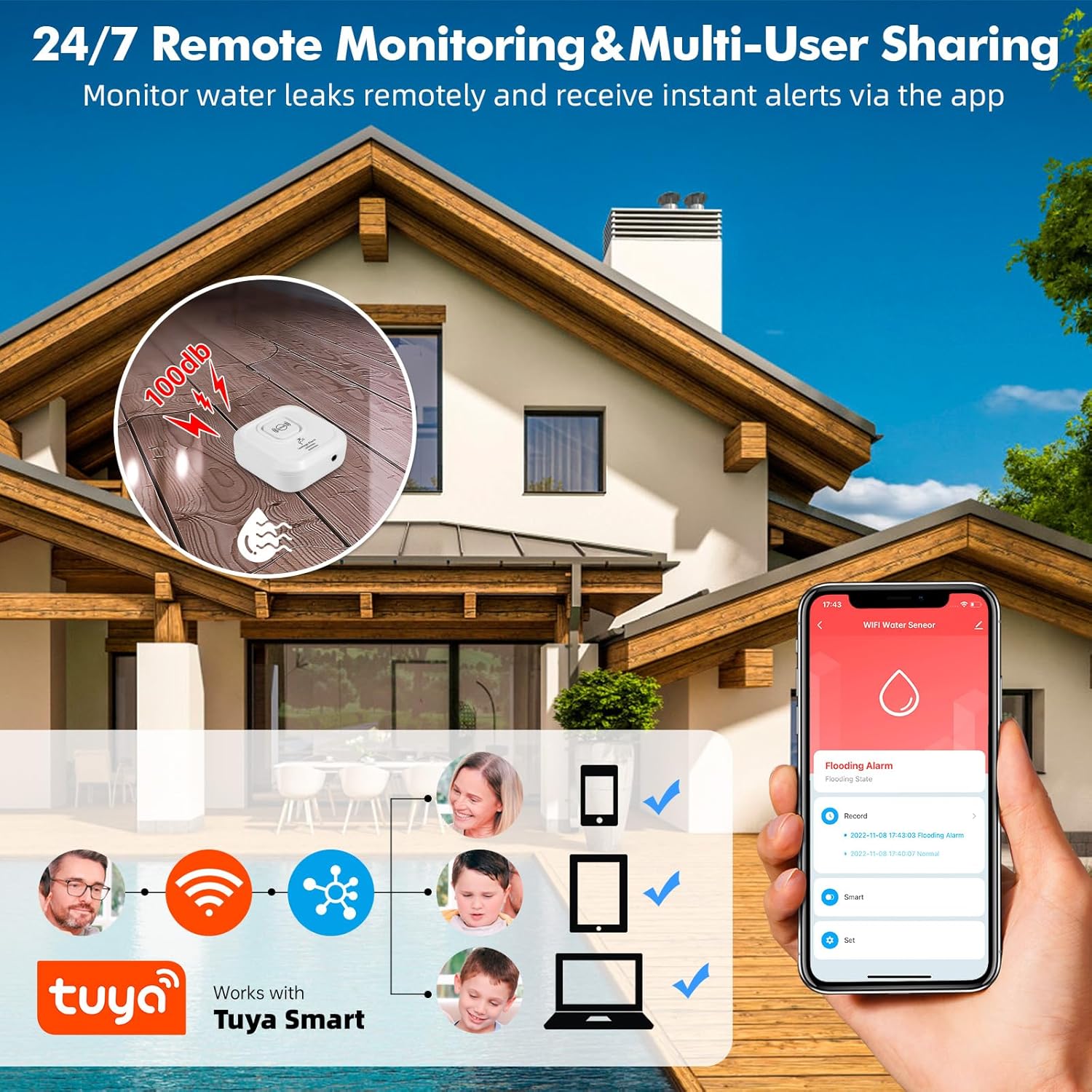
- Share device access with multiple users (family members) through the app.
- App notifications are free. Optional phone call and SMS notifications may incur charges (refer to Tuya app for details).

ምስል 4.3፡ Remote monitoring and multi-user sharing capabilities through the Tuya Smart app, allowing multiple family members to receive alerts.

ምስል 4.4፡ Example of real-time water leak notifications received through the Tuya Smart app.
5. መትከል እና አቀማመጥ
The compact design and IP67 rating allow for flexible placement in various locations prone to water leaks.
- Recommended Locations: Near water-containing appliances such as dishwashers, washing machines, water heaters, under sinks, in bathrooms, kitchens, basements, laundry rooms, and near sump pumps.
- የመጫኛ አማራጮች
- የመሬት አቀማመጥ; Simply place the detector on the floor in areas where leaks are likely to occur. Use the back sensors for general leak detection or the front sensor for drip detection.
- Wall Mounting/Hanging: Utilize the included hook and screws to mount the detector on a wall. The 105cm external probe can then be extended to the desired detection point, such as inside a cabinet under a sink.
- Naming Devices: Use the Tuya Smart app to name each detector and specify its location (e.g., "Basement Water Heater," "Kitchen Sink") for clear identification of alarm sources.

ምስል 5.1፡ Examples of suitable locations for installing the KERUI Water Leak Detector.
6. ጥገና
- የባትሪ መተካት፡ The app will notify you when battery levels are low. Replace all 4 AAA batteries promptly to ensure continuous protection. Always use new alkaline batteries.
- የአነፍናፊ ጽዳት; Periodically inspect the detection probes for any dirt, dust, or corrosion. Clean them gently with a soft, dry cloth to ensure optimal sensitivity.
- የጽኑዌር ዝማኔዎች ፦ Check the Tuya Smart app regularly for any available firmware updates for your device. Updates can improve performance and add new features.
- የአካባቢ ሁኔታዎች; While the device is IP67 rated, avoid prolonged submersion or exposure to extreme temperatures outside its operating range.
7. መላ መፈለግ
| ችግር | ሊሆን የሚችል ምክንያት | መፍትሄ |
|---|---|---|
| መሣሪያው አይበራም። | ባትሪዎች ሞተዋል ወይም በስህተት ተጭነዋል። | Ensure batteries are inserted with correct polarity. Replace with new AAA alkaline batteries. |
| No app notifications received. |
|
|
| Device does not detect water. |
|
|
| Audible alarm is too quiet or not sounding. |
|
|
| Cannot connect to 2.4GHz Wi-Fi. |
|
|
8. ዝርዝሮች
| ባህሪ | ዝርዝር |
|---|---|
| የምርት ስም | ኬሩአይ |
| ሞዴል | የውሃ ፍሳሽ ማወቂያ |
| ግንኙነት | 2.4GHz ዋይፋይ |
| የኃይል ምንጭ | 4 x AAA የአልካላይን ባትሪዎች |
| የድምፅ ደረጃ | 100 ዲቢቢ |
| የመቆጣጠሪያ ዘዴ | Tuya Smart Application |
| ልኬቶች (L x W x H) | 8 x 2.5 x 8 cm (approx. 65x65x28 mm for the main unit) |
| ክብደት | 44 ግራም |
| የውሃ መከላከያ ደረጃ | IP67 |
| External Probe Length | 105 ሴ.ሜ |
| Max Range (Wireless) | 20 Meters (approximate, depends on environment) |
| አነፍናፊ ቴክኖሎጂ | ዳሳሽ ያግኙ |
9. የደህንነት መረጃ
- መሣሪያውን ልጆች እና የቤት እንስሳት በማይደርሱበት ቦታ ያስቀምጡት.
- መሳሪያውን እራስዎ ለመበተን ወይም ለመጠገን አይሞክሩ። ይህ ዋስትናውን ሊያሳጣ እና ጉዳት ሊያስከትል ይችላል።
- ያገለገሉ ባትሪዎችን በአካባቢው ደንብ መሠረት ያስወግዱ። ባትሪዎችን በእሳት ውስጥ አያስወግዱ።
- መሳሪያው በአጋጣሚ እንዳይወድቅ ለመከላከል በተረጋጋ ቦታ ላይ መቀመጡን ወይም ደህንነቱ በተጠበቀ ሁኔታ መጫኑን ያረጋግጡ።
- This device is designed to detect water leaks and levels. It is not a substitute for proper plumbing maintenance or flood prevention measures.
10. ዋስትና እና ድጋፍ
For any questions, suggestions, or technical support regarding your KERUI Water Leak Detector, please contact KERUI customer service. Refer to the product packaging or the official KERUI webየእውቂያ መረጃ ለማግኘት ጣቢያ.
Information regarding specific warranty periods or repair services is not available in this manual. Please retain your purchase receipt for warranty claims.