
1. መግቢያ
This manual provides detailed instructions for the installation, operation, and maintenance of your ESX Vision VMX900DAB Universal 1-DIN Multimedia Receiver. Please read this manual thoroughly before using the device to ensure proper functionality and to maximize your user experience.
The ESX Vision VMX900DAB is a versatile 1-DIN multimedia receiver featuring a 9-inch multi-angle touchscreen display. It integrates advanced connectivity options including wireless Apple CarPlay and Android Auto, DAB+ digital radio, Bluetooth hands-free calling and audio streaming, and a comprehensive media player. The unit is designed for universal compatibility and offers a removable monitor for enhanced security.
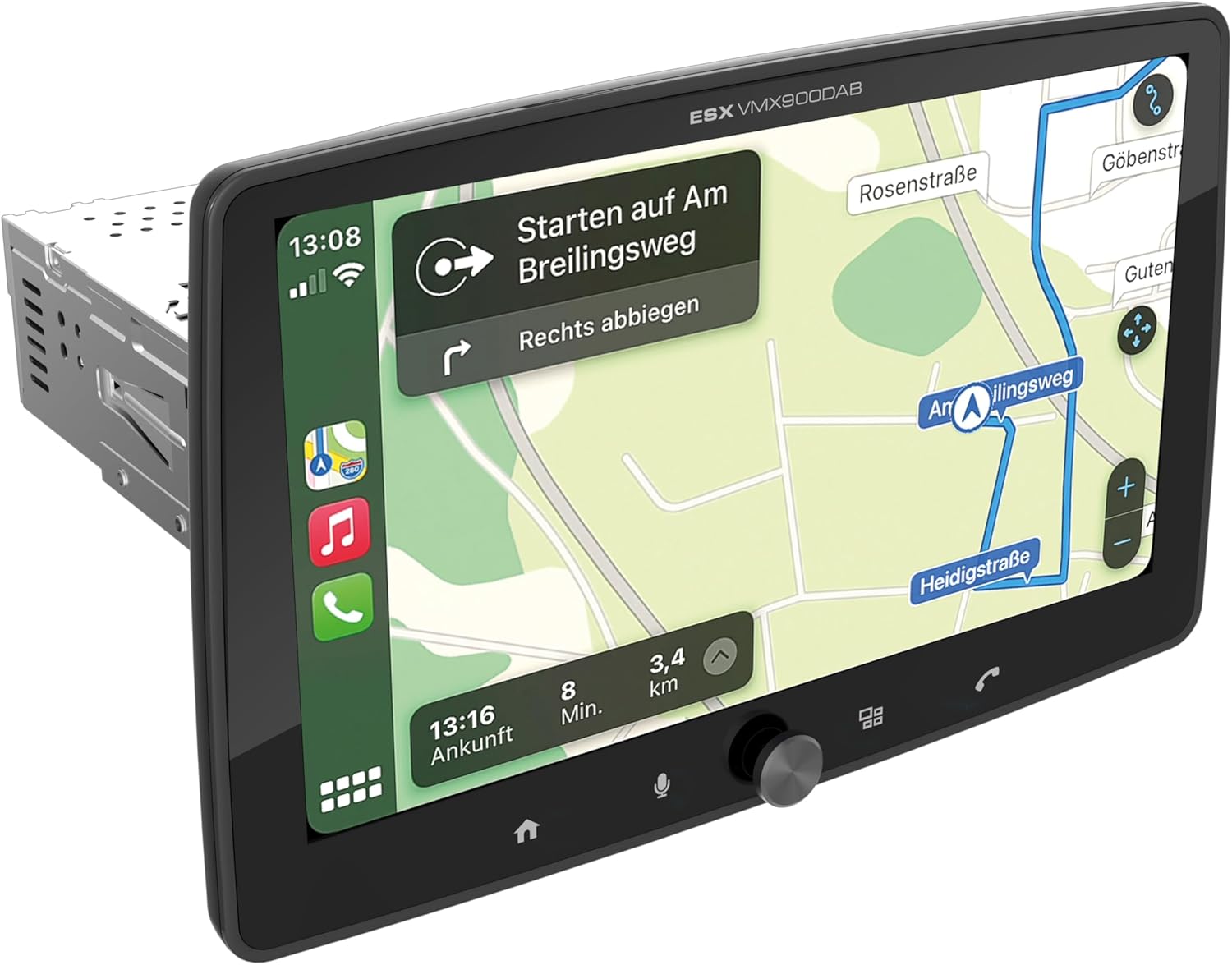
Figure 1.1: ESX Vision VMX900DAB with navigation interface.
2. ማዋቀር እና መጫን
2.1 የጥቅል ይዘቶች
ከመጫንዎ በፊት ሁሉም አካላት መኖራቸውን ያረጋግጡ-
- ESX Vision VMX900DAB Main Unit
- Detachable 9-inch Touchscreen Monitor
- የኃይል/ድምጽ ማጉያ የሽቦ ማሰሪያ
- ውጫዊ ማይክሮፎን
- የጂፒኤስ አንቴና
- DAB+ አንቴና
- የዩኤስቢ ማራዘሚያ ገመዶች
- ሃርድዌርን መጫን (ቅንፍ፣ ብሎኖች)
- የተጠቃሚ መመሪያ (ይህ ሰነድ)

ምስል 2.1: የተካተቱ መለዋወጫዎች እና አካላት.
2.2 ዋናውን ክፍል መትከል
- መጫኑን ከመጀመርዎ በፊት የተሽከርካሪው ባትሪ መቆራረጡን ያረጋግጡ።
- Insert the 1-DIN main unit into the vehicle's dashboard opening.
- Secure the main unit using the provided mounting brackets and screws.
2.3 ተቆጣጣሪውን ማገናኘት
The 9-inch monitor is detachable and connects to the main unit via a click system.
- Align the monitor's connector with the slot on the main unit.
- Gently push the monitor until it clicks securely into place.
- To remove, press the release button (if applicable) and pull the monitor away.

Figure 2.2: Detachable monitor with click system.
2.4 የወልና ግንኙነቶች
Refer to the wiring diagram provided with the unit for specific connections. Key connections include:
- Power and Speakers: Connect the main wiring harness to the vehicle's power supply and speakers.
- ውጫዊ ማይክሮፎን ለተሻለ የእጅ-ነጻ ጥሪ ጥራት ውጫዊውን ማይክሮፎን ከተወሰነው ግብዓት ጋር ይሰኩ።
- የጂ ፒ ኤስ አንቴና የጂፒኤስ አንቴናውን ያገናኙ እና ግልጽ በሆነ ቦታ ላይ ይጫኑት view ለትክክለኛ አቀማመጥ የሰማይ.
- DAB+ አንቴና፦ Connect the DAB+ antenna for digital radio reception.
- የዩኤስቢ ወደቦች፡ Two USB-A ports are available. One for media playback and charging (1.5A), and another specifically for Apple CarPlay/Android Auto and charging (1.5A).
- RCA ቅድመ-ampየተስተካከሉ ውጤቶች Six 4V RCA outputs (FL/FR/RL/RR/SUB1/SUB2) are available for connecting external ampአነፍናፊዎች።
- AUX RCA Inputs: Stereo audio and video inputs (L/R/VIDEO) for external audio/video sources.
- Camera RCA Inputs: ለፊት እና ለኋላ ካሜራዎች የተዘጋጁ ግብዓቶች።
- የተሽከርካሪ መቆጣጠሪያ; Analog steering wheel remote control input (learnable) for integration with vehicle controls.
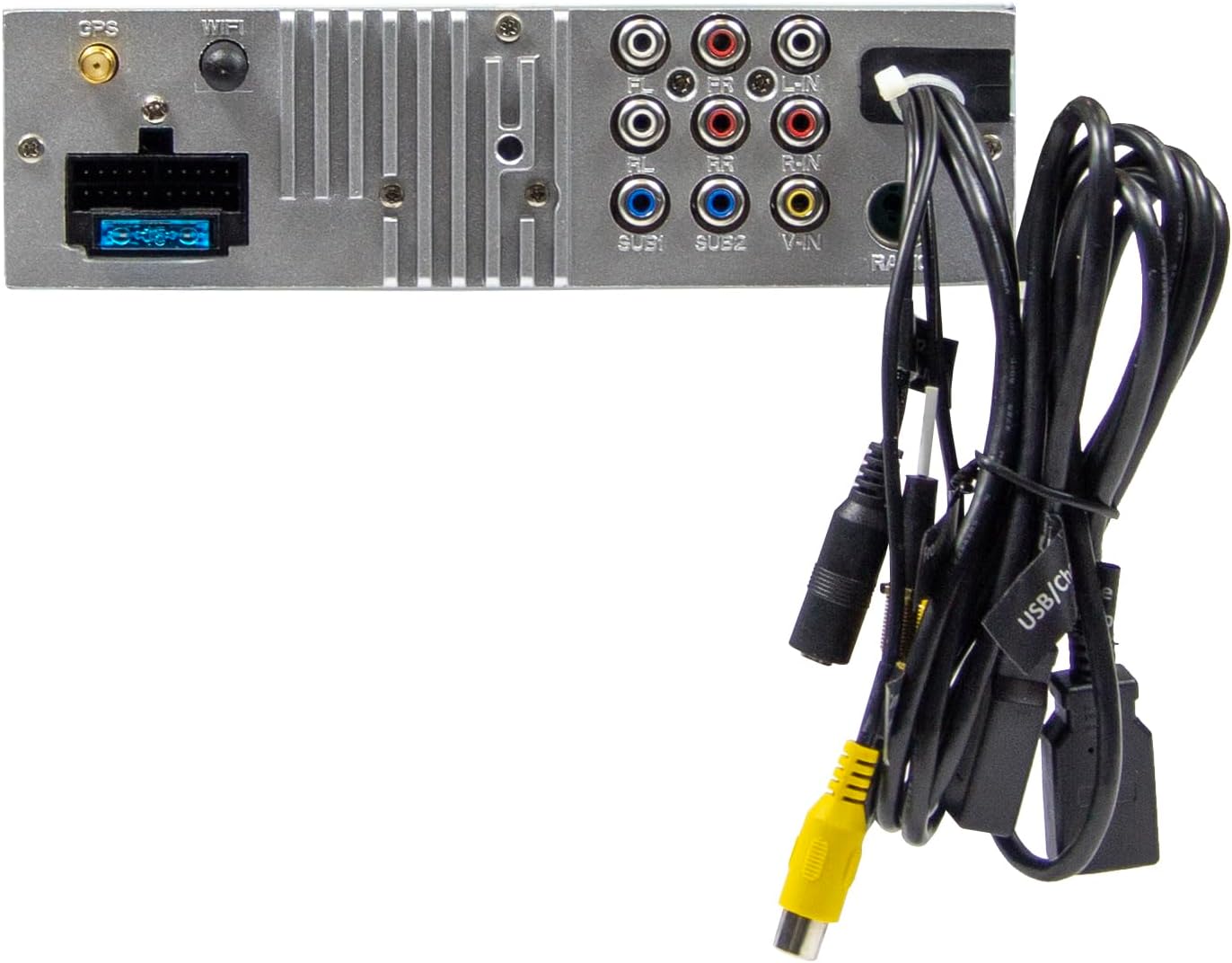
Figure 2.3: Rear connections of the main unit.
3. የአሠራር መመሪያዎች
3.1 ማብራት / ማጥፋት እና መሰረታዊ መቆጣጠሪያዎች
- አብራ፡ መሣሪያው በተሽከርካሪው ማቀጣጠያ በራስ-ሰር ይበራል።
- ኃይል ዝጋ: The unit will power off automatically with the vehicle's ignition.
- የድምጽ መቆጣጠሪያ፡- Use the large rotary knob on the front panel to adjust the volume.
- የተግባር ቁልፎች፡- Four function keys on the front panel provide quick access to common features.
- የንክኪ ማያ ገጽ፡ All primary functions are controlled via the 9-inch touchscreen.
3.2 የመነሻ ማያ ገጽ እና አሰሳ
The home screen provides access to all main functions and applications.

Figure 3.1: Main menu/home screen.
3.3 አፕል ካርፕሌይ እና አንድሮይድ አውቶ
The VMX900DAB supports both wireless and wired (via USB) Apple CarPlay and Android Auto.
- የገመድ አልባ ግንኙነት; Enable Bluetooth and Wi-Fi on your smartphone and follow the on-screen prompts to connect.
- ባለገመድ ግንኙነት፡ Connect your smartphone to the dedicated USB-A port using a compatible USB cable.
- Once connected, your smartphone's compatible apps (navigation, music, calls, messages) will be mirrored on the receiver's display.

Figure 3.2: Apple CarPlay interface.
3.4 Radio Functions (DAB+/FM/AM)
- DAB+ ሬዲዮ፡ Select the DAB+ icon from the home screen. The unit will scan for available digital radio stations.
- FM/AM ሬዲዮ Select the Radio icon. Use the touchscreen to tune to stations, save presets, and access RDS functions.
3.5 Bluetooth Hands-Free and Audio Streaming
- ማጣመር፡ Enable Bluetooth on your smartphone and search for the VMX900DAB. Select the device and confirm pairing.
- ከእጅ ነጻ ጥሪ፡ Once paired, you can make and receive calls directly through the receiver. The external microphone ensures clear voice transmission. Your phonebook can be synchronized.
- የድምፅ ዥረት Stream music wirelessly from your smartphone to the receiver.
3.6 የሚዲያ መልሶ ማጫወት
The unit supports various audio, video, and photo formats via USB.
- የሚደገፍ File ቅርጸቶች፡ AVI, FLV, MOV, MKV, WMV, WMA, MP3, FLAC, JPEG, PNG, BMP.
- Insert a USB drive into the media USB-A port. Select the USB icon from the home screen to browse and play media files.
3.7 የመቆጣጠሪያ ማስተካከያ
The monitor can be tilted and adjusted in height to achieve the optimal viewing angle and prevent obstruction of vehicle controls.

Figure 3.3: Adjustable monitor mechanism.
3.8 ማበጀት
- Startup Logo: Customize the startup logo in the settings menu.
- RGB Key Illumination: Select from various RGB colors and animation effects for the key illumination.
- የምናሌ ቋንቋዎች፡- Supported languages include DEU, ENG, SWE, ITA.
4. ጥገና
4.1 ክፍሉን ማጽዳት
- Use a soft, dry cloth to wipe the display and unit surfaces.
- በማያ ገጹ ላይ ላሉ አስቸጋሪ ምልክቶች፣ ለኤሌክትሮኒክ ማሳያዎች በተለይ የተነደፈ የስክሪን ማጽጃ እና የማይክሮፋይበር ጨርቅ ይጠቀሙ።
- Do not use abrasive cleaners, solvents, or harsh chemicals, as these can damage the finish or screen.
4.2 አጠቃላይ እንክብካቤ
- ክፍሉን ለከፍተኛ የአየር ሙቀት፣ ቀጥተኛ የፀሐይ ብርሃን ለረጅም ጊዜ ወይም ለከፍተኛ እርጥበት ከማጋለጥ ይቆጠቡ።
- ከመጠን በላይ ሙቀትን ለመከላከል በክፍሉ ዙሪያ ትክክለኛውን የአየር ዝውውርን ያረጋግጡ.
- When removing the monitor, handle it carefully to avoid damage to the connectors.
5. መላ መፈለግ
If you encounter issues with your VMX900DAB, refer to the following common problems and solutions:
| ችግር | ሊሆን የሚችል ምክንያት | መፍትሄ |
|---|---|---|
| ኃይል የለም | የተሳሳተ ሽቦ፤ የተነፈሰ ፊውዝ፤ የተሽከርካሪ ማቀጣጠል ጠፍቷል | Check power connections; Replace fuse; Turn on vehicle ignition |
| ድምጽ የለም። | የድምጽ መጠኑ በጣም ዝቅተኛ ነው፤ ድምጸ-ከል ተደርጓል፤ የድምጽ ማጉያው የማገናኘት ችግር | የድምጽ መጠን ይጨምሩ፤ ድምጸ-ከልን ያሰናክሉ፤ የድምጽ ማጉያ ግንኙነቶችን ያረጋግጡ |
| ብሉቱዝ አይገናኝም። | Bluetooth off on phone/unit; Incorrect pairing process | Ensure Bluetooth is on; Re-attempt pairing process |
| Apple CarPlay/Android Auto not starting | Incorrect USB port; Faulty USB cable; Phone not compatible/configured | Use the dedicated USB port; Try a different USB cable; Check phone settings for CarPlay/Android Auto |
| ደካማ የሬዲዮ አቀባበል | Antenna not connected; Poor antenna placement; Weak signal area | Check antenna connection; Adjust antenna position; Try in a different location |
| Monitor not displaying | Monitor not securely attached; Connector issue | Ensure monitor is fully clicked into place; Check for debris in connector |
If the problem persists after attempting these solutions, please contact ESX customer support or your authorized dealer.
6. ዝርዝሮች
| ባህሪ | ዝርዝር መግለጫ |
|---|---|
| የሞዴል ቁጥር | VMX900DAB |
| ማሳያ | 9-inch Multi-angle Touchscreen |
| የቅጽ ምክንያት | 1-DIN Universal |
| ግንኙነት | ዩኤስቢ፣ ብሉቱዝ፣ ረዳት |
| ልዩ ባህሪያት | Wireless Apple CarPlay, Wireless Android Auto, Detachable Monitor with Click System |
| ሬዲዮ መቃኛ | DAB+ (Digital Radio), FM/AM with RDS |
| ብሉቱዝ | Hands-free function, Audio Streaming |
| የዩኤስቢ ወደቦች | 2x USB-A (1.5A charging, one dedicated for CarPlay/Android Auto) |
| Max Music Power | 4 x 80 ዋ |
| ቅድመ-ampየተስተካከሉ ውጤቶች | 6x RCA (4V) (FL/FR/RL/RR/SUB1/SUB2) |
| AUX ግብዓቶች | RCA (L/R/VIDEO) |
| የካሜራ ግብዓቶች | RCA (Front/Rear) |
| የሚደገፍ File ቅርጸቶች | AVI, FLV, MOV, MKV, WMV, WMA, MP3, FLAC, JPEG, PNG, BMP |
| ውጫዊ ማይክሮፎን | ተካትቷል። |
| የመንኮራኩር መቆጣጠሪያ | Analog (learnable) |
| የጂፒኤስ ተቀባይ | ተካትቷል። |
| ምናሌ ቋንቋዎች | DEU, ENG, SWE, ITA |
| ጠቅላላ የውጤት ኃይል | 320 ዋት |
| የዙሪያ ድምጽ ቻናል ውቅር | 4.2 |
| የድምጽ ውፅዓት ሁኔታ | ስቴሪዮ |
7. ዋስትና እና ድጋፍ
For warranty information, please refer to the documentation provided at the time of purchase or contact your authorized ESX dealer. Warranty terms and conditions may vary by region and retailer.
For technical support or further assistance, please contact ESX customer service or visit the official ESX webለድጋፍ ሀብቶች ጣቢያ.


