
1. መግቢያ
ስለገዙ እናመሰግናለንasing the Sofirn HS21 and D25S headlamps. These headlamps are designed for various outdoor activities, offering reliable illumination and convenient features. This manual provides detailed instructions for the safe and effective use, setup, operation, and maintenance of your new headlampዎች. እባክዎን ይህንን መመሪያ ከመጠቀምዎ በፊት በደንብ ያንብቡት እና ለወደፊት ጥቅም ላይ እንዲውል ያስቀምጡት።
2. የደህንነት መመሪያዎች
- Do not shine the light directly into eyes. The powerful beam can cause temporary vision impairment or permanent eye damage.
- ልጆች በማይደርሱበት ቦታ ያስቀምጡ.
- የጭንቅላቱን መበታተን አያድርጉamp. This may damage the device and void the warranty.
- Use only the recommended battery types. Improper battery use can lead to fire, explosion, or leakage.
- የጭንቅላት መጋለጥን ያስወግዱamp ወደ ከፍተኛ ሙቀት ወይም ቀጥተኛ የፀሐይ ብርሃን ለረጅም ጊዜ.
- የውሃ መቋቋምን ለመጠበቅ የዩኤስቢ-ሲ የኃይል መሙያ ወደብ ሽፋን ባትሪ ሳይሞላ ደህንነቱ በተጠበቀ ሁኔታ መዘጋቱን ያረጋግጡ።
3. የጥቅል ይዘቶች
- 1 x Sofirn HS21 Headlamp
- 1 x Sofirn D25S Headlamp
- 2 x የጭንቅላት ማሰሪያዎች
- 2 x የዩኤስቢ-ሲ ኃይል መሙያ ገመዶች
- 2 x Rechargeable Batteries (pre-installed or separate)
- 1 x የተጠቃሚ መመሪያ
4. ምርት አብቅቷልview
4.1 Sofirn HS21 Headlamp
The Sofirn HS21 is a versatile headlamp featuring a combination of spotlight, floodlight, and red light. It is equipped with a convenient rotary switch for easy mode selection and offers a wide 130° rotation adjustment for optimal illumination angle.

Image 1: Sofirn HS21 Headlamp showing its various light modes including red light, spotlight, and floodlight.

Image 2: The Sofirn HS21 headlamp demonstrating its 130-degree rotation capability for adjustable light direction.
4.2 Sofirn D25S Headlamp
The Sofirn D25S is a compact and powerful headlamp utilizing an SST40 LED, offering multiple brightness levels. It features a hidden USB-C charging port for convenient recharging and a simple user interface with memory mode.

Image 3: Sofirn D25S Headlamp highlighting its comfortable switch and simple user interface.
5. ማዋቀር
5.1 የባትሪ ጭነት
Both HS21 and D25S headlamps typically come with batteries pre-installed. If not, or if replacing batteries:
- Unscrew the tail cap of the headlamp አካል.
- Insert the rechargeable battery with the positive (+) terminal facing towards the head of the lamp.
- ትክክለኛውን ግንኙነት እና የውሃ መቋቋምን ለማረጋገጥ የጅራቱን ቆብ አጥብቀው ይከርክሙት።
5.2 በመሙላት ላይ
ሁለቱም ጭንቅላትamps feature a built-in USB-C charging port.
For HS21:
- Locate the USB-C charging port on the side of the headlamp አካል.
- Gently lift the protective rubber cover to expose the port.
- የቀረበውን የዩኤስቢ-ሲ ገመድ ከጭንቅላቱ ጋር ያገናኙamp and to a USB power source (e.g., wall adapter, power bank, computer).
- The indicator light will show red during charging and turn green when fully charged.
- Once charging is complete, securely close the rubber cover to protect the port from dust and water.
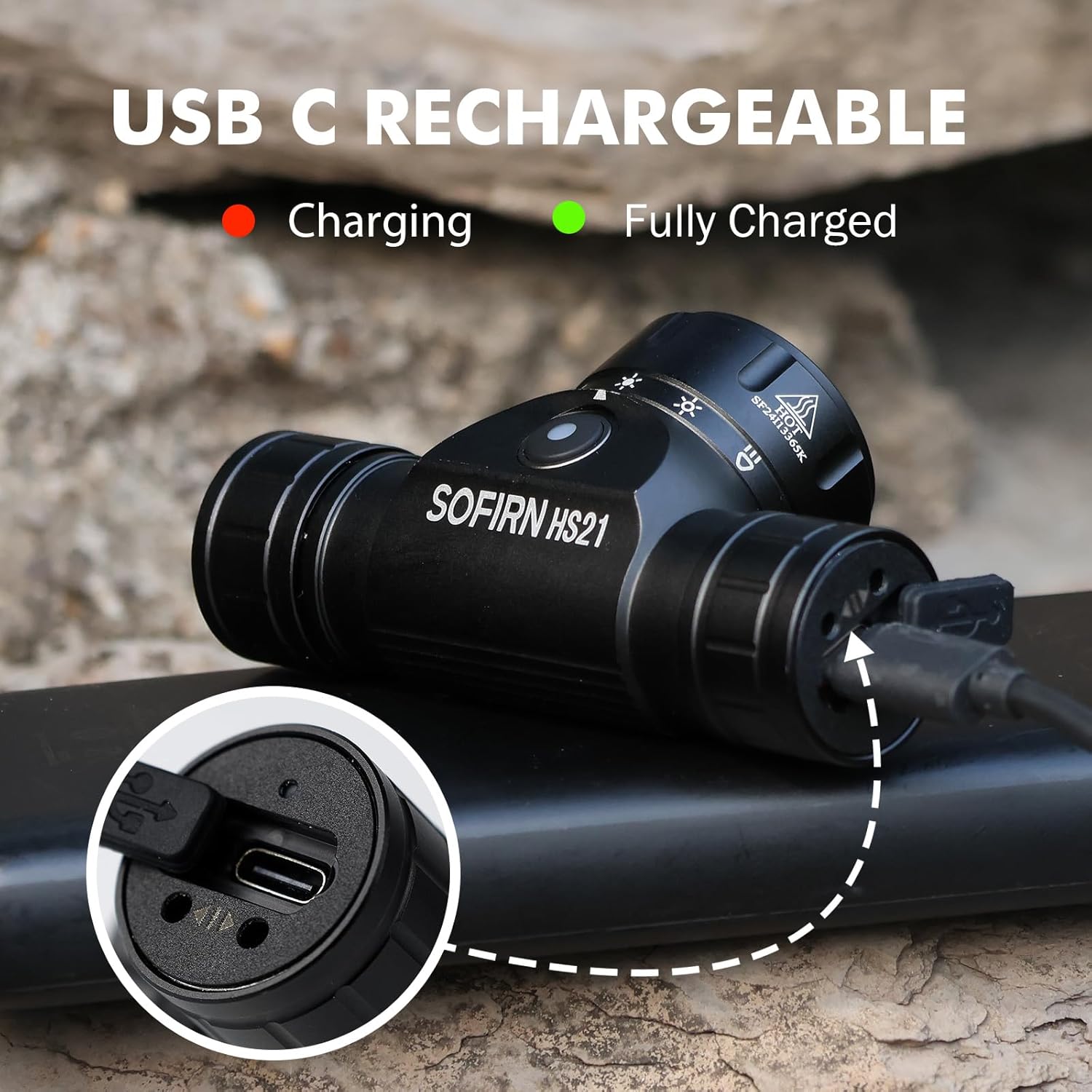
Image 4: Sofirn HS21 Headlamp connected to a USB-C charging cable, showing the charging indicator light.
For D25S:
- Unscrew the head of the D25S headlamp to reveal the hidden USB-C charging port.
- የቀረበውን የዩኤስቢ-ሲ ገመድ ከጭንቅላቱ ጋር ያገናኙamp and to a USB power source.
- The indicator light will show red during charging and turn green when fully charged.
- After charging, screw the head back on tightly to ensure water resistance.

Image 5: Sofirn D25S Headlamp with its head unscrewed, revealing the built-in USB-C charging port.
6. የአሠራር መመሪያዎች
6.1 Sofirn HS21 Headlamp ኦፕሬሽን
The HS21 features a rotary switch for easy mode selection and a separate power button.
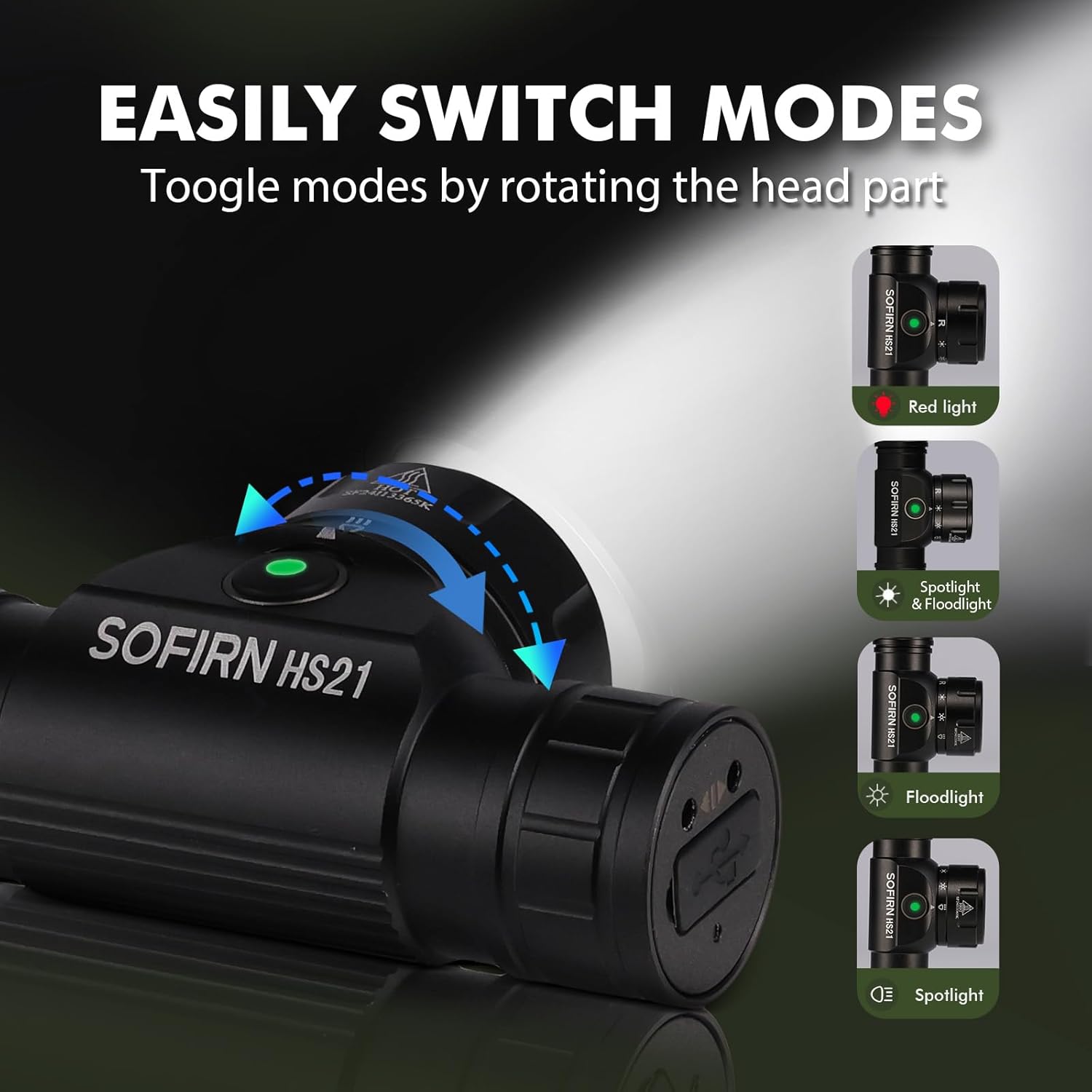
Image 6: Illustration of the Sofirn HS21's rotary switch mechanism for changing light modes.
- ማብራት/ማጥፋት፡ ጭንቅላቱን ለማዞር የኃይል ቁልፉን አንድ ጊዜ ይጫኑamp በርቷል ወይም ጠፍቷል.
- ሁነታ ምርጫ፡- Rotate the head part of the headlamp to cycle through the main light modes: Red Light, Spotlight, Floodlight, and Spotlight + Floodlight (combined).
- የብሩህነት ማስተካከያ; While a mode is active, press and hold the power button to cycle through brightness levels (Low, Medium, High). Release the button at your desired brightness.
- Red Light Activation: Rotate to the red light setting. Press and hold the power button for additional red light modes (e.g., red strobe, red beacon).
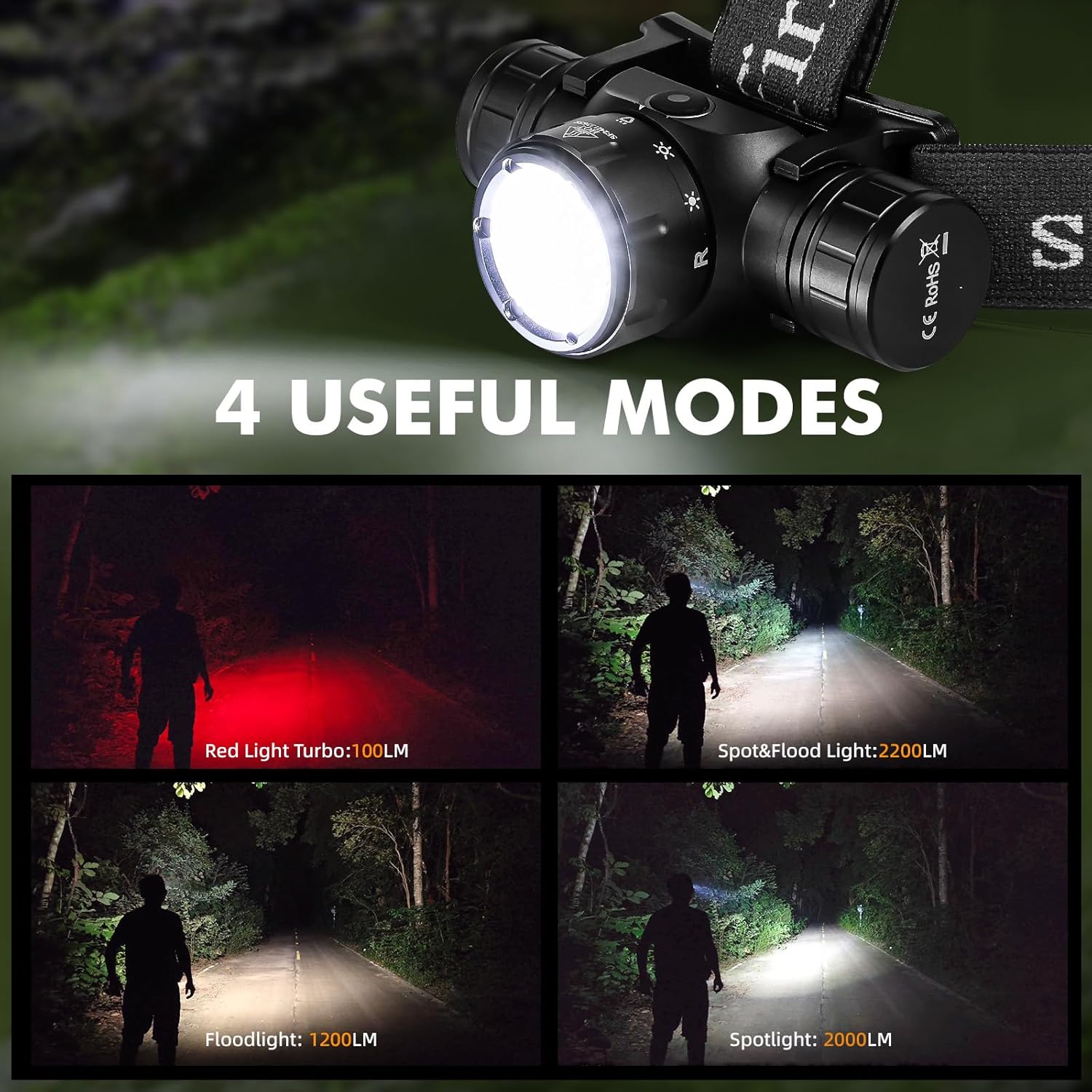
Image 7: The Sofirn HS21 headlamp displaying its four primary light modes: Red Light, Spot & Flood, Floodlight, and Spotlight.
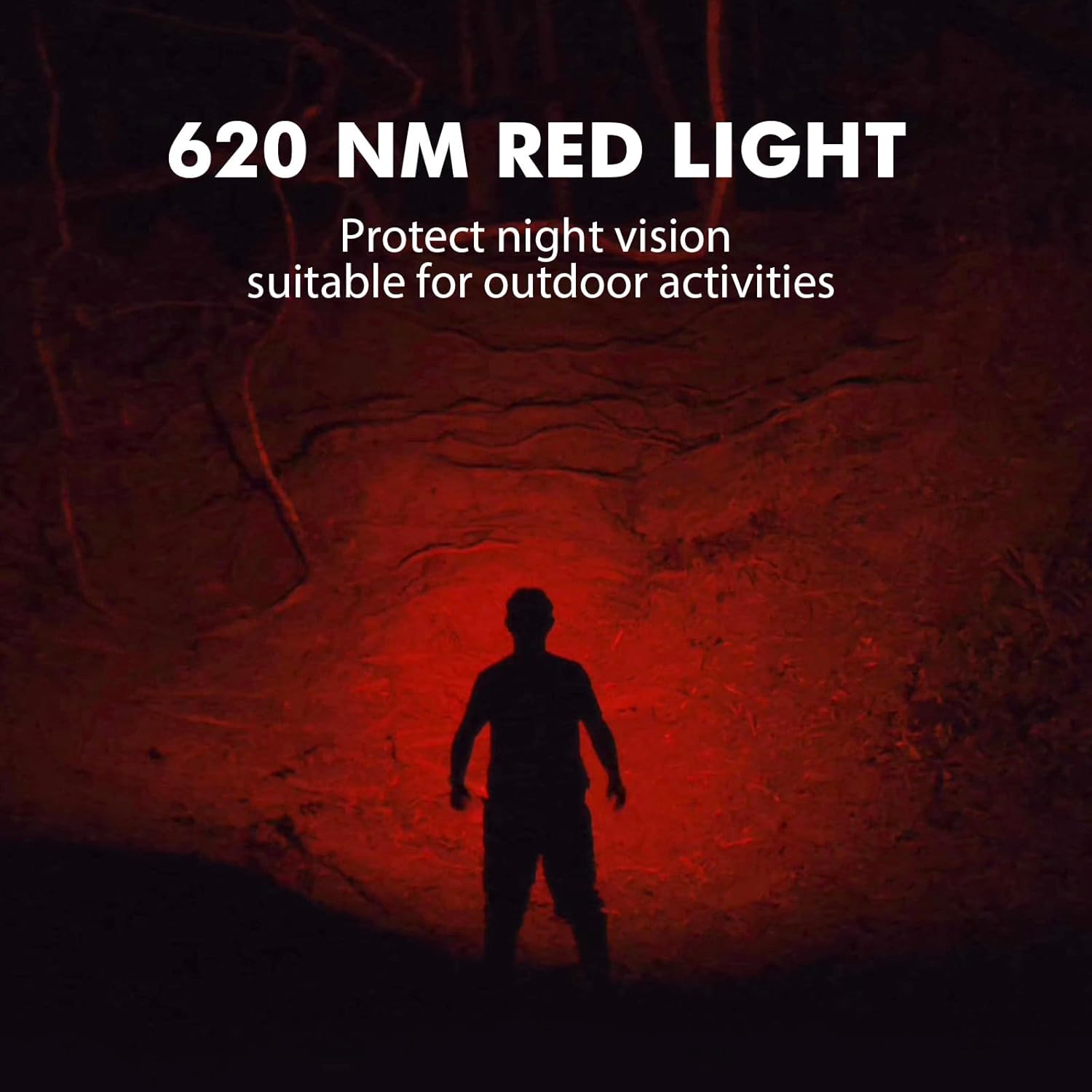
Image 8: The Sofirn HS21 headlamp emitting a 620 NM red light, suitable for preserving night vision.
6.2 Sofirn D25S Headlamp ኦፕሬሽን
The D25S operates with a single button interface.
- ማብራት/ማጥፋት፡ Press the button once to turn the headlamp በርቷል ወይም ጠፍቷል.
- ሁነታ ብስክሌት መንዳት፡ ራስ ሳለamp is on, press and hold the button to cycle through brightness modes: Low → Medium 1 → Medium 2 → High. Release the button at your desired mode.
- ቱርቦ ሁነታ፡ From any mode, double-click the button to activate Turbo mode. Double-click again to return to the previous mode.
- የማህደረ ትውስታ ተግባር The D25S will remember the last used brightness level (excluding Turbo) and turn on in that mode.
7. ጥገና
- ማጽዳት፡ ጭንቅላትን ይጥረጉamp ለስላሳ, መamp ጨርቅ. ገላጭ ማጽጃዎችን ወይም ፈሳሾችን አይጠቀሙ.
- ኦ-ቀለበት Periodically check and lubricate the O-rings with silicone grease to maintain water resistance. Replace damaged O-rings.
- የባትሪ እንክብካቤ ጭንቅላት ከሆነamp will not be used for an extended period, remove the battery to prevent leakage. Recharge batteries regularly to prolong their lifespan.
- ማከማቻ፡ ጭንቅላትን ያስቀምጡamp ከፀሐይ ብርሃን ርቆ በቀዝቃዛና ደረቅ ቦታ ውስጥ።
8. መላ መፈለግ
| ችግር | ሊሆን የሚችል ምክንያት | መፍትሄ |
|---|---|---|
| ዋናamp አይበራም | Low battery; Battery incorrectly installed; Loose tail cap; Faulty battery. | Charge battery; Reinstall battery with correct polarity; Tighten tail cap; Replace battery. |
| የብርሃን ውፅዓት ደብዛዛ ነው። | ባትሪው ዝቅተኛ ነው፤ ሌንስ ቆሻሻ ነው። | Charge battery; Clean the lens. |
| ባትሪ መሙላት አይሰራም | Cable not connected properly; Faulty cable or power source; Charging port obstructed. | Ensure secure connection; Try a different cable/power source; Clean charging port. |
| ውሃ ወደ ውስጥ ይገባል | O-rings damaged or missing; Tail cap/charging port cover not sealed properly. | Check and replace O-rings; Ensure all caps are tightly sealed. |
9. ዝርዝሮች
9.1 Sofirn HS21 Headlamp
| ባህሪ | ዝርዝር |
|---|---|
| የብርሃን ምንጭ | LED (Spotlight, Floodlight, Red Light) |
| ከፍተኛ ውፅዓት | 2200 Lumens (Spotlight + Floodlight) |
| ቀይ የብርሃን ሞገድ ርዝመት | 620 ኤም |
| የመቀየሪያ አይነት | Rotary Switch + Push Button |
| በመሙላት ላይ | ዩኤስቢ-ሲ ዳግም ሊሞላ የሚችል |
| ማሽከርከር | 130° የሚስተካከል |
| መጠኖች | 3.4 x 1.8 x 1.4 ኢንች |
| ክብደት | 0.3 ፓውንድ (ባትሪ ጨምሮ) |
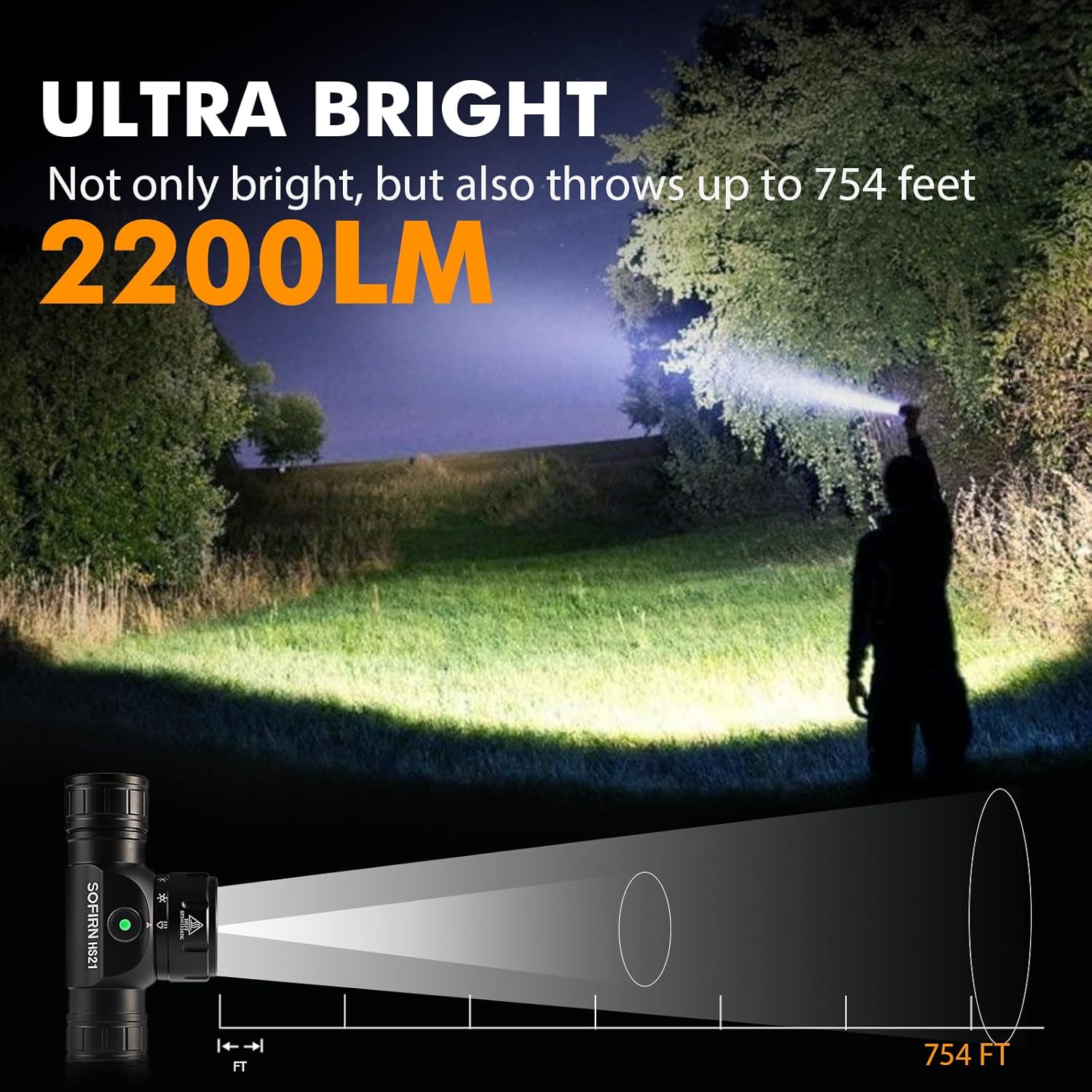
Image 9: The Sofirn HS21 headlamp demonstrating its ultra-bright output and beam distance of up to 754 feet.
9.2 Sofirn D25S Headlamp
| ባህሪ | ዝርዝር |
|---|---|
| የብርሃን ምንጭ | SST40 LED |
| ከፍተኛ ውፅዓት | 1200 Lumens |
| ሁነታዎች | Low, Medium 1, Medium 2, High, Turbo |
| በመሙላት ላይ | Hidden USB-C Rechargeable |
| ልዩ ባህሪያት | የማህደረ ትውስታ ሁነታ |
10. ዋስትና እና ድጋፍ
Sofirn products are covered by a limited warranty. For specific warranty details, please refer to the warranty card included with your product or visit the official Sofirn website. For technical support, troubleshooting assistance, or warranty claims, please contact Sofirn customer service through the retailer where you purchased the product or via the contact information provided on the official Sofirn webጣቢያ.