
1. መግቢያ
Thank you for choosing the LEFFOT M1 Plus Android 14.0 TV Box. This device is designed to transform your television into a smart entertainment hub, offering stunning 4K UHD visuals, powerful performance, and a wide range of connectivity options. This manual provides detailed instructions for setting up, operating, and maintaining your TV box to ensure an optimal user experience.
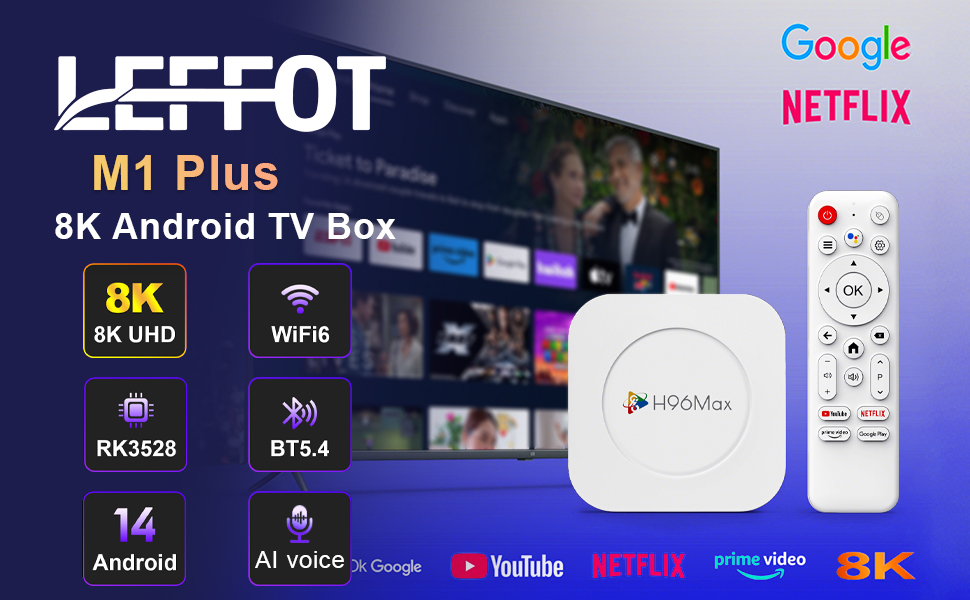
ምስል 1.1፡ አልቋልview of the LEFFOT M1 Plus Android TV Box highlighting its core features like 8K UHD, WiFi 6, BT 5.4, Android 14, and AI voice control.
2. የደህንነት መረጃ
መሳሪያውን ከመጠቀምዎ በፊት ሁሉንም የደህንነት መመሪያዎች በጥንቃቄ ያንብቡ። እነዚህን መመሪያዎች አለመከተል በመሳሪያው ላይ የኤሌክትሪክ ንዝረት፣ እሳት ወይም ጉዳት ሊያስከትል ይችላል።
- የቀረበውን የኃይል አስማሚ ብቻ ይጠቀሙ።
- መሳሪያውን ለውሃ፣ ለእርጥበት እና ለከፍተኛ የሙቀት መጠን አያጋልጡት።
- ከመጠን በላይ ሙቀትን ለመከላከል በመሳሪያው ዙሪያ ትክክለኛውን አየር ማናፈሻን ያረጋግጡ.
- መሳሪያውን እራስዎ ለመበተን ወይም ለመጠገን አይሞክሩ. ብቃት ያላቸውን የአገልግሎት ሰራተኞች ያነጋግሩ።
- መሳሪያውን ከፀሀይ ብርሀን እና ሙቀት ምንጮች ያርቁ.
3. የጥቅል ይዘቶች
ሁሉም እቃዎች በጥቅሉ ውስጥ መኖራቸውን ያረጋግጡ፡-
- LEFFOT M1 Plus Android TV Box
- የርቀት መቆጣጠሪያ
- HDMI ገመድ
- የኃይል አስማሚ
- የተጠቃሚ መመሪያ (ይህ ሰነድ)
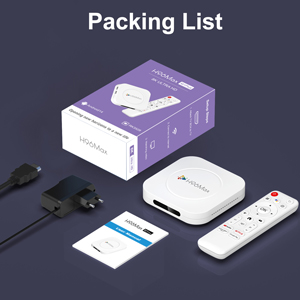
Image 3.1: The package contents including the TV box, remote control, power adapter, and HDMI cable.
4. ምርት አብቅቷልview
Familiarize yourself with the components and ports of your LEFFOT M1 Plus TV Box.
4.1. Device and Remote

Image 4.1: The LEFFOT M1 Plus TV Box (left) and its accompanying remote control (right).
4.2. ወደቦች እና በይነገጽ
The TV box features various ports for connectivity:
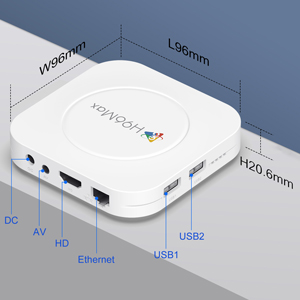
ምስል 4.2፡ ዝርዝር view of the TV box's ports: DC (power), AV (audio/video out), HD (HDMI), Ethernet, USB1, and USB2.
- ዲሲ፡ የኃይል ግብዓት ወደብ.
- ኤቪ Analog audio/video output (for older TVs).
- ኤችዲ HDMI output for connecting to your TV.
- ኢተርኔት፡ ለገመድ የአውታረ መረብ ግንኙነት የRJ-45 ወደብ።
- ዩኤስቢ1 እና ዩኤስቢ2፡ USB ports for connecting external devices like USB drives, keyboards, or mice.
5. ማዋቀር
Follow these steps to set up your LEFFOT M1 Plus TV Box:
- ከቲቪ ጋር ይገናኙ፡ Connect one end of the provided HDMI cable to the "HD" port on the TV box and the other end to an HDMI input port on your television. Note the HDMI input number (e.g., HDMI 1, HDMI 2) on your TV.
- የግንኙነት ኃይል; Plug the power adapter into the "DC" port on the TV box, then plug the adapter into a wall outlet.
- አብራ፡ የቲቪ ሳጥኑ በራስ ሰር መብራት አለበት። ካልሆነ በርቀት መቆጣጠሪያው ላይ የኃይል አዝራሩን ይጫኑ.
- የቴሌቪዥን ግብዓት ይምረጡ፦ On your TV, use the remote control to select the corresponding HDMI input source you connected the TV box to.
- የመጀመሪያ ማዋቀር አዋቂ፡- የቋንቋ ምርጫን፣ የጊዜ ሰቅን እና የአውታረ መረብ ግንኙነትን ጨምሮ የመጀመሪያውን ማዋቀር ለማጠናቀቅ የማያ ገጽ ላይ መመሪያዎችን ይከተሉ።
6. የአሠራር መመሪያዎች
Navigate and use your TV box effectively.
6.1. መሰረታዊ ዳሰሳ
- Use the directional (ወደላይ፣ ወደታች፣ ወደ ግራ፣ ወደ ቀኝ) buttons on the remote to move between menu items and applications.
- የሚለውን ይጫኑ OK button to select an item or confirm an action.
- የሚለውን ይጫኑ ተመለስ ወደ ቀዳሚው ማያ ገጽ ለመመለስ ቁልፍ።
- የሚለውን ይጫኑ ቤት button to return to the main home screen.
6.2. አፕሊኬሽኖችን መድረስ
From the home screen, you can access pre-installed applications or download new ones from the Google Play Store. Navigate to the desired app icon and press OK ለማስጀመር።

Image 6.1: The Android 14.0 TV Box home screen displaying popular streaming applications.
6.3. የድምጽ መቆጣጠሪያ
The LEFFOT M1 Plus supports voice control via Google Assistant. To use this feature:
- Ensure your remote control is paired and has working batteries.
- የሚለውን ይጫኑ የድምጽ ረዳት button (often a microphone icon) on your remote.
- Speak clearly into the remote's microphone. You can ask to open apps, search for content, or control playback.

Image 6.2: Demonstrating the convenient voice control feature using the remote and Google Assistant.
6.4. Media Playback and Display Features
Enjoy high-quality media with advanced features:
- 8ኬ ዩኤችዲ፡ The device supports up to 8K*4K@23fps and 4Kx2K@60fps resolution with HDR10 for vibrant and detailed visuals.
- Airplay, DLNA, WiFidisplay: Easily cast content from your mobile devices to your TV screen.

Image 6.3: Experience crystal-clear 8K resolution with the LEFFOT M1 Plus.

Image 6.4: The TV box supports various connectivity options and display technologies like Airplay, DLNA, and WiFidisplay.
6.5. የአጠቃቀም ሁኔታዎች
The LEFFOT M1 Plus TV Box is versatile for various uses:
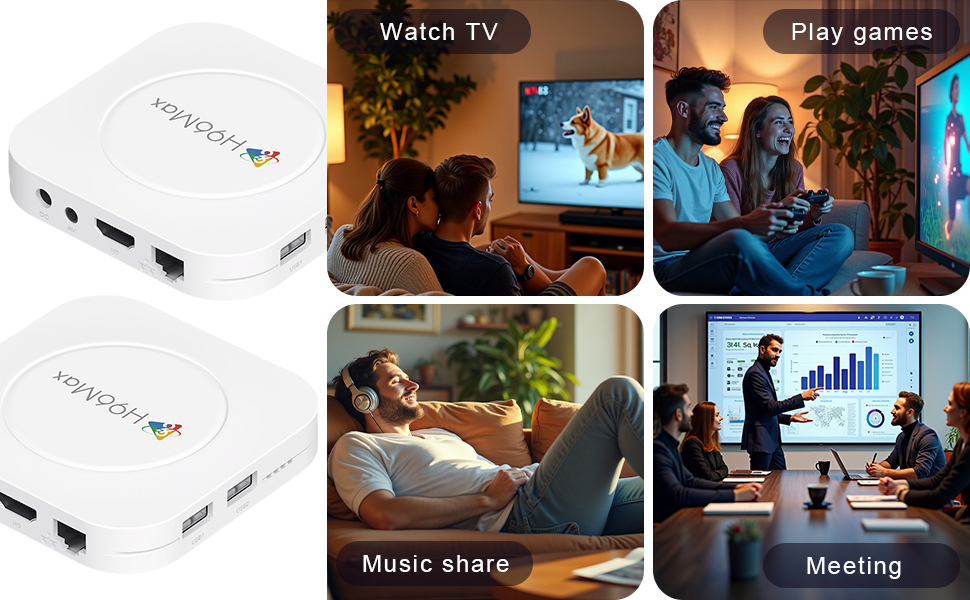
Image 6.5: The TV box can be used for watching TV, playing games, sharing music, and even for business presentations.
7. ግንኙነት
7.1. የ Wi-Fi ግንኙነት
The device supports 2.4G & 5G dual-band Wi-Fi 6 for fast and stable wireless internet.
- ወደ ሂድ ቅንብሮች > አውታረ መረብ እና በይነመረብ.
- ማዞር ዋይ ፋይ.
- ከዝርዝሩ ውስጥ የ Wi-Fi አውታረ መረብዎን ይምረጡ።
- Enter the password if prompted and select ተገናኝ.

Image 7.1: The TV box features advanced Wi-Fi 6 technology for faster and more reliable connections.
7.2. የኤተርኔት ግንኙነት
For a wired connection, plug an Ethernet cable into the "Ethernet" port on the TV box and the other end into your router/modem.
7.3. የብሉቱዝ ግንኙነት
The device supports Bluetooth 5.4 for connecting peripherals like headphones, game controllers, or speakers.
- ወደ ሂድ ቅንብሮች > የተገናኙ መሣሪያዎች > አዲስ መሣሪያን ያጣምሩ.
- የብሉቱዝ መሣሪያዎን ወደ ተጣማጅ ሁኔታ ያስገቡ።
- Select your device from the list and follow the on-screen prompts to pair.
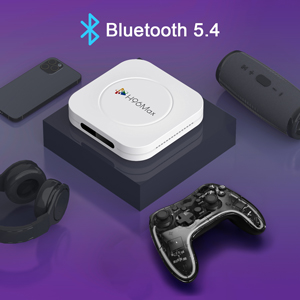
Image 7.2: The TV box supports Bluetooth 5.4 for seamless connection with various external devices.
8. መላ መፈለግ
ለጋራ ጉዳዮች እና መፍትሄዎቻቸው ይህንን ክፍል ይመልከቱ።
| ችግር | ሊሆን የሚችል ምክንያት | መፍትሄ |
|---|---|---|
| ኃይል የለም | የኃይል አስማሚ አልተገናኘም ወይም የተሳሳተ። | የኃይል አስማሚው ከመሳሪያው እና ከሚሰራ የኃይል መውጫ ጋር ደህንነቱ በተጠበቀ ሁኔታ መገናኘቱን ያረጋግጡ። የተለየ መውጫ ይሞክሩ። |
| በቴሌቪዥን ላይ ምንም ምልክት የለም | Incorrect HDMI input selected on TV; HDMI cable loose or faulty. | Verify TV input matches the HDMI port used. Check HDMI cable connections. Try a different HDMI cable or port. |
| የWi-Fi ግንኙነት ችግሮች | የተሳሳተ የይለፍ ቃል፤ ራውተር በጣም ሩቅ፤ ጣልቃ ገብነት። | Re-enter Wi-Fi password. Move device closer to router. Restart router and TV box. |
| የርቀት መቆጣጠሪያ ምላሽ አይሰጥም | ዝቅተኛ ባትሪዎች፤ የርቀት መቆጣጠሪያ አልተጣመረም። | Replace batteries. Re-pair the remote control if it's a Bluetooth remote (refer to device settings). |
| መተግበሪያዎች ይበላሻሉ ወይም ቀርፋፋ አፈፃፀም አላቸው | በጣም ብዙ መተግበሪያዎች እየሰሩ ነው፤ አነስተኛ የማከማቻ ቦታ፤ የሶፍትዌር ችግር። | Close background apps. Clear app caches. Restart the TV box. Consider a factory reset if issues persist (data will be lost). |
9. ዝርዝሮች
Key technical specifications of the LEFFOT M1 Plus Android TV Box:
- ስርዓተ ክወና፡ አንድሮይድ 14.0
- ሲፒዩ፡ RK3528 Quad Core ARM Cortex-A53
- ጂፒዩ፡ ማሊ-450 MP2
- RAM፡ 4 ጊባ
- ROM: 32 ጊባ
- የቪዲዮ ውፅዓት፡- Supports 4Kx2K@60fps, 8K*4K@23fps, HDR10
- ዋይ ፋይ፡ 2.4G & 5G Dual-band Wi-Fi 6
- ኢተርኔት፡ 100 ሚ
- ብሉቱዝ፡ BT 5.4
- ወደቦች፡ HDMI, USB (x2), DC, AV, Ethernet
- ልዩ ባህሪያት፡ Airplay, DLNA, WiFidisplay, Voice Control
- መጠኖች፡- 3.78 x 3.78 x 0.81 ኢንች (96 x 96 x 20.6 ሚሜ)
- ክብደት፡ 4.3 አውንስ (122 ግ ገደማ)
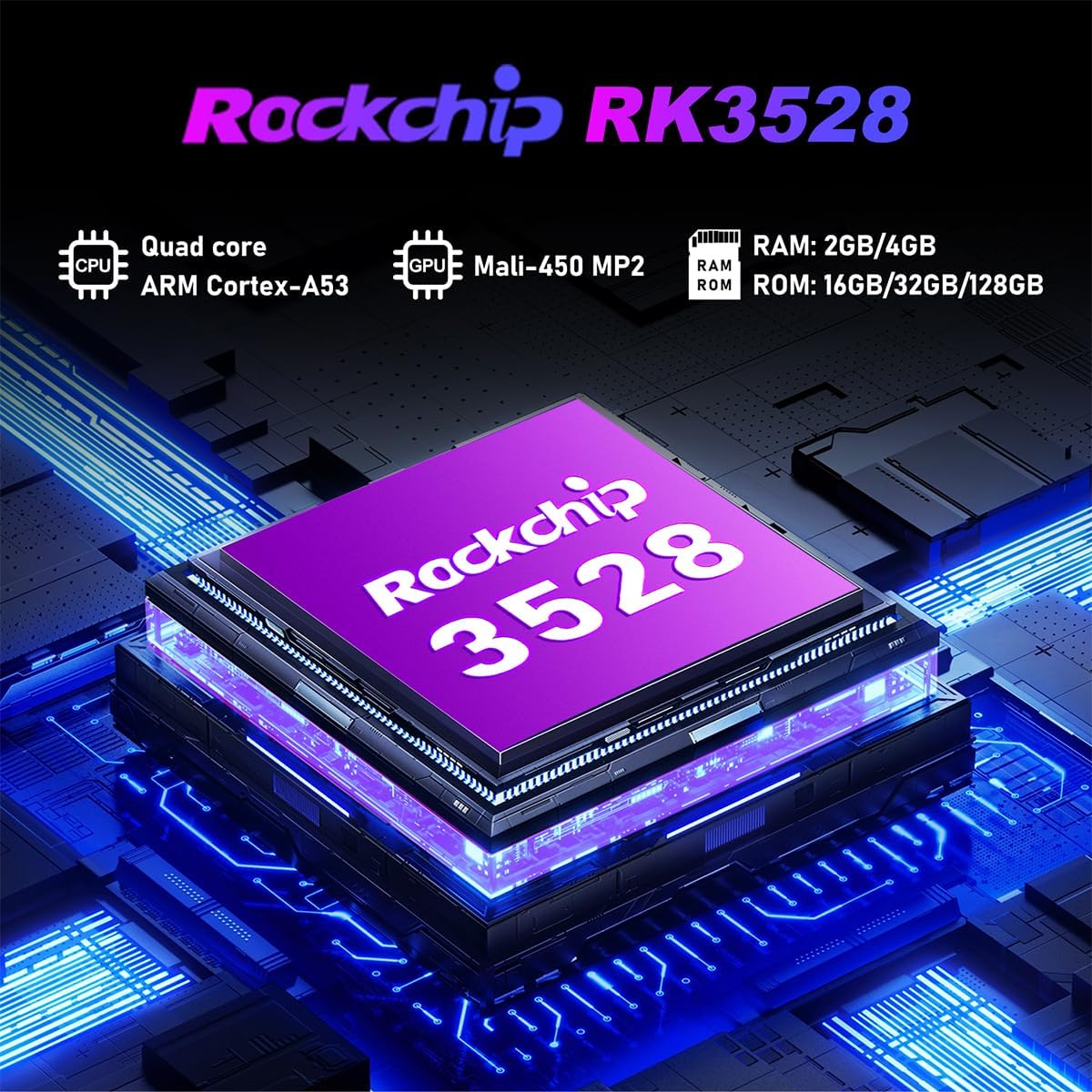
ምስል 9.1፡ ዝርዝር view of the Rockchip RK3528 processor, highlighting its quad-core CPU, Mali-450 MP2 GPU, and memory configurations.
10. ጥገና
To ensure the longevity and optimal performance of your TV box:
- ማጽዳት፡ የመሳሪያውን ውጫዊ ክፍል ለማጽዳት ለስላሳ እና ደረቅ ጨርቅ ይጠቀሙ. ፈሳሽ ማጽጃዎችን ወይም ኤሮሶሎችን አይጠቀሙ.
- የአየር ማናፈሻ; Ensure the ventilation holes are not blocked. Do not place the device on soft surfaces that may obstruct airflow.
- ማከማቻ፡ ለረጅም ጊዜ ጥቅም ላይ በማይውልበት ጊዜ የኃይል አስማሚውን ያላቅቁ እና መሳሪያውን ቀዝቃዛና ደረቅ ቦታ ያስቀምጡት።
11. ዋስትና እና ድጋፍ
LEFFOT products are designed for reliability and performance. This product comes with a standard manufacturer's warranty. Please refer to the warranty card included in your package for specific terms and conditions.
For technical support, troubleshooting assistance, or warranty claims, please contact LEFFOT customer service through the retailer where you purchased the product or visit the official LEFFOT webየእውቂያ መረጃ ለማግኘት ጣቢያ.
እባክዎ ለዋስትና ዓላማዎች የግዢ ማረጋገጫዎን ያቆዩ።