
1. መግቢያ
The Innex DS200 is a professional USB book scanner designed for efficient digitization of various documents, including books, magazines, and loose papers. It features a 26MP camera, A3 scanning capability, and advanced software functions to enhance scanning quality and workflow. This manual provides detailed instructions for setting up, operating, and maintaining your DS200 scanner.

Figure 1.1: Innex DS200 Scanner in operation with an open book.
2. የጥቅል ይዘቶች
ከዚህ በታች የተዘረዘሩት ሁሉም እቃዎች በጥቅልዎ ውስጥ መያዛቸውን ያረጋግጡ። ማንኛቸውም እቃዎች ከጠፉ ወይም ከተበላሹ፣ እባክዎ የደንበኛ ድጋፍን ያግኙ።
- Innex DS200 Scanner Unit
- የመቃኛ ፓድ
- የዩኤስቢ ገመድ
- የኃይል አስማሚ (አይነት A)
- Power Plugs (Type C, Type G)
- የእጅ ቁልፍ
- የእግር ፔዳል
- Adapter (USB-C to USB-A)
- ፈጣን ጅምር መመሪያ
- የአገልግሎት ካርድ
- የጂፒኤስአር መግለጫ
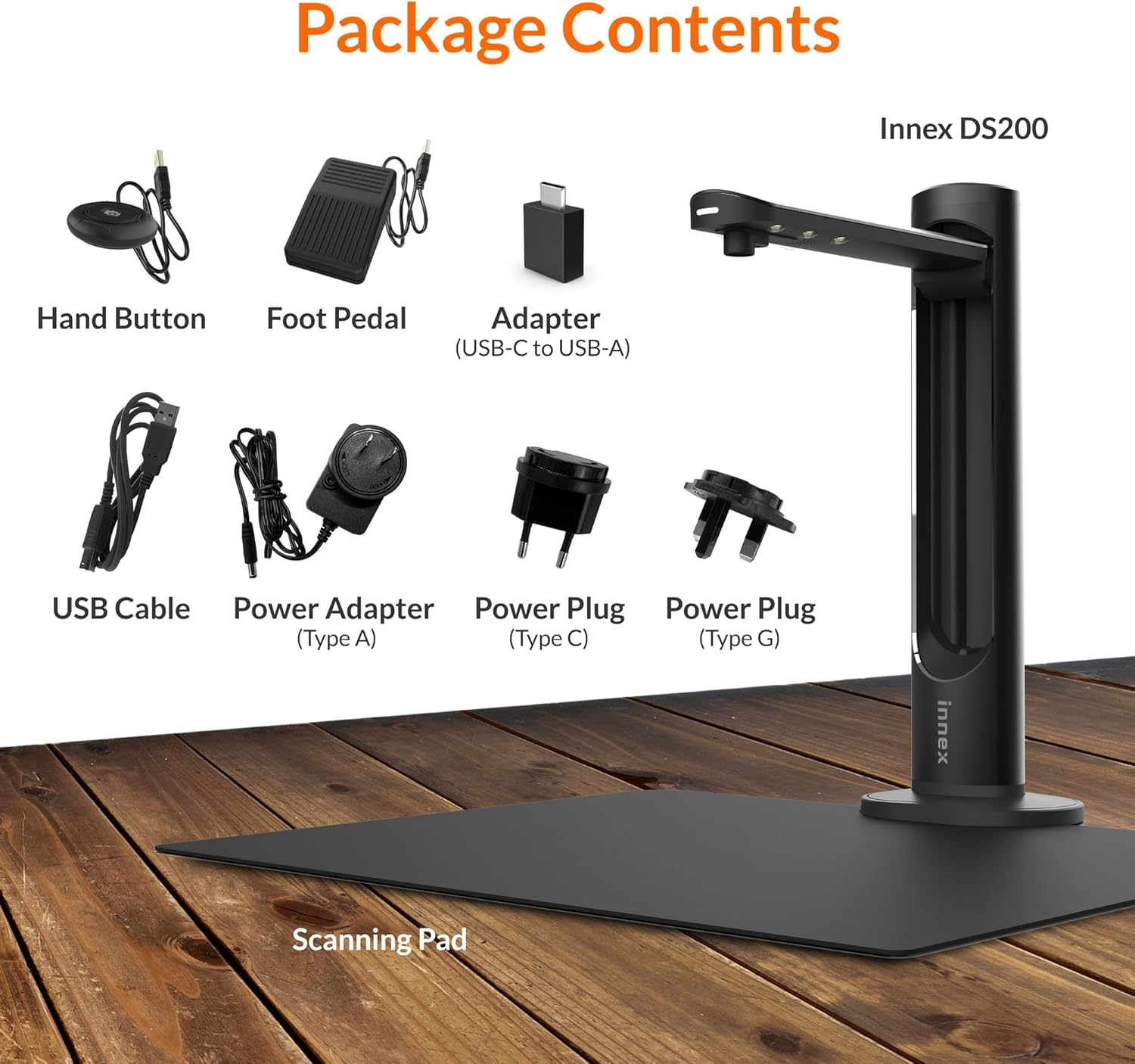
Figure 2.1: Contents of the Innex DS200 package.
3. ማዋቀር
- ክፍሎቹን ያራግፉ፡ ሁሉንም እቃዎች ከማሸጊያው ውስጥ በጥንቃቄ ያስወግዱ.
- ስካነሩን ያስቀምጡ፡ Place the Innex DS200 scanner unit on a stable, flat surface.
- Place the Scanning Pad: Position the black scanning pad directly beneath the scanner head. Ensure it is centered and flat.
- የግንኙነት ኃይል; Connect the power adapter to the scanner and plug it into an electrical outlet. Use the appropriate power plug for your region.
- ከኮምፒዩተር ጋር ይገናኙ; Connect the scanner to your computer using the provided USB cable. If your computer only has USB-C ports, use the included USB-C to USB-A adapter.
- ሶፍትዌር ጫን፡- Download and install the Innex Scan software from the official Innex website. Follow the on-screen instructions for installation. The software is compatible with Windows and macOS.
- መለዋወጫዎችን ያገናኙ፡ Plug in the hand button and foot pedal to the designated ports on the scanner unit.
4. የአሠራር መመሪያዎች
4.1. መሰረታዊ የፍተሻ ሂደት
- Launch Innex Scan Software: Open the Innex Scan application on your computer.
- የቦታ ሰነድ፡ Place the document or book you wish to scan on the scanning pad. Ensure it is within the scanning area. The laser guide can assist with alignment.
- ቅንብሮችን ያስተካክሉ፡ In the software, select your desired scanning mode (e.g., Document, Book, Photo) and adjust settings such as color mode, resolution, and output format.
- ቅኝትን አስጀምር፡ Trigger the scan using one of the available methods: the software capture button, the hand button, or the foot pedal.
- Review እና አስቀምጥ፡ ከተቃኙ በኋላ እንደገናview the image in the software. Apply any necessary corrections and save the file to your preferred location and format.

Figure 4.1: Using the laser guide for document alignment.

Figure 4.2: Multiple options for triggering a scan.
4.2. የሶፍትዌር ባህሪያት
The Innex Scan software includes several features to optimize your scanning experience:
- Curve Flattening: Automatically corrects the curvature of book pages for flat, readable scans.
- OCR (የጨረር ቁምፊ እውቅና) Converts scanned images into editable and searchable text in over 120 languages.
- Auto-Cropping: Automatically detects and crops the document edges.
- Page-Turn Detection: For book scanning, the software can detect when a page has been turned and automatically initiate the next scan.
- Finger Removal: Intelligently removes images of fingers holding down pages during scanning.
- Multi Scan Mode: Allows scanning multiple small items simultaneously, such as business cards or photos, and separates them into individual files.
- Visualizer Mode: Enables the scanner to function as a document camera for presentations or live demonstrations.
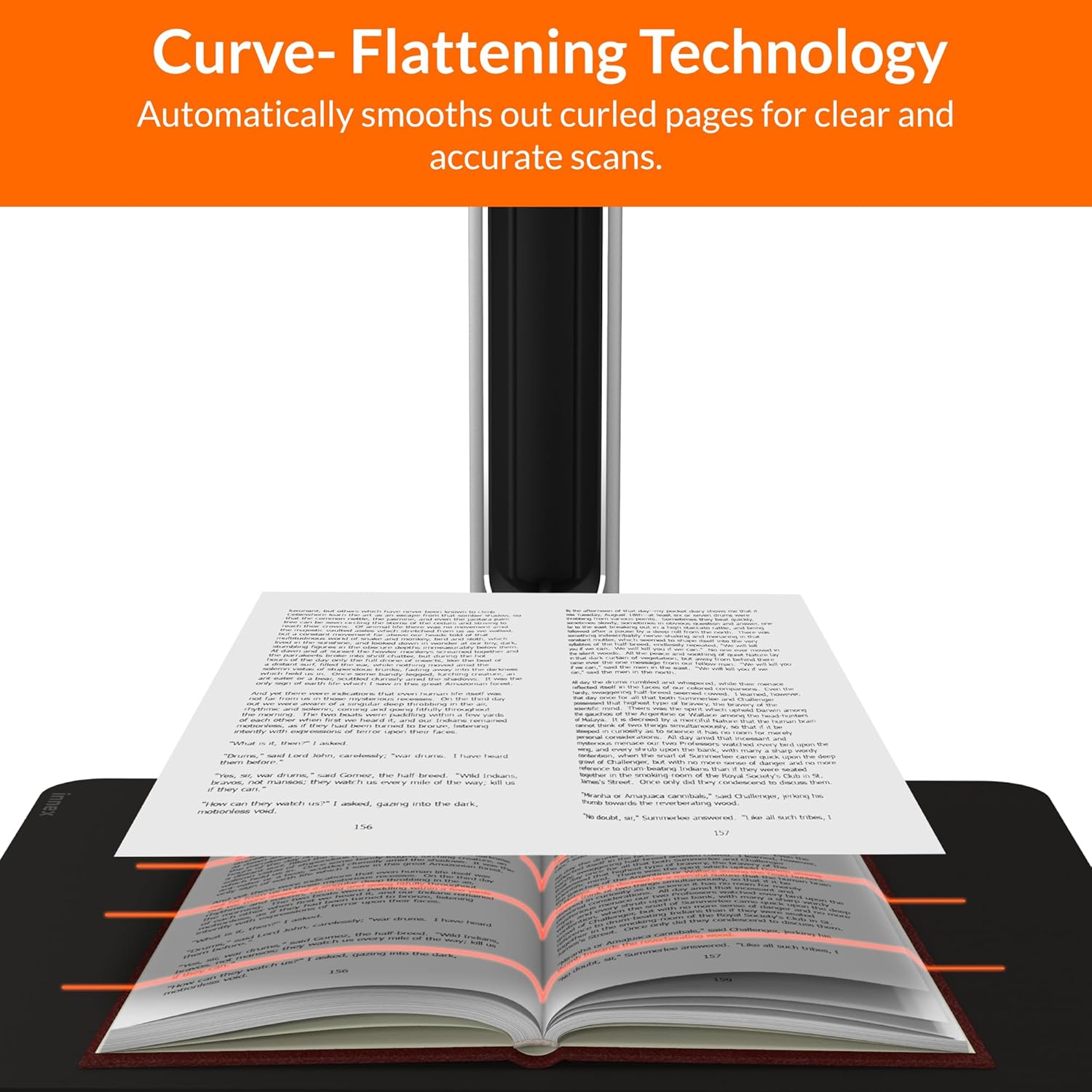
Figure 4.3: Curve Flattening Technology in use.

Figure 4.4: OCR Text Recognition and export options.

ምስል 4.5 - ተጠናቀቀview of Innex Scan software features.
4.3. Export Options
The Innex DS200 supports various export formats for both image and text files:
- ምስል Files: JPEG, PNG, BMP, TIFF
- ሰነድ Files: PDF (searchable), DOC, EXCEL, TEXT
- ኢ-መጽሐፍ Files: EPUB
- ኦዲዮ Files (Text-to-Speech): MP3 ፣ WAV
- ቪዲዮ Files (Visualizer Mode): MP4, AVI, FLV, WMV

Figure 4.6: Available export formats in Innex Scan software.
5. ጥገና
- ማጽዳት፡ Regularly wipe the scanner lens and LED lamp with a soft, dry, lint-free cloth to ensure optimal scan quality. Clean the scanning pad with a damp አስፈላጊ ከሆነ ጨርቅ.
- የሶፍትዌር ማሻሻያ Periodically check the official Innex webየቅርብ ጊዜ ባህሪያትን እና የአፈጻጸም ማሻሻያዎችን እንዳገኙ ለማረጋገጥ የሶፍትዌር ዝመናዎች ጣቢያ።
- ማከማቻ፡ ጥቅም ላይ በማይውሉበት ጊዜ፣ ስካነሩን ከፀሐይ ብርሃን እና ከፍተኛ የሙቀት መጠን ራቅ ባለ ንጹህና ደረቅ አካባቢ ያስቀምጡት።
6. መላ መፈለግ
6.1. የተለመዱ ጉዳዮች እና መፍትሄዎች
| ጉዳይ | ሊሆን የሚችል ምክንያት | መፍትሄ |
|---|---|---|
| ስካነር አልተገኘም። | Loose USB connection, driver issue, power issue | Ensure USB cable is securely connected. Check power connection. Reinstall scanner drivers or software. Try a different USB port. |
| ደካማ የቅኝት ጥራት | Dirty lens, insufficient lighting, incorrect settings, document not flat | Clean the scanner lens. Ensure adequate ambient lighting or use the built-in LED lamp. Adjust resolution and color settings in software. Ensure documents are flat on the scanning pad. |
| ሶፍትዌር ይበላሻል ወይም ይቆማል | Outdated software, system incompatibility, insufficient system resources | Update Innex Scan software to the latest version. Ensure your computer meets minimum system requirements. Close other demanding applications. Restart the software and computer. |
| OCR not working correctly | Poor scan quality, incorrect language setting, complex font | Improve scan quality. Verify the correct OCR language is selected in the software. For highly stylized or handwritten text, OCR accuracy may vary. |
7. ዝርዝሮች
Detailed technical specifications for the Innex DS200 scanner:

Figure 7.1: Innex DS200 Technical Specifications.
- ሞዴል፡ DS200
- የምስል ዳሳሽ፡- CMOS ዳሳሽ
- ከፍተኛ. ጥራት፡ 5800 x 4522 ፒክስል (26 ሜፒ)
- Output DPI: Approx. 300 dpi (A3)
- ከፍተኛ. የተኩስ ቦታ፡ A3 (16.77" x 12.59" / 426 x 320mm)
- የቀለም ጥልቀት; 24-ቢት
- Lens Focus: ቋሚ
- የፍተሻ ፍጥነት፡- 1.5 sec per A3 page
- የመቃኘት ቀስቅሴ፡ የእጅ አዝራር፣ የእግር ፔዳል፣ የሶፍትዌር ቁልፍ፣ ራስ-ሰር ቅኝት።
- የውጤት ቅርጸቶች፡- Picture (JPG, TIFF, BMP, PNG), Document (PDF, Image, PDF Searchable), Text (DOC, EXCEL, TEXT), E-book (EPUB), Audio (MP3, WAV), Video (AVI, MPEG, FLV, WMV)
- ሌዘር ትንበያ፡ አብሮ የተሰራ
- የብርሃን ምንጭ፡- አብሮ የተሰራ ከፍተኛ ብሩህነት LED
- በይነገጽ፡ USB 2.0 Type B x 1 (for PC Connection), USB 2.0 Type-A x 1 (for USB Extension)
- ኃይል፡- 5V/2A
- ዝቅተኛ የስርዓት መስፈርቶች Windows 10, 11, macOS 11 or later; Intel i5 Processor or higher; 8GB RAM (Recommended 16GB or more); 20GB Available HDD Space; USB 2.0 Port
- የምርት መጠኖች (የተጣጠፉ) 4.33"D x 5.91"W x 15.75"H (110 x 150 x 400mm)
- Product Dimensions (In Use): 12.05"D x 5.91"W x 15.75"H (307 x 150 x 400mm)
- የተጣራ ክብደት: በግምት. 2.64 ፓውንድ (1.2 ኪ.ግ)
8. ዋስትና እና ድጋፍ
For warranty information and technical support, please refer to the service card included in your package or visit the official Innex website. You can also contact FunTech Innovation, the manufacturer, for assistance.
አምራች፡ FunTech Innovation
Webጣቢያ፡ Innex Official Store on Amazon