
1. መግቢያ
ስለገዙ እናመሰግናለንasing the JVC XS-N1154B Bluetooth Speaker. This manual provides essential information for the safe and efficient operation of your device. Please read it thoroughly before use and retain it for future reference.
2. የደህንነት መረጃ
- ድምጽ ማጉያውን ለከፍተኛ ሙቀት፣ ቀጥተኛ የፀሐይ ብርሃን ወይም ከፍተኛ እርጥበት አያጋልጥ።
- ተናጋሪውን ለጠንካራ ተጽእኖዎች ከመጣል ወይም ከማስገዛት ተቆጠብ።
- ድምጽ ማጉያውን ለመበተን ወይም ለመቀየር አይሞክሩ። ይህ ዋስትናውን ያጣል።
- ድምጽ ማጉያውን ከውሃ እና ፈሳሾች ያርቁ, ምንም እንኳን የውሃ መከላከያ ደረጃው ቢሆንም, በውስጣዊ አካላት ላይ ጉዳት እንዳይደርስ ለመከላከል.
- የተገለጸውን የኃይል መሙያ ገመድ እና የኃይል አስማሚን ብቻ ይጠቀሙ።
- ድምጽ ማጉያውን ለስላሳ እና ደረቅ ጨርቅ ያጽዱ. ገላጭ ማጽጃዎችን ወይም ፈሳሾችን አይጠቀሙ.
3. የጥቅል ይዘቶች
ሁሉም እቃዎች በጥቅሉ ውስጥ መኖራቸውን ያረጋግጡ፡-
- JVC XS-N1154B Bluetooth Speaker
- የኃይል መሙያ ገመድ
- የተጠቃሚ መመሪያ
- የርቀት መቆጣጠሪያ (ከተካተተ)
4. ምርት አብቅቷልview
ከተናጋሪው አካላት እና መቆጣጠሪያዎች ጋር እራስዎን ይወቁ።
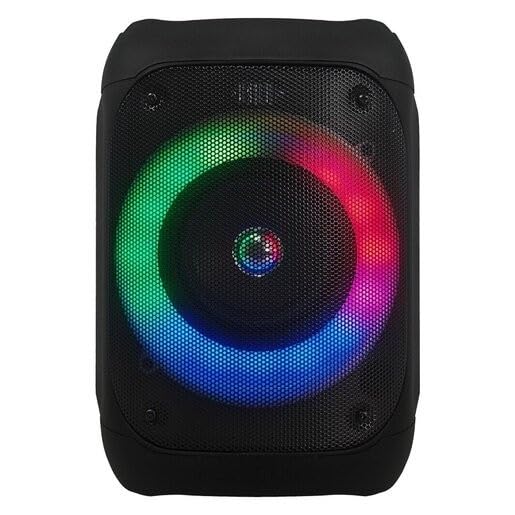
ምስል 1፡ ፊት ለፊት view of the JVC XS-N1154B Bluetooth Speaker, showcasing the speaker grille and integrated music-activated LED lights.
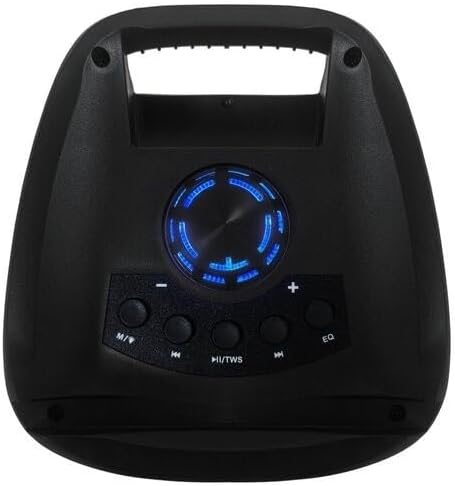
ምስል 2፡ ከፍተኛ view of the JVC XS-N1154B Bluetooth Speaker, displaying the control panel with various buttons and the volume knob.
የቁጥጥር ፓነል ተግባራት፡-
- የኃይል ቁልፍ፡- ድምጽ ማጉያውን ያበራል ወይም ያጠፋል.
- ሁነታ (ኤም) አዝራር፡- Switches between Bluetooth, USB, SD Card, and FM Radio modes.
- Play/Pause (►||) / TWS Button: Plays or pauses audio. Long press for TWS (True Wireless Stereo) pairing.
- Previous Track (◀◀) Button: Skips to the previous track or tunes down in FM mode.
- Next Track (►►) Button: Skips to the next track or tunes up in FM mode.
- ኢኩኪ ቁልፍ በእኩልታ ቅድመ-ቅምጦች በኩል ይሽከረከራል።
- የድምፅ ቁልፍ; Rotates to adjust the volume level.
5. ማዋቀር
5.1 ድምጽ ማጉያውን መሙላት
- የኃይል መሙያ ገመዱን ከድምጽ ማጉያው የኃይል መሙያ ወደብ ጋር ያገናኙ።
- Plug the other end of the cable into a suitable USB power adapter (not included) or a powered USB port.
- የኃይል መሙያ አመልካች መብራቱ በሚሞላበት ጊዜ በተለይም ቀይ ያበራል።
- Once fully charged, the indicator light may change color (e.g., turn off or turn blue/green). Disconnect the speaker from the power source.
5.2 ማብራት / ማጥፋት
- ለማብራት፡- Press and hold the Power button until the speaker powers on and you hear an audible prompt.
- ለማጥፋት፡- Press and hold the Power button again until the speaker powers off.
6. የአሠራር መመሪያዎች
6.1 የብሉቱዝ ማጣመር
- Ensure the speaker is powered on and in Bluetooth mode. If not, press the Mode (M) button to switch to Bluetooth mode. The speaker will indicate it is ready for pairing (e.g., a blinking LED or audible prompt).
- በተንቀሳቃሽ መሳሪያዎ (ስማርትፎን ፣ ታብሌት ፣ ላፕቶፕ) ላይ ብሉቱዝን ያንቁ እና የሚገኙ መሳሪያዎችን ይፈልጉ።
- Select "JVC XS-N1154B" from the list of devices.
- ከተጣመረ በኋላ ድምጽ ማጉያው የሚሰማ ማረጋገጫ ይሰጣል፣ እና የብሉቱዝ አመልካች መብራቱ ጠንካራ ይሆናል።
- አሁን በድምጽ ማጉያው በኩል ከመሳሪያዎ ላይ ድምጽ ማጫወት ይችላሉ።
6.2 ዩኤስቢ/ኤስዲ ካርድ መልሶ ማጫወት
- የዩኤስቢ ፍላሽ አንፃፊ ወይም ኤስዲ ካርድ ያስገቡ (ከተደገፈ ኦዲዮ ጋር files) into the corresponding port on the speaker.
- The speaker will automatically switch to USB or SD card mode and begin playing audio. If not, press the Mode (M) button to select the correct input.
- Use the Previous Track (◀◀), Next Track (►►), and Play/Pause (►||) buttons to control playback.
6.3 ኤፍኤም ሬዲዮ ኦፕሬሽን
- ወደ ኤፍኤም ሬዲዮ ሁነታ ለመቀየር የሞድ (ኤም) ቁልፍን ይጫኑ።
- To auto-scan and save available stations, press and hold the Play/Pause (►||) button. The speaker will scan and store stations automatically.
- Use the Previous Track (◀◀) and Next Track (►►) buttons to navigate between saved FM stations.
6.4 LED ብርሃን ሁነታዎች
The speaker features music-activated LED lights. These lights typically synchronize with the audio playback. There may be an additional button or a combination of buttons to cycle through different light modes or to turn them off. Refer to the remote control section for specific controls if available.
6.5 የድምጽ መቆጣጠሪያ
Rotate the Volume Knob on the top panel clockwise to increase volume and counter-clockwise to decrease volume.
6.6 የርቀት መቆጣጠሪያ አጠቃቀም
If your package includes a remote control, it provides convenient access to various functions:
- ኃይል፡- አብራ/አጥፋ
- ሁነታ፡ Switch input sources (Bluetooth, USB, SD, FM)
- ጥራዝ +/- የድምጽ መጠን ያስተካክሉ
- አጫውት/ ለአፍታ አቁም፡ መልሶ ማጫወትን ይቆጣጠሩ
- ቀዳሚ/ቀጣይ፡ Skip tracks/stations
- EQ: Change equalizer presets
- LED: Control LED light modes (if applicable)
7. ጥገና
7.1 ጽዳት
Wipe the speaker's exterior with a soft, dry, lint-free cloth. Do not use liquid cleaners, sprays, or solvents, as these may damage the finish or internal components. Ensure all ports are dry before use, especially given its waterproof nature.
7.2 ማከማቻ
ለረጅም ጊዜ ጥቅም ላይ በማይውሉበት ጊዜ፣ ድምጽ ማጉያውን ቀዝቃዛና ደረቅ ቦታ፣ ከፀሐይ ብርሃን እና ከፍተኛ የሙቀት መጠን ራቅ አድርገው ያስቀምጡት። የባትሪውን ዕድሜ ለመጠበቅ በየጊዜው መሙላት ይመከራል።
8. መላ መፈለግ
| ችግር | ሊሆን የሚችል ምክንያት | መፍትሄ |
|---|---|---|
| ተናጋሪው አይበራም። | ባትሪው ተሟጧል። | ድምጽ ማጉያውን ሙሉ በሙሉ ይሙሉ። |
| ድምጽ የለም። | Volume is too low or muted. Device not paired correctly. | Increase volume. Re-pair Bluetooth device. Check audio source. |
| የብሉቱዝ ማጣመር አልተሳካም። | ድምጽ ማጉያው በማጣመር ሁነታ ላይ አይደለም። መሳሪያው በጣም ሩቅ ነው። ጣልቃ ገብነት። | ድምጽ ማጉያ በብሉቱዝ ማጣመሪያ ሁነታ ላይ መሆኑን ያረጋግጡ። መሣሪያውን ወደ ፊት ያንቀሳቅሱት። ሌሎች የብሉቱዝ መሳሪያዎችን ያጥፉ። |
| የዩኤስቢ/ኤስዲ ካርድ እየተጫወተ አይደለም። | ትክክል አይደለም። file ቅርጸት። ካርድ/ድራይቭ በትክክል አልገባም። | ኦዲዮን ያረጋግጡ files are in a supported format. Reinsert the USB drive/SD card. Press Mode button to select correct input. |
| የኤፍኤም ሬዲዮ አቀባበል ደካማ ነው። | ደካማ ምልክት። | ተናጋሪውን የተሻለ አቀባበል ወዳለበት አካባቢ ያዛውሩት። |
9. ዝርዝሮች
- ሞዴል፡ XS-N1154B
- የምርት ስም፡ JVC
- ግንኙነት፡ ብሉቱዝ ፣ ዩኤስቢ ፣ ኤስዲ ካርድ
- ሬዲዮ፡ ዲጂታል ኤፍ ኤም ሬዲዮ
- የኃይል ውፅዓት፡- 4 ዋት
- የኦዲዮ ውፅዓት ሁነታ ፦ ስቴሪዮ
- የመቆጣጠሪያ ዘዴ፡- የርቀት
- ቁሳቁስ፡ ፕላስቲክ
- የውሃ መከላከያ; አዎ
- የኃይል ምንጭ፡- በባትሪ የተጎላበተ
- መጠኖች፡- በግምት 18.6D x 18.9W x 25.5H ሴሜ
- ክብደት፡ በግምት 1.2 ኪ.ግ
- ተስማሚ መሣሪያዎች ላፕቶፕ, ስማርትፎን
10. ዋስትና እና ድጋፍ
10.1 የዋስትና መረጃ
This JVC XS-N1154B Bluetooth Speaker comes with a የ 1 ዓመት ዋስትና ከተገዛበት ቀን ጀምሮ። ይህ ዋስትና የማምረቻ ጉድለቶችን እና በመደበኛ አጠቃቀም ወቅት የአሠራር ጉድለቶችን ይሸፍናል። አላግባብ መጠቀም፣ አደጋዎች፣ ያልተፈቀዱ ማሻሻያዎች ወይም መደበኛ ብልሽት እና መቀደድ የሚደርስ ጉዳትን አይሸፍንም።
10.2 የደንበኛ ድጋፍ
For technical assistance, warranty claims, or further inquiries, please contact JVC customer support through their official website or the retailer where the product was purchased. Please have your product model number (XS-N1154B) and proof of purchase ready when contacting support.