
ቲ ኤንድ ጂ ቲጂ112
የቲ&ጂ TG112 ተንቀሳቃሽ የብሉቱዝ ድምጽ ማጉያ የተጠቃሚ መመሪያ
ሞዴል፡- TG112
መግቢያ
The T&G TG112 Portable Bluetooth Speaker is designed to provide high-quality audio in a compact and durable form factor. Featuring seamless Bluetooth connectivity, multi-source playback options, and a long-lasting battery, it is suitable for various indoor and outdoor listening environments. This manual provides detailed instructions for setup, operation, and maintenance of your TG112 speaker.
የደህንነት መረጃ
እባክዎ ይህንን ምርት ከመጠቀምዎ በፊት ሁሉንም የደህንነት መመሪያዎች ያንብቡ እና ይረዱ። ይህንን መመሪያ ለወደፊት ማጣቀሻ ያቆዩት።
- ተናጋሪውን ለረጅም ጊዜ ለከፍተኛ ሙቀት ወይም ቀጥተኛ የፀሐይ ብርሃን አታጋልጥ።
- ድምጽ ማጉያውን አይበታተኑ፣ አይጠግኑ ወይም አይቀይሩ። ይህ ዋስትናውን ሊያሳጣ እና የደህንነት አደጋዎችን ሊያስከትል ይችላል።
- Keep the speaker away from water and liquids, even though it is waterproof, excessive exposure or submersion should be avoided.
- የተገለጸውን የኃይል መሙያ ገመድ እና የኃይል አስማሚን ብቻ ይጠቀሙ።
- ድምጽ ማጉያውን ለስላሳ እና ደረቅ ጨርቅ ያጽዱ. ገላጭ ማጽጃዎችን ወይም ፈሳሾችን አይጠቀሙ.
- ተናጋሪውን ለጠንካራ ተጽእኖዎች ከመጣል ወይም ከማስገዛት ተቆጠብ።
የጥቅል ይዘቶች
ሁሉም እቃዎች በጥቅሉ ውስጥ መኖራቸውን ያረጋግጡ፡-
- T&G TG112 ተንቀሳቃሽ የብሉቱዝ ድምጽ ማጉያ
- Power Cable (USB charging cable)
- የተጠቃሚ መመሪያ (ይህ ሰነድ)
ምርት አልቋልview
Familiarize yourself with the various parts and controls of your TG112 speaker.

ምስል 1፡ ፊት ለፊት view of the T&G TG112 speaker, showcasing its cylindrical design, blue fabric grille, and orange carrying handle. The T&G logo is visible on the front.
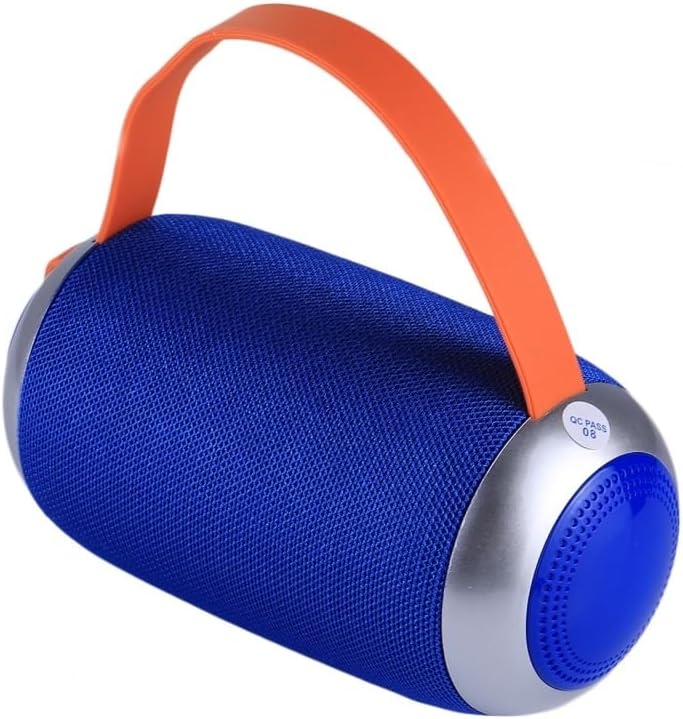
ምስል 2፡ ጎን view of the T&G TG112 speaker, highlighting the control panel with buttons for power, volume, mode selection, and playback controls. The charging port and input slots are typically located near these controls.
የቁጥጥር ፓነል ተግባራት፡-
- የኃይል ቁልፍ፡- ድምጽ ማጉያውን ለማብራት/ለማጥፋት ተጭነው ይያዙ።
- ሁነታ አዝራር (ኤም)፦ Short press to switch between Bluetooth, FM Radio, AUX-IN, and TF Card/USB modes.
- የማጫወት/ለአፍታ አቁም አዝራር (▶⏸): Short press to play or pause audio. In call mode, press to answer/end calls.
- ድምጽ ቀንስ / ቀዳሚ ትራክ (-): ለቀደመው ትራክ አጭር ተጫን። ድምጽን ለመቀነስ በረጅሙ ተጫን።
- የድምጽ መጨመር / ቀጣይ ትራክ (+): ለቀጣይ ትራክ አጭር ተጫን። ድምጽን ለመጨመር በረጅሙ ተጫን።
- የዩኤስቢ ወደብ፡ ለዩኤስቢ ዲስክ መልሶ ማጫወት።
- የ TF ካርድ ማስገቢያ ለ TF (ማይክሮ ኤስዲ) ካርድ መልሶ ማጫወት።
- AUX-IN ወደብ፡ ባለ 3.5 ሚሜ የድምጽ ገመድ በመጠቀም ለሽቦ የድምጽ ግንኙነት።
- DC 5V ኃይል መሙያ ወደብ፡- ድምጽ ማጉያውን ለመሙላት.
ማዋቀር
1. አፈጉባ Charውን ኃይል መሙላት
- Connect the provided power cable to the DC 5V charging port on the speaker.
- የኬብሉን ሌላኛውን ጫፍ ከዩኤስቢ ኃይል አስማሚ (ያልተካተተ) ወይም ከኮምፒዩተር ዩኤስቢ ወደብ ጋር ያገናኙ።
- የኃይል መሙያ አመልካች መብራቱ በሚሞላበት ጊዜ ያበራል እና ሙሉ በሙሉ ሲሞላ ይጠፋል።
- ሙሉ ክፍያ በተለምዶ ከ2-3 ሰዓታት ይወስዳል።
2. ማብራት / ማጥፋት
- ለማብራት፡- የሚሰማ ጥያቄ እስኪሰሙ ድረስ የኃይል አዝራሩን ለ3 ሰከንድ ያህል ተጭነው ይያዙ።
- ለማጥፋት፡- የሚሰማ ጥያቄ እስኪሰሙ ድረስ የኃይል አዝራሩን ለ3 ሰከንድ ያህል ተጭነው ይያዙ።
የአሠራር መመሪያዎች
1. የብሉቱዝ ማጣመር
- Ensure the speaker is powered on and in Bluetooth mode. If not, short press the "M" (Mode) button to switch to Bluetooth mode. The speaker will emit a pairing tone, and the Bluetooth indicator light will flash.
- በመሳሪያዎ ላይ ብሉቱዝን ያንቁ (ስማርትፎን፣ ታብሌት፣ ወዘተ)።
- ፈልግ "TG112" በሚገኙ የብሉቱዝ መሳሪያዎች ዝርዝር ውስጥ።
- Select "TG112" to connect. Once successfully paired, the speaker will emit a confirmation tone, and the Bluetooth indicator light will stop flashing and remain solid.
- መሳሪያው በክልል ውስጥ ከሆነ እና ብሉቱዝ የነቃ ከሆነ ድምጽ ማጉያው ሲበራ በራስ-ሰር ከመጨረሻው የተጣመረ መሳሪያ ጋር እንደገና ይገናኛል።
2. AUX-IN ሁነታ
- የ3.5ሚሜ የድምጽ ገመድ አንድ ጫፍ (ያልተካተተ) በድምጽ ማጉያው ላይ ካለው AUX-IN ወደብ ጋር ያገናኙ።
- ሌላውን ጫፍ ከመሣሪያዎ የድምጽ ውፅዓት መሰኪያ ጋር ያገናኙ።
- The speaker will automatically switch to AUX-IN mode, or you may need to press the "M" (Mode) button to select it.
- ከተገናኘው መሣሪያዎ መልሶ ማጫወትን እና ድምጽን ይቆጣጠሩ።
3. TF Card / USB Disk Playback
- Insert a TF (MicroSD) card or USB disk containing MP3 audio files into the respective slot on the speaker.
- ድምጽ ማጉያው የማከማቻ መሣሪያውን በራስ-ሰር ያገኛል እና ኦዲዮ ማጫወት ይጀምራል files. If not, press the "M" (Mode) button to switch to the correct mode.
- Use the Play/Pause, Previous Track (-), and Next Track (+) buttons to control playback.
4. ኤፍኤም ሬዲዮ ሁነታ
- ወደ ኤፍኤም ሬዲዮ ሁነታ ለመቀየር "M" (ሞድ) የሚለውን ቁልፍ ይጫኑ።
- To auto-scan and save available stations, short press the Play/Pause button. The speaker will scan and store stations automatically.
- Use the Previous Track (-) and Next Track (+) buttons to navigate between saved stations.
- For better FM reception, connect the charging cable to the DC 5V port; it acts as an antenna.
5. ከእጅ ነፃ ጥሪ
- በብሉቱዝ በኩል ከስማርት ስልክ ጋር ሲገናኝ፣ ድምጽ ማጉያው ለእጅ ነፃ ጥሪዎች ሊያገለግል ይችላል።
- ጥሪን ለመመለስ፡- አጫውት/አፍታ አቁም የሚለውን ቁልፍ ተጫን።
- ጥሪን ለማቆም፡- አጫውት/አፍታ አቁም የሚለውን ቁልፍ ተጫን።
- ጥሪን አለመቀበል፡- ተጫወት/አፍታ አቁም የሚለውን ተጭነው ይቆዩ።
ጥገና
- ማጽዳት፡ የተናጋሪውን ገጽ ለስላሳ፣ ደረቅ፣ ከንፈር ነፃ በሆነ ጨርቅ ይጥረጉ። ፈሳሽ ማጽጃዎችን፣ ኤሮሶሎችን ወይም መሟሟቶችን አይጠቀሙ።
- ማከማቻ፡ ረዘም ላለ ጊዜ ጥቅም ላይ በማይውልበት ጊዜ ድምጽ ማጉያውን በቀጥታ ከፀሀይ ብርሀን እና ከከፍተኛ ሙቀት ርቆ በቀዝቃዛና ደረቅ ቦታ ያከማቹ።
- የባትሪ እንክብካቤ የባትሪውን ዕድሜ ለማራዘም፣ ድምጽ ማጉያውን ለመጀመሪያ ጊዜ ከመጠቀምዎ በፊት ሙሉ በሙሉ ይሙሉት እና በመደበኛነት ጥቅም ላይ ካልዋሉ ቢያንስ በየሶስት ወሩ አንድ ጊዜ እንደገና ይሙሉት። ባትሪውን በተደጋጋሚ ሙሉ በሙሉ ከማጥፋት ይቆጠቡ።
መላ መፈለግ
| ችግር | ሊሆን የሚችል ምክንያት | መፍትሄ |
|---|---|---|
| ድምጽ ማጉያ አይበራም። | ዝቅተኛ ባትሪ. | ድምጽ ማጉያውን ሙሉ በሙሉ ይሙሉ። |
| ድምጽ የለም። | ድምጽ በጣም ዝቅተኛ፤ የተሳሳተ ሁነታ፤ መሳሪያው አልተገናኘም። | Increase volume; switch to correct mode (Bluetooth, AUX, etc.); ensure device is paired/connected. |
| የብሉቱዝ ማጣመር አልተሳካም። | ድምጽ ማጉያ በማጣመር ሁነታ ላይ አይደለም; መሳሪያ ብሉቱዝ ጠፍቷል; ከድምጽ ማጉያ በጣም የራቀ. | Ensure speaker is in Bluetooth pairing mode; turn on device Bluetooth; move device closer (within 10m/33ft); clear previous pairings on device. |
| ደካማ የኤፍኤም ሬዲዮ አቀባበል። | Weak signal; no antenna. | Connect the charging cable to act as an external antenna; try repositioning the speaker. |
| የተዛባ ድምጽ። | የድምጽ መጠኑ በጣም ከፍተኛ ነው፤ ባትሪ ዝቅተኛ፤ ጣልቃ ገብነት። | Decrease volume; charge speaker; move away from other electronic devices. |
ዝርዝሮች
| የሞዴል ስም | ቲጂ112 |
| የምርት ስም | ቲ&ጂ |
| የግንኙነት ቴክኖሎጂ | ብሉቱዝ |
| ገመድ አልባ የመገናኛ ቴክኖሎጂ | ብሉቱዝ |
| የብሉቱዝ ክልል | እስከ 10 ሜትር (33 ጫማ) |
| የድምጽ ማጉያ አይነት | ከቤት ውጭ |
| ልዩ ባህሪያት | Bass Boost, Portable, Waterproof |
| የኃይል ምንጭ | በባትሪ የተጎላበተ |
| የባትሪ አቅም | 1200mAh |
| የድምጽ ማጉያ ከፍተኛ የውጤት ኃይል | 5 ዋት |
| የድግግሞሽ ምላሽ | 20 kHz |
| የምርት ልኬቶች | 6" ዲ x 3.46" ዋ x 6" ሸ (16.5 x 8.8 x 8.8 ሴሜ) |
| የእቃው ክብደት | 15.7 አውንስ (447 ግ) |
| ቁሳቁስ | ፕላስቲክ |
| ቀለም | ሰማያዊ |
| የተካተቱ አካላት | የኃይል ገመድ |
| የትውልድ ሀገር | ቻይና |
ዋስትና እና ድጋፍ
For warranty information or technical support, please refer to the product packaging or contact the retailer where the product was purchased. Specific warranty terms may vary by region and retailer.
Ask a question about this manual
Ask about setup, troubleshooting, compatibility, parts, safety, or missing instructions. Manuals+ will review the question and use this page’s manual context to help answer it.