
መግቢያ
This manual provides comprehensive instructions for the safe and effective use of your VOCOO Digital Timer (Model 5260) and Visual Timer (Model 6233). Please read this manual thoroughly before operating the devices and retain it for future reference.
የደህንነት መረጃ
- Keep timers away from water and high humidity.
- Do not expose timers to extreme temperatures or direct sunlight.
- Use only specified battery types (AAA).
- Do not attempt to disassemble or repair the timers. Contact customer support for assistance.
- ባትሪዎችን ልጆች በማይደርሱበት ቦታ ያስቀምጡ.
የጥቅል ይዘቶች
ሁሉም እቃዎች በጥቅሉ ውስጥ መኖራቸውን ያረጋግጡ፡-
- 1 x VOCOO Digital Timer (Model 5260)
- 1 x VOCOO Visual Timer (Model 6233)
- 2 x AAA Batteries (for Visual Timer, typically also for Digital Timer)
- 1 x የተጠቃሚ መመሪያ

Image: Contents of the VOCOO timer package, including the Digital Timer (Model 5260), Visual Timer (Model 6233), AAA batteries, and instruction manual.
ምርት አልቋልview
VOCOO Visual Timer (Model 6233)

Image: Diagram of the VOCOO Visual Timer (Model 6233) detailing its dimensions, battery compartment, volume control, and alarm duration switch.
- የሰዓት ቆጣሪ መደወያ፡- Used to set the desired time.
- Visual Disk: Red disk that recedes as time passes.
- የባትሪ ክፍል፡ Located on the back, requires 2 x AAA batteries.
- የድምጽ መጠን አዝራር፡- Adjusts alarm sound (Mute/Loud).
- Alarm Duration Set: Switches between 3-second and 60-second alarm duration.
- መግነጢሳዊ ጀርባ፡ ከብረት ገጽታዎች ጋር እንዲጣበቅ ያስችለዋል።
VOCOO Digital Timer (Model 5260)

Image: VOCOO Digital Timer (Model 5260) displaying time, held in a hand in a kitchen setting.
- የ LED ማሳያ Shows time in minutes and seconds.
- ቁጥጥር ቁጥጥር: Rotates to set time, press to start/stop.
- የኃይል/ድምጸ-ከል አዝራር፡- Located on the bottom, controls power and mute function.
- መግነጢሳዊ ጀርባ፡ ከብረት ገጽታዎች ጋር እንዲጣበቅ ያስችለዋል።
ማዋቀር
የባትሪ ጭነት
Both timers require 2 x AAA batteries (included for the Visual Timer, typically also for the Digital Timer).
- የባትሪውን ክፍል በሰዓት ቆጣሪው ጀርባ ላይ ያግኙት።
- የባትሪውን ክፍል ክዳን ይክፈቱ.
- ትክክለኛውን ዋልታ (+/-) በማረጋገጥ 2 AAA ባትሪዎችን ያስገቡ።
- የባትሪውን ክፍል ደህንነቱ በተጠበቀ ሁኔታ ይዝጉ።
Image: Visual Timer's rear view showing the battery compartment and magnet.
የአሠራር መመሪያዎች
VOCOO Visual Timer (Model 6233)
- የሰዓት ቆጣሪውን ማቀናበር Rotate the timer dial clockwise to the desired time (up to 60 minutes). The red visual disk will appear, indicating the set time.
- የሰዓት ቆጣሪውን መጀመር፡- The timer begins counting down immediately after setting. The red disk will gradually disappear as time elapses.
- ማንቂያ፡- When the red disk completely disappears, the alarm will sound.
- የማንቂያ ድምጽ ማስተካከል; Use the volume button on the side to switch between Mute and Loud settings.
- Adjusting Alarm Duration: Use the alarm duration switch on the side to select between 3 seconds and 60 seconds.
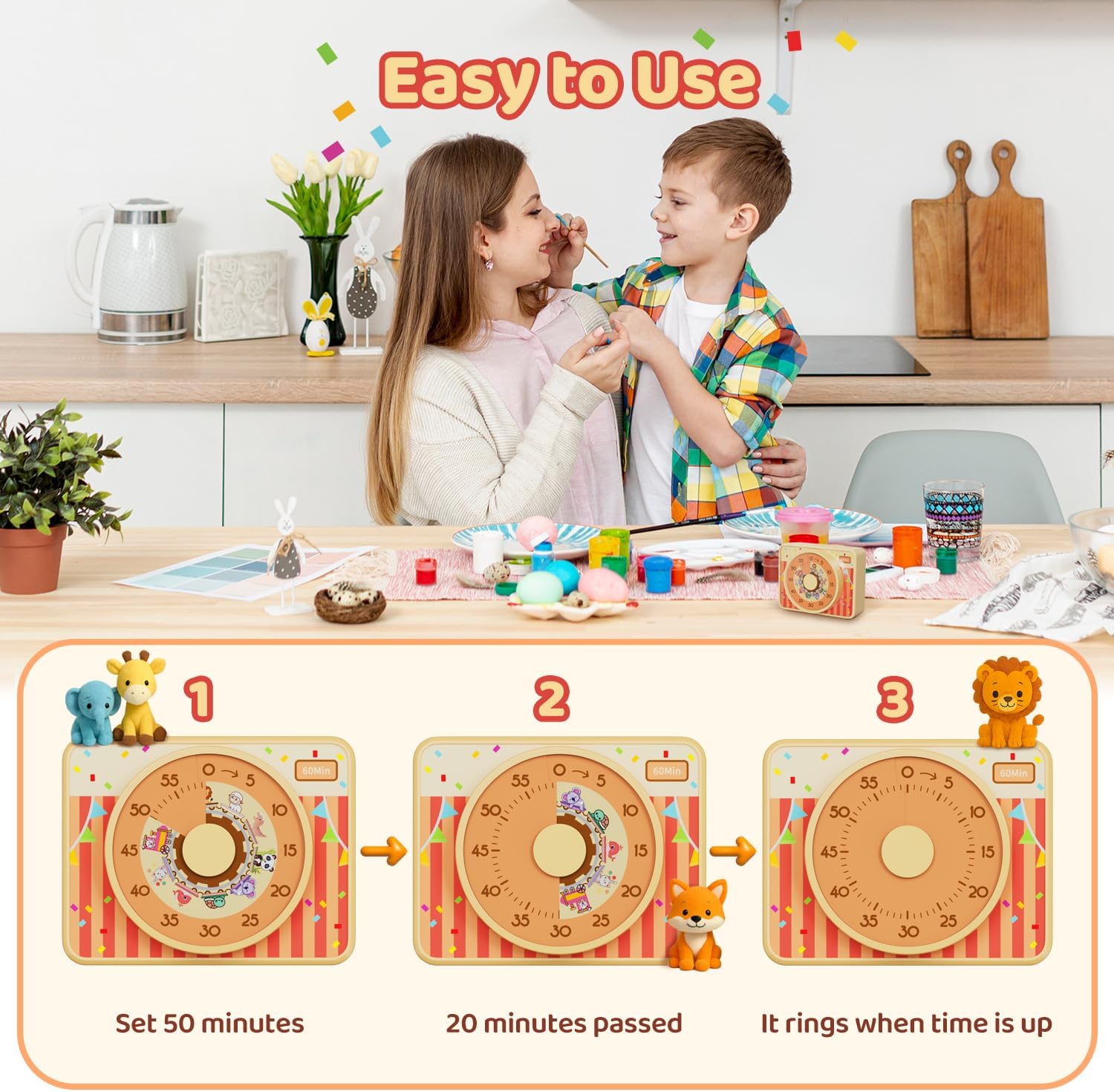
Image: Visual Timer (Model 6233) operation sequence: setting the dial to 50 minutes, showing 20 minutes elapsed, and the alarm sounding at zero.
VOCOO Digital Timer (Model 5260)
- ማብራት/ማጥፋት፡ Press and hold the power button on the bottom to turn the timer on or off.
- Setting Countdown Time: When the timer is paused or reset to 00:00, rotate the control dial clockwise to increase the time or counter-clockwise to decrease the time. The maximum countdown time is 99 minutes and 55 seconds.
- Starting/Pausing Countdown: Press the control dial once to start the countdown. Press it again to pause.
- Resetting Countdown: When the timer is paused, press and hold the control dial for 3 seconds to reset the time to 00:00.
- Count-up Mode: When the timer is at 00:00, press the control dial once to start counting up. The maximum count-up time is 99 minutes and 55 seconds.
- ተግባር ድምጸ-ከል አድርግ፡ Press the power/mute button on the bottom to toggle between audible alarm and mute mode. In mute mode, the numbers on the display will blink when the alarm triggers.

Image: VOCOO Digital Timer (Model 5260) illustrating both count-up and count-down timing modes.

Image: VOCOO Digital Timer (Model 5260) demonstrating its 2-level volume and mute function, with blinking numbers indicating mute mode.
ጥገና
- ማጽዳት፡ የሰዓት ቆጣሪዎቹን ለስላሳና ደረቅ ጨርቅ ይጥረጉ። ሻካራ ማጽጃዎችን አይጠቀሙ ወይም በውሃ ውስጥ አይጥሉም።
- የባትሪ መተካት፡ Replace batteries when the display dims or the timer functions become unreliable. Always replace both batteries at the same time.
- ማከማቻ፡ Store the timers in a cool, dry place when not in use for extended periods. Remove batteries if storing for several months.
መላ መፈለግ
| ችግር | ሊሆን የሚችል ምክንያት | መፍትሄ |
|---|---|---|
| ሰዓት ቆጣሪው አይበራም። | ባትሪዎች ሞተዋል ወይም በስህተት ገብተዋል። | ባትሪዎችን በአዲስ የ AAA ባትሪዎች ይተኩ፣ ይህም ትክክለኛውን ፖሊነት ያረጋግጣል። |
| ማንቂያው አይሰማም። | Timer is in mute mode or volume is set too low. | For Visual Timer: Check the volume button setting. For Digital Timer: Press the power/mute button to toggle sound. |
| Visual disk does not move. | Timer dial not set correctly or mechanism issue. | Ensure the dial is rotated fully to the desired time. If issue persists, contact support. |
| Digital display is dim or flickering. | ዝቅተኛ የባትሪ ኃይል. | ባትሪዎችን ይተኩ. |
ዝርዝሮች
- የምርት ስም፡- VOCOO Digital and Visual Timer
- ሞዴሎች፡ 5260 (Digital Timer), 6233 (Visual Timer)
- የኃይል ምንጭ፡- 2 x AAA Batteries (per timer, if applicable)
- Visual Timer Max Time: 60 ደቂቃዎች
- Digital Timer Max Time: 99 minutes 55 seconds (Count-up/Count-down)
- Visual Timer Dimensions (approx.): 3.7ኢን (9.5ሴሜ) x 2.95ኢን (7.5ሴሜ) x 1.6ኢን (4.1ሴሜ)
- Digital Timer Alarm Volume: Loud (80-90dB), Soft (60-75dB)
- Visual Timer Alarm Duration: 3 ሰከንድ / 60 ሰከንድ
- ASIN: B0F7RL6H89
- መጀመሪያ የሚገኝ ቀን፡- ግንቦት 7 ቀን 2025
ዋስትና እና ድጋፍ
VOCOO products are designed for reliability and performance. For warranty information, technical support, or any questions regarding your timer, please contact VOCOO customer service through the retailer's platform or the official VOCOO webጣቢያ.
Please have your product model number (5260 or 6233) and ASIN (B0F7RL6H89) available when contacting support.