1. መግቢያ
Thank you for choosing the Generic 50000mAh Solar Power Bank. This high-capacity portable charger is designed to keep your electronic devices powered on the go, featuring solar charging capabilities, multiple output ports, and a digital display for convenience. Please read this manual carefully to ensure proper use and optimal performance of your device.
2. ምርት አብቅቷልview
2.1 ቁልፍ ባህሪያት
- Impressive 50000mAh Capacity: Provides multiple recharges for mobile devices.
- የተዋሃደ የፀሐይ ፓነል; Offers alternative charging for emergency situations or outdoor use.
- ሁለገብ ኃይል መሙላት; Equipped with 4 USB outputs (3 standard USB, 1 fast charging USB) and a USB Type-C output.
- Advanced Fast Charging: Supports 22.5W fast charging for efficient and rapid device power-up.
- ዲጂታል ማሳያ: Integrated LCD screen accurately shows the remaining battery level.
- በርካታ የግቤት አማራጮች፡- Compatible with Lightning, Micro USB, and USB Type-C inputs for recharging the power bank.
- ተግባራዊ ንድፍ; Portable white structure with a convenient carrying handle, ideal for travel, work, and outdoor activities.
2.2 ክፍሎች
Familiarize yourself with the different parts of your power bank:
- ዲጂታል ማሳያ: የባትሪ ኃይልን ያሳያልtage.
- የፀሐይ ፓነል; Located on the front for solar charging.
- USB Output Ports (x4): ውጫዊ መሳሪያዎችን ለመሙላት.
- USB Type-C Output Port: ውጫዊ መሳሪያዎችን ለመሙላት.
- Input Ports (Lightning, Micro USB, USB Type-C): የኃይል ባንክን እንደገና ለመሙላት።
- የኃይል ቁልፍ፡- To activate the display or turn on/off the device.
- የእጅ መያዣ; ለቀላል ተንቀሳቃሽነት።
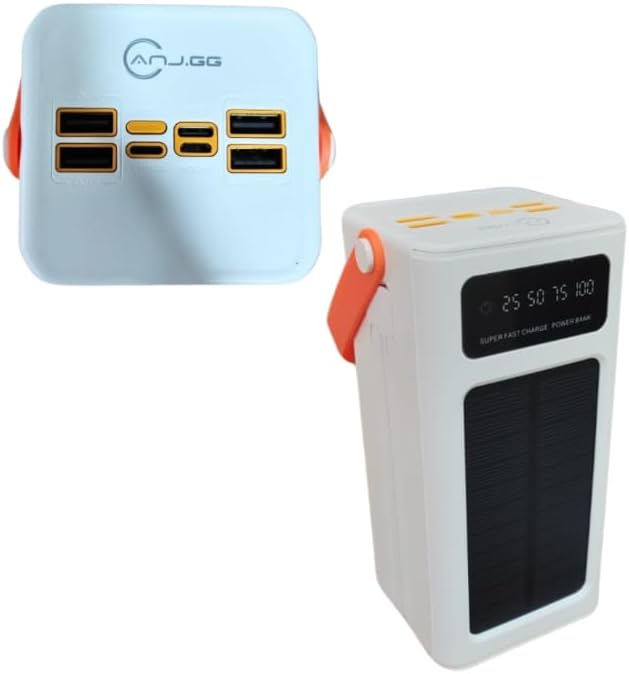
ምስል 2.2.1: ከፍተኛ view of the power bank, highlighting the four USB output ports and various input ports.

ምስል 2.2.2: የፊት-ጎን view of the power bank, showing the digital display, solar panel, and carrying handle.
3. ማዋቀር
3.1 የኃይል ባንክ የመጀመሪያ ክፍያ
Before first use, fully charge the power bank using a wall adapter. This ensures the internal battery is properly conditioned.
- Connect a compatible charging cable (Micro USB, Lightning, or USB Type-C) to one of the power bank's input ports.
- Connect the other end of the cable to a USB wall adapter (not included) and plug it into a power outlet.
- The digital display will show the charging progress. Charge until the display reads 100%.
3.2 የፀሐይ ኃይል መሙላት
The integrated solar panel provides an alternative charging method, primarily for emergencies or maintaining charge. It is not intended as the primary charging source due to varying solar intensity and charging speed.
- የኃይል ባንኩን የፀሐይ ፓነል በቀጥታ የፀሐይ ብርሃን ፊት ለፊት ያድርጉት።
- የፀሐይ ፓነልን የሚያደናቅፍ ምንም ነገር እንደሌለ ያረጋግጡ።
- The solar charging indicator on the display will activate when charging via solar power.
4. የአሠራር መመሪያዎች
4.1 ውጫዊ መሳሪያዎችን መሙላት
- Ensure the power bank is sufficiently charged. Check the digital display for the battery level.
- Connect your device's charging cable to one of the power bank's USB output ports or the USB Type-C output port.
- የኬብሉን ሌላኛው ጫፍ ከመሣሪያዎ ጋር ያገናኙ።
- The power bank should automatically begin charging your device. If not, press the power button once to activate.
- The digital display will show the power bank's remaining charge.
For optimal performance, use quality charging cables compatible with your devices.
4.2 የዲጂታል ማሳያውን መረዳት
The digital display provides real-time information about the power bank's status:
- ባትሪ Percentage: Shows the exact remaining charge (e.g., 25, 50, 75, 100).
- የኃይል መሙያ አመልካች፡- An icon or animation will appear when the power bank is being recharged.
- የፀሐይ ኃይል መሙላት አመልካች፡- A specific icon (e.g., a sun) will light up when solar charging is active.
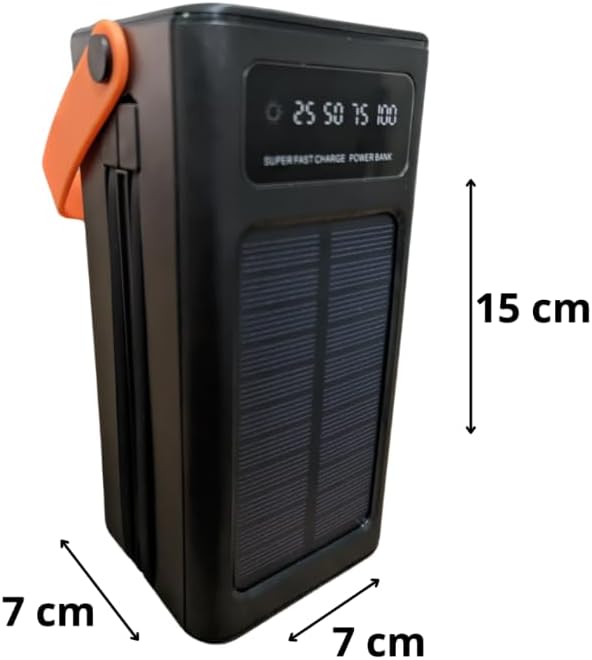
Image 4.2.1: Close-up of the digital display showing battery level indicators (25, 50, 75, 100).
5. ጥገና
- መደበኛ መሙላት; To maintain battery health, fully recharge the power bank at least once every three months, even if not in use.
- ማከማቻ፡ የኃይል ባንኩን በቀጥታ ከፀሀይ ብርሀን እና ከከፍተኛ ሙቀት ርቆ በቀዝቃዛና ደረቅ ቦታ ያከማቹ።
- ማጽዳት፡ ውጫዊውን ክፍል ለማጽዳት ለስላሳና ደረቅ ጨርቅ ይጠቀሙ። ጠጣር ኬሚካሎችን ወይም ሻካራ ቁሳቁሶችን አይጠቀሙ።
- ጠብታዎችን እና ተጽእኖዎችን ያስወግዱ፡ Protect the device from physical damage.
- የውሃ መጋለጥ; ይህ መሳሪያ ውሃ የማይገባ ነው። ለውሃ ወይም ለከፍተኛ እርጥበት መጋለጥን ያስወግዱ.
6. መላ መፈለግ
- መሣሪያ ከኃይል ባንክ እየሞላ አይደለም፡-
- Ensure the power bank is charged (check digital display).
- የኃይል መሙያ ገመዱ ከኃይል ባንክ እና ከመሳሪያዎ ጋር ደህንነቱ በተጠበቀ ሁኔታ መገናኘቱን ያረጋግጡ።
- በኃይል ባንክ ላይ የተለየ የዩኤስቢ ወደብ ይሞክሩ።
- የተለየ የኃይል መሙያ ገመድ ይሞክሩ።
- ውጤቱን ለማግበር በኃይል ባንክ ላይ ያለውን የኃይል ቁልፍ ይጫኑ።
- የኃይል ባንክ እየሞላ አይደለም፡-
- Ensure the charging cable is securely connected to the power bank's input port and the wall adapter.
- Verify the wall adapter is working and plugged into a live outlet.
- የተለየ የኃይል መሙያ ገመድ ወይም ግድግዳ አስማሚ ይሞክሩ።
- For solar charging, ensure the panel is in direct sunlight and unobstructed. Note that solar charging is slower than wall charging.
- ቀስ ብሎ መሙላት;
- በፍጥነት የሚሞላ ተኳሃኝ የሆነ ገመድ እየተጠቀሙ መሆኑን እና መሳሪያዎ ፈጣን ባትሪ መሙላትን እንደሚደግፍ ያረጋግጡ።
- The 22.5W fast charging port provides higher output; ensure you are using this specific port if fast charging is desired.
- ኃይል እየሞላ እያለ በመሳሪያዎ ላይ አላስፈላጊ መተግበሪያዎችን ይዝጉ።
7. ዝርዝሮች
| ሞዴል | 50000mAh የፀሐይ ኃይል ባንክ |
| አቅም | 50000mAh |
| የግቤት ወደቦች | Lightning, Micro USB, USB Type-C |
| የውጤት ወደቦች | 4 x USB (3x 5V-2A, 1x 22.5W Smart Port), 1 x USB Type-C |
| የዩኤስቢ ዓይነት-C ውፅዓት | 5V-3A, 9V-2.22A, 12V-1.67A |
| ፈጣን ባትሪ መሙላት | እስከ 22.5 ዋ |
| ልዩ ባህሪያት | Carrying Handle, Digital Display, Solar Panel |
| የኃይል ምንጭ | Rechargeable Battery and Solar Power |
| ቀለም | ነጭ |
| የምርት ክብደት | 450 ግ |
| የጥቅል ልኬቶች | 25 x 18 x 8 ሴ.ሜ |

Image 7.1: Dimensions of the power bank (note: image shows black version for clarity of dimensions).
8. የዋስትና መረጃ
This product is covered by a standard manufacturer's warranty against defects in materials and workmanship. The warranty period typically begins from the date of purchase. Please retain your proof of purchase for any warranty claims. For specific warranty terms and conditions, refer to the documentation provided at the time of purchase or contact your retailer.
9. ድጋፍ
If you encounter any issues or have questions regarding your Generic 50000mAh Solar Power Bank that are not addressed in this manual, please contact the retailer or the point of purchase for assistance. Provide your product model and a detailed description of the issue to facilitate support.