
ThruNite Ti-Grey
የTruNite Ti Mini Keychain ፍላሽ መብራት የተጠቃሚ መመሪያ
የምርት ስም፡ ThruNite | ሞዴል፡ Ti-Grey
1. መግቢያ
This manual provides detailed instructions for the safe and efficient use of your ThruNite Ti Mini Keychain Flashlight. Designed for everyday carry, this compact and powerful USB-C rechargeable flashlight offers multiple lighting modes and a magnetic tailcap for versatile use in various indoor and outdoor scenarios.

Image: The ThruNite Ti Mini Keychain Flashlight, demonstrating its small form factor when held in a hand.
2. በሳጥኑ ውስጥ ያለው
እባኮትን በደረሰኝ ጊዜ የጥቅል ይዘቱን ያረጋግጡ፡-
- ThruNite Ti Mini Flashlight (with built-in battery)
- የዩኤስቢ-ሲ ኃይል መሙያ ገመድ
- Pocket Clip (pre-installed or included separately)
- Keychain Ring
- Spare USB-C Port Cover
- የተጠቃሚ መመሪያ
3. ምርት አብቅቷልview

ምስል፡ ፈነዳ view diagram of the ThruNite Ti Mini, highlighting its key components such as the switch button, charging indicator, keychain, LED, magnetic cap, USB-C port, and two-way clip.
- ቀይር አዝራር፡- Controls power and mode selection.
- የኃይል መሙያ አመልካች፡- የመሙላት ሁኔታን ያሳያል (ለመሙላት ቀይ ፣ ሙሉ ለሙሉ የተሞላ አረንጓዴ)።
- Keychain: Attachment point for keys or lanyards.
- High Performance LED: ብርሃን ይሰጣል.
- መግነጢሳዊ ካፕ፡ Allows attachment to metal surfaces for hands-free use.
- የዩኤስቢ-ሲ ባትሪ መሙያ በይነገጽ፡- አብሮ የተሰራውን ባትሪ ለመሙላት.
- Two-way Clip: For securing the flashlight to pockets, hats, or gear.
4. ዝርዝሮች
| ባህሪ | ዝርዝር |
|---|---|
| ከፍተኛ ውፅዓት | 650 Lumens |
| ማክስ ውርወራ | 105 ሜትር |
| ከፍተኛው የሩጫ ጊዜ | 51 days (Firefly mode) |
| የኃይል ምንጭ | Built-in 350mAh Lithium-Ion Battery |
| በመሙላት ላይ | ዩኤስቢ-ሲ ዳግም ሊሞላ የሚችል |
| ቁሳቁስ | Aerospace-grade 6061-T6 Aluminum |
| ጨርስ | Type III Hard-Anodized |
| የውሃ መቋቋም | IPX-8 (Waterproof to 2 meters) |
| ተጽዕኖ መቋቋም | 1.5 ሜትር |
| መጠኖች | 60.8 ሚሜ (ርዝመት) x 16.5 ሚሜ (ዲያሜትር) |
| ክብደት | 26.5 ግ (0.93 አውንስ) |

Image: Dimensions of the ThruNite Ti Mini, illustrating its compact size relative to a common earbud case.
5. ማዋቀር
5.1 የመጀመሪያ ደረጃ መሙላት
Before first use, fully charge the flashlight. Open the USB-C port cover and connect the included USB-C cable to the flashlight and a power source (e.g., computer, USB wall adapter).
- The charging indicator will glow ቀይ በመሙላት ጊዜ.
- The indicator will turn አረንጓዴ መሙላት ሲጠናቀቅ.
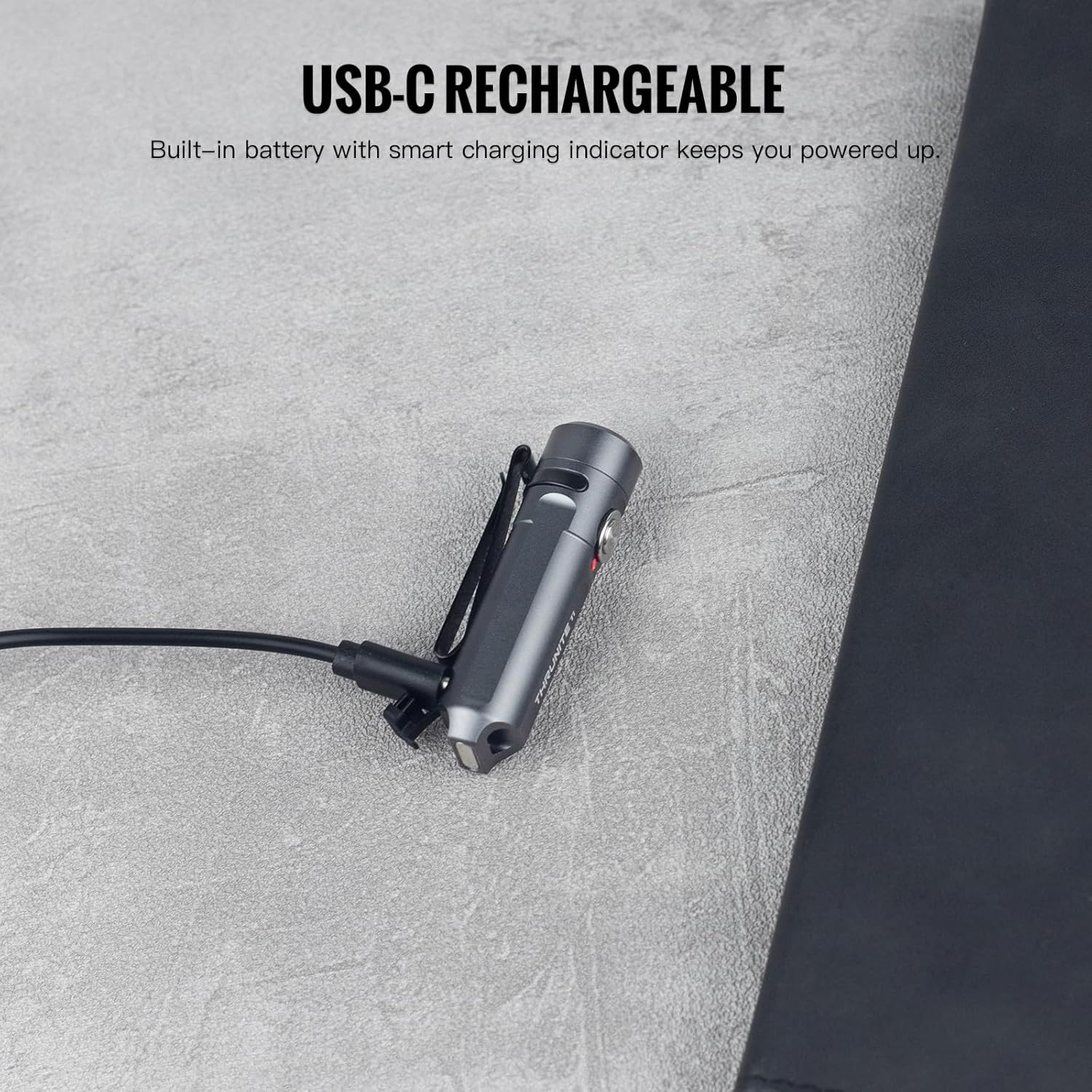
Image: The ThruNite Ti Mini connected to its USB-C charging cable, showing the charging port and indicator light.
5.2 መለዋወጫዎችን ማያያዝ
The flashlight comes with a keychain ring and a two-way pocket clip for various carrying options.
- Keychain: Attach the included keychain ring to the designated loop at the tail of the flashlight.
- የኪስ ክሊፕ፡ The two-way clip can be used to secure the flashlight to a pocket, belt, or the brim of a hat. It can be reversed for different carrying preferences.

ምስል፡ ዘጸamples of the ThruNite Ti Mini being used as an EDC companion, clipped to a backpack and attached to a keychain.
6. የአሠራር መመሪያዎች
6.1 መሠረታዊ አሠራር
- አብራ/አጥፋ፡ Double-click the side switch to turn the light ON. Press and hold the switch to turn it OFF.
- ሁነታዎችን ይቀይሩ፡ When the light is ON, single-click the switch to cycle through Firefly, Low, Medium, and High modes. The light will remember the last used mode (except Strobe).
- ጊዜያዊ ከፍተኛ፡ From OFF, press and hold the switch to activate the highest mode (650 lumens) temporarily. Release the switch to turn OFF.
- የስትሮብ ሁነታ፡ Triple-click the switch from any state (ON or OFF) to activate Strobe mode. Single-click to return to the previously used mode.
6.2 Mode Details and Runtimes
| ሁነታ | ውፅዓት | የሩጫ ጊዜ |
|---|---|---|
| ከፍተኛ | 650 lumens | 1 ሰአት 35 ደቂቃ |
| መካከለኛ | 200 lumens | 2 ሰአት 20 ደቂቃ |
| ዝቅተኛ | 30 lumens | 9.5 ሰዓት |
| ፋየርፍሊ | 0.2 lumens | 51 ሰዓት |
| ስትሮብ | 650 lumens | - |

Image: Detailed table outlining the output and runtime for each lighting mode of the ThruNite Ti Mini.
6.3 ከእጅ-ነጻ ክወና
The magnetic tailcap allows the flashlight to be securely attached to most metal surfaces, providing convenient hands-free illumination. This is ideal for tasks requiring both hands, such as vehicle maintenance or working in dimly lit areas.

Image: The ThruNite Ti Mini utilizing its magnetic tailcap for hands-free lighting, attached to different metal objects.
7. ጥገና
- ማጽዳት፡ የእጅ ባትሪውን አካል በለስላሳ፣ ዲ አዘውትሮ ያጽዱamp ጨርቅ. ኃይለኛ ኬሚካሎችን ወይም ሻካራ ቁሳቁሶችን ከመጠቀም ይቆጠቡ.
- ዩኤስቢ-ሲ ወደብ Ensure the USB-C charging port cover is properly sealed when not charging to maintain its waterproof rating. If the cover is damaged or lost, use the provided spare.
- ማከማቻ፡ የእጅ ባትሪውን ለረጅም ጊዜ ጥቅም ላይ በማይውልበት ጊዜ ቀዝቃዛና ደረቅ ቦታ ያስቀምጡት።
8. መላ መፈለግ
8.1 መብራት አይበራም
- የባትሪ ክፍያ፡- Ensure the battery is sufficiently charged. Connect the flashlight to a USB-C power source and check the charging indicator.
- የአሠራር ቅደም ተከተል Confirm you are using the correct operation sequence: double-click to turn ON, press and hold to turn OFF.
8.2 የመሙላት ጉዳዮች
- የኬብል ግንኙነት; Verify the USB-C cable is securely connected to both the flashlight and the power source.
- Port Condition: Check the USB-C port for any debris or damage. Clean gently if necessary.
- የኃይል ምንጭ፡- Try a different USB power source or cable to rule out issues with the charging equipment.
9. ዋስትና እና ድጋፍ
9.1 የዋስትና መረጃ
The ThruNite Ti Mini Keychain Flashlight comes with a limited warranty. Please refer to the warranty card included in your package for specific terms and conditions. This typically covers manufacturing defects under normal use.
9.2 የደንበኛ ድጋፍ
For further assistance, technical support, or warranty claims, please contact ThruNite customer service. You can usually find contact information on the official ThruNite webጣቢያ ወይም በግዢ መድረክዎ በኩል።
Note: Always refer to the official ThruNite website or your product packaging for the most up-to-date support information.
Ask a question about this manual
Ask about setup, troubleshooting, compatibility, parts, safety, or missing instructions. Manuals+ will review the question and use this page’s manual context to help answer it.