1. መግቢያ
The Hama WM-450 Multi-Device Wireless Mouse is an optical mouse designed for versatile use across multiple devices. It features 7 buttons, a scroll wheel, and supports wireless connectivity via Bluetooth (two channels) and a 2.4 GHz radio frequency (one channel) using a USB-A receiver. This allows simultaneous connection to up to three devices, with quick switching between them. An integrated AI Assist button enhances productivity by activating an inter-program AI assistant. The mouse is designed for comfortable and silent operation.

ምስል 1.1፡ አልቋልview of the Hama WM-450 mouse highlighting its key features: Bluetooth connectivity, 10-meter wireless range, USB-A receiver, and battery power.
2. ማዋቀር
2.1 የባትሪ ጭነት
- የባትሪውን ክፍል በመዳፊት ታችኛው ክፍል ላይ ያግኙት።
- የባትሪውን ክፍል ክዳን ይክፈቱ.
- Insert the two AAA batteries (included) according to the polarity markings (+/-) inside the compartment.
- የባትሪውን ክፍል ደህንነቱ በተጠበቀ ሁኔታ ይዝጉ።
2.2 ማብራት / ማጥፋት
Slide the ON/OFF switch, located on the underside of the mouse, to the 'ON' position to power on the mouse. Slide it to 'OFF' when not in use to conserve battery life.
2.3 Connecting via USB-A Receiver (2.4 GHz Radio)
- Remove the USB-A receiver from its storage slot on the underside of the mouse.
- Plug the USB-A receiver into an available USB-A port on your computer, laptop, or compatible device.
- The mouse should be automatically recognized and ready for use. This connection uses the 2.4 GHz radio channel.
2.4 በብሉቱዝ መገናኘት
The mouse supports two Bluetooth channels for connecting to different devices.
- አይጤው መብራቱን ያረጋግጡ።
- Press the channel switch button (usually on the underside or top of the mouse) to select either Bluetooth Channel 1 or Bluetooth Channel 2. The corresponding indicator light will flash.
- On your device (PC, tablet, smartphone), go to Bluetooth settings and enable Bluetooth.
- ፈልግ new devices. The mouse should appear as 'Hama WM-450' or similar.
- ለማጣመር መዳፊትን ይምረጡ። በማያ ገጹ ላይ ያሉ ማናቸውንም ጥያቄዎች ይከተሉ።
- Once paired, the indicator light will stop flashing and remain solid for a few seconds, indicating a successful connection.

Image 2.1: The underside of the Hama WM-450 mouse, illustrating the battery compartment, the ON/OFF switch, and the integrated storage for the USB-A receiver.
3. አሠራር
3.1 መሰረታዊ ተግባራት
- የግራ ጠቅታ፡- ዋና ምርጫ እና ማግበር።
- በቀኝ ጠቅታ: የአውድ ምናሌዎችን ይደርሳል።
- የማሽከርከር ጎማ፡ በሰነዶች እና በማሸብለል web pages. The high-quality aluminum scroll wheel provides precise control.
- የጸጥታ ጠቅታ አዝራሮች፡ The left and right click buttons are designed for silent operation, reducing noise in quiet environments.
3.2 ባለብዙ መሣሪያ መቀያየር
To switch between connected devices (USB-A, Bluetooth 1, Bluetooth 2), press the dedicated channel switch button on the mouse. The mouse will instantly connect to the selected device.
3.3 Side Navigation Buttons
The mouse features two practical side buttons. These buttons typically function as 'Back' and 'Forward' for easier navigation in web አሳሾች ፣ file explorers, and applications like Outlook.

ምስል 3.1፡ መቀራረብ view of the two side navigation buttons on the Hama WM-450 mouse, used for 'Back' and 'Forward' functions.
3.4 የዲፒአይ ማስተካከያ
The mouse includes a DPI switch button, usually located near the scroll wheel. Press this button to cycle through different sensitivity settings: 800, 1200, and 1600 DPI (Dots Per Inch). Choose the DPI setting that best suits your preference and task.
3.5 AI Assist Button
The dedicated AI Assist button activates an inter-program AI assistant, designed to enhance productivity. Refer to your device's software documentation for specific functionalities enabled by this feature.
4. ጥገና
4.1 ጽዳት
አይጡን ለማጽዳት ለስላሳ፣ ደረቅ፣ ከቆሻሻ ነፃ የሆነ ጨርቅ ይጠቀሙ። ለጠንካራ ቆሻሻ፣ ትንሽampen the cloth with water or a mild cleaning solution. Avoid using harsh chemicals, abrasive cleaners, or excessive moisture, as these can damage the mouse.
4.2 የባትሪ መተካት
When the mouse performance degrades or the indicator light signals low battery, replace the two AAA batteries. Always use fresh batteries of the same type.
4.3 USB Receiver Storage
When transporting the mouse or not using the 2.4 GHz radio connection, store the USB-A receiver in its dedicated slot on the underside of the mouse to prevent loss.
5. መላ መፈለግ
- አይጥ ምላሽ እየሰጠ አይደለም፡-
- አይጤው መብራቱን ያረጋግጡ።
- የባትሪውን ደረጃ ይፈትሹ እና አስፈላጊ ከሆነ ይተኩ.
- For USB-A connection, ensure the receiver is securely plugged into a working USB port. Try a different USB port.
- ለብሉቱዝ ግንኙነት፣ ብሉቱዝ በመሳሪያዎ ላይ መንቃቱን እና መዳፊቱ መጣመሩን ያረጋግጡ። መዳፊቱን እንደገና ለማጣመር ይሞክሩ።
- Ensure the correct channel (USB-A, BT1, BT2) is selected on the mouse.
- የማያቋርጥ ግንኙነት;
- Move the mouse closer to the receiver/device. The effective range is up to 10 meters, but obstacles can reduce this.
- ጣልቃ ገብነት ሊያስከትሉ ከሚችሉ ሌሎች ገመድ አልባ መሳሪያዎች አጠገብ መዳፊቱን ከመጠቀም ይቆጠቡ።
- የጠቋሚ እንቅስቃሴው ያልተስተካከለ ወይም ቀርፋፋ ነው፡
- በመዳፊት ስር ያለውን የኦፕቲካል ዳሳሽ ያፅዱ።
- Ensure you are using the mouse on a suitable surface. Highly reflective or transparent surfaces may affect performance.
- Adjust the DPI setting to a higher value if the cursor is too slow.
- Side buttons or AI Assist button not working:
- Ensure your operating system or application supports these functions.
- Check for any specific software or driver requirements for your device.
6. ዝርዝሮች
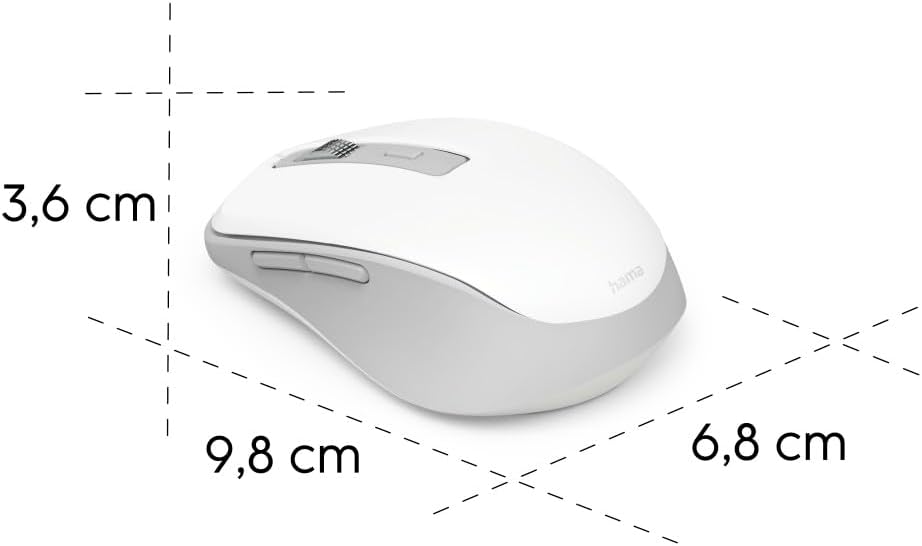
Image 6.1: Dimensional diagram of the Hama WM-450 mouse, indicating its length, width, and height.
| የምርት ስም | ሃማ |
| የሞዴል ስም | WM-450 እ.ኤ.አ. |
| የሞዴል ቁጥር | 00173080 |
| የግንኙነት ቴክኖሎጂ | Bluetooth, 2.4 GHz Radio (USB-A) |
| ገመድ አልባ ክልል | እስከ 10 ሜትር |
| አነፍናፊ ቴክኖሎጂ | ኦፕቲካል |
| የዲፒአይ ቅንብሮች | 800፣ 1200፣ 1600 |
| የአዝራሮች ብዛት | 7 (including scroll wheel click) |
| የኃይል ምንጭ | 2 x AAA ባትሪዎች (ተካቷል) |
| ልኬቶች (L x W x H) | 9.8 x 6.8 x 3.6 ሴሜ (ግምታዊ) |
| ክብደት | 140 ግራም |
| ተስማሚ መሣሪያዎች | PC, Tablet, Laptop, Smartphone, iPad |
| ልዩ ባህሪያት | Multi-device connectivity (3 devices), AI Assist button, Silent click buttons, Side navigation buttons, Retractable USB receiver, Polymer-coated mouse feet, High-quality aluminum scroll wheel. |
| የቁሳቁስ ቅንብር | At least 20% recycled materials |
| ማሸግ | 100% plastic-free |
7. ዋስትና እና ድጋፍ
የዋስትና መረጃ፣ የቴክኒክ ድጋፍ ወይም የአገልግሎት ጥያቄዎች ካሉዎት፣ እባክዎን ከምርትዎ ጋር የተካተተውን የዋስትና ካርድ ይመልከቱ ወይም ኦፊሴላዊውን Hama ይጎብኙ። webጣቢያ። የደንበኛ ድጋፍ ለማግኘት የእውቂያ ዝርዝሮች በተለምዶ በአምራቹ ላይ ይገኛሉ webጣቢያ.