
1. መግቢያ
This manual provides essential information for the safe and effective operation of your GEPRC Vapor-D6 O4 Pro FPV Drone. Please read this manual thoroughly before operating the drone to ensure proper setup, flight, and maintenance. This drone is designed for advanced users and offers enhanced image clarity, stability, and agility for FPV racing and cinematic aerial footage.
2. የደህንነት መረጃ
- የቅድመ በረራ ፍተሻ፡- Always inspect the drone for any damage, loose parts, or obstructions before each flight. Ensure propellers are securely attached and free from cracks.
- የባትሪ ደህንነት፡ Use only recommended 6S LiPo 1500mAh – 2000mAh batteries. Do not overcharge or over-discharge batteries. Store batteries in a safe, fireproof location.
- የበረራ አካባቢ; ከሰዎች፣ ከእንስሳት፣ ከህንፃዎች እና ከኤሌክትሪክ መስመሮች ርቀው ክፍት በሆኑ ቦታዎች ይብረሩ። ኃይለኛ ነፋስ ወይም መጥፎ የአየር ሁኔታ ባለበት ወቅት ከመብረር ይቆጠቡ።
- የእይታ መስመር፡ Maintain visual line of sight with your drone at all times, even when using FPV goggles.
- የፕሮፔለር አደጋ፡ Keep hands and face clear of propellers when motors are armed. Propellers can cause serious injury.
- የአካባቢ ደንቦች፡- Adhere to all local aviation laws and regulations regarding drone operation.
- የክህሎት ደረጃ This drone is intended for advanced users. Beginners should seek guidance from experienced pilots.
3. የጥቅል ይዘቶች
ሁሉም እቃዎች በጥቅልዎ ውስጥ መኖራቸውን ያረጋግጡ፡-
- 1 x GEPRC Vapor-D6 O4 Pro FPV Drone
- 2 x HQprop 6X3.5X3 Propellers
- 2 x Battery Anti-Slip Pads
- 1 x Spare Screw Pack (includes: 6 x M3*10mm round head screws, 6 x M3*8mm round head screws, 2 x M3*6mm flat head screws, 1 x M5*28mm thin head screw, 1 x M5 flange nut, 4 x M3 rivet nuts)
- 1 x Vapor Side Panel
- 2 x M20*250mm Battery Straps
- 1 x L-shaped Screwdriver 1.5mm
- 1 x L-shaped Screwdriver 2.0mm
- 1 x GoPro Mount
4. ምርት አብቅቷልview
The GEPRC Vapor-D6 O4 Pro is a high-performance FPV racing quadcopter designed for seamless integration with the O4 Air Unit Pro VTX. It features a robust carbon fiber frame, anti-vibration design, and powerful motors for dynamic flight.
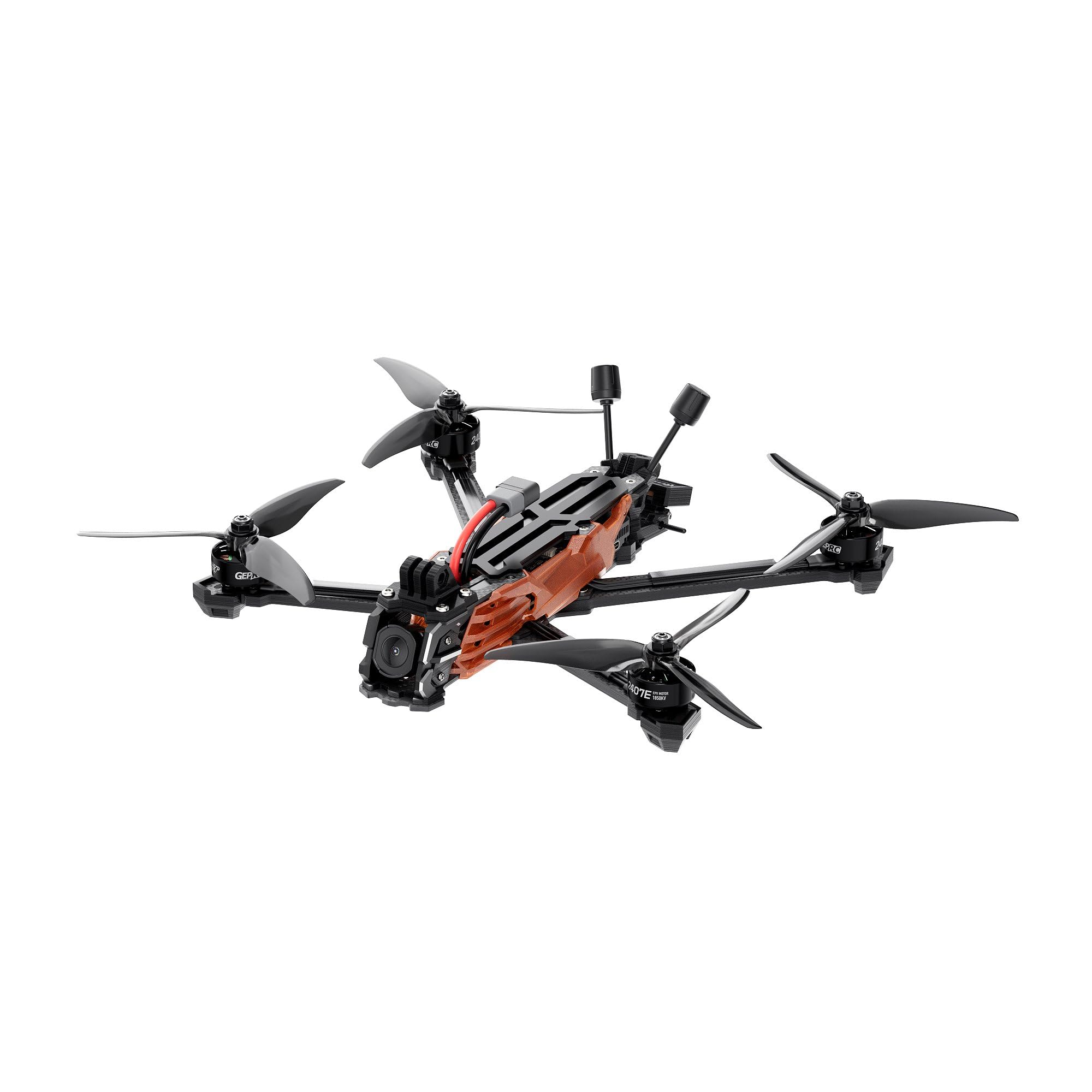
ምስል 1፡ ከላይ ወደ ታች view of the GEPRC Vapor-D6 O4 Pro FPV Drone, showcasing its carbon fiber frame and propeller layout.

ምስል 2: ማዕዘን view of the GEPRC Vapor-D6 O4 Pro FPV Drone, highlighting its integrated O4 Air Unit Pro and robust design.
ቁልፍ ባህሪዎች
- O4 Air Unit Pro Integration: Designed for seamless integration with the O4 Air Unit Pro VTX, delivering enhanced image clarity and light sensitivity for immersive FPV racing and cinematic aerial shots.
- የፀረ-ንዝረት ንድፍ; Features a precision-engineered aluminum lens housing and shock-absorbing silicone mounts to minimize vibrations, ensuring crisp, stable footage.
- ከፍተኛ አፈጻጸም ያላቸው ሞተሮች; Equipped with SPEEDX2 E-series motors (2407E 1750KV) for smooth, responsive thrust and agility.
- Durable Carbon Fiber Frame: Built with reinforced 5mm carbon fiber arms and a robust layered plate design for exceptional durability and impact resistance.
- Stable Flight Performance: Factory-tuned PID controls ensure stable flight. Optional GPS module (GEP-M10) enables accurate positioning.
5. ማዋቀር
5.1 የፕሮፔለር መጫኛ
- Ensure the drone is powered off and the battery is disconnected.
- Identify the correct rotation direction for each propeller (CW and CCW).
- Align the propeller with the motor shaft and press down firmly.
- Secure the propeller with the provided propeller nuts, ensuring they are tightened but not overtightened.
5.2 የባትሪ ግንኙነት
- Place a battery anti-slip pad on the top plate of the drone.
- Secure the recommended 6S LiPo battery (1500mAh – 2000mAh) to the drone using the M20*250mm battery straps. Ensure the battery is centered and tightly secured.
- Connect the XT60 battery connector to the drone's power port.
5.3 Receiver Binding (ELRS 2.4G / TBS Nano RX)
Refer to your specific receiver's manual for detailed binding instructions. Generally, the process involves:
- Power on your remote controller and set it to binding mode.
- Power on the drone. The receiver's LED should indicate it's ready for binding (e.g., flashing rapidly).
- Initiate the binding process on your remote controller.
- Once bound, the receiver's LED should turn solid, indicating a successful connection.
5.4 FPV System Setup (O4 Air Unit Pro)
Ensure your FPV goggles are compatible with the O4 Air Unit Pro Transmission Module. Power on your goggles and the drone. The video feed should automatically connect. Adjust channel and frequency settings if necessary via your goggles' menu.
6. የአሠራር መመሪያዎች
6.1 Arming/Disarming Motors
To arm the motors, move both sticks on your remote controller to the bottom-right corner (or as configured in Betaflight). The motors will spin up slowly. To disarm, move both sticks to the bottom-left corner.
6.2 መሰረታዊ የበረራ መቆጣጠሪያዎች
- ስሮትል Controls altitude (left stick up/down).
- ያው Rotates the drone left or right (left stick left/right).
- ቦታ፡ Tilts the drone forward or backward (right stick up/down).
- ጥቅል Tilts the drone left or right (right stick left/right).
6.3 የላቀ የበረራ ሁነታዎች
The Vapor-D6 O4 Pro supports various flight modes configurable in Betaflight. Common modes include:
- አንግል ሁነታ፡ Self-leveling mode, suitable for stable cruising.
- Acro Mode: Manual mode, offering full control for freestyle and racing.
- GPS Rescue (with optional GPS): If equipped with the GEP-M10 GPS module, this mode can assist in returning the drone to a predefined home point in case of signal loss or emergency.
7. ጥገና
- የፕሮፔለር ፍተሻ፡- Regularly check propellers for any damage, bends, or cracks. Replace damaged propellers immediately.
- የፍሬም ፍተሻ፡- Inspect the carbon fiber frame and arms for any signs of stress, cracks, or damage after hard landings or crashes.
- የሞተር ማጽዳት; Keep motors free from dirt, dust, and debris. Use compressed air or a soft brush to clean them.
- የጠመዝማዛ ጥብቅነት; Periodically check all screws for tightness, especially those securing motors and frame components.
- የጽኑዌር ዝማኔዎች ፦ Keep your flight controller (GEP-F722-HD v2) and O4 Air Unit Pro firmware updated to the latest versions for optimal performance and bug fixes.
8. መላ መፈለግ
| ችግር | ሊሆን የሚችል ምክንያት | መፍትሄ |
|---|---|---|
| ድሮን አይበራም። | Disconnected battery; faulty battery; damaged power cable | Ensure battery is fully charged and connected. Check XT60 connector for damage. |
| No video feed in FPV goggles | VTX/camera not powered; incorrect channel/frequency; damaged O4 Air Unit Pro | Verify O4 Air Unit Pro is powered. Check channel/frequency settings. Inspect cables. |
| Drone does not arm | Throttle not at lowest position; safety switch engaged; receiver not bound | Ensure throttle is at zero. Disengage any safety switches. Re-bind receiver. |
| Unstable flight/drifting | Damaged propellers; incorrect PID tuning; motor issues | Inspect and replace damaged propellers. Check Betaflight PID settings. Inspect motors for damage. |
| የቁጥጥር/ሲግናል ማጣት | Out of range; interference; receiver issue | Fly within range. Avoid areas with high interference. Check receiver connection. |
9. ዝርዝሮች
| አካል | ዝርዝር መግለጫ |
|---|---|
| ሞዴል | Vapor-D6 O4 Pro |
| ፍሬም | GEP-Vapor-D6 O4 Pro frame |
| የዊልቤዝ | 274.60 ሚ.ሜ |
| የላይኛው ንጣፍ ውፍረት | 2.0 ሚ.ሜ |
| መካከለኛ ፕሌትስ ውፍረት | 2.0 ሚ.ሜ |
| የታችኛው ጠፍጣፋ ውፍረት | 2.5 ሚ.ሜ |
| Arm Thickness | 5.0 ሚ.ሜ |
| የበረራ መቆጣጠሪያ (FC) | GEP-F722-HD v2 |
| ኤም.ሲ.ዩ | STM32F722 |
| ገይሮ | ICM42688-P(SPI) |
| ባሮሜትር | አዎ |
| ኦኤስዲ | Betaflight OSD w/AT7456E |
| ESC | ታከር H60_BLS 60A 4IN1 ESC |
| ቪቲኤክስ | O4 Air Unit Pro Transmission Module |
| ካሜራ | O4 Air Unit Pro Transmission Module |
| አንቴና | O4 Air Unit Pro Antenna |
| ማገናኛ | XT60 |
| አማራጭ ጂፒኤስ | GEP-M10 GPS |
| 6-inch Motor | GEPRC SPEEDX2 2407E 1750KV |
| 6-ኢንች ፕሮፔለር | HQprop 6X3.5X3 |
| Weight (PNP Version) | 465 ግ ± 5 ግ |
| ተቀባይ | PNP/GEPRC ELRS24/TBS Nano RX |
| የሚመከር ባትሪ | 6S LiPo 1500mAh – 2000mAh |
| የበረራ ጊዜ | 14-19 ደቂቃ |
| የቪዲዮ ቀረጻ ጥራት | 4K |
| ቁሳቁስ | የካርቦን ፋይበር |
| የምርት ልኬቶች | 10.75"ኤል x 11" ዋ x 3.15" ኤች |
10. ዋስትና እና ድጋፍ
GEPRC products are manufactured to high standards. For warranty claims or technical assistance, please contact GEPRC customer support. Our support team is available to assist with setup and troubleshooting.
For immediate assistance, refer to the official GEPRC website or contact their customer service channels. Keep your proof of purchase for any warranty-related inquiries.