
1. መግቢያ
This manual provides detailed instructions for the safe and effective use of your OLIGHT Perun 3 Mini rechargeable headlamp and OLIGHT Oclip Pro EDC flashlight. Please read this manual thoroughly before operation and retain it for future reference.

ምስል፡ የOLIGHT Perun 3 ሚኒ headlamp attached to its elastic headband, ready for use.
2. የጥቅል ይዘቶች
- OLIGHT Perun 3 Mini Headlamp
- OLIGHT Oclip Pro EDC Flashlight
- Headband with quick-detach bracket
- መግነጢሳዊ ኃይል መሙያ ገመድ
- የተጠቃሚ መመሪያ (ይህ ሰነድ)
3. ማዋቀር
3.1. Perun 3 Mini Headlamp
- ከጭንቅላት ማሰሪያ ጋር መያያዝ; Insert the Perun 3 Mini into the quick-detach bracket on the headband. Ensure it clicks securely into place.
- የጭንቅላት ማሰሪያ ማስተካከል; Adjust the elastic straps for a comfortable and secure fit on your head.
- በእጅ የሚያዝ አጠቃቀም፡- The quick-detach bracket allows for easy removal of the Perun 3 Mini for handheld operation. Press the release button on the bracket to detach.
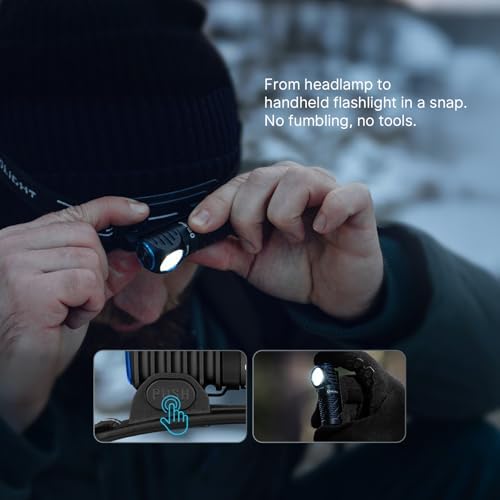
Image: Transitioning the Perun 3 Mini from headlamp to handheld flashlight by pressing the release button on the bracket.
3.2. Oclip Pro EDC Flashlight
- በመክፈት ላይ፡ Before first use, press and hold the main button for approximately 1 second to unlock the Oclip Pro. A visual indicator may confirm unlocking.
- ክሊፕ ማድረግ፡ Use the integrated clip to attach the Oclip Pro to clothing, gear, or other suitable surfaces.
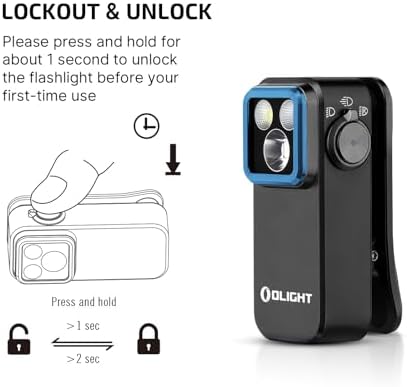
Image: Instructions for unlocking the Oclip Pro by pressing and holding the button for 1 second.
4. የአሠራር መመሪያዎች
4.1. Perun 3 Mini Headlamp
The Perun 3 Mini features multiple white light modes and red light modes for various applications.
- የነጭ ብርሃን ሁነታዎች፡ Offers 5 different white light output levels, including a Moonlight mode for extended use.
- የቀይ ብርሃን ሁነታዎች፡ Provides 3 red light modes, suitable for preserving night vision or as an emergency signal.
- ሁነታ መቀየር፡ Refer to the device's specific button press sequences for cycling through modes (e.g., single press, double press, press and hold).
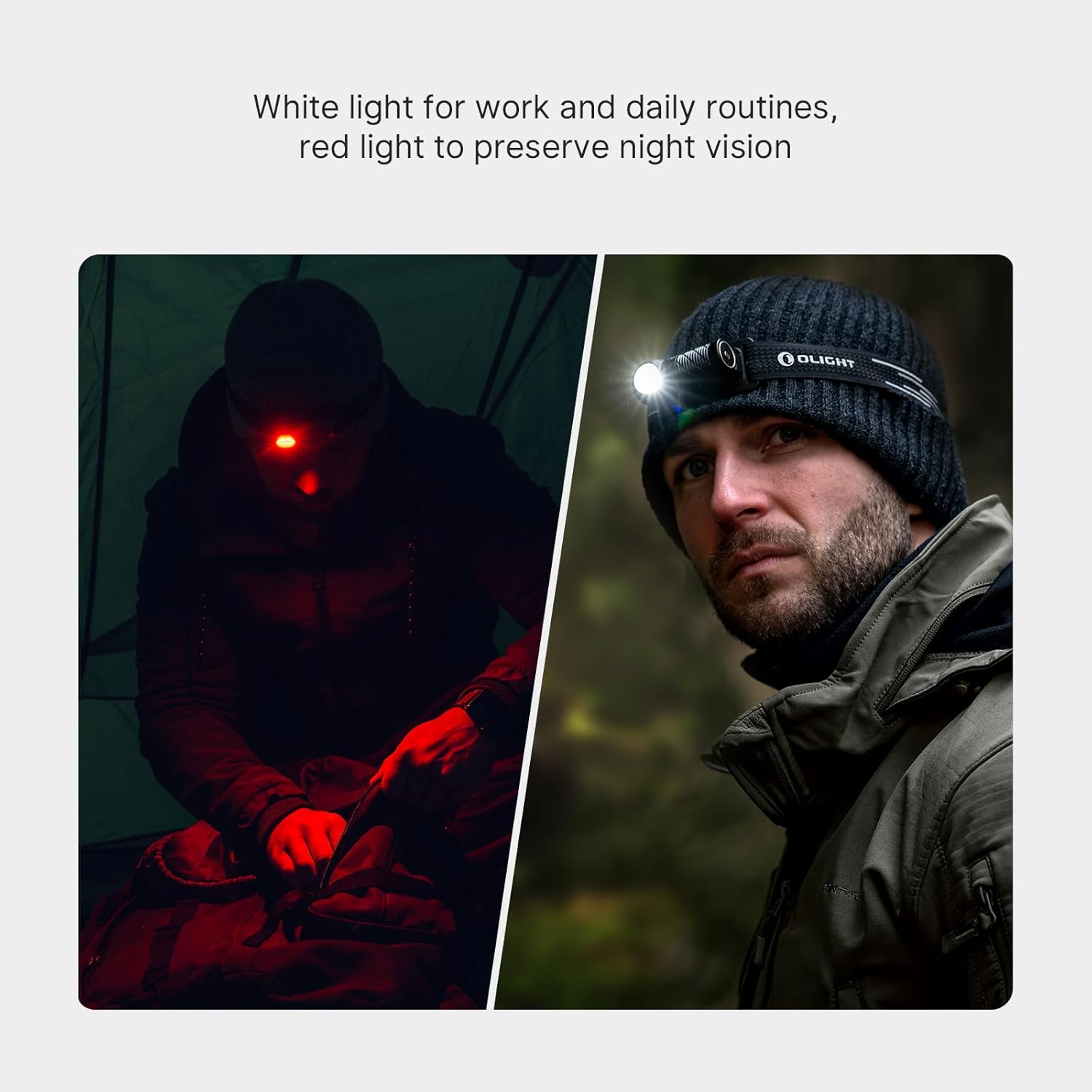
Image: The Perun 3 Mini in use, demonstrating both white light for general tasks and red light for night vision preservation.
4.2. Oclip Pro EDC Flashlight
The Oclip Pro offers three distinct lighting solutions controlled by a user-friendly interface.
- Lighting Solutions:
- የጎርፍ መጥለቅለቅ ብርሃን- For wide area illumination (up to 500 lumens).
- ትኩረት For focused, long-range illumination (up to 120-meter range).
- ቀይ መብራት; For night vision preservation or signaling (40/4 lumens).
- የተጠቃሚ በይነገጽ፡ Modes are switched by toggling the selector.
- የባትሪ አመልካች፡- A battery indicator located in the center of the switch displays the current battery level.

Image: Visual representation of the Oclip Pro's floodlight for daily routines, spotlight for focused tasks, and red light for night vision.
5. ጥገና
5.1. መሙላት
Both the Perun 3 Mini and Oclip Pro are rechargeable. Use the provided magnetic charging cable to recharge the devices. Connect the magnetic charging end to the flashlight's charging port and the USB end to a compatible power source.
The Perun 3 Mini's rechargeable battery offers up to 10 days of continuous use in Moonlight mode, reducing the frequency of recharging.
5.2. ጽዳት እና ማከማቻ
- ማጽዳት፡ መሳሪያዎቹን ለስላሳ, መamp ቆሻሻን ወይም ፍርስራሾችን ለማስወገድ ጨርቅ። ሻካራ ማጽጃዎችን ወይም ሟሟቶችን አይጠቀሙ።
- ማከማቻ፡ Store the flashlights in a cool, dry place away from direct sunlight and extreme temperatures. For long-term storage, ensure the battery is partially charged (e.g., 50%) to prolong battery life.
6. መላ መፈለግ
- መብራት የማይበራ;
- የባትሪውን ደረጃ ያረጋግጡ እና አስፈላጊ ከሆነ ይሙሉ።
- Ensure the device is unlocked (refer to Setup section for Oclip Pro).
- Verify proper connection if using the Perun 3 Mini with the headband bracket.
- የጨለመ ብርሃን ውጤት;
- Battery may be low; recharge the device.
- Lens may be dirty; clean according to maintenance instructions.
- የመሣሪያው ሙቀት መጨመር;
- High output modes can generate heat. If the device becomes excessively hot, switch to a lower mode or turn it off to cool down.
7. ዝርዝሮች
7.1. OLIGHT Perun 3 Mini Headlamp
- ከፍተኛው ውጤት፡ እስከ 920 lumens
- ሞገድ ርቀት: እስከ 133 ሜትር
- የብርሃን ሁነታዎች 5 white light modes, 3 red light modes
- Battery Life (Moonlight Mode): እስከ 10 ቀናት ድረስ
- የጭንቅላት ማሰሪያ፡ Lightweight with breathable holes, anti-sweat strip, reflective material. Quick-detach bracket.

Image: Key specifications of the Perun 3 Mini, highlighting its compact size, lumen output, and beam distance.
7.2. OLIGHT Oclip Pro EDC Flashlight
- Floodlight Output: እስከ 500 lumens
- Spotlight Range: እስከ 120 ሜትር
- Red Light Output: 40/4 lumens
- Clip Durability: 10,000-open-close-cycle tested
- የተጠቃሚ በይነገጽ፡ Toggle selector for mode switching, integrated battery indicator.

ምስል፡ የተለያዩ views of the Oclip Pro, showcasing its design and compact form factor.

Image: The Oclip Pro emphasizing its versatile lighting options and the robust, tested clip mechanism.
8. ዋስትና እና ድጋፍ
For detailed warranty information, please refer to the official OLIGHT website or contact OLIGHT customer service. OLIGHT products typically come with a manufacturer's warranty covering defects in materials and workmanship.
ለተጨማሪ እርዳታ፣ የቴክኒክ ድጋፍ ወይም ወደ view other OLIGHT products, please visit the official OLIGHT store: