
OMOTON B0FCMD15TF
OMOTON Foldable Bluetooth Keyboard with Touchpad (QWERTZ Layout)
Model: B0FCMD15TF
ብራንድ፡ ኦሞቶን
1. መግቢያ
Thank you for choosing the OMOTON Foldable Bluetooth Keyboard with Touchpad. This portable QWERTZ keyboard is designed for convenience and efficiency, offering multi-device connectivity and an integrated touchpad. This manual provides detailed instructions for setup, operation, and maintenance to ensure optimal performance.
2. የጥቅል ይዘቶች
እባክዎን ጥቅሉን ለሚከተሉት ነገሮች ያረጋግጡ፡
- OMOTON Foldable Bluetooth Keyboard
- የሞባይል ስልክ ማቆሚያ
- ዓይነት-ሲ ባትሪ መሙያ ገመድ
- መያዣ
- የተጠቃሚ መመሪያ
3. ምርት አብቅቷልview
The OMOTON Foldable Bluetooth Keyboard features a compact QWERTZ layout with 78 full-size keys and a multi-touch touchpad. It supports connection to up to three devices simultaneously across iOS, Android, and Windows operating systems. Its magnetic folding design makes it highly portable.
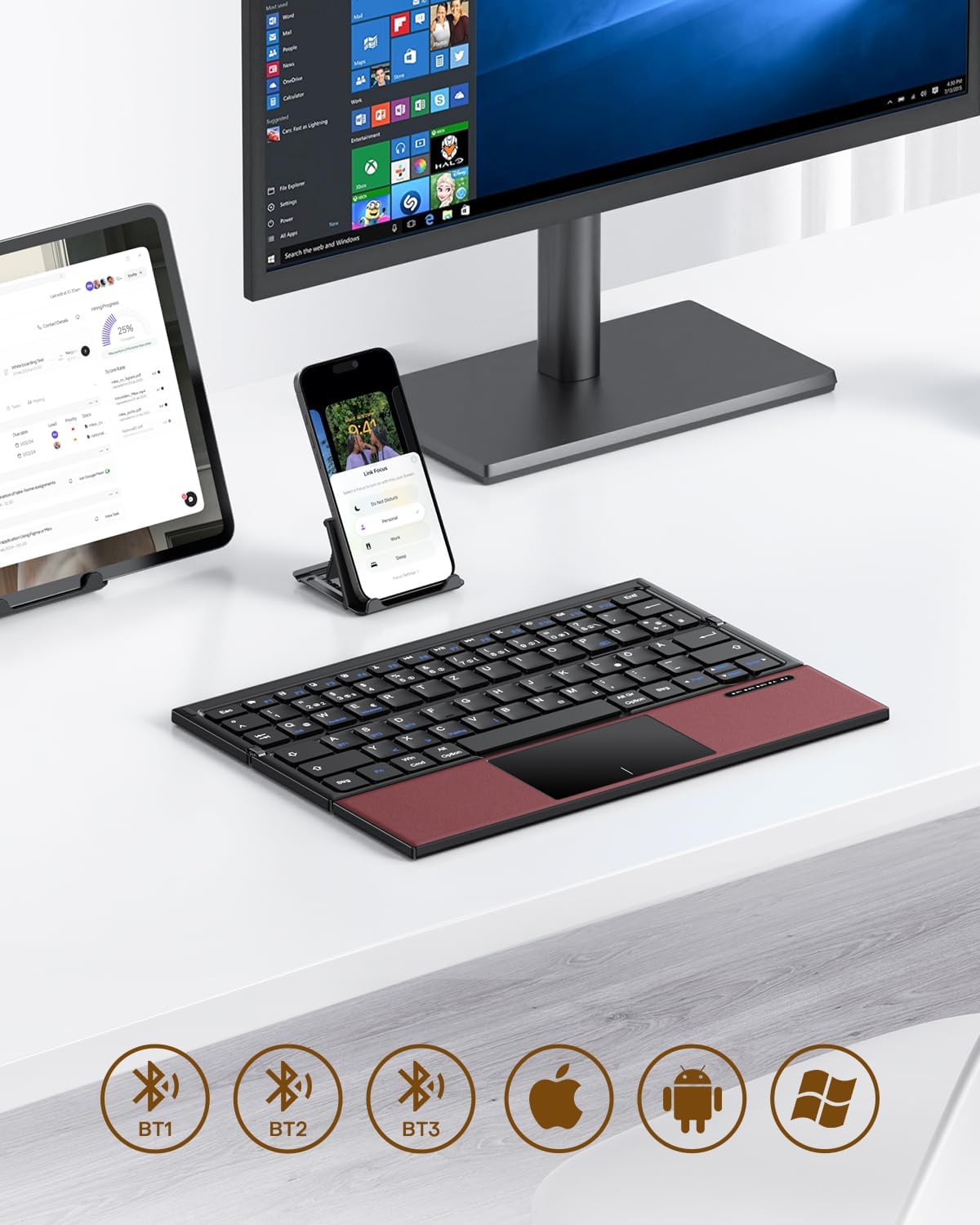
Image 3.1: The OMOTON Foldable Bluetooth Keyboard in use with a tablet, smartphone, and monitor, demonstrating multi-device connectivity via BT1, BT2, and BT3 channels.
ቁልፍ ባህሪዎች
- ባለሶስት እጥፍ ንድፍ; Compact and portable for travel.
- የተዋሃደ የመዳሰሻ ሰሌዳ Multi-touch functionality for navigation without an external mouse.
- የብዝሃ-መሣሪያ ግንኙነት; Connects to up to three Bluetooth-enabled devices (BT1, BT2, BT3).
- የQWERTZ አቀማመጥ፡- Standard German keyboard layout with 78 full-size keys.
- ዳግም ሊሞላ የሚችል ባትሪ፡ Built-in 180mAh battery with Type-C charging.

Image 3.2: Close-up details of the keyboard, highlighting its magnetic closure, indicator lights, silent scissor keys, elegant PU leather finish, and durable metal hinge.
ተንቀሳቃሽነት፡-
The keyboard's compact, tri-fold design makes it ideal for travel and on-the-go use. It easily fits into bags and pockets, making it a convenient companion for various environments.

Image 3.3: The keyboard in use in a cafe, on an airplane, and in a meeting room, demonstrating its versatility for different work and travel scenarios.

Image 3.4: The folded keyboard being placed into a carrying case inside a bag and slipped into a jacket pocket, illustrating its compact size and ease of transport.
4. ማዋቀር
4.1 የቁልፍ ሰሌዳውን መሙላት
Before first use, fully charge the keyboard. Use the included Type-C charging cable to connect the keyboard to a power source (e.g., computer USB port, USB wall adapter).
- The power indicator light will show charging status.
- ሙሉ ክፍያ በተለምዶ ከ2-3 ሰዓታት ይወስዳል።
- The keyboard offers up to 60 hours of operating time and 90 days of standby time on a full charge.

Image 4.1: The keyboard connected via its Type-C port for charging, with icons indicating charging time, working time, and standby time.
4.2 ከመሳሪያ ጋር ማጣመር
The keyboard supports up to three Bluetooth connections (BT1, BT2, BT3). Follow these steps to pair your keyboard with a device:
- አብራ፡ Unfold the keyboard to automatically power it on. The indicator light will flash.
- ቻናል ይምረጡ፡- የሚለውን ይጫኑ Fn + BT1, Fn + BT2, ወይም Fn + BT3 keys simultaneously to select a Bluetooth channel. The corresponding indicator light will flash slowly.
- የማጣመሪያ ሁነታን ያስገቡ ፦ ተጫን Fn + ሲ (or the Bluetooth icon key) to enter pairing mode. The selected channel indicator light will flash rapidly.
- ብሉቱዝን በመሳሪያ ላይ ያንቁ፦ በመሳሪያዎ (ስማርትፎን፣ ታብሌት፣ ላፕቶፕ) ላይ ወደ ብሉቱዝ ቅንብሮች ይሂዱ እና ብሉቱዝን ያብሩ።
- የቁልፍ ሰሌዳ ይምረጡ፦ ፈልግ "OMOTON Keyboard" (or similar) in the list of available devices and select it to connect.
- ግንኙነት አረጋግጥ፡ Once connected, the indicator light on the keyboard will stop flashing and remain solid for a few seconds before turning off.
Note: The Type-C cable is for charging only and does not support wired connectivity.
4.3 በመሳሪያዎች መካከል መቀያየር
በተጣመሩ መሳሪያዎች መካከል ለመቀያየር በቀላሉ ይጫኑ Fn + BT1, Fn + BT2, ወይም Fn + BT3 to select the desired channel. The keyboard will automatically connect to the last paired device on that channel.
5. የአሠራር መመሪያዎች
5.1 Keyboard Layout and Special Keys
The keyboard features a QWERTZ layout with 78 standard keys and 12 multimedia shortcuts. Familiarize yourself with the layout for efficient typing.

Image 5.1: The keyboard displaying its full-size keys and integrated multi-touch touchpad, designed for a laptop-like typing experience.
5.2 የመዳሰሻ ሰሌዳውን መጠቀም
The multi-touch touchpad supports various gestures for navigation. This eliminates the need for an external mouse.
- ነጠላ ጣት መታ ያድርጉ፡ ግራ-ጠቅ ያድርጉ።
- ሁለት ጣት መታ ያድርጉ፡ በቀኝ ጠቅ ያድርጉ (የአውድ ምናሌ)።
- ባለ ሁለት ጣት ማሸብለል; ወደ ላይ/ወደ ታች ወይም ወደ ግራ/ቀኝ ይሸብልሉ።
- ለማጉላት ቆንጥጦ: Zoom in/out (supported on some devices/apps).
- የጣት ምልክቶችን ያንሸራትቱ፡ Specific gestures may vary by operating system (Windows, Android, iOS).
Note for iPad users: You may need to enable "AssistiveTouch" in your iPad settings for full touchpad functionality. Some gestures may vary between applications. Scrolling direction can be adjusted in your device settings.
5.3 የኃይል ቆጣቢ ሁኔታ
To conserve battery, the keyboard will automatically enter sleep mode after 30 minutes of inactivity. To wake it up, press any key.
5.4 Ergonomic Usage
For comfortable and ergonomic typing, ensure your screen is positioned correctly to maintain a healthy posture.

Image 5.2: A visual guide showing the recommended ergonomic posture for using the keyboard with a screen, emphasizing proper neck and back alignment.
6. ጥገና
- ማጽዳት፡ የቁልፍ ሰሌዳውን ወለል ለማጽዳት ለስላሳ እና ደረቅ ጨርቅ ይጠቀሙ። ለጠንካራ ቆሻሻ፣ ትንሽ ቆልampበጨርቁ ላይ በውሃ ወይም ለስላሳ የጽዳት መፍትሄ. ከመጠን በላይ እርጥበትን ያስወግዱ.
- ማከማቻ፡ When not in use, fold the keyboard and store it in the provided carrying case to protect it from dust and scratches.
- የባትሪ እንክብካቤ Avoid fully discharging the battery frequently. Charge the keyboard regularly, especially if it will be stored for an extended period.
- ከባድ ሁኔታዎችን ያስወግዱ; የቁልፍ ሰሌዳውን ለከፍተኛ ሙቀት፣ ለቀጥታ የፀሐይ ብርሃን ወይም ለከፍተኛ እርጥበት አያጋልጡት።
7. መላ መፈለግ
7.1 የቁልፍ ሰሌዳው እየተገናኘ አይደለም
- የቁልፍ ሰሌዳው መብራቱን ያረጋግጡ (ክፍት)።
- በመሳሪያዎ ላይ ብሉቱዝ መንቃቱን ያረጋግጡ።
- Check if the keyboard is in pairing mode (indicator light flashing rapidly after pressing Fn+C).
- Ensure you have selected the correct Bluetooth channel (BT1, BT2, or BT3).
- የቁልፍ ሰሌዳውን ከመሳሪያዎ የብሉቱዝ ቅንብሮች ለማጣመር እና እንደገና ለማጣመር ይሞክሩ።
- የቁልፍ ሰሌዳው ባትሪ መሙላቱን ያረጋግጡ።
7.2 Touchpad Not Responding
- የቁልፍ ሰሌዳው በብሉቱዝ በኩል በትክክል መገናኘቱን ያረጋግጡ።
- For iPad users, verify that "AssistiveTouch" is enabled in your iPad settings.
- የቁልፍ ሰሌዳውን እና መሳሪያዎን እንደገና ያስጀምሩ።
- Clean the touchpad surface to remove any dirt or debris.
7.3 Incorrect Key Output (QWERTZ vs. QWERTY)
- This keyboard has a QWERTZ layout. Ensure your device's software keyboard setting is also set to QWERTZ (German layout) for correct character output.
- If your device is set to QWERTY, some keys (e.g., Y/Z, special characters) will not match the physical keyboard. Adjust your device's input language/keyboard layout settings.
7.4 አጭር የባትሪ ህይወት
- ከመጠቀምዎ በፊት የቁልፍ ሰሌዳው ሙሉ በሙሉ መሙላቱን ያረጋግጡ።
- The keyboard automatically enters sleep mode after 30 minutes of inactivity to save power.
- Avoid leaving the keyboard unfolded and powered on when not in use for extended periods.
8. ዝርዝሮች
| የምርት ስም | ኦሞቶን |
| ሞዴል | B0FCMD15TF |
| የግንኙነት ቴክኖሎጂ | ብሉቱዝ |
| ተስማሚ መሣሪያዎች | iPadOS, iOS, Android, Windows (Laptops, PCs, Tablets, Smartphones) |
| የቁልፍ ሰሌዳ አቀማመጥ | QWERTZ (የጀርመን አቀማመጥ) |
| የቁልፎች ብዛት | 78 |
| ልዩ ባህሪያት | Foldable, Portable, Rechargeable, Integrated Multi-touch Touchpad |
| ቁሳቁስ | ፕላስቲክ፣ ፖሊዩረቴን (PU) |
| የባትሪ አቅም | 180 mAh Li-ion |
| የኃይል መሙያ ወደብ | ዓይነት-C |
| የኃይል መሙያ ጊዜ | በግምት. 2-3 ሰዓታት |
| የስራ ጊዜ | እስከ 60 ሰዓታት ድረስ |
| የመጠባበቂያ ጊዜ | እስከ 90 ቀናት ድረስ |
| የታጠፈ ልኬቶች | 25.3 x 6 x 2.1 ሴ.ሜ |

Image 8.1: Visual representation of the keyboard's dimensions when unfolded and folded, alongside a tablet and smartphone for scale.
9. ዋስትና እና ድጋፍ
OMOTON products come with a standard warranty. For detailed warranty information, please refer to the warranty card included in your package or visit the official OMOTON webጣቢያ.
If you encounter any issues or have questions regarding your OMOTON Foldable Bluetooth Keyboard, please contact OMOTON Customer Support:
- Webጣቢያ፡ OMOTON Official Store on Amazon
Please have your model number (B0FCMD15TF) and purchase details ready when contacting support.
Ask a question about this manual
Ask about setup, troubleshooting, compatibility, parts, safety, or missing instructions. Manuals+ will review the question and use this page’s manual context to help answer it.