
መግቢያ
This manual provides detailed instructions for the setup, operation, and maintenance of your LEFFOT M1 Plus 4K Ultra HD Streaming Device. Please read this manual thoroughly before use to ensure optimal performance and longevity of your device.
The LEFFOT M1 Plus is a high-performance streaming device designed to deliver an immersive entertainment experience with 4K Ultra HD resolution, powered by Android 14. It features robust connectivity options and intelligent voice control for seamless interaction.
በሣጥኑ ውስጥ ያለው

Image: Contents of the LEFFOT M1 Plus package. This includes the streaming device, remote control, HD cable, power adapter, and user manual.
- LEFFOT M1 Plus Streaming Device (x1)
- Voice Remote Control (x1)
- HD Cable (x1)
- የኃይል አስማሚ (x1)
- የተጠቃሚ መመሪያ (x1)
የማዋቀር መመሪያ
- ከቲቪ ጋር ይገናኙ፡ Insert one end of the provided HD cable into the HDMI port on the LEFFOT M1 Plus device and the other end into an available HDMI port on your television.

Image: Step-by-step visual guide for connecting the TV Box to your television's HDMI port, connecting to the internet, and starting to stream content.
- አብራ፡ Connect the power adapter to the DC port on the device and then plug the adapter into a power outlet. The device will automatically power on.
- የርቀት መቆጣጠሪያ ማጣመር; Insert two AAA batteries (not included) into the voice remote. Follow the on-screen instructions to pair the remote via Bluetooth. This typically involves holding down specific buttons on the remote near the device until a pairing confirmation appears.
- የአውታረ መረብ ግንኙነት፡- On the initial setup screen, select your preferred language and connect to your Wi-Fi network. The device supports dual-band WiFi 6 (802.11ax) for fast and stable connections. Alternatively, you can connect via an Ethernet cable to the LAN port.
- የጎግል መለያ ማዋቀር፡- ወደ Google Play መደብር እና ሌሎች የGoogle አገልግሎቶችን ለመድረስ በGoogle መለያዎ ይግቡ።
የአሠራር መመሪያዎች
አሰሳ
Use the directional pad and 'OK' button on the voice remote to navigate the Android TV interface. The home screen provides quick access to your favorite apps, recommended content, and system settings.
የድምጽ ቁጥጥር (የጉግል ረዳት)
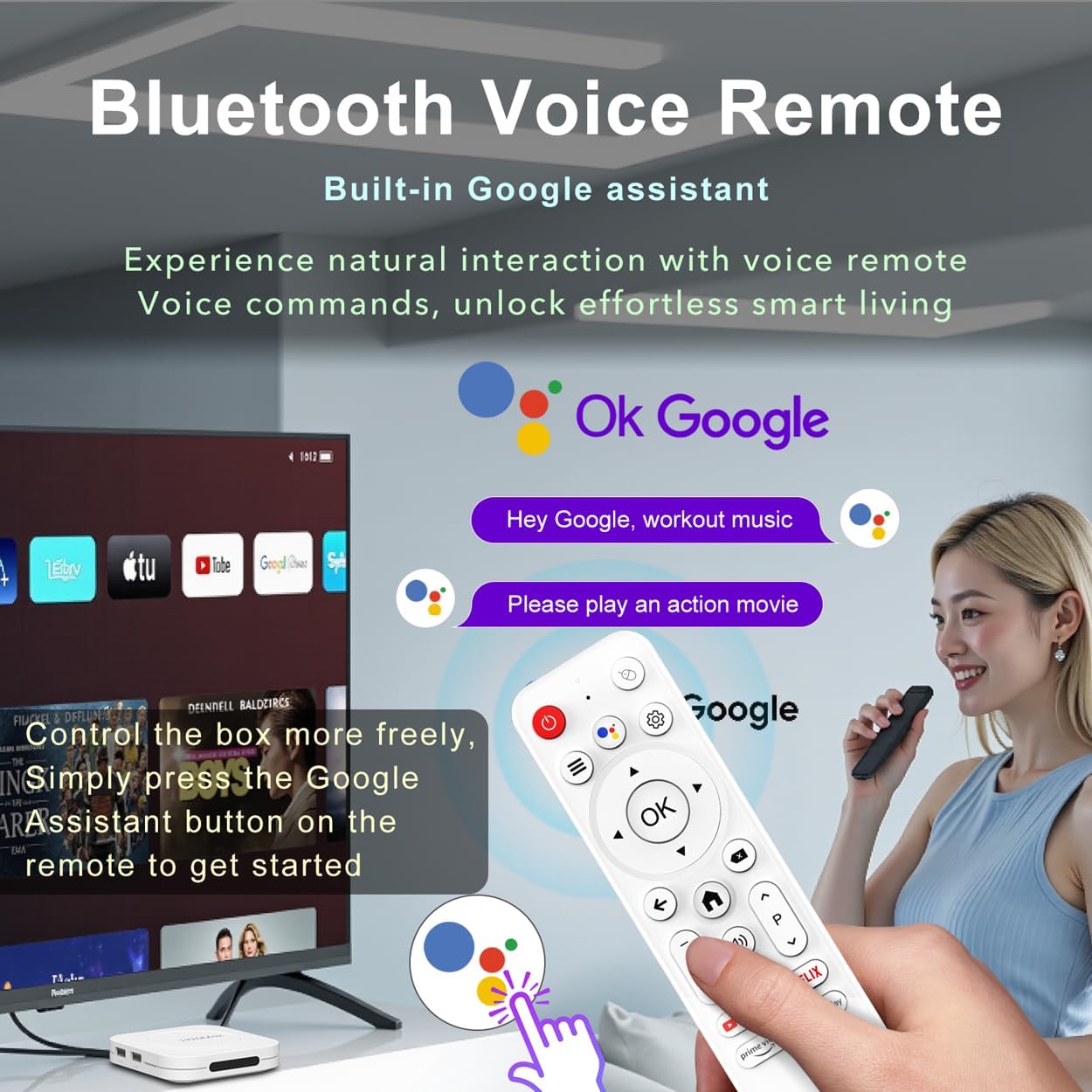
Image: The LEFFOT M1 Plus remote control, highlighting the Google Assistant button for voice commands.
The device features built-in Google Assistant integration via the BT 5.4 voice remote. Press the Google Assistant button on the remote and speak your commands to search for content, adjust volume, open apps, or check information hands-free.
ስክሪን ማንጸባረቅ
Effortlessly share content from your mobile devices (smartphones, tablets) to your TV using Airplay, DLNA, or WiFidisplay functions. This is ideal for sharing photos, videos, or playing mobile games on the big screen.
የሚዲያ መልሶ ማጫወት
Access thousands of apps from the Google Play Store, including popular streaming services like Netflix, Prime Video, YouTube, Hulu, and Disney+. The device supports 8K@23fps decoding and 4K@60fps HDR10 output for a high-quality viewልምድ.
ቁልፍ ባህሪያት
- Ultimate 4K Ultra HD Resolution: Experience stunning clarity with 8K@23fps decoding and 4K@60fps HDR10 output, delivering cinema-quality picture with vibrant colors and crisp details.

ምስል፡ የቴሌቪዥን ማሳያ ማሳያasing the clarity and detail of 8K Ultra HD decoding, emphasizing vibrant colors and sharp details.
- Powerhouse Performance: Equipped with a Rockchip RK3528 Quad-Core A53 processor and 4GB RAM, ensuring flawless multitasking, smooth streaming, and responsive gaming.
- Military-Grade Connectivity: Features dual-band WiFi 6 (802.11ax) and 100M Ethernet for stable and high-speed 4K streaming, minimizing buffering. Bluetooth 5.4 is also included for peripheral connections.

Image: Visual representation of the device's advanced connectivity features, including 2.4G & 5G Dual-band WiFi 6 and 100M Ethernet for stable streaming.
- Android 14 Entertainment Hub: Runs the latest Android 14 OS, providing access to over 5,000 apps from the Google Play Store for endless entertainment options.
- Massive 128GB Storage Capacity: Store hundreds of apps, games, and offline media. Additional storage expansion is available via USB ports.
- Complete Connectivity Suite: Includes BT 5.4, USB 2.0 (x2), HD 2.0b, Ethernet, DC, and AV ports for connecting various external devices like soundbars, game controllers, and external storage.
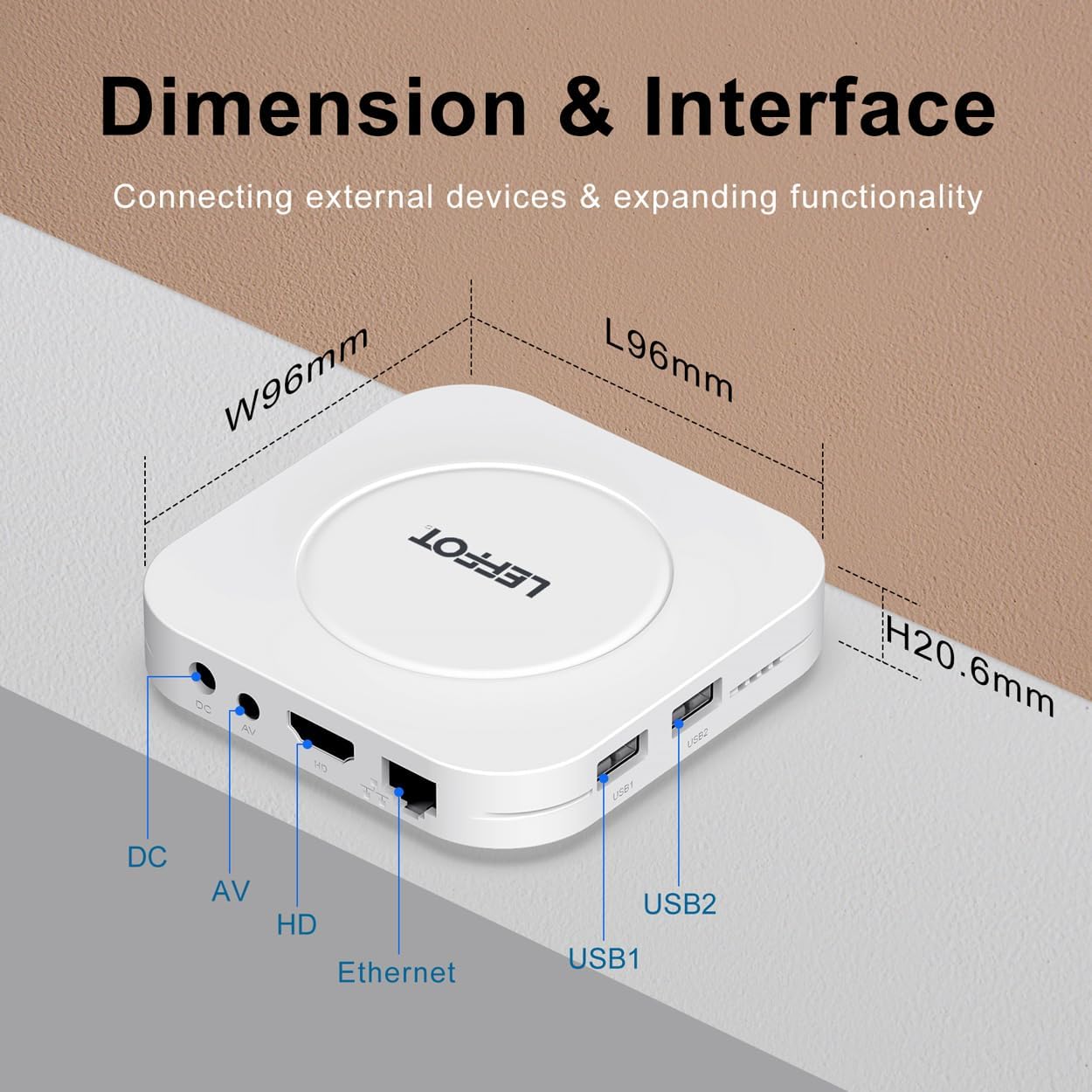
Image: An illustration detailing the dimensions and various interface ports of the LEFFOT M1 Plus, including DC, AV, HD, Ethernet, USB1, and USB2.
ጥገና
- ማጽዳት፡ መሳሪያውን ለማጽዳት ለስላሳ እና ደረቅ ጨርቅ ይጠቀሙ. ፈሳሽ ማጽጃዎችን ወይም ገላጭ ቁሳቁሶችን ያስወግዱ.
- የሶፍትዌር ማሻሻያ Ensure your device's software is up-to-date by checking for system updates periodically in the settings menu. This ensures optimal performance and security.
- የማከማቻ አስተዳደር፡ Regularly clear cached data and uninstall unused apps to free up storage space and maintain device speed.
መላ መፈለግ
- ኃይል የለም፡ የኃይል አስማሚው ከመሳሪያው እና ከሚሰራ የኃይል መውጫ ጋር ደህንነቱ በተጠበቀ ሁኔታ መገናኘቱን ያረጋግጡ። አስፈላጊ ከሆነ የተለየ መውጫ ይሞክሩ።
- በቴሌቪዥን ላይ ምንም ፎቶ የለም፦ Verify the HD cable connections. Ensure your TV input is set to the correct HDMI port. Try a different HD cable if the issue persists.
- የርቀት ምላሽ የማይሰጥ፡ Check the batteries in the remote control. Re-pair the remote by following the instructions in the Setup Guide.
- የWi-Fi ግንኙነት ችግሮች፡- Ensure your Wi-Fi router is on and functioning correctly. Re-enter your Wi-Fi password in the device settings. Try moving the device closer to the router or connecting via Ethernet.
- የመተግበሪያ መቀዝቀዝ/መበላሸት Close and restart the app. Clear the app's cache or data in the device settings (Settings > Apps > [App Name] > Storage). If the issue continues, uninstall and reinstall the app.
ዝርዝሮች
| ባህሪ | ዝርዝር |
|---|---|
| የምርት ስም | LEFFOT |
| የሞዴል ስም | M1 ፕላስ |
| ስርዓተ ክወና | አንድሮይድ 14 |
| ፕሮሰሰር | Rockchip RK3528 Quad-Core A53 |
| ራም | 4 ጊባ |
| ROM | 128 ጊባ |
| ጥራት | 8K (decoding), 4K@60fps HDR10 (output) |
| ግንኙነት | Dual-band WiFi 6 (802.11ax), Bluetooth 5.4, 100M Ethernet |
| ወደቦች | HD 2.0b, USB 2.0 (x2), Ethernet, DC, AV |
| ልዩ ባህሪያት | Google Assistant, Airplay, DLNA, WiFidisplay |
| መጠኖች | 3.8 x 3.8 x 0.81 ኢንች |
| የእቃው ክብደት | 4.4 አውንስ |
ዋስትና እና ድጋፍ
Your LEFFOT M1 Plus device comes with a standard manufacturer's warranty. For detailed warranty information, technical support, or service inquiries, please refer to the contact information provided in your product packaging or visit the official LEFFOT webጣቢያ.