
1. መግቢያ
This manual provides essential instructions for setting up, operating, and maintaining your LEFFOT H618 Plus 4K Ultra HD Streaming Device. Please read this guide thoroughly before use to ensure proper functionality and to maximize your entertainment experience.
2. የደህንነት መረጃ
- መሳሪያው በድንገት እንዳይወድቅ ለመከላከል በተረጋጋና ጠፍጣፋ መሬት ላይ መቀመጡን ያረጋግጡ።
- መሳሪያውን ለውሃ፣ ለእርጥበት እና ለከፍተኛ የሙቀት መጠን አያጋልጡት።
- ከመጠን በላይ ሙቀትን ለመከላከል የአየር ማናፈሻ ክፍተቶችን ከመዝጋት ይቆጠቡ.
- ጉዳትን ለመከላከል የቀረበውን የኃይል አስማሚ ብቻ ይጠቀሙ።
- መሣሪያውን እና መለዋወጫዎችን ልጆች በማይደርሱበት ቦታ ያቆዩት።
- መሳሪያውን እራስዎ ለመበተን ወይም ለመጠገን አይሞክሩ. ለእርዳታ ብቁ የሆኑ የአገልግሎት ሰራተኞችን ያነጋግሩ።
3. የጥቅል ይዘቶች
ሁሉም እቃዎች በጥቅሉ ውስጥ መኖራቸውን ያረጋግጡ፡-
- LEFFOT H618 Plus Streaming Device
- የድምጽ የርቀት መቆጣጠሪያ
- የኃይል አስማሚ
- HDMI ገመድ
- የተጠቃሚ መመሪያ

ምስል 3.1፡ የጥቅል ይዘቶች
4. የማዋቀር መመሪያዎች
4.1 መሳሪያውን በማገናኘት ላይ
- ከቲቪ ጋር ይገናኙ፡ Plug one end of the HDMI cable into the HDMI port on the LEFFOT H618 Plus device and the other end into an available HDMI input on your television.
- የግንኙነት ኃይል; Connect the power adapter to the DC port on the device and then plug the adapter into a wall outlet.
- አብራ፡ መሣሪያው በራስ-ሰር መብራት አለበት። ካልሆነ በርቀት መቆጣጠሪያው ላይ ያለውን የኃይል ቁልፍ ይጫኑ።

ምስል 4.1፡ ግንኙነትview
4.2 የርቀት መቆጣጠሪያ ቅንብር
- ባትሪዎችን አስገባ: Open the battery compartment on the back of the voice remote control and insert two AAA batteries (included), ensuring correct polarity.
- ማጣመር፡ The remote control should automatically pair with the device upon first use. If not, follow the on-screen instructions or press and hold the pairing button (usually located inside the battery compartment or on the side of the remote) until the indicator light flashes.
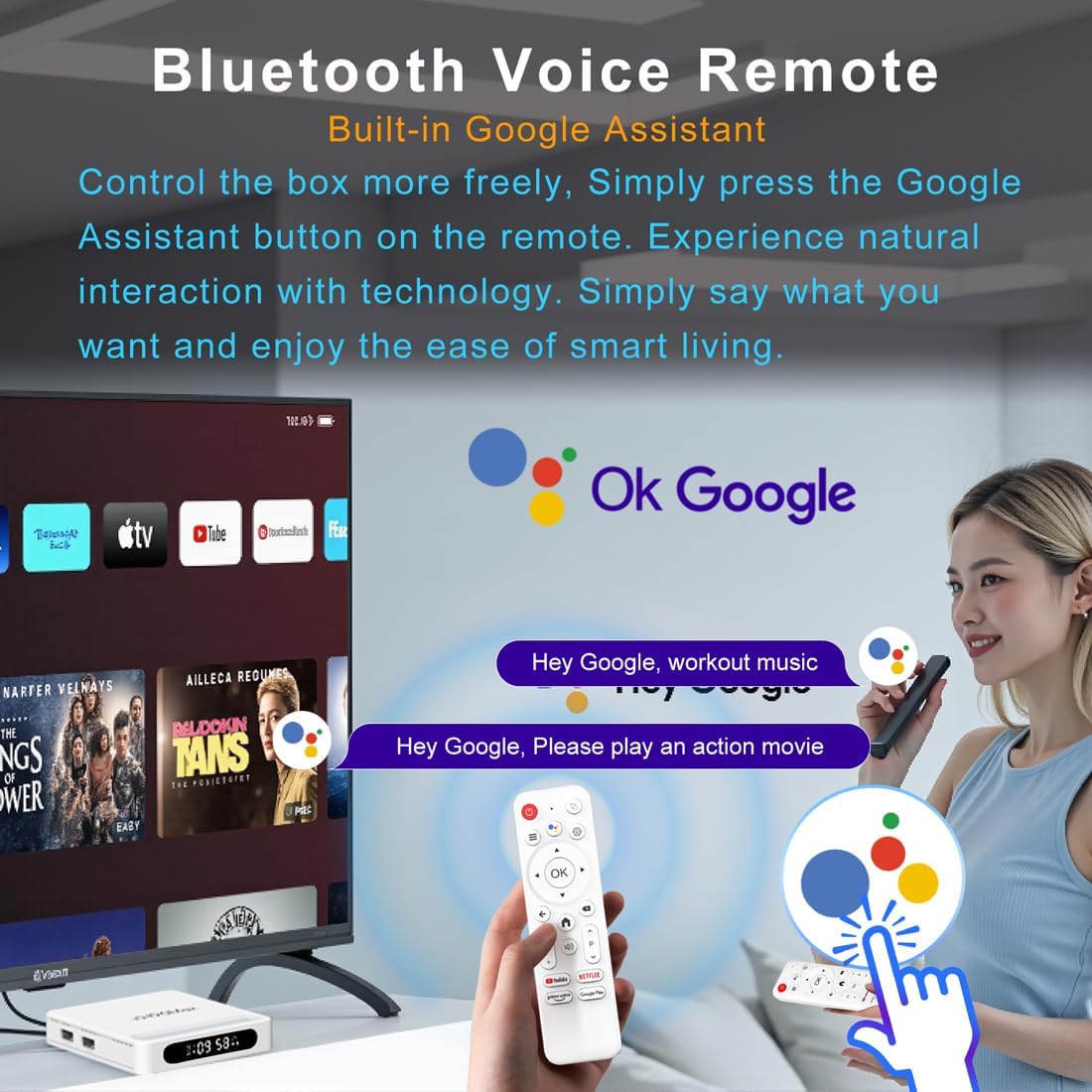
ምስል 4.2፡ የድምጽ የርቀት መቆጣጠሪያ
4.3 የመነሻ መሣሪያ ውቅር
Follow the on-screen prompts to complete the initial setup, which typically includes:
- የቋንቋ ምርጫ።
- Connecting to a Wi-Fi network or Ethernet.
- በGoogle መለያዎ መግባት።
- Installing essential applications.
5. የአሠራር መመሪያዎች
5.1 አሰሳ እና በይነገጽ
Use the directional pad (D-pad) on your remote to navigate through the Android TV interface. The 'OK' button confirms selections, 'Back' returns to the previous screen, and 'Home' takes you to the main screen.
5.2 Voice Remote with Google Assistant
Press the Google Assistant button on your remote and speak your commands. You can search for content, open apps, control playback, and more using your voice.
5.3 መተግበሪያዎችን መድረስ
The device comes pre-loaded with Google Play, allowing access to over 5000+ applications. Navigate to the 'Apps' section on the home screen to browse, download, and manage your applications.

Figure 5.1: Accessing Apps via Google Play
5.4 4K UHD Playback and HDR10
The LEFFOT H618 Plus supports 8K@22fps decoding and 4K@60fps playback with HDR10. Ensure your television is 4K HDR compatible and that you are streaming 4K HDR content for the best visual experience.

Figure 5.2: 4K UHD and HDR10 Visuals
5.5 Screen Casting
Utilize the built-in Airplay and Miracast features to cast content from your smartphone or tablet directly to your TV screen.
6. ዝርዝሮች
| ባህሪ | መግለጫ |
|---|---|
| የምርት ስም | LEFFOT |
| የሞዴል ስም | H618 Plus |
| ስርዓተ ክወና | አንድሮይድ 14 |
| ሲፒዩ | Allwinner H618 Quad-Core ARM Cortex A53 |
| ጂፒዩ | ማሊ-ጂ31 MP2 |
| ራም | 2 ጊባ |
| ROM | 16 ጊባ |
| ቪዲዮ ዲኮዲንግ | 8K@22fps, 4K@60fps with HDR10 |
| ግንኙነት | Dual-band WiFi 6 (2.4G/5G), 100M Ethernet, Bluetooth 5.4 |
| ወደቦች | HDMI 2.0a, USB 2.0 (x2), AV, DC |
| ልዩ ባህሪያት | Voice Remote with Google Assistant, Airplay, Miracast |
| መጠኖች | 3.2 x 3.2 x 0.67 ኢንች |
| ክብደት | 4.1 አውንስ |

ምስል 6.1፡ ቁልፍ ባህሪያት አልቋልview
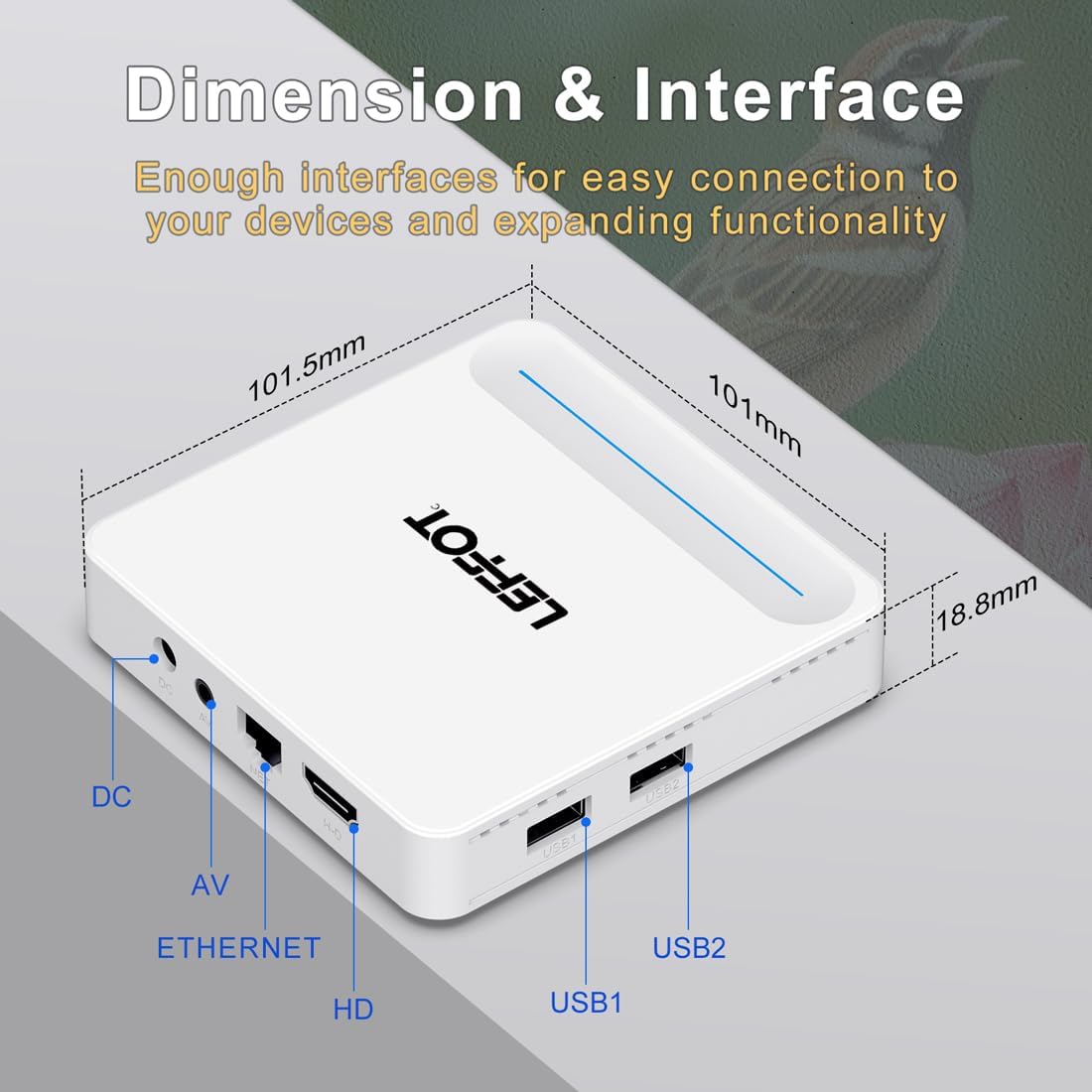
Figure 6.2: Device Dimensions and Interface
7. መላ መፈለግ
7.1 ምንም ኃይል / መሳሪያ አይበራም
- የኃይል አስማሚው ከመሳሪያው እና ከኃይል መውጫው ጋር ደህንነቱ በተጠበቀ ሁኔታ የተገናኘ መሆኑን ያረጋግጡ።
- Ensure the power outlet is functional. Try plugging another device into the same outlet.
- Press the power button on the remote control or the device itself.
7.2 No Signal on TV Screen
- Verify that the HDMI cable is securely connected to both the device and the TV.
- ቴሌቪዥንዎ በትክክለኛው የኤችዲኤምአይ ግብዓት ምንጭ ላይ መዋቀሩን ያረጋግጡ።
- Try using a different HDMI cable or a different HDMI port on your TV.
- Restart the streaming device and your TV.
7.3 የርቀት መቆጣጠሪያ ምላሽ አይሰጥም
- በርቀት መቆጣጠሪያው ውስጥ ያሉትን ባትሪዎች ይፈትሹ እና ይተኩ.
- በርቀት መቆጣጠሪያው እና በመሳሪያው መካከል ምንም እንቅፋቶች አለመኖራቸውን ያረጋግጡ።
- Re-pair the remote control with the device by following the instructions in Section 4.2.
7.4 Buffering or Slow Performance
- Check your internet connection speed. A stable and fast connection is crucial for streaming 4K content.
- If using Wi-Fi, try moving the device closer to your router or connecting via an Ethernet cable for a more stable connection.
- Close any unused applications running in the background on the device.
- Clear the cache of streaming applications.
- Restart your router, modem, and the streaming device.
8. ጥገና
- መሳሪያውን ለስላሳና ደረቅ ጨርቅ አዘውትረው ያጽዱ። ፈሳሽ ማጽጃዎችን ወይም ኤሮሶሎችን አይጠቀሙ።
- Keep the device free from dust and debris, especially around ventilation areas.
- ለረጅም ጊዜ ጥቅም ላይ በማይውልበት ጊዜ መሳሪያውን በቀዝቃዛና ደረቅ ቦታ ያከማቹ.
9. ዋስትና እና ድጋፍ
For warranty information and technical support, please refer to the documentation included with your purchase or visit the official LEFFOT webጣቢያ. ለዋስትና ጥያቄዎች የግዢ ማረጋገጫዎን ያስቀምጡ።