
1. መግቢያ
This manual provides comprehensive instructions for the safe and effective use of the AMPBANK H128 Handheld Thermal Camera. The H128 is designed for precise temperature measurement and thermal imaging, suitable for various applications including electrical inspections, HVAC diagnostics, building energy audits, and automotive maintenance. Please read this manual thoroughly before operating the device and retain it for future reference.

ምስል 1.1፡ የ AMPBANK H128 Handheld Thermal Camera, showcasing its ergonomic design and integrated display.
2. የደህንነት መረጃ
በመሳሪያው ላይ ጉዳት እና ጉዳት እንዳይደርስ ለመከላከል የሚከተሉትን የደህንነት ጥንቃቄዎች ሁልጊዜ ይከተሉ።
- Do not point the camera directly at extremely high-intensity energy sources, such as the sun or lasers, as this may damage the infrared detector.
- Avoid dropping the device or subjecting it to severe impact, despite its robust design.
- Do not immerse the device in water or other liquids. While it has an IP65 rating for dust and water jet protection, it is not designed for submersion.
- Use only the specified charging cable (USB-C) and power adapter to charge the device.
- ካሜራውን ለመበተን ወይም ለመቀየር አይሞክሩ። ጥገናዎች በተፈቀደላቸው የአገልግሎት ሰራተኞች ብቻ መከናወን አለባቸው.
- ሌንሱን ንፁህ እና ከአቧራ እና ከቆሻሻ የጸዳ ያድርጉት። ለማጽዳት ለስላሳ፣ ከላጣ የጸዳ ጨርቅ ይጠቀሙ።
- Operate the device within the specified environmental conditions (temperature and humidity).
3. ምርት አብቅቷልview
3.1. አካላት
የ AMPBANK H128 thermal camera includes the following main components:
- ኢንፍራሬድ ሌንስ; የሙቀት ጨረርን ይይዛል።
- ማሳያ ማያ: Shows thermal images, temperature readings, and menu options.
- የመቆጣጠሪያ አዝራሮች; For navigation and selection (OK, Up, Down, Return/Power).
- ቀስቅሴ አዝራር፡- To capture images.
- ዩኤስቢ-ሲ ወደብ ለክፍያ እና የውሂብ ማስተላለፍ.
- Tripod Mount: Standard 1/4-inch thread for stable positioning.
3.2. ቁልፍ ባህሪያት
The H128 thermal camera offers a range of advanced features for efficient and accurate thermal inspections:
- Enhanced Clarity with TISR Resolution: The camera utilizes TISR (Thermal Image Super Resolution) technology to achieve an effective display resolution of 240x240 pixels from a 128x128 infrared sensor, providing clearer thermal images.
- የተራዘመ የ24-ሰዓት የባትሪ ህይወት፡- Equipped with a built-in 2900mAh rechargeable battery, the H128 provides up to 24 hours of continuous operation, minimizing downtime during extended inspections.
- ትክክለኛ የሙቀት መለኪያ፡ The device offers high accuracy with a temperature resolution of 0.1°C and readings within ±3%, covering a wide temperature range from -4°F to 842°F (-20°C to 450°C). Users can adjust emissivity for various materials to improve accuracy.
- Temperature Alarm for Anomaly Detection: A built-in alarm system quickly identifies abnormal heat sources, automatically tracking and displaying maximum, minimum, and center temperatures on the screen.
- ዘላቂ እና ጠንካራ ዲዛይን; The H128 is built to withstand demanding environments, featuring a 6.56-foot (2-meter) drop protection and an IP65 ingress protection rating against dust and water jets.
- ከፍተኛ የፍሬም ተመን፡ A 25Hz frame rate ensures smooth, real-time thermal imagery, crucial for dynamic inspections.
- Multiple Thermal Palettes: Choose from 5 different color palettes (Iron Red, Black Hot, Rainbow, White Hot, Red Hot) to best visualize temperature differences for specific applications.

Figure 3.1: Comparison of thermal image clarity with and without TISR technology, demonstrating the enhanced 240x240 resolution.

Figure 3.2: Illustration of the H128's long-lasting 24-hour battery life and Type-C charging port.

Figure 3.3: The H128 in use, demonstrating its capability for accurate temperature measurement in an electrical panel.

Figure 3.4: The H128 display highlighting hot, center, and cold spots with an integrated high/low temperature alarm.
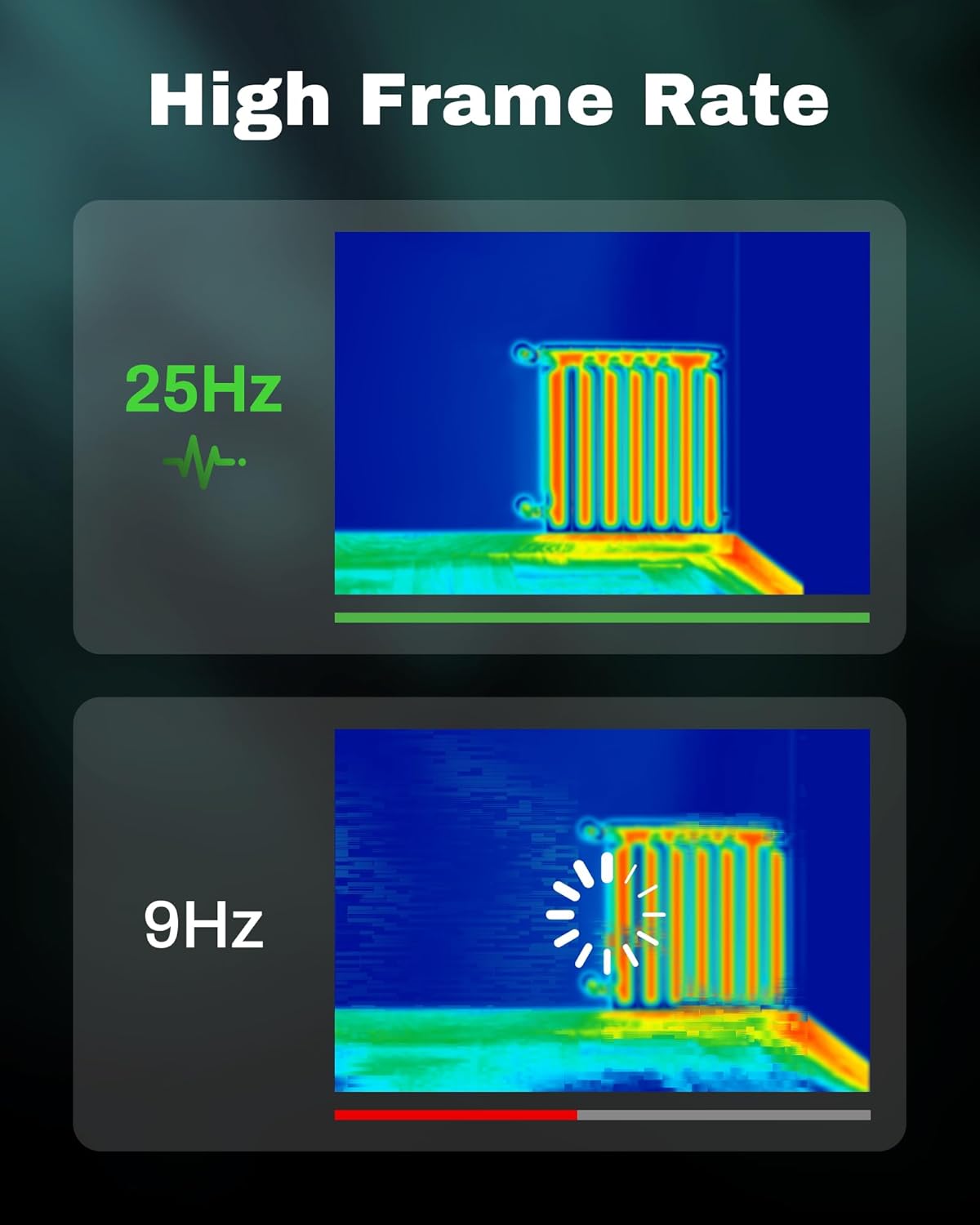
Figure 3.5: Visual comparison of thermal image fluidity at 25Hz versus 9Hz frame rates.

Figure 3.6: Display of the five available thermal color palettes for varied visualization of heat signatures.
4. ማዋቀር
4.1. ማሸግ
ሁሉንም እቃዎች ከማሸጊያው በጥንቃቄ ያስወግዱ። ሳጥኑ የሚከተሉትን መያዝ አለበት፡
- AMPBANK H128 Thermal Imaging Camera
- የ USB-C ገመድ
Inspect the camera for any signs of damage. If any components are missing or damaged, contact customer support immediately.
4.2. ባትሪውን በመሙላት ላይ
Before first use, fully charge the camera's built-in battery.
- Connect the supplied USB-C cable to the USB-C port on the top of the camera.
- የዩኤስቢ-ሲ ገመዱን ሌላኛውን ጫፍ ከተኳሃኝ የዩኤስቢ የኃይል አስማሚ (ያልተካተተ) ወይም ከኮምፒዩተር የዩኤስቢ ወደብ ጋር ያገናኙ።
- The charging indicator on the screen will show the charging status. A full charge typically takes several hours.
- አንዴ ሙሉ ኃይል ከሞላ በኋላ ገመዱን ያላቅቁት።
4.3. የመነሻ ኃይል ማብራት እና መሰረታዊ ቅንጅቶች
- አብራ፡ Press and hold the power button (often integrated with the Return button) for approximately 8 seconds until the screen illuminates.
- የቋንቋ ምርጫ፡- Upon first power-on, you may be prompted to select your preferred language. Use the Up/Down buttons to navigate and the OK button to confirm.
- ቀን እና ሰዓት፡- ለትክክለኛ ጊዜ ትክክለኛውን ቀን እና ሰዓት ያዘጋጁamping of captured images. Navigate to the settings menu using the OK button, then find the Date/Time option.
5. ኦፕሬሽን
5.1. መሰረታዊ ኦፕሬሽን
- ማብራት/ማጥፋት፡ Press and hold the power button for 8 seconds to turn on. Press and release the power button to turn off or enter sleep mode.
- የአሰሳ ምናሌዎች፡- የሚለውን ተጠቀም OK ምናሌውን ለማስገባት አዝራሩን ይጠቀሙ። Up እና ወደታች arrow buttons to scroll through options. Press OK to select an option. Press the ተመለስ button to exit a menu or go back.
- ምስሎችን ማንሳት; Aim the camera at the target. Press the trigger button (located on the handle) to capture a thermal image. Images are saved internally.
5.2. Measurement Modes and Settings
- Temperature Spot Measurement: The H128 automatically displays the maximum, minimum, and center temperatures on the screen.
- የልቀት ማስተካከያ; For accurate temperature readings, adjust the emissivity setting based on the material being inspected. Access this setting through the menu. Common emissivity values can be found in reference tables.
- የርቀት ቅንብር፡- Inputting the approximate distance to the target can further refine temperature accuracy.
- የሙቀት ፓሌቶች: Change the color scheme of the thermal image to highlight temperature differences more effectively. Navigate to the palette settings in the menu and choose from Iron Red, Black Hot, Rainbow, White Hot, or Red Hot.
5.3. የውሂብ አስተዳደር
The H128 can store over 8000 images internally. To transfer images to a computer:
- Connect the camera to your computer using the supplied USB-C cable.
- ካሜራው እንደ ተነቃይ የማከማቻ መሳሪያ ሆኖ ይታያል።
- Browse to the image folder and copy the desired files ወደ ኮምፒተርዎ.

Figure 5.1: Connecting the H128 thermal camera to a laptop via USB-C for image transfer.
6. ጥገና
6.1. ማጽዳት
- የካሜራ አካል፡ የካሜራውን አካል በለስላሳ፣ d ይጥረጉamp ጨርቅ. ገላጭ ማጽጃዎችን ወይም ፈሳሾችን አይጠቀሙ.
- ኢንፍራሬድ ሌንስ; The infrared lens is a delicate optical component. Use a lens cleaning cloth or a soft, lint-free cloth specifically designed for optics. Gently wipe the lens to remove dust or smudges. Do not apply excessive pressure or use harsh chemicals.
6.2. ማከማቻ
When not in use, store the H128 in a cool, dry place, away from direct sunlight and extreme temperatures. Ensure the battery is partially charged (around 50%) before long-term storage to preserve battery health.
6.3. የባትሪ እንክብካቤ
የባትሪ ዕድሜን ከፍ ለማድረግ፡-
- በተደጋጋሚ ባትሪውን ሙሉ በሙሉ ከመሙላት ይቆጠቡ።
- ለረጅም ጊዜ ባትሪው ሙሉ በሙሉ እንዲሞላ ከመተው ይቆጠቡ።
- ባትሪውን በክፍል ሙቀት ውስጥ ይሙሉት።
7. መላ መፈለግ
| ችግር | ሊሆን የሚችል ምክንያት | መፍትሄ |
|---|---|---|
| ካሜራ አይበራም። | ባትሪው ተሟጧል። | ባትሪውን በዩኤስቢ-ሲ ገመድ ይሙሉት። |
| ምስሉ ደብዛዛ ወይም ግልጽ ያልሆነ ነው። | Lens is dirty. / Incorrect focus (if applicable). | Clean the infrared lens with a soft, lint-free cloth. The H128 has fixed focus, ensure you are within the optimal measurement distance. |
| የሙቀት ንባቦች የተሳሳቱ ይመስላሉ. | Incorrect emissivity setting. / Distance to target is too far. | Adjust the emissivity setting in the menu to match the material being measured. Ensure you are within the recommended measurement distance. |
| ምስሎችን ወደ ኮምፒውተር ማስተላለፍ አይቻልም። | Loose USB-C connection. / Driver issue. | Ensure the USB-C cable is securely connected to both the camera and the computer. Try a different USB port or cable. Restart both devices. |
| የባትሪ ዕድሜ ከሚጠበቀው በታች ነው። | Frequent use of high-brightness settings. / Battery degradation over time. | Reduce screen brightness if possible. Ensure proper charging and storage practices. If battery life significantly degrades, contact support. |
If the problem persists after attempting these solutions, please contact AMPBANK customer support.
8. ዝርዝሮች
| መለኪያ | ዋጋ |
|---|---|
| ሞዴል | H128 |
| የኢንፍራሬድ ጥራት | 128x128 ፒክሰሎች |
| TISR Display Resolution | 240x240 ፒክሰሎች |
| የሙቀት ክልል | -4°F እስከ 842°F (-20°ሴ እስከ 450°ሴ) |
| ትክክለኛነት | ±3% or ±3°C (whichever is greater) |
| የሙቀት ትብነት (NETD) | 40mk |
| የፍሬም መጠን | 25Hz |
| የባትሪ ዓይነት | አብሮ የተሰራ ዳግም ሊሞላ የሚችል ሊቲየም አዮን (2900mAh) |
| የባትሪ ህይወት | እስከ 24 ሰዓታት ያለማቋረጥ ጥቅም ላይ ይውላል |
| የኃይል መሙያ ወደብ | ዩኤስቢ-ሲ |
| ጥበቃን ጣል | 6.56 ጫማ (2 ሜትር) |
| የአይፒ ደረጃ አሰጣጥ | IP65 |
| የማከማቻ አቅም | 8000+ images |
| መጠኖች | 9.33 x 4.76 x 3.86 ኢንች (ግምታዊ) |
| ክብደት | 1.06 ፓውንድ (ግምታዊ) |
9. ዋስትና እና ድጋፍ
ለዝርዝር የዋስትና መረጃ፣ እባክዎን ከምርትዎ ጋር የተካተተውን የዋስትና ካርድ ይመልከቱ ወይም ባለስልጣኑን ይጎብኙ AMPባንክ webጣቢያ. የዋስትና ውሎች እና ሁኔታዎች እንደ ክልል እና ምርት ሊለያዩ ይችላሉ።
If you require technical assistance, have questions about your product, or need to initiate a warranty claim, please contact AMPBANK customer support through their official channels:
- አምራች፡ AMPባንክ
- የመስመር ላይ መደብር ን ይጎብኙ AMPBANK Store on Amazon
- እባክዎን ኦፊሴላዊውን ይመልከቱ AMPባንክ website or product packaging for the most current contact information (email, phone, service centers).