
XINDADA HW S11
XINDADA HW S11 Smartwatch User Manual
Model: HW S11
1. መግቢያ
The XINDADA HW S11 Smartwatch is a versatile device designed for communication, navigation, and activity tracking. Featuring a 2.02-inch HD display, Android 8.1 operating system, and a powerful quad-core processor, it supports independent calls, video calls, GPS positioning, and a wide range of applications.

ምስል 1.1፡ አልቋልview of the HW S11 Smartwatch highlighting key features such as 4G video calls, GPS, music control, and access to popular apps.
2. በሳጥኑ ውስጥ ያለው
እባክዎ ቦክስ ሲወጡ የጥቅል ይዘቱን ያረጋግጡ፡-
- XINDADA HW S11 Smartwatch
- Charging Cable (Magnetic Wireless)
- የተጠቃሚ መመሪያ
3. የመጀመሪያ ደረጃ ማዋቀር
3.1 Smartwatchን በመሙላት ላይ
Before first use, fully charge your smartwatch. Connect the magnetic wireless charging cable to the charging points on the back of the watch and to a compatible USB power source. The watch has a 700 mAh battery.
3.2 የሲም ካርድ ጭነት
The HW S11 Smartwatch supports an independent SIM card for cellular connectivity. Locate the separate SIM card slot on the side of the watch. Carefully insert a Nano-SIM card into the slot, ensuring correct orientation.

Image 3.1: Detail of the smartwatch showing the 180° swivel camera and the dedicated SIM card slot for independent cellular connectivity.
3.3 ማብራት / ማጥፋት
- ለማብራት፡- ማያ ገጹ እስኪበራ ድረስ የኃይል ቁልፉን (ብዙውን ጊዜ በጎን በኩል) ተጭነው ይያዙ።
- ለማጥፋት፡- የኃይል ቁልፉን ተጭነው ተጭነው ከዚያ በስክሪኑ ላይ 'Power Off' የሚለውን ይምረጡ።
3.4 የመጀመሪያ ውቅር
Upon first power-on, follow the on-screen prompts to select your language, set the time and date, and connect to a Wi-Fi network if desired.
4. የአሠራር መመሪያዎች
4.1 በይነገጹን ማሰስ
The smartwatch features a 2.02-inch HD touchscreen. Swipe left, right, up, or down to access different menus, notifications, and quick settings. Tap to select items and press the side button to return to the home screen or go back.
4.2 ጥሪዎችን ማድረግ እና መቀበል
With a SIM card installed, you can make and receive calls directly from your smartwatch. Access the 'Phone' application, dial a number, or select a contact to initiate a call. Incoming calls will display on the screen, allowing you to answer or reject.
4.3 የቪዲዮ ጥሪዎች
The HW S11 supports HD video calls. Utilize the built-in 180° swivel telescopic camera for video communication. Ensure you have a stable internet connection (Wi-Fi or cellular data) and a compatible video calling application installed.
4.4 የጂፒኤስ አቀማመጥ
The smartwatch integrates GPS, Beidou, and LBS Wi-Fi for precise real-time positioning. This feature allows for tracking your location, recording historical trajectories, and indoor positioning in large public spaces like malls or airports.
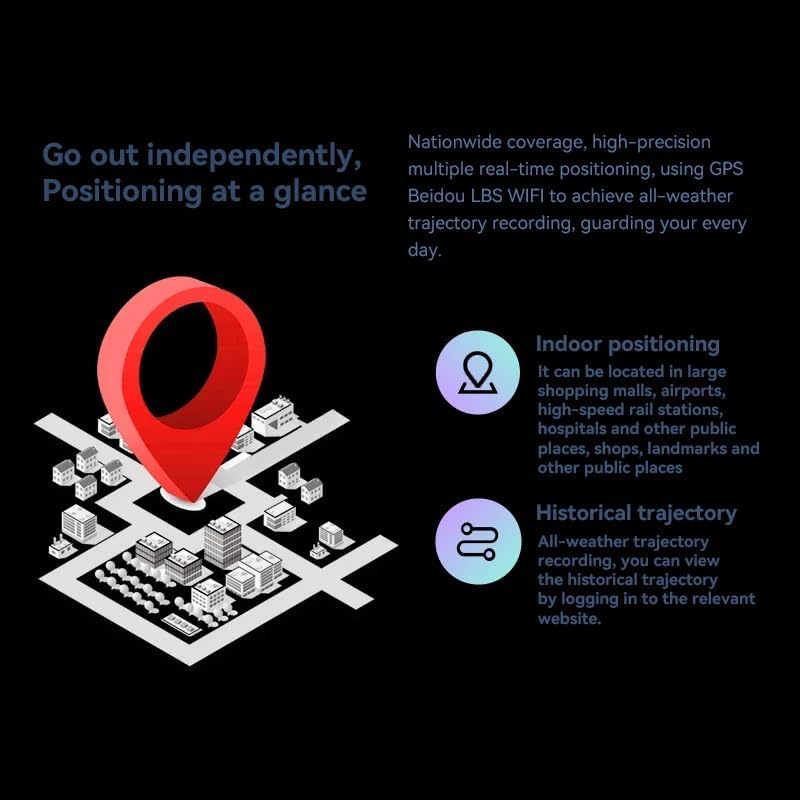
Image 4.1: Visual representation of the smartwatch's GPS and multi-location tracking features, including indoor and historical trajectory capabilities.
4.5 Application Usage
Running on Android 8.1 with 2GB RAM and 16GB internal storage, the smartwatch allows you to download and use various applications from its integrated app store. Popular apps like WeChat, TikTok, YouTube, and games are supported.

Image 4.2: The smartwatch interface showcasing a selection of popular applications available for download and use.
4.6 የሙዚቃ ቁጥጥር
Control music playback on your connected smartphone or directly from the smartwatch if music files are stored on its internal memory. Access the music player app to play, pause, skip tracks, and adjust volume.
5. ጥገና
- ማጽዳት፡ Wipe the watch screen and body with a soft, dry, lint-free cloth. Avoid using harsh chemicals or abrasive materials.
- የውሃ መቋቋም; While the device may have some resistance, avoid submerging it in water or exposing it to high-pressure water streams.
- ማከማቻ፡ በማይጠቀሙበት ጊዜ ስማርት ሰዓቱን በቀዝቃዛና ደረቅ ቦታ ያከማቹ።
- የባትሪ እንክብካቤ To prolong battery life, avoid extreme temperatures and do not allow the battery to fully discharge for extended periods.
6. መላ መፈለግ
6.1 Watch Does Not Power On
- ሰዓቱ ሙሉ በሙሉ መሙላቱን ያረጋግጡ። ቢያንስ ለ 30 ደቂቃዎች ከኃይል መሙያው ጋር ያገናኙት.
- Try pressing and holding the power button for 10-15 seconds to force a restart.
6.2 Poor GPS Signal
- ግልጽ በሆነ ቦታ ላይ መሆንዎን ያረጋግጡ view የሰማይ።
- Avoid areas with tall buildings or dense foliage that can obstruct the signal.
6.3 መተግበሪያዎች እያወረዱ/እየሰሩ አይደሉም
- Check your Wi-Fi or cellular data connection.
- Ensure there is sufficient storage space on the device (16GB internal memory).
- ስማርት ሰዓቱን እንደገና ያስጀምሩ።
6.4 የንክኪ ማያ ገጽ ምላሽ አይሰጥም
- ማንኛውንም ቆሻሻ ወይም እርጥበት ለማስወገድ ማያ ገጹን ያጽዱ።
- መሣሪያውን እንደገና ያስጀምሩ. ችግሩ ከቀጠለ የደንበኛ ድጋፍን ያግኙ።
7. ዝርዝሮች

ምስል 7.1: ውስጣዊ view highlighting the Android 8.1 operating system and the quad-core ASR8601 processor, ensuring smooth operation.
| ባህሪ | ዝርዝር |
|---|---|
| ሞዴል | HW S11 |
| የምርት ስም | XINDADA |
| ስርዓተ ክወና | አንድሮይድ 8.1 |
| ፕሮሰሰር | Quad-core (ASR8601) |
| ራም | 2 ጊባ |
| የውስጥ ማከማቻ | 16 ጊባ |
| የማሳያ መጠን | 2.02 ኢንች |
| የማሳያ ዓይነት | LCD |
| ጥራት | 320 x 390 ፒክስል |
| የባትሪ አቅም | 700 ሚአሰ |
| ግንኙነት | Bluetooth, Wi-Fi, 4G (SIM card support) |
| ጂፒኤስ | Integrated GPS, Beidou, LBS |
| ካሜራ | 180° Swivel Telescopic Camera |
| መጠኖች | 5 x 5 x 5 ሴ.ሜ |
| ክብደት | 100 ግ |
8. ዋስትና እና ድጋፍ
ለዋስትና መረጃ እና የቴክኒክ ድጋፍ፣ እባክዎ ከግዢዎ ጋር የቀረበውን ሰነድ ይመልከቱ ወይም ቸርቻሪዎን ያነጋግሩ። ለማንኛውም የዋስትና ጥያቄዎች የግዢ ማረጋገጫዎን ያስቀምጡ።
Ask a question about this manual
Ask about setup, troubleshooting, compatibility, parts, safety, or missing instructions. Manuals+ will review the question and use this page’s manual context to help answer it.