
1. መግቢያ
Thank you for choosing the roborock Q10 S5 Robot Vacuum and Mop Cleaner. This manual provides essential information for setting up, operating, and maintaining your device to ensure optimal performance and longevity. Please read this manual thoroughly before using the product and keep it for future reference.
2. የደህንነት መረጃ
To reduce the risk of injury, electric shock, fire, or damage, please observe the following safety precautions:
- ይህንን መሳሪያ እድሜያቸው 8 እና ከዚያ በላይ ለሆኑ ህፃናት እና የአካል፣ የስሜት ህዋሳት ወይም አእምሮአዊ ችሎታዎች ወይም ልምድ እና እውቀት ማነስ ባላቸው ሰዎች መሳሪያውን በአስተማማኝ መንገድ ቁጥጥር ወይም መመሪያ ከተሰጣቸው እና የሚመለከታቸውን አደጋዎች ከተረዱ ሊጠቀሙበት ይችላሉ። .
- ልጆች ከመሳሪያው ጋር እንደማይጫወቱ ለማረጋገጥ ክትትል ሊደረግባቸው ይገባል.
- የጽዳት እና የተጠቃሚ ጥገና ያለ ቁጥጥር በልጆች መደረግ የለበትም.
- Do not use the robot in areas with open flames or fragile objects.
- የኃይል መሙያ መትከያው ከግድግዳ ጋር እኩል በሆነ ቦታ ላይ መቀመጡን ያረጋግጡ።
- ከመሳሪያው ጋር የቀረበውን የመጀመሪያውን የኃይል አስማሚ ብቻ ይጠቀሙ።
- Do not expose the robot to direct sunlight or moisture.
- ከማጽዳትዎ በፊት የኤሌክትሪክ ገመዶችን፣ ትናንሽ ነገሮችን እና በቀላሉ የሚሰበሩ እቃዎችን ከወለሉ ላይ ያስወግዱ።
3. ምርት አብቅቷልview
Familiarize yourself with the components of your roborock Q10 S5 robot vacuum.
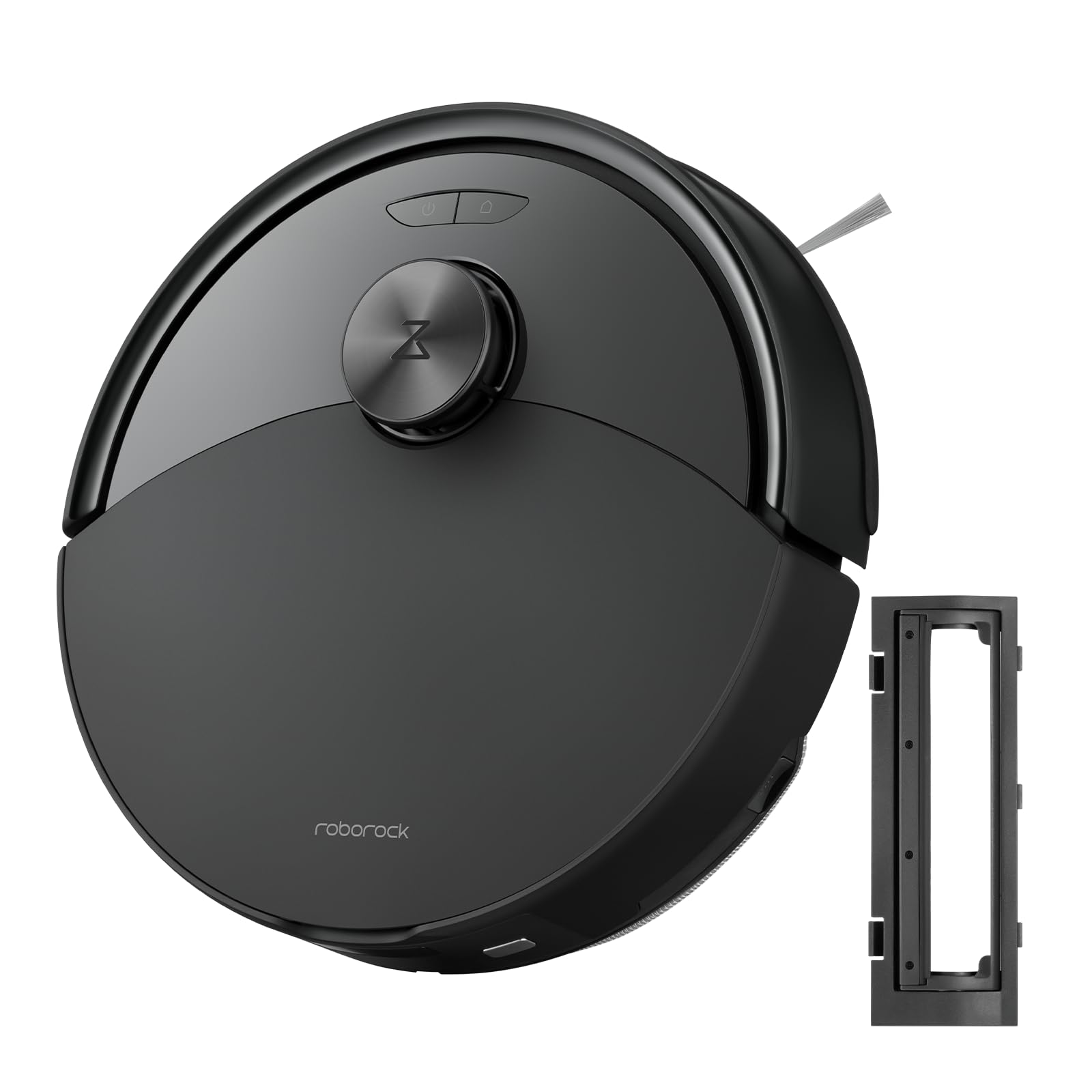
ምስል 1፡ The roborock Q10 S5 Robot Vacuum and Mop Cleaner. This image shows the top view of the robot, highlighting its sleek black design and main control buttons.
የሮቦት አካላት፡-
- ከፍተኛ ሽፋን፡ Lifts to reveal the dustbin and Wi-Fi indicator.
- የኃይል/ንፁህ አዝራር፡- Press to start/pause cleaning, hold to turn on/off.
- Dock/Spot Clean Button: Press to send the robot back to the dock, hold for spot cleaning.
- የኤልዲኤስ ዳሳሽ፡ ለአሰሳ እና ለካርታ ስራ።
- መከላከያ፡ እንቅፋቶችን ፈልጎ ያገኛል።
- የጎን ብሩሽ; ከጠርዞችና ከማዕዘኖች ላይ ያሉትን ቆሻሻዎች ያስወግዳል።
- ዋና ብሩሽ፡ Collects dirt and debris from floors. Features a floating design for better contact.
- ኦምኒዳይሬክሽን ዊል፡ For movement.
- እውቂያዎችን በመሙላት ላይ፡ ከኃይል መሙያ መትከያው ጋር ይገናኛል።
- የገደል ዳሳሾች፡ ሮቦቱ ደረጃውን እንዳይወርድ ይከላከላል።
- የውሃ ማጠራቀሚያ እና መጥረጊያ ፓድ፡ ለማጽጃ ተግባር።
የኃይል መሙያ መትከያ;
- Dock Location Beacon: Helps the robot locate the dock.
- እውቂያዎችን በመሙላት ላይ፡ Transfers power to the robot.
- Power Cable Port: የኃይል አስማሚውን ያገናኛል.
4. ማዋቀር
- ሮቦቱን ይንቀሉት፡- Carefully remove the robot and all accessories from the packaging. Remove any protective films or shipping materials.
- የጎን ብሩሽ ይጫኑ፦ Press the side brush onto its post until it clicks into place.
- የኃይል መሙያ መትከያውን ያስቀምጡ፦
- Place the charging dock on a hard, level surface against a wall.
- Ensure there is at least 0.5 meters (1.6 feet) of clear space on both sides and 1.5 meters (4.9 feet) in front of the dock.
- Connect the power cable to the charging dock and plug it into a wall outlet.
- የመጀመሪያ ክፍያ Place the robot on the charging dock. The robot will automatically turn on and begin charging. For first-time use, fully charge the robot before operation (approximately 4-6 hours). The power indicator light will breathe white during charging and turn solid white when fully charged.
- መተግበሪያውን ያውርዱ፡- ፈልግ "Roborock" in the App Store or Google Play Store, or scan the QR code on the packaging to download and install the app.
- ከWi-Fi ጋር ይገናኙ፡
- Open the Roborock app and follow the on-screen instructions to add your device.
- ስልክዎ ከ2.4GHz Wi-Fi አውታረ መረብ ጋር መገናኘቱን ያረጋግጡ።
- ተጭነው ይያዙት። መትከያ እና ኃይል buttons simultaneously for 3 seconds until you hear the "Resetting Wi-Fi" voice alert.
- ግንኙነቱን ለማጠናቀቅ የመተግበሪያውን መመሪያዎች ይከተሉ።
5. የአሠራር መመሪያዎች
የጽዳት ሥራ መጀመር፦
- ከሮቦት፡- የሚለውን ይጫኑ ኃይል button once. The robot will start cleaning.
- ከመተግበሪያ፡ Open the Roborock app and tap the "Clean" button.
Pausing/Resuming/Stopping:
- ለአፍታ አቁም፡ በሮቦቱ ላይ ማንኛውንም ቁልፍ ይጫኑ ወይም በመተግበሪያው ውስጥ "ለአፍታ አቁም" የሚለውን ይጫኑ።
- ከቆመበት ቀጥል፡ የሚለውን ይጫኑ ኃይል button or tap "Resume" in the app.
- ተወ: To stop a cleaning cycle, press the መትከያ button to send the robot back to the charging dock, or tap "Stop" in the app.
የማጥራት ተግባር
- የውሃ ማጠራቀሚያ መሙላት; Open the water tank cover, fill with clean water, and close securely.
- የሞፕ ፓድን ያያይዙ፦ Wet the mop pad and wring it out. Slide it into the mop pad slot until it is securely attached.
- Start Mopping: The robot will automatically detect the mop module and switch to mopping mode. You can adjust water flow levels in the app.
የመተግበሪያ ባህሪዎች
- የካርታ አስተዳደር፡ Create and save maps, set no-go zones, virtual walls, and invisible barriers.
- የተመረጠ የክፍል ጽዳት፡ Choose specific rooms to clean.
- የታቀደ ጽዳት; Set cleaning schedules for different times and days.
- Custom Cleaning Modes: የመምጠጥ ኃይልን እና የውሃ ፍሰት መጠንን ያስተካክሉ።
- የርቀት መቆጣጠሪያ፡- የሮቦቱን እንቅስቃሴ በእጅ ይቆጣጠሩ።
6. ጥገና
Regular maintenance ensures your roborock Q10 S5 operates efficiently. Always turn off the robot and unplug the charging dock before performing any maintenance.
Dustbin and Filter (Weekly):
- Lift the top cover of the robot.
- ቆሻሻ መጣያውን ያስወግዱ.
- የቆሻሻ መጣያ ሽፋኑን ይክፈቱ እና ይዘቱን ወደ ቆሻሻ መጣያ ውስጥ ያስወግዱት።
- Remove the filter. Tap it gently to remove dust. The filter can be rinsed with water; ensure it is completely dry before reinstallation (allow 24 hours).
- Rinse the dustbin with water if necessary and allow it to dry completely.
- Reinstall the dry filter and dustbin.
Main Brush (Weekly):
- ሮቦቱን አዙረው።
- Press the tabs to remove the main brush cover.
- ዋናውን ብሩሽ አንሳ።
- Use the cleaning tool (if provided) or scissors to cut and remove any hair or debris tangled around the brush.
- Reinstall the main brush and cover, ensuring it clicks into place.
Side Brush (Monthly):
- Unscrew the side brush.
- ማንኛውንም ፀጉር ወይም ቆሻሻ ያስወግዱ.
- Reattach and tighten the screw.
Sensors and Charging Contacts (Monthly):
- Wipe all sensors (cliff sensors, wall sensor, LDS sensor window) and the charging contacts on both the robot and the dock with a soft, dry cloth.
Mop Pad (After Each Use):
- ከውኃ ማጠራቀሚያው የማቅለጫውን ንጣፍ ያስወግዱ።
- Rinse thoroughly with water and allow it to air dry completely before next use.
7. መላ መፈለግ
If you encounter issues with your robot, please refer to the following table before contacting support.
| ችግር | ሊሆን የሚችል ምክንያት | መፍትሄ |
|---|---|---|
| ሮቦት አይበራም። | ዝቅተኛ ባትሪ ወይም አልተሞላም። | ሮቦቱን በቻርጅ መሙያ መትከያው ላይ ያስቀምጡት እና እየሞላ መሆኑን ያረጋግጡ። |
| ሮቦት ከWi-Fi ጋር መገናኘት አይችልም። | Incorrect Wi-Fi password, 5GHz network, or poor signal. | Ensure correct 2.4GHz Wi-Fi, reset Wi-Fi on robot, move closer to router. |
| ሮቦት በተደጋጋሚ ይጣበቃል. | እንቅፋቶች፣ የተጠላለፉ ኬብሎች ወይም የቆሸሹ ዳሳሾች። | Clear floor, clean sensors, use no-go zones in app. |
| ደካማ የጽዳት አፈፃፀም. | Full dustbin, dirty filter, tangled brushes. | Empty dustbin, clean/replace filter, clean main/side brushes. |
| ሮቦት ያልተለመደ ድምጽ ያሰማል. | Debris in main brush, side brush, or wheels. | Inspect and clean all brushes and wheels for obstructions. |
If the problem persists, please refer to the Roborock app for more detailed error messages or contact customer support.
8. ዝርዝሮች
| ባህሪ | ዝርዝር |
|---|---|
| ሞዴል | Q10 S5 |
| መጠኖች | በግምት 353 x 350 x 96.5 ሚሜ (13.9 x 13.8 x 3.8 ኢንች) |
| ክብደት | በግምት. 3.7 ኪግ (8.16 ፓውንድ) |
| ባትሪ | Lithium-Ion (Capacity not specified, typical for robot vacuums) |
| ደረጃ የተሰጠው ኃይል | Approx. 60W (Typical for robot vacuums) |
| Dustbin አቅም | Approx. 470 ml (Typical for robot vacuums) |
| የውሃ ማጠራቀሚያ አቅም | Approx. 300 ml (Typical for robot vacuums) |
| የመሳብ ኃይል | Up to 10,000 Pa (HyperForce Suction Power from feature bullets) |
| የ Wi-Fi ግንኙነት | 2.4 ጊኸ |
ማስታወሻ-ዝርዝር መግለጫዎች ያለ ማስታወቂያ ሊለወጡ ይችላሉ ፡፡
9. ዋስትና እና ድጋፍ
roborock products are manufactured to the highest quality standards. For detailed warranty information, please refer to the warranty card included in your product packaging or visit the official roborock website. For technical support, troubleshooting assistance, or to purchase replacement parts, please contact roborock customer service through the app or their official webጣቢያ.
ኦፊሴላዊ Webጣቢያ፡ www.roborock.com


