
Phanteks G400A
Phanteks Eclipse G400A ATX መካከለኛ ታወር የኮምፒውተር መያዣ ተጠቃሚ መመሪያ
Model: G400A | Brand: Phanteks
መግቢያ
The Phanteks Eclipse G400A is a high-performance ATX Mid-Tower computer case designed for optimal airflow and component compatibility. Featuring a tempered glass side panel and pre-installed D-RGB fans, it offers both aesthetic appeal and efficient cooling. This manual provides detailed instructions for setting up, operating, maintaining, and troubleshooting your Eclipse G400A case.

Figure 1: Phanteks Eclipse G400A ATX Mid-Tower Computer Case (White)
የማዋቀር መመሪያ
1. ማሸግ እና መፈተሽ
Carefully remove the computer case from its packaging. Inspect the case for any signs of damage during transit. Ensure all accessories, including screws, cable ties, and the user manual, are present.
2. አካል መጫን
The Eclipse G400A is designed for easy installation of your PC components. Follow these general steps:
- Motherboard መጫን; Install your ATX motherboard onto the pre-installed standoffs. Ensure proper alignment and secure it with screws. The case supports rear-side connector mainboards for a cleaner build.
- የኃይል አቅርቦት ክፍል (PSU) ጭነት፡- Install your PSU into the dedicated compartment at the bottom rear of the case. The case supports PSUs up to 270mm in length.
- የማጠራቀሚያ ድራይቭ ጭነት; The case supports 2x 2.5" SSDs and 2x 3.5" HDDs. Utilize the dedicated storage brackets and cable management tray for a clean setup.

Figure 2: Internal layout with highlighted storage and cable management areas
- ግራፊክስ ካርድ (ጂፒዩ) መጫን፡ Install your graphics card into the appropriate PCIe slot. The case supports large GPU cards and includes triple mid-plate 120mm fan locations for direct GPU cooling.
- የራዲያተር እና የደጋፊ ጭነት; The case comes with 4x M25-140 Gen2 D-RGB fans pre-installed. It offers dedicated 360mm radiator support in the top without restrictions.
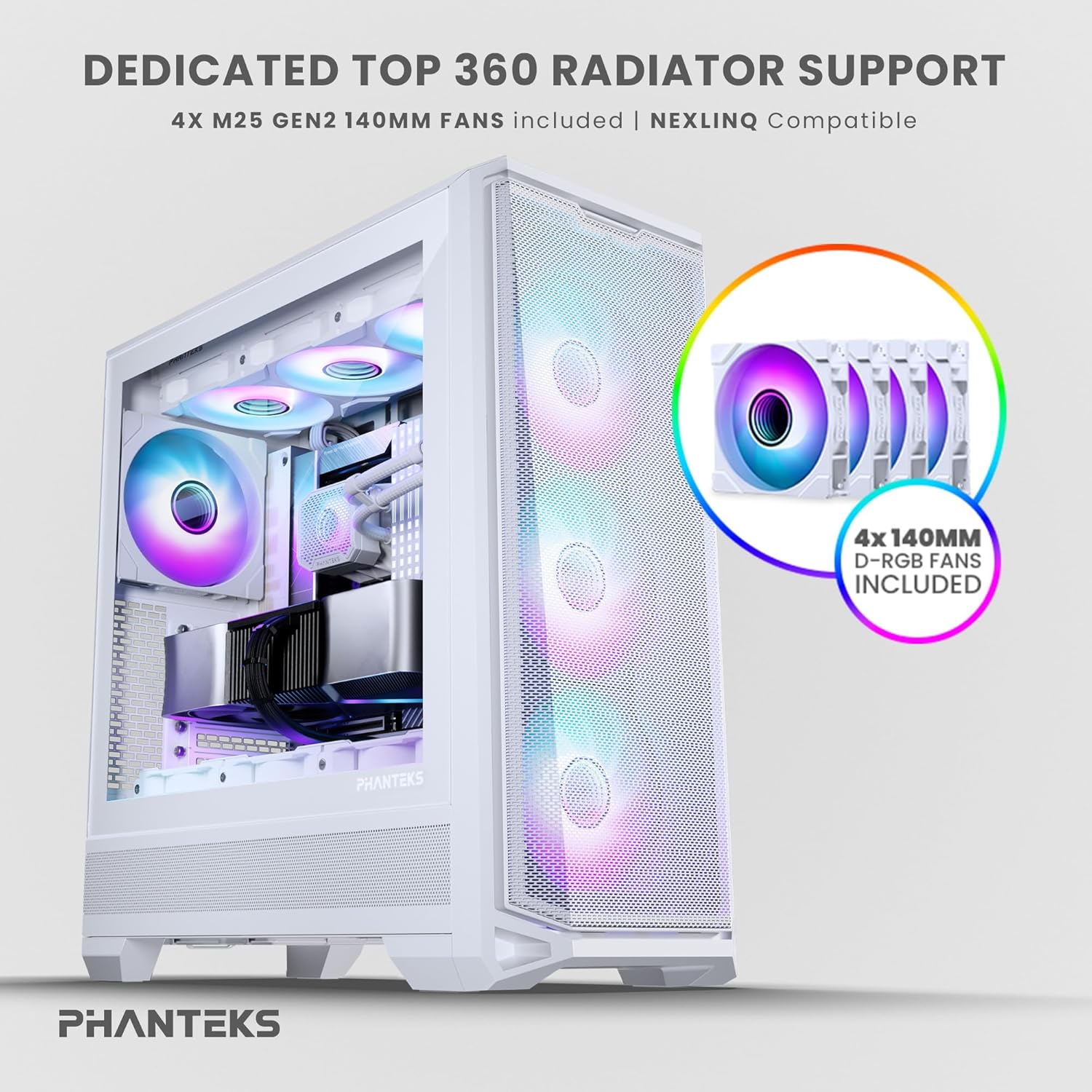
Figure 3: Top radiator support and pre-installed 140mm D-RGB fans

Figure 4: Dedicated 120mm fan positions for direct GPU cooling
3. የኬብል አስተዳደር
Utilize the dedicated cable management tool and Velcro ties provided to route and secure cables behind the motherboard tray. This ensures optimal airflow and a clean interior.
የአሠራር መመሪያዎች
1. ማብራት
After connecting all internal components and external peripherals, connect the power cable to your PSU and a wall outlet. Press the power button located on the top I/O panel of the case to power on your system.

Figure 5: Front I/O Panel Layout
2. የRGB መብራት መቆጣጠሪያ
The pre-installed M25-140 Gen2 D-RGB fans feature addressable RGB lighting. Control the lighting effects through your motherboard's RGB software (if compatible with D-RGB/ARGB) or a dedicated Phanteks RGB controller (sold separately).
ጥገና
1. ማጽዳት
አዘውትሮ ማጽዳት ጥሩ አፈፃፀምን ለመጠበቅ እና የአካል ክፍሎችዎን ዕድሜ ለማራዘም ይረዳል።
- የአቧራ ማጣሪያዎች; The Eclipse G400A features ultra-fine performance mesh panels on the top, left, and right sides, acting as dust filters. Regularly remove and clean these filters using compressed air or a soft brush to prevent dust buildup.
- ውጫዊ፡ ውጫዊ ገጽታዎችን ለስላሳ, መamp ጨርቅ. ገላጭ ማጽጃዎችን ወይም ፈሳሾችን ያስወግዱ።

Figure 6: Removable front mesh panel and dust filter for easy cleaning
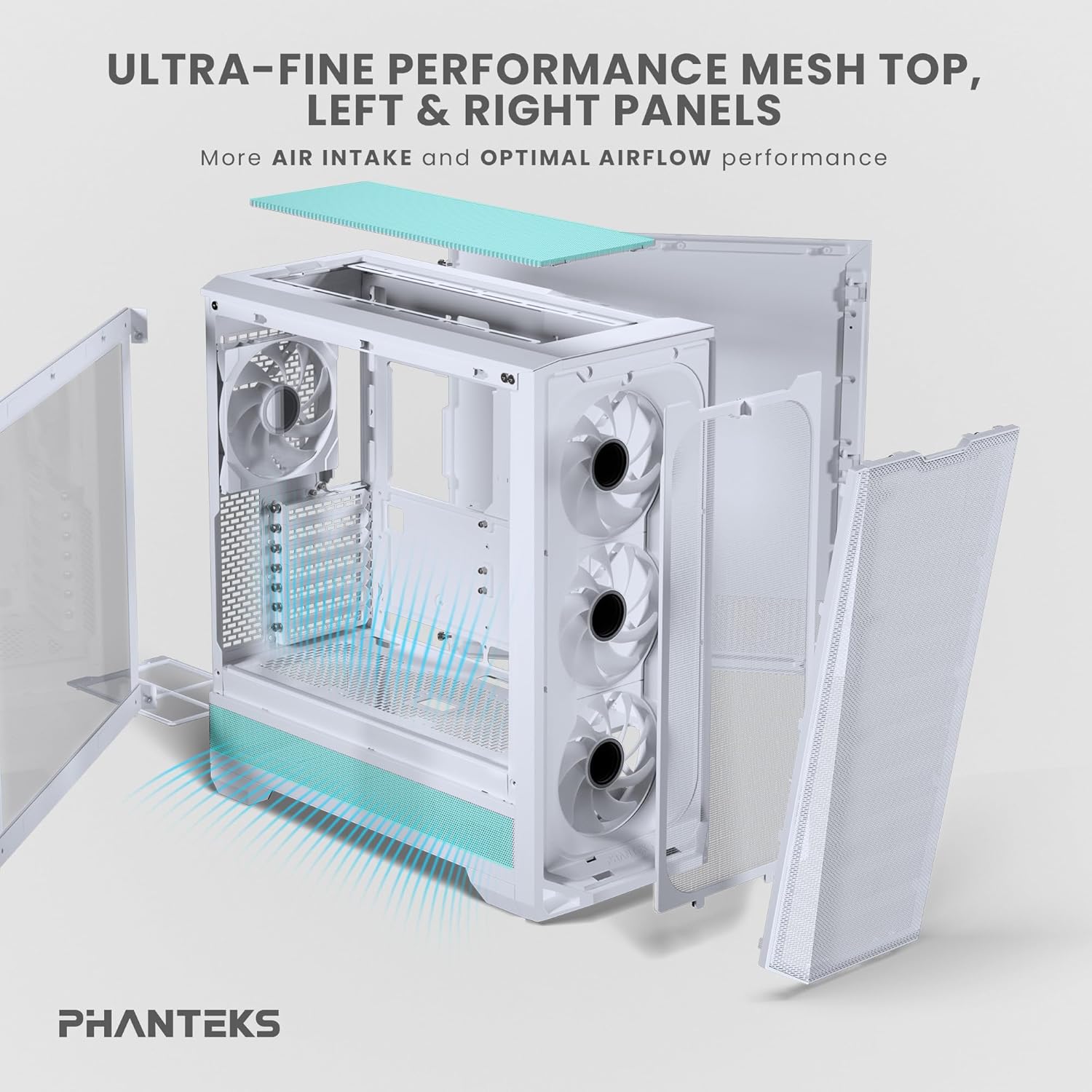
Figure 7: Disassembled panels demonstrating airflow and access for cleaning
2. የአየር ፍሰት ማመቻቸት
Ensure cables are neatly managed to avoid obstructing airflow. Periodically check fan operation to ensure they are spinning freely and quietly.
መላ መፈለግ
- ስርዓቱ አይበራም;
- Check all power connections, including the PSU to wall outlet, PSU to motherboard (24-pin and CPU 8-pin), and front panel power switch header.
- የ PSU ማብሪያ / ማጥፊያው በ 'በርቷል' ቦታ ላይ መሆኑን ያረጋግጡ።
- አድናቂዎች አይሽከረከሩም / RGB አያበሩም:
- Verify fan and RGB cables are correctly connected to the motherboard headers or a dedicated RGB controller.
- Check motherboard BIOS/UEFI settings for fan control and RGB settings.
- ደካማ የአየር ፍሰት / ከፍተኛ ሙቀት;
- Clean all dust filters and fans.
- Ensure proper cable management to avoid airflow obstruction.
- Verify fan orientation (intake/exhaust) for optimal airflow path.
ቴክኒካዊ ዝርዝሮች
| ባህሪ | ዝርዝር መግለጫ |
|---|---|
| የምርት ስም | ፋንቴክስ |
| የሞዴል ስም | Eclipse G400A |
| የጉዳይ ዓይነት | ማዕከላዊ ማማ |
| ቀለም | ነጭ |
| ቁሳቁስ | አይዝጌ ብረት፣ ሙቀት ያለው ብርጭቆ |
| ልኬቶች (LxWxH) | 19.48" ዲ x 9.05" ዋ x 20.55" ሸ (49.48 x 22.99 x 52.20 ሴሜ) |
| የእቃው ክብደት | 19 ፓውንድ (8.62 ኪ.ግ) |
| ቀድሞ የተጫኑ አድናቂዎች | 4x M25-140 Gen2 D-RGB 140mm Fans |
| የራዲያተር ድጋፍ | እስከ 360 ሚሜ (አናት) |
| የማከማቻ ድጋፍ | 2x 2.5" ኤስኤስዲ፣ 2x 3.5" ኤችዲዲ |
| የፊት I/O | USB-C 3.2 Gen 2, 2x USB 3.0, Audio/Microphone, Power Button, Reset Button |
ዋስትና እና ድጋፍ
Phanteks products are manufactured to the highest quality standards. For warranty information and technical support, please refer to the official Phanteks webጣቢያ ወይም በቀጥታ የደንበኛ አገልግሎታቸውን ያግኙ። ለዋስትና ጥያቄዎች የግዢ ማረጋገጫዎን ያስቀምጡ።
ለበለጠ እርዳታ፣ ይፋዊውን የ Phanteks ድጋፍ ገጽ ይጎብኙ፡- www.phanteks.com/support.html
Ask a question about this manual
Ask about setup, troubleshooting, compatibility, parts, safety, or missing instructions. Manuals+ will review the question and use this page’s manual context to help answer it.