
1. መግቢያ
This user manual provides detailed instructions for the T&G Portable Bluetooth Speaker, model TG116C. Designed for exceptional audio performance, this compact speaker delivers crystal-clear sound and powerful bass, making it ideal for various indoor and outdoor environments. Please read this manual thoroughly before using the product to ensure proper operation and longevity.
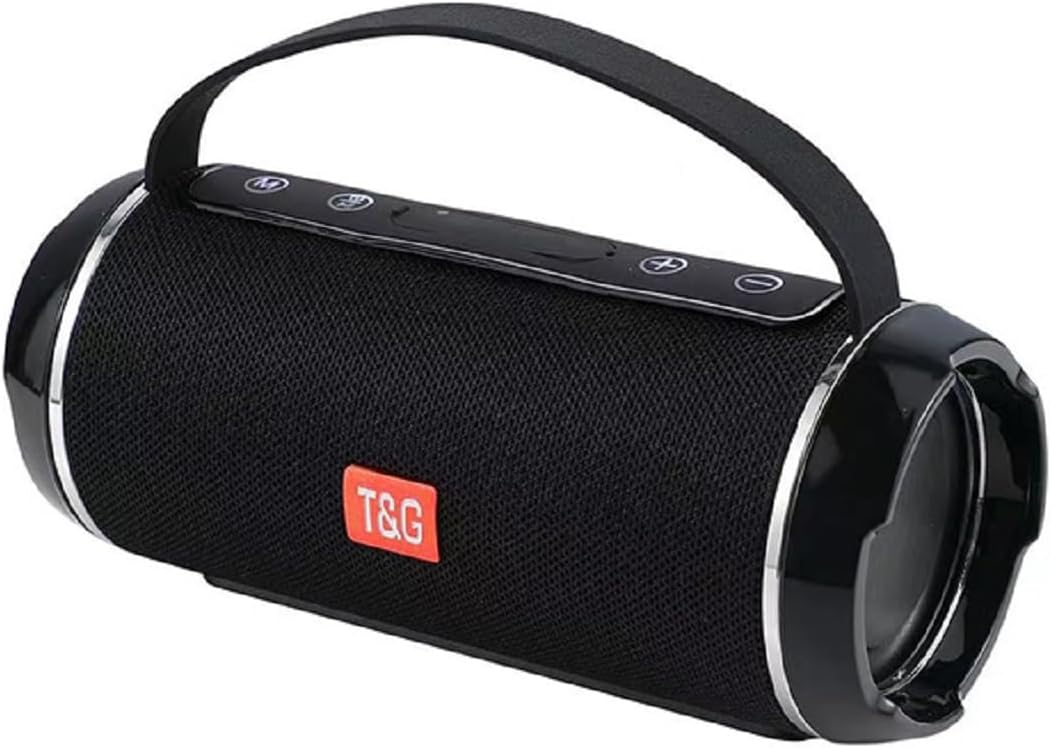
Figure 1: T&G Portable Bluetooth Speaker TG116C
2. ቁልፍ ባህሪያት
- Immersive HD Sound with Deep Bass: Experience crystal-clear audio and powerful, distortion-free bass from this compact Bluetooth speaker. Advanced dual-driver technology and passive radiators deliver rich, balanced sound across all frequencies.
- 360° የዙሪያ ድምጽ፦ Designed to fill any room with sound, providing an immersive listening experience.
- ተንቀሳቃሽ እና የታመቀ ንድፍ; Measuring just 3.2" tall and 7.08" wide, this lightweight speaker fits easily in bags or backpacks. Features a convenient carry lanyard for on-the-go convenience.
- ለረጅም ጊዜ የሚቆይ የባትሪ ህይወት; Enjoy up to 50 hours of nonstop music with a high-capacity lithium battery. Smart power-saving technology auto-adjusts consumption and enables deep sleep when idle.
- ፈጣን ኃይል መሙላት; USB-C fast charging delivers 5 hours of playtime in just 10 minutes.
- የውሃ መከላከያ ደረጃ IPX4: This speaker is splash-proof, making it suitable for outdoor adventures, beach trips, and poolside use. Note: IPX4 protects against splashes from any direction; it is not designed for full immersion.
- ሁለገብ ግንኙነት; Supports Bluetooth for wireless freedom, as well as AUX input, USB, and MicroSD card playback.
- እውነተኛ ሽቦ አልባ ስቴሪዮ (TWS) ማጣመር፡- Connect two TG116C speakers wirelessly for an enhanced stereo sound experience.

Figure 2: IPX4 Waterproof Grade - Splash Resistant

Figure 3: Compact Product Dimensions (7.08" x 3.14" x 3.14")
3. የጥቅል ይዘቶች
እባክዎን ጥቅሉን ለሚከተሉት ነገሮች ያረጋግጡ፡
- T&G Portable Bluetooth Speaker (TG116C)
- የዩኤስቢ-ሲ ኃይል መሙያ ገመድ
- 3.5ሚሜ የድምጽ ገመድ (AUX)
- የተጠቃሚ መመሪያ
4. መቆጣጠሪያዎች እና ወደቦች
ከተናጋሪው መቆጣጠሪያዎች እና ወደቦች ጋር እራስዎን ይወቁ፡
- ማብሪያ ማጥፊያ (⑂): ለማብራት/ለማጥፋት በረጅሙ ይጫኑ። ለማጫወት/ለማቆም አጭር ይጫኑ።
- ሁነታ አዝራር (ኤም)፦ Short press to switch between Bluetooth, AUX, USB, and MicroSD modes.
- ድምጽ ቀንስ / ቀዳሚ ትራክ (-): የድምጽ ቅነሳን ለማግኘት አጭር ይጫኑ። ለቀዳሚው ትራክ ረጅም ይጫኑ።
- የድምጽ መጨመር / ቀጣይ ትራክ (+): ድምጽ ለመጨመር አጭር ይጫኑ። ለቀጣዩ ትራክ ረጅም ይጫኑ።
- የዩኤስቢ-ሲ ኃይል መሙያ ወደብ፡- ድምጽ ማጉያውን ለመሙላት.
- ዩኤስቢ-ኤ ወደብ፡ ለዩኤስቢ አንጻፊ መልሶ ማጫወት።
- የማይክሮ ኤስዲ ካርድ ማስገቢያ; ለማይክሮ ኤስዲ ካርድ መልሶ ማጫወት።
- AUX ግቤት (3.5ሚሜ): ባለገመድ የድምጽ ግንኙነት.
ምስል 4 - ተጠናቀቀview of Speaker Controls and Ports (refer to product for exact layout)
5. ማዋቀር
5.1 ድምጽ ማጉያውን መሙላት
- የቀረበውን የዩኤስቢ-ሲ የኃይል መሙያ ገመድ ከድምጽ ማጉያው የዩኤስቢ-ሲ ወደብ ጋር ያገናኙ።
- የኬብሉን ሌላኛውን ጫፍ ከዩኤስቢ ኃይል አስማሚ (ያልተካተተ) ወይም ከኮምፒዩተር ዩኤስቢ ወደብ ጋር ያገናኙ።
- The charging indicator light will illuminate. Once fully charged, the light will change or turn off (refer to specific product behavior).
- A full charge provides up to 50 hours of playtime. For quick power, 10 minutes of charging can provide 5 hours of playtime.
5.2 ማብራት / ማጥፋት
- ለማብራት፡- የኃይል አዝራሩን ለረጅም ጊዜ ይጫኑ (⑂) until you hear a power-on prompt or see the indicator lights illuminate.
- ለማጥፋት፡- የኃይል አዝራሩን ለረጅም ጊዜ ይጫኑ (⑂) again until you hear a power-off prompt or the indicator lights turn off.
5.3 የብሉቱዝ ማጣመር
- Ensure the speaker is powered on and in Bluetooth mode (indicated by a flashing blue light or voice prompt "Bluetooth Mode"). If not, short press the Mode (M) button to switch.
- በተንቀሳቃሽ መሣሪያዎ (ስማርትፎን፣ ታብሌት፣ ኮምፒውተር) ላይ ብሉቱዝን አንቃ።
- ፈልግ available Bluetooth devices. The speaker will appear as "TG116C" or similar.
- Select "TG116C" to connect. Once paired, you will hear a confirmation sound or voice prompt, and the Bluetooth indicator light will become solid.
- ድምጽ ማጉያው ሲበራ ከመጨረሻው የተጣመረ መሣሪያ ጋር በራስ-ሰር ለመገናኘት ይሞክራል።
5.4 እውነተኛ ገመድ አልባ ስቴሪዮ (TWS) ማጣመር
To achieve a true stereo sound experience, you can pair two TG116C speakers together:
- Ensure both TG116C speakers are powered on and in Bluetooth mode, but not connected to any device.
- On one of the speakers (this will be your primary speaker), long press the Mode (M) button until you hear a pairing sound, indicating TWS pairing mode.
- ሁለቱ ድምጽ ማጉያዎች በራስ-ሰር ይፈልጉ እና እርስ በርስ ይገናኛሉ. አንዴ ከተገናኙ በኋላ የማረጋገጫ ድምጽ ይሰማሉ።
- አሁን፣ በክፍል 5.3 እንደተገለጸው ተንቀሳቃሽ መሣሪያዎን ከዋናው ድምጽ ማጉያ ጋር በብሉቱዝ ያገናኙ። ሁለቱም ድምጽ ማጉያዎች ድምጽን በስቲሪዮ ያጫውታሉ።

Figure 5: TWS Pairing for 3D Stereo Sound

Figure 6: TWS Pairing for Enhanced Bass
6. የአሠራር መመሪያዎች
6.1 ሙዚቃን መጫወት
- የብሉቱዝ ሁኔታ After successful pairing, open your music app and start playback. Use the speaker's Power button for play/pause.
- የ ‹XX› ሁነታ Connect one end of the 3.5mm audio cable to the speaker's AUX input and the other end to your audio device's headphone jack. Short press the Mode (M) button to switch to AUX mode.
- የዩኤስቢ/ማይክሮ ኤስዲ ሁነታ፡ Insert a USB drive into the USB-A port or a MicroSD card into its slot. The speaker will automatically switch to the respective mode and begin playing supported audio files. If not, short press the Mode (M) button.
6.2 Volume Control and Track Navigation
- ድምጽ ጨምር የ'+' አዝራሩን በአጭሩ ይጫኑ።
- ጥራዝ ታች የ'-' አዝራሩን በአጭሩ ይጫኑ።
- ቀጣይ ትራክ፡ የ'+' አዝራሩን ለረጅም ጊዜ ይጫኑ።
- ቀዳሚ ትራክ የ'-' አዝራሩን ለረጅም ጊዜ ይጫኑ።
6.3 Call Functionality (Bluetooth Mode)
- ጥሪ መልስ፡- የኃይል ቁልፉን በአጭሩ ተጫን (⑂) አንድ ገቢ ጥሪ ሲደውል።
- ጥሪን ጨርስ፡ የኃይል ቁልፉን በአጭሩ ተጫን (⑂) በጥሪ ወቅት።
- ጥሪን ውድቅ አድርግ፡ የኃይል አዝራሩን ለረጅም ጊዜ ይጫኑ (⑂) አንድ ገቢ ጥሪ ሲደውል።
7. ጥገና እና እንክብካቤ
- ማጽዳት፡ Use a soft, dry cloth to clean the speaker. Do not use abrasive cleaners, alcohol, or chemical solvents.
- የውሃ መቋቋም; The speaker is IPX4 rated, meaning it is protected against splashing water from any direction. Do not submerge the speaker in water or expose it to strong jets of water. Ensure the port cover is securely closed before exposing to water.
- ማከማቻ፡ Store the speaker in a cool, dry place away from direct sunlight and extreme temperatures. If storing for a long period, charge the battery periodically to maintain its lifespan.
- ተጽዕኖዎችን ያስወግዱ፡ Do not drop the speaker or subject it to strong impacts, as this may damage internal components.
8. መላ መፈለግ
| ችግር | ሊሆን የሚችል ምክንያት | መፍትሄ |
|---|---|---|
| ተናጋሪው አይበራም። | ዝቅተኛ ባትሪ; የኃይል ቁልፉ በቂ ጊዜ አልተጫነም። | Charge the speaker for at least 30 minutes. Long press the Power button for 3-5 seconds. |
| ከብሉቱዝ መሳሪያ ጋር ማጣመር አይቻልም። | Speaker not in pairing mode; Device Bluetooth off; Too far from speaker; Already connected to another device. | Ensure speaker is in Bluetooth mode (flashing light). Turn device Bluetooth off/on. Move device closer (within 10m). Disconnect from other devices. |
| ምንም ድምጽ ወይም ዝቅተኛ ድምጽ የለም. | Volume too low on speaker/device; Incorrect mode selected; Cable not fully inserted (AUX). | Increase volume on both speaker and device. Press Mode (M) button to select correct input. Ensure AUX cable is fully inserted. |
| የድምፅ ማዛባት. | ድምጽ በጣም ከፍተኛ፤ መሳሪያው ከድምጽ ማጉያው በጣም የራቀ፤ ጣልቃ ገብነት። | ድምጽ ይቀንሱ። መሳሪያውን ወደ ቅርብ ያንቀሳቅሱት። ከሌሎች የኤሌክትሮኒክስ መሳሪያዎች ያርቁ። |
| TWS ማጣመር አልተሳካም። | Speakers already paired to a device; Not in TWS pairing mode. | Ensure both speakers are disconnected from any Bluetooth devices. Long press the Mode (M) button on one speaker to initiate TWS pairing. |
9. ዝርዝሮች
| ባህሪ | ዝርዝር |
|---|---|
| የምርት ስም | ቲ&ጂ |
| የሞዴል ስም | TG116C |
| የግንኙነት ቴክኖሎጂ | ገመድ አልባ (ብሉቱዝ) |
| ገመድ አልባ የመገናኛ ቴክኖሎጂ | ብሉቱዝ |
| የድምጽ ማጉያ አይነት | ከቤት ውጭ |
| ልዩ ባህሪ | Bass Boost, Hi Res Audio, Waterproof, auto speaker setup, dolby trueHD |
| ለምርት የሚመከር አጠቃቀሞች | የቤት ውስጥ / ከቤት ውጭ |
| የኃይል ምንጭ | በባትሪ የተጎላበተ |
| የምርት ልኬቶች | 7.09" ዲ x 3.15" ዋ x 3.15" ኤች |
| የእቃው ክብደት | 1.22 ፓውንድ |
| ቀለም | ጥቁር |
| የክፍል ብዛት | 1.0 ቆጠራ |
| አምራች | ቲ&ጂ |
10. ዋስትና እና ድጋፍ
The T&G Portable Bluetooth Speaker TG116C comes with a standard manufacturer's warranty. Please refer to the product packaging or the official T&G webጣቢያ ለተወሰኑ የዋስትና ውሎች እና ሁኔታዎች።
For technical support, troubleshooting assistance, or warranty claims, please contact T&G customer service through their official channels. Contact information can typically be found on the product packaging or the brand's official webጣቢያ.
ማሳሰቢያ፡ የግዢ ደረሰኝዎን ለዋስትና ዓላማዎች የግዢ ማረጋገጫ አድርገው ያስቀምጡ።