
1. መግቢያ
Thank you for choosing the EWEADN V80 Wired TKL RGB Gaming Keyboard. This manual provides essential information for setting up, operating, maintaining, and troubleshooting your new keyboard. The V80 keyboard features an 80% Tenkeyless (TKL) layout, PBT keycaps, quiet membrane switches, 26-key anti-ghosting, and dynamic RGB backlighting, designed for an ergonomic and efficient user experience.
2. የጥቅል ይዘቶች
- EWEADN V80 ቁልፍ ሰሌዳ
- የዩኤስቢ ገመድ
- የተጠቃሚ መመሪያ
- 2 Year Manufacturer Warranty Information
3. የማዋቀር መመሪያዎች
The EWEADN V80 keyboard is designed for plug-and-play convenience, requiring no driver installation for basic functionality.
- የዩኤስቢ ገመዱን ያገናኙ; Locate the USB-C port on the keyboard (typically on the top edge). Connect one end of the provided USB cable to this port.
- ከመሣሪያዎ ጋር ይገናኙ፡ Plug the other end of the USB cable into an available USB-A port on your computer (Laptop, PC, etc.).
- የስርዓት እውቅና Your operating system (Windows, macOS) should automatically detect and configure the keyboard. A setup assistant may appear on macOS to identify the keyboard type; follow the on-screen prompts.
- የቁልፍ ሰሌዳ እግሮችን ማስተካከል፦ For optimal typing comfort, extend the two-stage adjustable kickstands located on the underside of the keyboard to achieve your preferred typing angle.
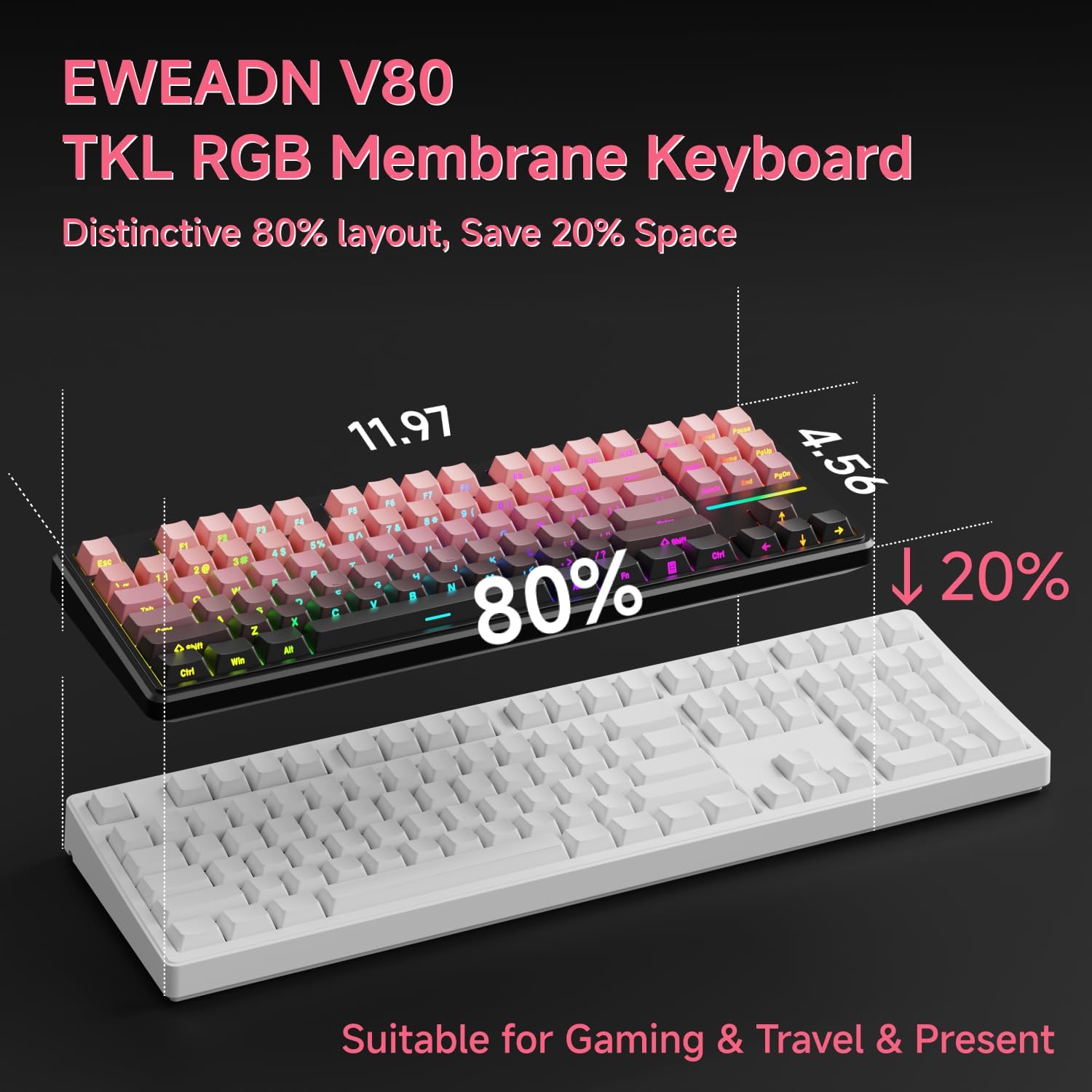
Image: Connecting the USB-C cable to the EWEADN V80 keyboard.

Image: The underside of the EWEADN V80 keyboard with its two-stage adjustable kickstands extended for ergonomic typing.
4. የአሠራር መመሪያዎች
4.1 RGB የጀርባ ብርሃን መቆጣጠሪያ
The EWEADN V80 features dynamic RGB backlighting with multiple modes and adjustable settings.
- የኋላ መብራትን ማብራት/ማጥፋትን ቀያይር፦ ተጫን Fn + የኋላ ቦታ.
- የመብራት ሁነታን ይቀይሩ፡ ተጫን Fn + አስገባ to cycle through 12 dynamic lighting effects.
- ብሩህነትን ማስተካከል; ተጫን Fn + PU (Page Up) to increase brightness, and Fn + PD (Page Down) to decrease brightness.
- Adjust Lighting Speed: ተጫን Fn + -= to decrease speed, and =+ ፍጥነት ለመጨመር.
- Light Strip Control: ተጫን Fn + P to control the side light strip.

Image: The EWEADN V80 keyboard showcasing various RGB backlight modes, including static colors, rainbow wave, and cycling ripple effects.
Video: Demonstrates the dynamic RGB lighting effects of the EWEADN V80 keyboard, cycling through different colors and patterns.
4.2 የተግባር ቁልፍ ጥምረት
The V80 keyboard utilizes the Fn key for various multimedia and system functions.
| ጥምር አዝራር | ተግባር |
|---|---|
| Fn + F1 | የማያ ብሩህነት - |
| Fn + F2 | የማያ ብሩህነት+ |
| Fn + F3 | መስኮት ቀይር |
| Fn + F4 | ማይክሮፎን |
| Fn + F5 | መልቲ-ሚዲያ |
| Fn + F6 | የቀድሞ ዘፈን |
| Fn + F7 | ቀጣይ ዘፈን |
| Fn + F8 | ድምጽ- |
| Fn + F9 | ድምጽ+ |
| Fn + F10 | ድምጸ-ከል አድርግ |
| Fn + F11 | የእኔ ኮምፒውተር |
| Fn + F12 | ካልኩሌተር |
| ጥምር አዝራር | ተግባር |
|---|---|
| Fn + F1 | የማያ ብሩህነት - |
| Fn + F2 | የማያ ብሩህነት+ |
| Fn + F3 | Multitasking Control |
| Fn + F4 | የማስጀመሪያ ሰሌዳ |
| Fn + F5 | የቀድሞ ዘፈን |
| Fn + F6 | ቀጣይ ዘፈን |
| Fn + F7 | ተጫወት/ ለአፍታ አቁም |
| Fn + F8 | ድምጽ- |
| Fn + F9 | ድምጽ+ |
| Fn + F10 | ድምጸ-ከል አድርግ |
| Fn + F11 | የእኔ ኮምፒውተር |
| Fn + F12 | ካልኩሌተር |
4.3 ፀረ-መንፈስ
The V80 keyboard features 26-key rollover anti-ghosting, ensuring that every keypress is registered accurately, even when multiple keys are pressed simultaneously during intense gaming or fast typing. This prevents missed inputs and enhances performance.

Image: The EWEADN V80 keyboard illustrating its 26-key anti-ghosting capability, showing multiple simultaneous key presses being registered.
5. ባህሪያት
- Wired Connectivity & Multi-System Support: The USB-C wired design provides a stable, interference-free connection with zero input lag. It is compatible with Windows and Mac operating systems, offering versatile integration for various devices.
- 80% TKL Layout: The Tenkeyless design saves significant desk space, promoting a cleaner and more efficient setup without sacrificing essential keys for gaming or productivity.
- Quiet Membrane Operation: Equipped with quiet membrane switches, the keyboard delivers tactile, mechanical-like feedback while minimizing noise, ideal for environments where quiet operation is preferred.
- Ergonomic ማስተካከያ; An integrated two-stage kickstand allows users to adjust the typing angle, providing optimal wrist support and reducing strain during prolonged use.
- የPBT ቁልፍ ቁልፎች፡- Durable double-shot injection-molded PBT keycaps feature subtle side-printed legends, crisp backlight transmission, and a matte texture that resists shine and improves grip for extended use.
- 26-ቁልፍ ፀረ-መናፍስት፡ Ensures accurate registration of every keypress, even during rapid and simultaneous inputs, crucial for competitive gaming.

Image: The EWEADN V80 keyboard demonstrating its plug-and-play compatibility with various operating systems including Windows, Mac, iOS, and Android.

ምስል: ዝርዝር view of the EWEADN V80's upgraded side-printed PBT keycaps, emphasizing their durability, matte texture, and aesthetic appeal.

Image: A close-up of the EWEADN V80's membrane gaming switches, illustrating their smooth, silent, and strain-free operation.
Video: A short demonstration of the EWEADN V80 Wired RGB Gaming Keyboard, highlighting its compact design and RGB lighting.
Video: Showcases the EWEADN V80 Cute Pink Silent Keyboard, emphasizing its quiet typing experience and aesthetic appeal.
6. ዝርዝሮች
| ባህሪ | ዝርዝር |
|---|---|
| የምርት ስም | EWEADN |
| የሞዴል ቁጥር | ቪ80 |
| የግንኙነት ቴክኖሎጂ | ዩኤስቢ-ሲ (ገመድ ያለው) |
| የቁልፍ ሰሌዳ መግለጫ | ሜምብራን |
| የመቀየሪያ አይነት | Mechanical-like |
| የቁልፎች ብዛት | 87 |
| የቁልፍ ሰሌዳ አቀማመጥ | QWERTY |
| የቁልፍ ሰሌዳ የኋላ መብራት | RGB (12 dynamic modes) |
| ፀረ-መናፍስት | 26-ቁልፍ ሮሎቨር |
| የቁልፍ ሰሌዳዎች | Double-shot PBT, Side-Printed Legends |
| Ergonomic ባህሪያት | ሁለት-ሴtagኢ ሊስተካከል የሚችል የኪስ ስታንድ |
| ተስማሚ መሣሪያዎች | Laptop, PC, Smartphone, Tablet (via compatible adapters) |
| የምርት ልኬቶች (L x W x H) | 14.37" x 5.47" x 1.53" |
| ቁሳቁስ | ፕላስቲክ |
| ቀለም | BlackBerry Pink |
7. ጥገና
To ensure the longevity and optimal performance of your EWEADN V80 keyboard, follow these maintenance guidelines:
- መደበኛ ጽዳት; Use a soft, lint-free cloth to wipe down the keycaps and keyboard surface. For deeper cleaning, a can of compressed air can remove dust and debris from between the keys.
- ፈሳሾችን ያስወግዱ; Do not spill liquids on the keyboard. If a spill occurs, immediately disconnect the keyboard from your device and allow it to dry completely before reconnecting.
- በጥንቃቄ ይያዙ; Avoid dropping the keyboard or subjecting it to excessive force, which can damage internal components or keycaps.
- የኬብል አስተዳደር Ensure the USB cable is not kinked or strained, as this can lead to damage over time.
8. መላ መፈለግ
If you encounter any issues with your EWEADN V80 keyboard, please refer to the following common solutions:
- የቁልፍ ሰሌዳ ምላሽ አይሰጥም፡
- የዩኤስቢ ገመድ ከኪቦርድዎ እና ከኮምፒዩተርዎ ጋር ደህንነቱ በተጠበቀ ሁኔታ መገናኘቱን ያረጋግጡ።
- የቁልፍ ሰሌዳውን በኮምፒተርዎ ላይ ወደተለየ የዩኤስቢ ወደብ ለመሰካት ይሞክሩ።
- Test the keyboard on another computer to determine if the issue is with the keyboard or your device.
- RGB Backlighting Not Working:
- የጀርባ ብርሃንን በመጠቀም መብራቱን ያረጋግጡ Fn + የኋላ ቦታ.
- የብሩህነት ደረጃዎችን በመጠቀም ያስተካክሉ Fn + PU/PD.
- Keys Not Registering Correctly (Ghosting):
- The V80 has 26-key anti-ghosting. If you experience issues, ensure your operating system and any gaming software are up to date.
- Clean the affected keys to remove any debris that might be interfering with the switch mechanism.
እነዚህ እርምጃዎች ችግርዎን ካልፈቱ፣ እባክዎ የደንበኞች ድጋፍን ያነጋግሩ።
9. ዋስትና እና ድጋፍ
The EWEADN V80 Wired TKL RGB Gaming Keyboard comes with a የ 2 ዓመት የአምራች ዋስትና. For any inquiries, technical assistance, or warranty claims, please contact our dedicated customer support team.
የኢሜል ድጋፍ eweadnkeyboard@outlook.com

Image: EWEADN's commitment to quality and customer support, featuring various products.