1. መግቢያ
The PRUNUS J168 is a versatile portable radio and Bluetooth speaker designed for excellent reception and multiple playback options. It features AM, FM, and Shortwave (SW) radio bands, Bluetooth connectivity, TF card playback, and an AUX input. This device is equipped with a digital frequency display, manual tuning, and a sleep timer function, all powered by a long-lasting rechargeable battery.
2. የጥቅል ይዘቶች
- PRUNUS J168 Portable Radio
- የዩኤስቢ-ሲ ኃይል መሙያ ገመድ
- ላንያርድ
- የባለቤት መመሪያ
3. ምርት አብቅቷልview
Familiarize yourself with the controls and features of your PRUNUS J168 radio.
ምስል 3.1: የፊት view of the PRUNUS J168 radio, showing the digital display, keypad, and control buttons for various functions.

Figure 3.2: A user's hand interacting with the PRUNUS J168 radio, demonstrating the ease of use for the keypad and the manual tuning knob located on the side.
መቆጣጠሪያዎች እና ወደቦች;
- የኃይል ቁልፍ፡- መሳሪያውን ያበራል/ያጠፋል።
- ዲጂታል ማሳያ: ድግግሞሽ፣ ሁነታ፣ የባትሪ ሁኔታ እና ሌሎች መረጃዎችን ያሳያል።
- Keypad (0-9): For direct frequency input and selecting preset stations.
- የዴል አዝራር፦ Deletes preset stations.
- FM/AM/SW Button: Cycles through radio bands.
- MODE አዝራር፡- Switches between radio, Bluetooth, TF card, and AUX modes.
- PRE Button: ቅድመ-ዝግጅት የተደረገባቸውን ጣቢያዎች ያስቀምጣል ወይም ያስታውሳል።
- የድምጽ+/- አዝራሮች፡ የድምፅ መጠንን ያስተካክላል።
- የማስተካከያ ቁልፍ፡ For manual frequency tuning.
- ቴሌስኮፒክ አንቴና፡ ለተሻሻለ የሬዲዮ አቀባበል።
- የ TF ካርድ ማስገቢያ ከማይክሮ ኤስዲ ካርድ ሙዚቃ ለማጫወት።
- AUX ግቤት፡ ውጫዊ የድምጽ መሳሪያዎችን ለማገናኘት 3.5 ሚሜ መሰኪያ.
- የጆሮ ማዳመጫ ጃክ ለግል ማዳመጥ የሚያገለግል 3.5ሚሜ ጃክ።
- ዩኤስቢ-ሲ ወደብ መሣሪያውን ለመሙላት.
- የሚታጠፍ ማቆሚያ፡ Located on the back for angled viewing
4. ማዋቀር
4.1 የመጀመሪያ ደረጃ መሙላት
Before first use, fully charge the radio. Connect the provided USB-C cable to the radio's USB-C port and the other end to a USB power adapter (not included) or a computer's USB port. The charging indicator on the display will show charging status. A full charge typically takes a few hours.

Figure 4.1: The PRUNUS J168 radio being charged via its USB-C port, highlighting its compact dimensions and the convenience of modern charging.
4.2 ማብራት / ማጥፋት
ተጭነው ይያዙት። የኃይል አዝራር ሬዲዮውን ለማብራት ወይም ለማጥፋት።
5. የአሠራር መመሪያዎች
5.1 የሬዲዮ ሁነታ (AM/FM/SW)
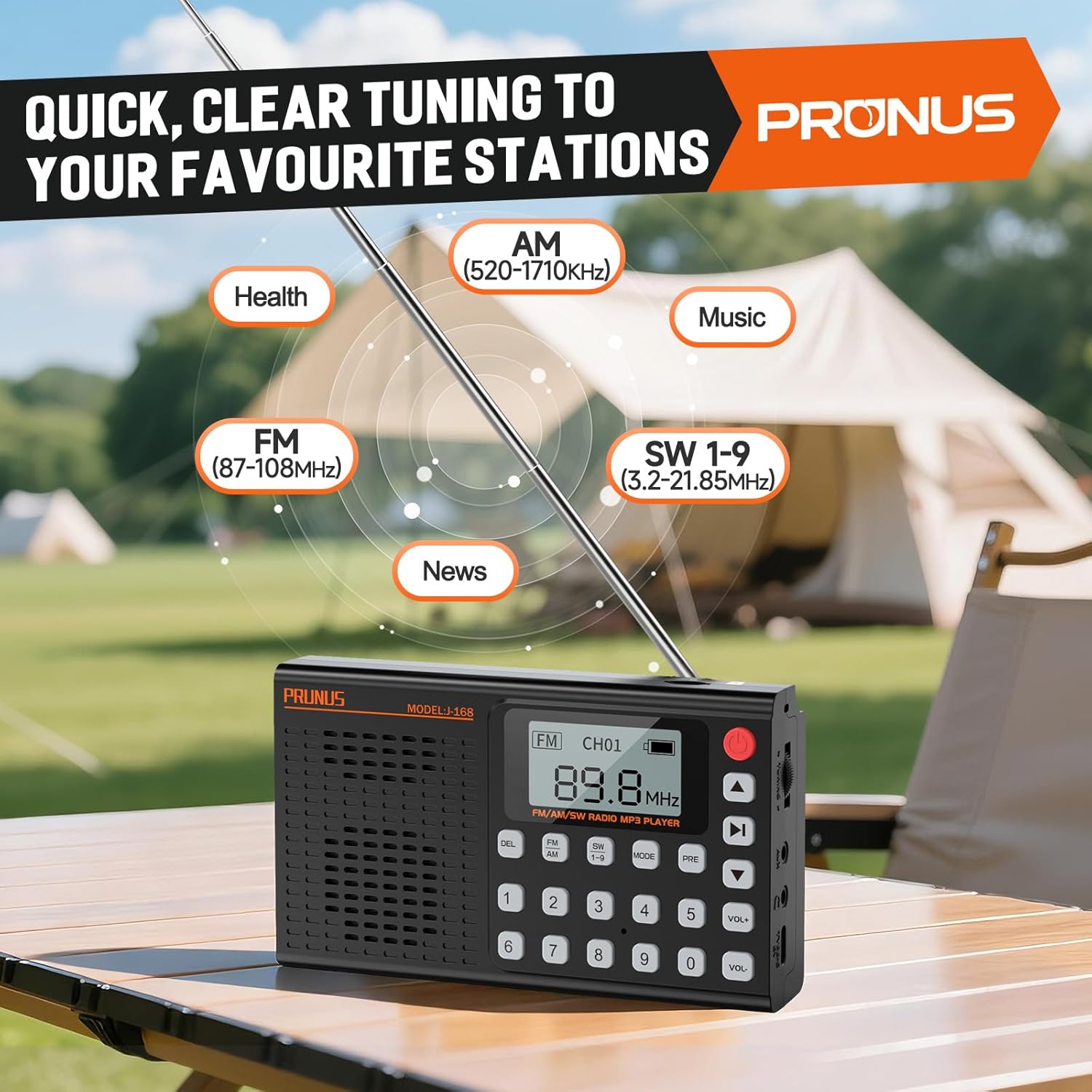
- ባንድ ይምረጡ፡ የሚለውን ይጫኑ FM/AM/SW Button repeatedly to cycle through FM (87-108 MHz), AM (520-1710 kHz), and Shortwave (SW 1-9, 3.2-21.85 MHz) bands.
- የመቃኛ ጣቢያዎች፡
- በእጅ ማስተካከል የሚለውን ተጠቀም ኖንቦን በማዞር ላይ on the side to fine-tune frequencies.
- ቀጥተኛ ድግግሞሽ ግቤት፡ Enter the desired frequency using the keypad (e.g., for 98.5 FM, type 9-8-5).
- ራስ-ሰር ቅኝት; Press and hold the Play/Pause button (often integrated with the PRE button or a dedicated scan button, refer to device markings) to automatically scan and save available stations.
- አቀባበል፡ ለተመቻቸ የኤፍኤም እና የኤስደብሊው ደብሊው አቀባበል ቴሌስኮፒክ አንቴናውን ያራዝሙ። ለኤኤም፣ ለተሻለ ምልክት ሬዲዮውን ያሽከርክሩት።
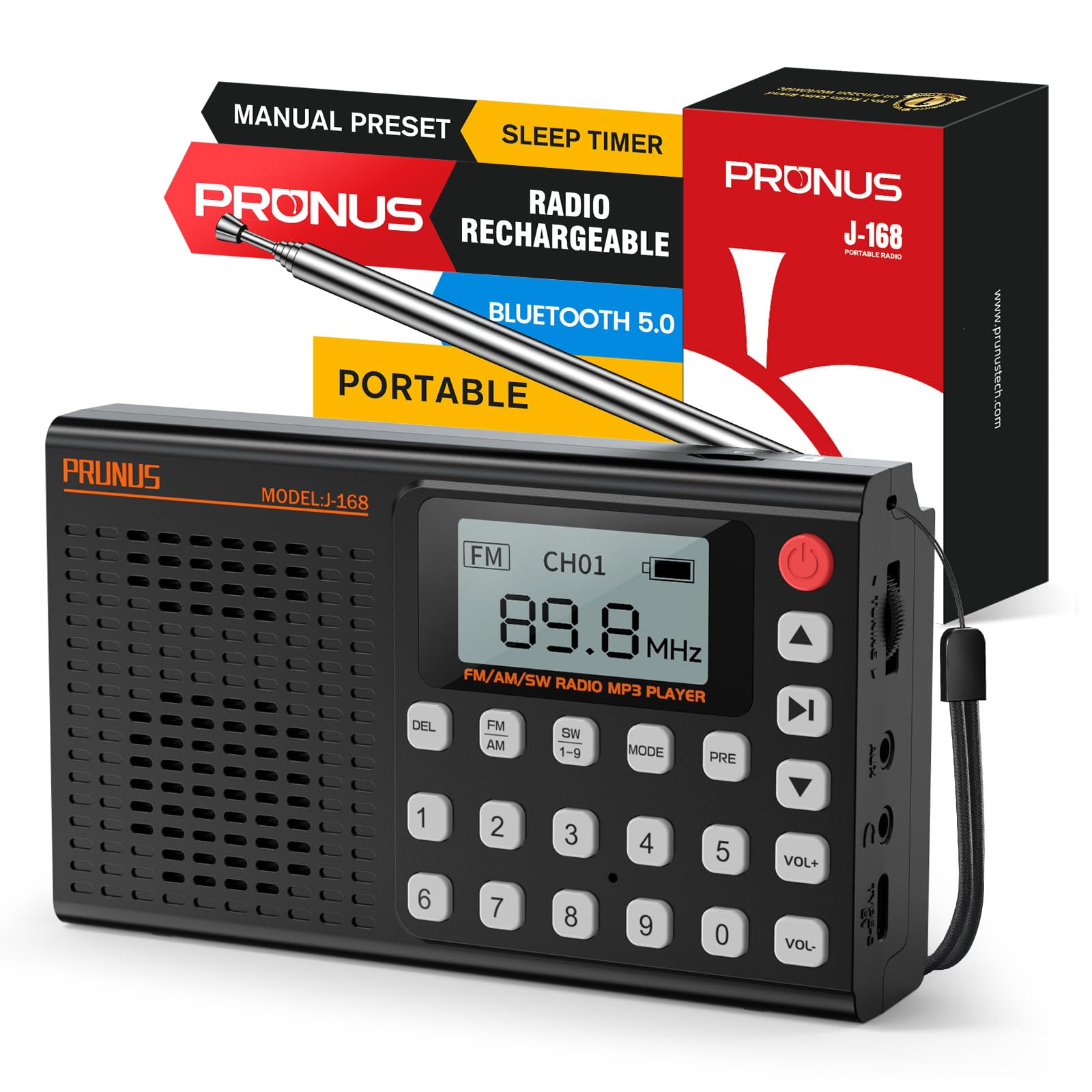
Figure 5.1: The PRUNUS J168 radio's digital display indicating various radio bands (AM, FM, SW) and their frequency ranges, illustrating its capability to tune into diverse content like health, music, and news programs.
5.2 ቅድመ-ቅምጦች
The radio supports storing up to 99 stations for FM, AM, and SW bands each.
- Save a Preset: ወደሚፈለገው ጣቢያ ያስተካክሉ። ተጭነው ይያዙት። PRE Button until the display shows a flashing preset number. Use the keypad to enter a preset number (1-99) or let it auto-assign, then press ቅድመ እንደገና ለማረጋገጥ.
- Recall a Preset: በሬዲዮ ሞድ ውስጥ ፣ የሚለውን ይጫኑ PRE Button briefly, then use the keypad to enter the preset number, or use the arrow buttons (often integrated with volume or track buttons) to navigate through saved stations.
- Delete a Preset: Select the preset you wish to delete. Press the DEL Button. Confirm deletion if prompted.
5.3 የብሉቱዝ ሁነታ
- ብሉቱዝን ያንቁ፡ የሚለውን ይጫኑ MODE አዝራር until "Bluetooth" or a Bluetooth icon appears on the display. The radio will enter pairing mode.
- ማጣመር፡ On your mobile device, enable Bluetooth and search for available devices. Select "J-168" from the list to connect. A confirmation sound or message will indicate successful pairing.
- መልሶ ማጫወት፡ Once connected, play audio from your device. Use the radio's play/pause and track skip buttons (often integrated with volume buttons) or your mobile device to control playback.

Figure 5.2: The PRUNUS J168 radio demonstrating its versatile connectivity options, including the TF card slot, AUX input, and a smartphone screen confirming a successful Bluetooth connection to the device.
5.4 TF ካርድ መልሶ ማጫወት
- TF ካርድ አስገባ፡ Gently insert a Micro SD (TF) card with MP3 audio files into the TF card slot until it clicks into place.
- ሁነታን ይምረጡ፡- የሚለውን ይጫኑ MODE አዝራር until the display shows "TF Card" or a corresponding icon.
- የመልሶ ማጫወት ቁጥጥር፡- Use the radio's play/pause and track skip buttons to control music playback.
- EQ ቅድመ-ቅምጦች፡- In TF card mode, you can select from 6 EQ presets (Normal, Classical, Pop, Jazz, Rock, Bass) to customize the audio output. Refer to the display for EQ options.
5.5 AUX ግቤት
Connect an external audio device (e.g., smartphone, MP3 player) to the radio's 3.5mm AUX input jack using an audio cable (not included). Press the MODE አዝራር to select AUX mode. Audio from the external device will play through the radio's speaker.
5.6 የእንቅልፍ ሰዓት ቆጣሪ
የእንቅልፍ ሰዓት ቆጣሪው ሬዲዮው ከተወሰነ ጊዜ በኋላ በራስ-ሰር እንዲጠፋ ያስችለዋል።
- ሰዓት ቆጣሪን አግብር፡ ሬዲዮው በሚበራበት ጊዜ ይጫኑ የእንቅልፍ ሰዓት ቆጣሪ ቁልፍ (refer to device markings, often a dedicated button or a long press on another button).
- የሚቆይበትን ጊዜ ያዘጋጁ፡ በተደጋጋሚ ይጫኑ የእንቅልፍ ሰዓት ቆጣሪ ቁልፍ to cycle through available durations (e.g., 10, 15, 30, 45, 60, 90 minutes). The selected time will be displayed.
- ማረጋገጫ፡- ሬዲዮው ከተዘጋጀው ጊዜ በኋላ በራስ-ሰር ይጠፋል።

Figure 5.3: The PRUNUS J168 radio positioned on a nightstand, with its display showing various sleep timer settings, illustrating its utility for a relaxing nighttime routine.
6. ባትሪ መሙላት እና ባትሪ
The PRUNUS J168 is equipped with a 2000mAh rechargeable battery, providing extended playback time.
- በመሙላት ላይ፡ Use the provided USB-C cable to charge the device. Connect it to any standard USB power source.
- የባትሪ ህይወት፡ A fully charged battery can provide up to 9 hours of continuous playback at maximum volume. Actual battery life may vary based on volume level and usage mode.
- የባትሪ አመልካች፡- The digital display shows the current battery level. Recharge when the indicator shows low battery to ensure uninterrupted use.
7. ጥገና
- ማጽዳት፡ የሬዲዮውን ውጫዊ ክፍል ለማጽዳት ለስላሳና ደረቅ ጨርቅ ይጠቀሙ። ሻካራ ማጽጃዎችን ወይም ሟሟቶችን አይጠቀሙ።
- ማከማቻ፡ ራዲዮውን በቀጥታ ከፀሀይ ብርሀን እና ከከፍተኛ ሙቀት ርቆ በቀዝቃዛና ደረቅ ቦታ ያከማቹ።
- የአንቴና እንክብካቤ; ጉዳት እንዳይደርስ ለመከላከል ቴሌስኮፒክ አንቴናውን በቀስታ ይያዙት።
- የባትሪ እንክብካቤ For optimal battery longevity, avoid fully discharging the battery frequently. Charge the device regularly, even if not in use for extended periods.
8. መላ መፈለግ
| ችግር | ሊሆን የሚችል ምክንያት | መፍትሄ |
|---|---|---|
| ሬዲዮ አይበራም። | ዝቅተኛ ባትሪ. | Charge the radio using the USB-C cable. |
| ደካማ የሬዲዮ አቀባበል። | አንቴና አልተዘረጋም፤ ደካማ የሲግናል አካባቢ፤ ጣልቃ ገብነት። | Fully extend the telescopic antenna. For AM, rotate the radio. Move to an area with better signal. Avoid electronic interference. |
| ብሉቱዝ አይገናኝም። | Radio not in Bluetooth mode; device not discoverable; already connected to another device. | Ensure radio is in Bluetooth mode. Make sure your device's Bluetooth is on and discoverable. Disconnect from other Bluetooth devices. |
| No sound from TF card. | የTF ካርድ በትክክል አልገባም፤ አይደገፍም file format; volume too low. | የTF ካርድ እንደገና ያስገቡ። ያረጋግጡ files are in MP3 format. Increase volume. |
9. ዝርዝሮች
| ባህሪ | ዝርዝር |
|---|---|
| የሞዴል ቁጥር | ጄ168 |
| የምርት ልኬቶች | 1.4 x 8.8 x 5.3 inches (5.4 x 3.1 x 1.3 inches for main unit) |
| የእቃው ክብደት | 9.1 ounces (6.9oz for main unit) |
| የሬዲዮ ባንዶች ይደገፋሉ | FM (87-108 MHz), AM (520-1710 kHz), SW 1-9 (3.2-21.85 MHz) |
| የግንኙነት ቴክኖሎጂ | ብሉቱዝ፣ ዩኤስቢ፣ AUX |
| የኃይል ምንጭ | ባትሪ (2000mAh ዳግም ሊሞላ የሚችል ባትሪ) |
| የኃይል መሙያ ወደብ | ዩኤስቢ-ሲ |
| ልዩ ባህሪያት | Lightweight, Portable, Rechargeable, Sleep Timer, TF Card Playback, Headphone Jack, Foldable Stand |
10. የምርት ማሳያ ቪዲዮ
ለዝርዝር ማብራሪያ ይህንን ቪዲዮ ይመልከቱview and demonstration of the PRUNUS J168 radio's features and functions.
Video 10.1: A comprehensive demonstration of the PRUNUS J168 radio, showcasing its AM/FM/SW radio capabilities, Bluetooth connectivity, and MP3 player functions.
11. ዋስትና እና ድጋፍ
PRUNUS products are designed for reliability and performance. For specific warranty information, please refer to the warranty card included with your purchase or visit the official PRUNUS website. If you encounter any issues or require technical assistance, please contact PRUNUS customer support through their official channels.
ለተጨማሪ መረጃ እና ድጋፍ፣ መጎብኘት ይችላሉ። PRUNUS Store on Amazon.