
1. በላይview
The Element 32-inch 720p HD Xumo Smart TV offers reliable performance and smart functionality in a compact design. Ideal for smaller spaces such as kitchens, dorm rooms, guest rooms, or offices, this television combines a clear HD display with a versatile smart platform and modern connectivity options.
Key features include a 720p resolution display, a 120Hz effective refresh rate for smooth motion, and the integrated Xumo OS for access to numerous streaming applications and free live channels. Connectivity is robust with multiple HDMI ports, USB, LAN, Bluetooth, and Apple AirPlay support. The TV also comes with a voice remote for convenient navigation.
2. በሳጥኑ ውስጥ ያለው
Upon unboxing your Element 32-inch Xumo Smart TV, please ensure all the following components are present:
- 32-inch Element Xumo TV
- Voice Remote + 2 AAA batteries
- TV Stand & Screws
- ፈጣን ጅምር መመሪያ

Image: The contents of the TV box, showing the 32-inch television, its remote control, two stand feet, and a bag of screws for assembly. Dimensions of the TV are also displayed.
3. ማዋቀር
3.1 የቲቪ መቆሚያውን ማያያዝ
- ጭረቶችን ለመከላከል የቴሌቪዥኑን ማያ ገጽ በጥንቃቄ ወደ ታች ለስላሳ እና ንጹህ ቦታ ያድርጉት።
- እያንዳንዱን የቆመ እግር በቴሌቪዥኑ ግርጌ ላይ ካሉት ተጓዳኝ የዊንች ቀዳዳዎች ጋር ያስተካክሉ።
- Secure each stand foot using the provided screws. Ensure they are tightened firmly but do not overtighten.
- ቴሌቪዥኑን በጥንቃቄ ያንሱት እና በተረጋጋ ደረጃ ላይ ያስቀምጡት.
Alternatively, the TV supports VESA mounting for wall installation (wall mount hardware sold separately).
3.2 የኃይል ግንኙነት
Connect the power cord to the TV's power input and then plug it into a standard electrical outlet. A pilot light on the TV will indicate that it is receiving power.
3.3 Initial Setup (Xumo OS)
መጀመሪያ ሲበራ ቴሌቪዥኑ በመጀመርያው የማዋቀር ሂደት ውስጥ ይመራዎታል። ይህ የሚያጠቃልለው፡-
- የቋንቋ ምርጫ፡- የእርስዎን ተወዳጅ ቋንቋ ይምረጡ።
- የአውታረ መረብ ግንኙነት፡- Connect the TV to your home Wi-Fi network or via an Ethernet cable.
- Xumo OS Account Setup: Follow on-screen prompts to set up or log in to your Xumo OS account. This is necessary to access smart features and apps.
- የሰርጥ ቅኝት ፦ አንቴናን የሚያገናኝ ከሆነ፣ ቴሌቪዥኑ የሚገኙትን ቻናሎች ይቃኛል።

Image: The Element 32-inch Xumo Smart TV is shown on a wooden TV stand, displaying its smart interface with various streaming app icons.
4. ግንኙነቶች
The Element Xumo Smart TV provides a variety of ports for connecting external devices:
- HDMI ወደቦች (3) Connect high-definition devices such as Blu-ray players, gaming consoles, or cable/satellite boxes. One HDMI port supports eARC (enhanced Audio Return Channel) for simplified audio connections to compatible soundbars or AV receivers.
- የዩኤስቢ ወደብ (1) የUSB ማከማቻ መሳሪያዎችን ከ ጋር ያገናኙ view ፎቶዎችን፣ ሙዚቃን ያጫውቱ ወይም ቪዲዮዎችን ይመልከቱ።
- LAN (ኢተርኔት) ወደብ፡ ለገመድ የበይነመረብ ግንኙነት።
- Audio Out (Optical) / Headphone Jack: ውጫዊ የድምጽ ስርዓቶችን ወይም የጆሮ ማዳመጫዎችን ለማገናኘት.
- Composite Input / Analog Tuner: For connecting older devices or an antenna.
5. ቴሌቪዥንዎን ሥራ ላይ ማዋል
5.1 የርቀት መቆጣጠሪያ
The included voice remote allows for intuitive control of your TV. It features dedicated buttons for popular streaming services and a microphone for voice commands.
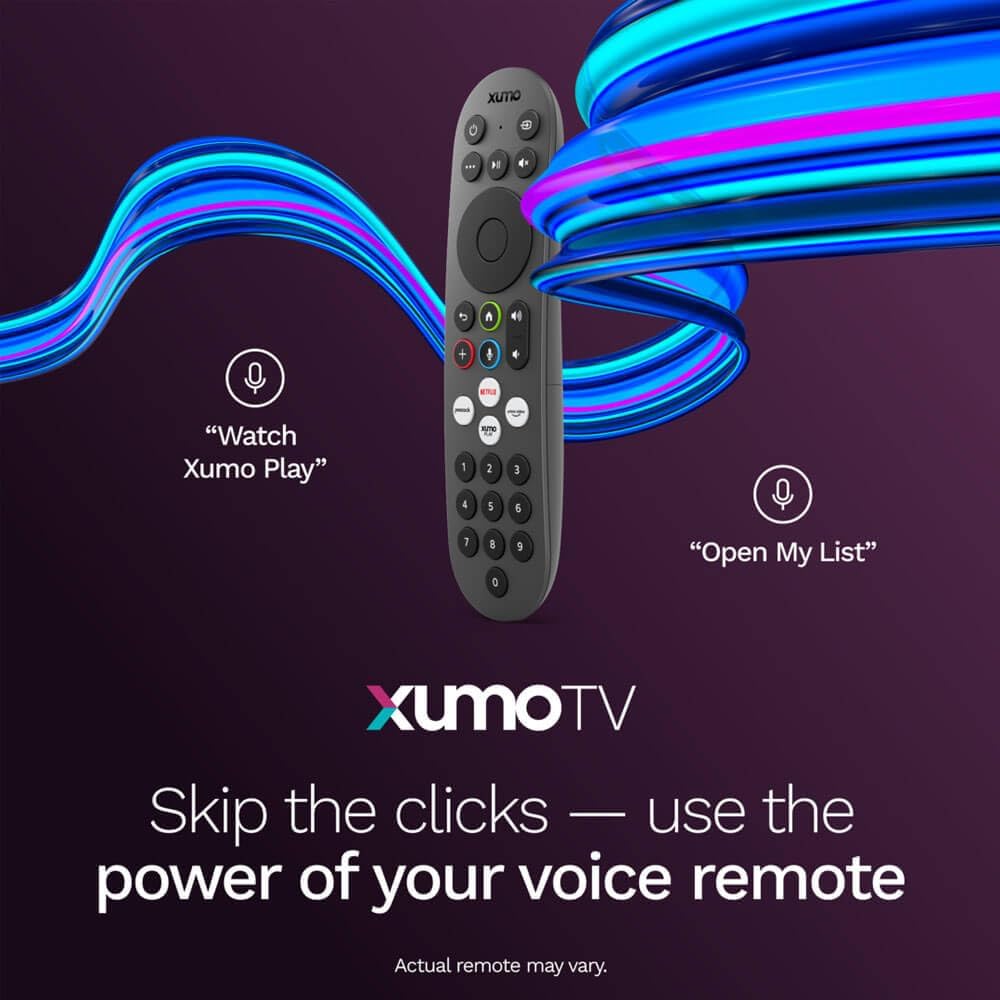
Image: A close-up of the Element Xumo Smart TV voice remote, highlighting its various buttons including a microphone for voice commands and quick access buttons for streaming services.
5.2 Smart Features & Streaming (Xumo OS)
The Xumo OS provides access to over 250 preloaded apps and more than 750 free live channels. You can:
- Search Content: Use the unified search function to find content across all your installed apps.
- የእኔ ዝርዝር፦ Curate your personal watchlist for easy access to your favorite shows and movies.
- Free On-Demand Libraries: Explore a wide selection of free on-demand content.
- የድምጽ ቁጥጥር፡- Use the voice remote to navigate, search, and control your TV hands-free.

Image: The Xumo TV interface showing a selection of popular streaming applications and content recommendations.
5.3 የምስል እና የድምጽ ቅንብሮች
Your TV delivers a crisp 720p HD display with a 120Hz effective refresh rate, minimizing motion blur for clear visuals. Dolby Audio processing enhances the sound experience. You can adjust picture and sound settings via the TV's menu to suit your preferences.
- የሥዕል ሁነታዎች Select from various preset picture modes (e.g., Standard, Vivid, Movie, Sports) or customize settings like brightness, contrast, and color.
- የድምጽ ሁነታዎች፡ Choose from different sound modes (e.g., Standard, Music, Movie, Speech) or adjust bass and treble levels.
5.4 Apple AirPlay & Home Support
Seamlessly stream content or mirror your screen from your iPhone, iPad, or Mac directly to your Element TV using Apple AirPlay. With Apple Home support, you can integrate your TV into your Apple smart home ecosystem for convenient control.
6. ጥገና
To ensure the longevity and optimal performance of your Element Xumo Smart TV, follow these maintenance guidelines:
- ማያ ገጹን ማጽዳት; ስክሪኑን በቀስታ ለስላሳ፣ ደረቅ፣ ከተሸፈነ ጨርቅ ይጥረጉ። ለግትር ምልክቶች፣ በትንሹ መampጨርቁን በውሃ ወይም በስክሪኑ ላይ የተወሰነ የጽዳት መፍትሄ (በፍፁም በቀጥታ ወደ ማያ ገጹ ላይ አይረጩ)።
- ካቢኔን ማጽዳት; የቴሌቪዥን ካቢኔቱን ለማጽዳት ለስላሳና ደረቅ ጨርቅ ይጠቀሙ። ሻካራ ማጽጃዎችን ወይም ሟሟቶችን ከመጠቀም ይቆጠቡ።
- የአየር ማናፈሻ; ከመጠን በላይ ሙቀትን ለመከላከል በቴሌቪዥኑ ጀርባ ላይ የአየር ማናፈሻ ክፍተቶች አለመዘጋታቸውን ያረጋግጡ።
- ጥቅም ላይ በማይውልበት ጊዜ ማብራት; ኃይልን ለመቆጠብ እና ዕድሜውን ለማራዘም በማይጠቀሙበት ጊዜ ቴሌቪዥኑን ያጥፉ።
7. መላ መፈለግ
If you encounter any issues with your Element Xumo Smart TV, refer to the following common troubleshooting tips:
- ኃይል የለም፡ የኃይል ገመዱ በቴሌቪዥኑም ሆነ በኤሌክትሪክ መውጫው ላይ ደህንነቱ በተጠበቀ ሁኔታ መሰካቱን ያረጋግጡ። መውጫው ተግባራዊ መሆኑን ያረጋግጡ።
- ምንም ምስል/ድምጽ የለም፡ Verify that the correct input source is selected. Check all cable connections (HDMI, antenna, etc.) for secure fit.
- የርቀት መቆጣጠሪያ አይሰራም; በርቀት መቆጣጠሪያው ውስጥ ያሉትን የ AAA ባትሪዎች ይተኩ። በርቀት መቆጣጠሪያው እና በቴሌቪዥኑ የ IR ዳሳሽ መካከል ምንም እንቅፋት አለመኖሩን ያረጋግጡ።
- የአውታረ መረብ ግንኙነት ጉዳዮች፡- Restart your Wi-Fi router. Check the TV's network settings to ensure it's connected to the correct network and the password is entered correctly.
- Smart App Problems: Try restarting the app. If the issue persists, clear the app's cache or reinstall it. Ensure your TV's software is up to date.
For persistent issues, please contact Element customer support.
8. ዝርዝሮች
| ባህሪ | ዝርዝር መግለጫ |
|---|---|
| የሞዴል ቁጥር | E300AE32C |
| የስክሪን መጠን | 32 ኢንች |
| የማሳያ ጥራት | 720p (1366x768) |
| የማደስ ደረጃ | 60 Hz (120Hz Effective) |
| ምጥጥነ ገጽታ | 1.78፡1 |
| ስርዓተ ክወና | Xumo OS |
| ግንኙነት | 3x HDMI (1x eARC), 1x USB, LAN (Ethernet), Optical Audio Out, Headphone Jack, Composite Input, Wi-Fi, Bluetooth |
| ልዩ ባህሪያት | Bezel-Less Design, Built-In Speaker, Voice Remote, Apple AirPlay & Home Support |
| TV with Stand Dimensions (W x H x D) | 28.8" x 19.2" x 7.0" |
| TV without Stand Dimensions (W x H x D) | 28.8" x 17.0" x 2.7" |
| የእቃው ክብደት | 8.8 ፓውንድ £ |
9. ዋስትና እና ድጋፍ
The Element 32-inch 720p HD Xumo Smart TV comes standard with a የ 2 ዓመት የአምራች ዋስትና. ይህ ዋስትና በመደበኛ አጠቃቀም ላይ የቁሳቁሶች እና የአሠራር ጉድለቶችን ይሸፍናል ። ለዋስትና ጥያቄዎች እባክዎ የግዢ ማረጋገጫዎን ያቆዩ።
For technical support, warranty inquiries, or further assistance, please refer to the contact information provided in your Quick Start Guide or visit the official Element Electronics webጣቢያ.