
መግቢያ
This manual provides detailed instructions for the installation, operation, and maintenance of the ASUS B760M-AYW WiFi D4 II microATX motherboard. Please read this manual thoroughly before installing or using the product to ensure correct setup and optimal performance.
የደህንነት መረጃ
- Always disconnect the power cable from the wall socket before touching any internal components.
- Wear an anti-static wrist strap or frequently touch a grounded object to prevent electrostatic discharge (ESD) damage to components.
- ሚስጥራዊነት ያላቸውን ክፍሎች እንዳይነኩ ክፍሎችን በጫፎቻቸው ይያዙ።
- ከመጠን በላይ ሙቀትን ለመከላከል በፒሲዎ መያዣ ውስጥ ትክክለኛውን አየር ማናፈሻን ያረጋግጡ።
ማዋቀር
1. የሲፒዩ ጭነት
The motherboard supports Intel LGA 1700 socket processors. Carefully align the CPU with the socket, ensuring the triangular mark on the CPU matches the mark on the socket. Lower the CPU gently into the socket, then close the load plate and secure the retention lever.
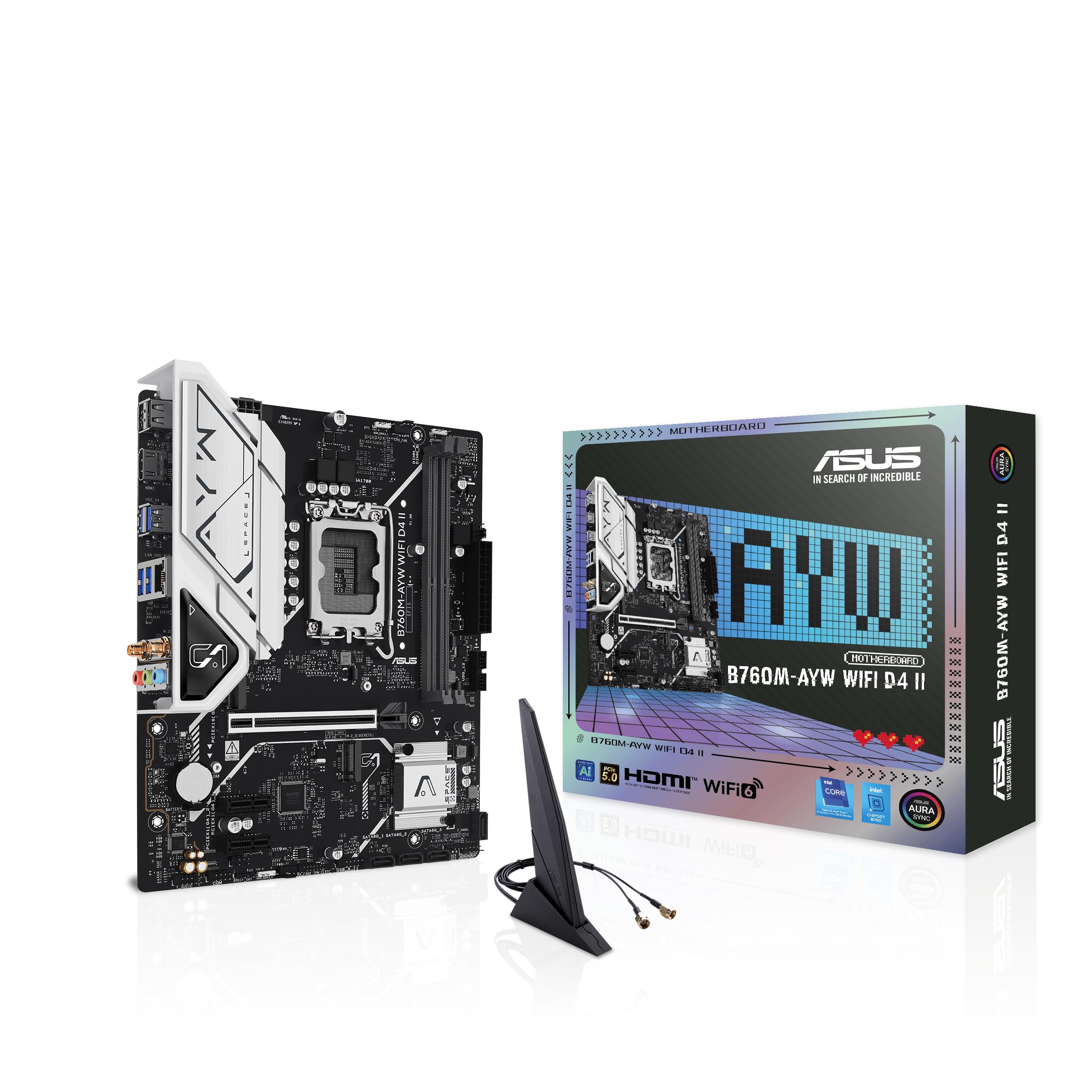
ምስል፡ ከላይ ወደ ታች view of the ASUS B760M-AYW WiFi D4 II motherboard, highlighting the LGA 1700 CPU socket.
2. ማህደረ ትውስታ (ራም) መጫን
This motherboard features two DDR4 DIMM slots. For optimal performance, install memory modules in a dual-channel configuration. Open the clips on both ends of the DIMM slot, align the memory module with the slot key, and press down firmly until the clips snap into place.
3. የማከማቻ ጭነት (M.2 እና SATA)
The motherboard includes two M.2 slots for NVMe SSDs and four SATA 6 Gbps ports for traditional hard drives or SSDs.
- M.2 SSD፡ Insert the M.2 SSD into the slot at a 30-degree angle, then push it down and secure it with the provided M.2 screw package.
- SATA ድራይቮች፡ Connect SATA data cables from your storage drives to the SATA ports on the motherboard. Connect power cables from your power supply to the drives.

Image: The ASUS B760M-AYW WiFi D4 II motherboard shown with its retail box, Wi-Fi antenna, SATA cables, and M.2 screw packages.
4. የማስፋፊያ ካርድ መጫኛ (PCIe)
The motherboard features one PCIe 5.0 x16 slot for graphics cards and additional PCIe 4.0 x1 slots for other expansion cards. Insert the card firmly into the desired slot until it clicks into place and secure it with a case screw.
5. የኃይል ግንኙነቶች
ባለ 24-ፒን ATX የኃይል ማገናኛውን እና ባለ 8-ፒን ሲፒዩ የኃይል ማገናኛውን ከኃይል አቅርቦትዎ ወደ ማዘርቦርዱ ላይ ወደሚገኙት ተጓዳኝ ወደቦች ያገናኙ።
6. የፊት ፓነል ግንኙነቶች
Connect your PC case's front panel cables (USB 5Gbps, audio, power switch, reset switch, power LED, HDD LED) to the corresponding headers on the motherboard. Refer to the motherboard layout for exact header locations.
7. የኋላ የግቤት/ውህደት ግንኙነቶች
Connect your peripherals to the rear I/O ports. These include HDMI, USB 5Gbps Type-A, Realtek 2.5Gb Ethernet, and audio jacks.
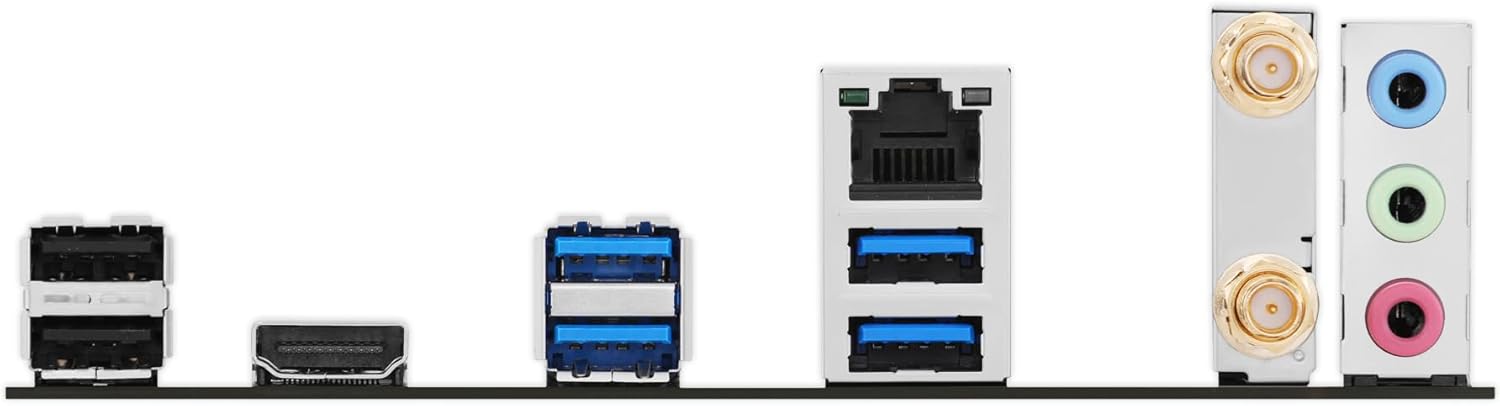
ምስል: ዝርዝር view of the rear input/output panel of the ASUS B760M-AYW WiFi D4 II motherboard, showing USB ports, Ethernet, and audio jacks.
8. የዋይፋይ አንቴና መጫኛ
Screw the included Wi-Fi antenna onto the two antenna connectors on the rear I/O panel. Position the antenna for optimal signal reception.
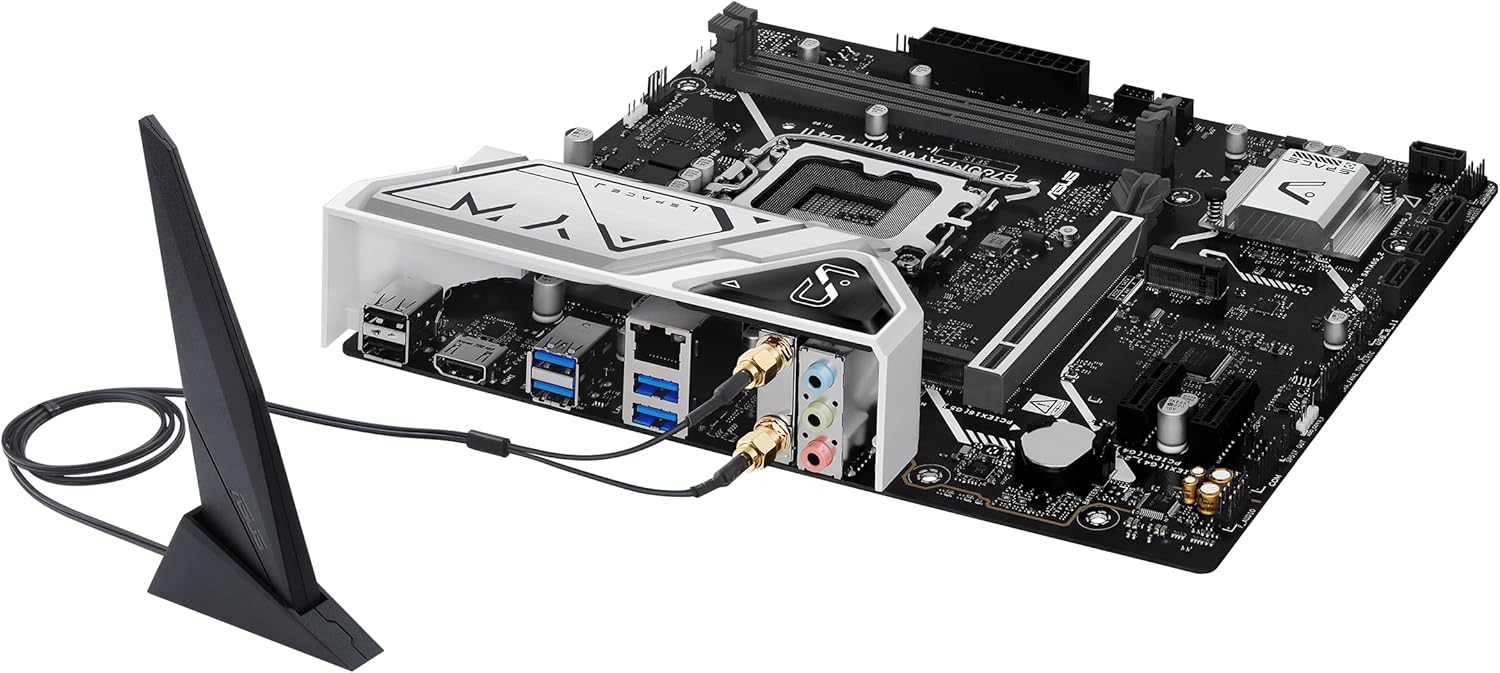
Image: The ASUS B760M-AYW WiFi D4 II motherboard with its external Wi-Fi antenna connected to the rear I/O ports.
በመስራት ላይ
1. የባዮስ/UEFI ውቅር
የባዮስ/UEFI ማዋቀር መገልገያውን ለመድረስ፣ ይጫኑ ሰርዝ key during the Power-On Self-Test (POST). Here you can configure boot order, enable XMP for memory, adjust fan speeds, and manage other system settings.
2. የአሽከርካሪዎች መጫኛ
After installing your operating system, install the necessary drivers for the motherboard's components. These include chipset drivers, LAN drivers, Wi-Fi drivers, and audio drivers. Drivers can be found on the ASUS support webጣቢያ ለእርስዎ የተለየ ማዘርቦርድ ሞዴል።
3. የሶፍትዌር መገልገያዎች
ASUS provides several utilities to enhance your system experience:
- ኦራ አመሳስል For controlling RGB lighting on compatible components.
- አድናቂ ኤክስፐርት 2+፡ ለላቀ የአድናቂዎች ቁጥጥር እና የስርዓት ማቀዝቀዣ ማመቻቸት።
- የጦር ሣጥን A centralized software suite for system monitoring, driver updates, and utility management.
ጥገና
1. የ BIOS ዝመናዎች
የ ASUS ድጋፍን በየጊዜው ያረጋግጡ website for BIOS updates. BIOS updates can improve system stability, add support for new hardware, or fix bugs. Use the ASUS EZ Flash utility within the BIOS to perform updates, following the instructions carefully.
2. የአሽከርካሪ ማሻሻያ
Keep your drivers updated to ensure optimal performance and compatibility. Regularly check the ASUS support website for the latest drivers for your motherboard.
3. ማጽዳት
To maintain optimal performance and longevity, regularly clean dust from your PC case and motherboard components. Use compressed air to remove dust from heatsinks, fans, and slots. Ensure the system is powered off and unplugged before cleaning.
መላ መፈለግ
1. Q-LED Core Indicators
The motherboard features Q-LED Core indicators that light up to indicate the status of key components during POST. These LEDs can help diagnose issues:
- የሲፒዩ ኤልኢዲ፡ የሲፒዩ ጅምር ሁኔታን ያመለክታል።
- DRAM LED፦ Indicates memory detection status.
- ቪጂኤ ኤልኢዲ፡ Indicates graphics card detection status.
- ቡት ኤልኢዲ፡ Indicates boot device detection status.
If an LED remains lit, it suggests an issue with the corresponding component.
2. የተለመዱ ጉዳዮች
- ኃይል የለም፡ Check all power connections (24-pin ATX, 8-pin CPU, GPU power). Ensure the power supply is switched on.
- ማሳያ የለም፡ Verify the graphics card is properly seated and connected to power. Ensure the monitor cable is connected to the graphics card, not the motherboard (unless using integrated graphics).
- የስርዓት አለመረጋጋት; Check memory seating, run memory diagnostic tools, ensure CPU cooler is properly installed, and verify BIOS settings.
- ተጓዳኝ አልተገኘም Ensure the device is properly connected and its drivers are installed. Try a different port if available.
ዝርዝሮች
| ባህሪ | ዝርዝር መግለጫ |
|---|---|
| የምርት ስም | ASUS |
| የሞዴል ስም | B760M-AYW WIFI D4 II |
| ሲፒዩ ሶኬት | LGA 1700 |
| ተስማሚ ፕሮሰሰሮች | Intel Core 14th, 13th, 12th Gen, Pentium Gold, Celeron Processors |
| ቺፕሴት ዓይነት | ኢንቴል B760 |
| RAM ማህደረ ትውስታ ቴክኖሎጂ | DDR4 |
| የማህደረ ትውስታ ቦታዎች ይገኛሉ | 2 |
| ከፍተኛው የማህደረ ትውስታ ማከማቻ አቅም | 96 ጊባ |
| ግራፊክስ ካርድ በይነገጽ | PCI ኤክስፕረስ 5.0 x16 |
| Total M.2 Slots | 2 |
| Total SATA Ports | 4 |
| ኤተርኔት | ሪልቴክ 2.5ጂቢ ኤተርኔት |
| ዋይ ፋይ | ዋይ ፋይ 6 |
| HDMI ወደቦች | 1 |
| የፊት ዩኤስቢ | USB 5Gbps support |
| የኋላ ዩኤስቢ | ዩኤስቢ 5Gbps ዓይነት-A |
| የቅጽ ምክንያት | microATX |
| የንጥል መጠኖች (L x W x H) | 9.6"ኤል x 8.3" ዋ x 1.4" ኤች |
የዋስትና መረጃ
The ASUS B760M-AYW WiFi D4 II motherboard comes with a 3-year limited warranty. For detailed terms and conditions, please refer to the warranty card included with your product or visit the official ASUS support webጣቢያ.
ድጋፍ
ለቴክኒካል ድጋፍ፣ የአሽከርካሪ ማውረዶች፣ የ BIOS ዝመናዎች እና ተጨማሪ የምርት መረጃ፣ እባክዎን ኦፊሴላዊውን የ ASUS ድጋፍ ይጎብኙ webጣቢያ፡
You can also find FAQs and troubleshooting guides on the support portal.